Studio_Creatio
8.0

I'm getting a strange error when I attempt to log into a dev site running on a locally hosted machine. I get the log in screen, but after I enter the credentials, I got the following response:

{
 "Code": -1,
 "Exception": "System.MissingMethodException: Method not found: 'StackExchange.Redis.RedisValue StackExchange.Redis.RedisValue.op_Implicit(System.Memory`1)'."
}

Any suggestions on what might be causing the error? Or where to look? Nothing in the logs is jumping out at me.

I do have another instance of Creatio running on the same server and it runs just fine.

Like 0

Like

2 comments

Hello,

This error is almost certainly caused by a version mismatch of the StackExchange.Redis library, rather than anything related to the login itself. The message indicates that the application is trying to call a method that exists in one version of the library, but at runtime a different version is being loaded where that method doesn’t exist.

Since you mentioned another Creatio instance on the same server works fine, the most likely issue is that the two sites have different versions of StackExchange.Redis.dll (or related dependencies like System.Memory.dll) in their bin folders, or different binding redirects in web.config.

A good starting point is to compare the Redis-related DLLs between the working and non-working instances and make sure they match exactly. Also check the web.config for any binding redirects that might be forcing a different version at runtime. If everything looks the same, it’s worth verifying which assembly is actually being loaded, as sometimes an unexpected version can be picked up from another location.

In short, focus on aligning the Redis-related dependencies between the two instances—this type of error should be resolved once the correct assembly version is being loaded.

Mira Dmitruk,

Sorry I haven't replied to this sooner - had higher priority items to get done.

I finally resolved this. Ultimately, it took process monitor and process explorer to figure it out, but ultimately, I noticed that the w3wp.exe had multiple versions of System.Memory loaded. There was a binding redirect for System.Memory, but it looked like System.Buffers was trying to load the wrong version as well. The fix was to add a binding redirect to point to 4.0.3.0. for System.Buffers (there was a difference in the versions in terrasoft.webapp\bin and terrasoft.webapp\roslyn\bin).

I have zero idea why it broke.

Show all comments
Tide
Studio_Creatio
#Clio
Studio_Creatio
8.0

I recently started exploring T.I.D.E (ATF TIDE) for working with Git integration in Creatio, and I’m trying to understand how widely it’s being used in real projects.

A couple of questions I had:

  • Is anyone here actively using T.I.D.E in their development workflow?
  • How stable/reliable is it compared to the default SVN approach?
  • Are there any proper setup guides or documentation available (especially for Git authentication and repository setup)?
  • Any common pitfalls or things to watch out for?

I’ve gone through some basic setup, but I’m facing issues around repository cloning and authentication, so any guidance or real-world experience would really help.

Like 2

Like

1 comments

Hello,
This approach is not yet widely adopted, so it is difficult to compare it directly with the default SVN.Currently, most of the information about T.I.D.E. is available in the Git repository:
https://github.com/Advance-Technologies-Foundation/T.I.D.E./tree/main
Unfortunately, we do not have hands-on experience or examples of working with it yet, as this functionality is not commonly used.

Show all comments
Studio_Creatio
8.0

Hello community

in the past I created a a custom freedom section using the "Page ListTemplateV2" I would like to upgrade it to version V3.

I tried to change the parent page, but the system tells me "the AddButton already exists.."

What do you suggest me?

Like 1

Like

2 comments

Hello Stefano Bassoli,

Check your custom schema to see if it has any explicit definitions of the "AddButton". Remove or rename the local "AddButton" if the new parent schema already provides it. Only one definition must remain.

Eduard Dovydovskyi,

Hi Eduard

I tried but there isn't a button with name "AddButton".
I solved creating a new list page and mapping it in the "SysModule" table with this query

SELECT "Id" AS "SysModuleId"
from "SysModule" sm 
where sm."Code"= <section name>;
SELECT "UId" as NewUID
FROM "SysSchema"
WHERE "Name"= <new list page>;

update "SysModule" set "SectionSchemaUId" = <NewUID>
where "Id"=<SysModuleId>;
Show all comments
multivaluefield
multiselect
FreedomUI
Studio_Creatio
8.0

I need to create a multi value field based on lookup.

The only solution I found is https://customerfx.com/tool/multi-select-text-field/
But it seems to work only with classic UI.

Is there a solution with Freedom UI ?

Like 0

Like

1 comments
Best reply

Hi Olivier,

If I understand your requirement correctly, this should be straightforward. You just need to create a object which can store the two lookup values you want to connect.

Example: To save multiple Industries for an Account, create an object called "Industries in Account" (inheriting from BaseEntity) with two lookup columns: "Account" and "Industry".

Then, set up the Multiselect Lookup component on your Account edit page via the No-Code Designer:

• Lookup: "Industry"
• Multiselect Value Storage: "Industries in Account"
• Apply filter by page data: Account.Id = IndustriesInAccount.Account

Optionally, you can add a static filter to pre-filter the available Industry values, or set the "Required" attribute to ensure at least one Industry must always selected before saving.

Let me know if you have any questions.

Best,
David

Hi Olivier,

If I understand your requirement correctly, this should be straightforward. You just need to create a object which can store the two lookup values you want to connect.

Example: To save multiple Industries for an Account, create an object called "Industries in Account" (inheriting from BaseEntity) with two lookup columns: "Account" and "Industry".

Then, set up the Multiselect Lookup component on your Account edit page via the No-Code Designer:

• Lookup: "Industry"
• Multiselect Value Storage: "Industries in Account"
• Apply filter by page data: Account.Id = IndustriesInAccount.Account

Optionally, you can add a static filter to pre-filter the available Industry values, or set the "Required" attribute to ensure at least one Industry must always selected before saving.

Let me know if you have any questions.

Best,
David

Show all comments

I am currently working on Day 8 of the Hybrid Training: Creatio Administration and Configuration, specifically on the step “Working with Processes in Creatio – Feedback Process .

However, I encountered an issue when trying to configure the Feedback Mini Page element in the business process.

Issue:
I am unable to add the Score parameter to the Feedback Mini Page element.

Actions Taken:

  • I created a new Lookup for the Score parameter label.
  • I attempted to add the parameter to the Feedback Mini Page element in the business process.

Despite these steps, the Score parameter element does not appear in the Feedback Mini Page element, so I cannot proceed with the configuration as instructed in the training.

Could you please advise on how to resolve this issue? Your guidance would be greatly appreciated so I can continue with the next steps of the training.

Thank you for your support

Like 0

Like

2 comments

Hello,

Could you please send us screenshots of your business process settings, along with the task you are trying to complete?

This will help to better understand the context and review the issue.

Malika,

thankyou , this cse is resolved

Show all comments
Studio_Creatio
8.0

Good morning,

I am developing an application and I would like to include a signature area (example below) that works on mobile phones, tablets, and other devices. How can I integrate this in Creatio?

Examples:
https://www.jqueryscript.net/demo/Canvas-Signature-Pad-Sign/
https://www.cssscript.com/demo/smooth-signature-canvas-pad/

Thank you.

Best regards.

Like 3

Like

1 comments

Hello Cristiano Carvalho,

You can create a custom UI component and integrate it into the interface. These components can handle requests, read data, and bind properties.

Documentation:
https://academy.creatio.com/docs/8.x/dev/development-on-creatio-platform/category/freedom-ui-component

Video tutorial:
https://www.youtube.com/watch?v=CE5uETqTsyQ&list=PLnolcTT5TeE2BMFf_XmJrSwpnbcLCLJkb

A simpler approach (with more limited capabilities compared to a full custom control) is described here:
https://customerfx.com/article/embedding-an-iframe-on-a-creatio-freedom-ui-page/

This approach can be used to render custom HTML, not only an iframe.

Show all comments

Hi All,

I created a business process that runs every 15 mins to read all activities that have result not filled in and I want to send pre-configured page to all users for each of these activities to fill the result. But the page is not popping-up; although the notification is working and the user is getting the notification in the notification panel.

Thanks for your help!

Like 2

Like

3 comments

Hello Puneet,

Thank you for your message.

If a business process is configured to start using a Start timer (for example, every 15 minutes), the process is executed by the system scheduler. In this scenario, the process runs in the background on the server, without direct interaction with the user session.

As a result, all elements that follow the Start timer event are also executed in the background context, regardless of their individual settings. Because of this, UI elements such as pre-configured pages cannot be opened automatically for users.

Instead, when the process reaches the step that requires user interaction, the user receives a notification and can open the corresponding page from the Process Actions sidebar to complete the step manually.

This is expected system behavior when processes are initiated by a timer.


Andrii Kendzor,

Thanks for your response. How can I make it work as in user gets the popup of pre-configured page?

Hi,

Thank you for your question.

A pre-configured page can only be displayed automatically when a business process is executed within an active user session. Since your process is started by a Start timer, it is executed by the system scheduler in the background, and therefore it cannot open UI elements such as pop-up pages for users.

To achieve the behavior you described, the process would need to be started within a user session, for example by a button or manual process launch. In such cases, the pre-configured page can be displayed as a popup for the user.

If the process must continue to run automatically every 15 minutes, the recommended approach is to keep the timer-based process and notify users through notification panel, from where they can open and complete the task.

Show all comments
Studio_Creatio
8.0

Organization roles


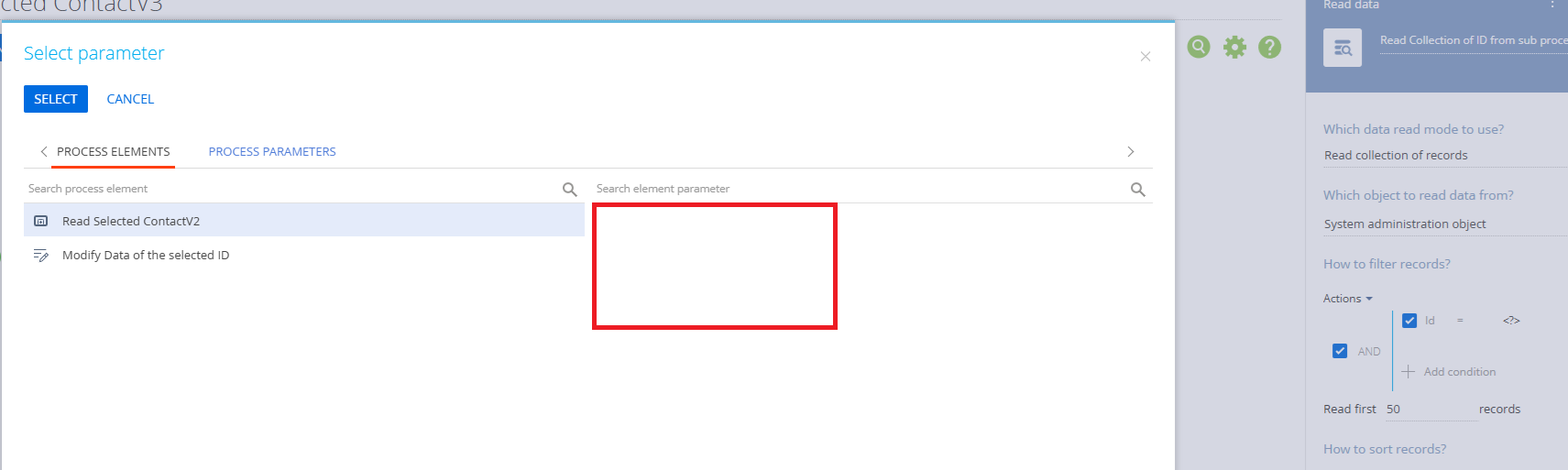
I already set Manager User in Organizational roles, but how to get that manager in business process? Cases: I want to give Perform Task for that manager based on user as you can see in the image (Nama RM) is user with Relation Manager Role, but I want to give that task to the manager. How to do that? Thanks
Business Process

Like 0

Like

3 comments

Hello,

Currently there is not possibility in the system to read a user's manager using a business process this way. However, we will register this idea for our R&D team so they could review the possibility of implementing such functionality in future releases.

Mira Dmitruk,

Thanks for the answer, are there any other solutions for my case instead of using a business process?

You have to read the sysadminunit object and find the hiearchy there.

It is a bit tricky but something like this should work:

"Nama RM"  will have a role in sysadminunit 

this role will have a management role in sysadminunit 

this management role will have users in sysadminunit 

Show all comments
Studio_Creatio
8.0

Hi all,

I'm hoping to implement a custom click handler from a Freedom UI list view that opens a preconfigured sidebar that displays a detailed view of the record that was clicked. I've successfully been able to capture the click event, open the side panel, & fetch the Id of the active row, but have not been able to figure out how to use that data to actually display on the sidebar; it's always popping up blank. Has anyone here tried to do something similar?

Here's my current code for reference:

{
				request: "crt.HandleViewModelAttributeChangeRequest",
				handler: async (request, next) => {
					let sidebarCode = "";
					let rowId = "";
      				if (request.attributeName == "GridDetail_9lgj3r0_ActiveRow") {
						rowId = await request.$context.GridDetail_9lgj3r0_ActiveRow;
						sidebarCode = "LeadSidebar";
					}


					if (sidebarCode != "") {
						const handlerChain = sdk.HandlerChainService.instance;
						await handlerChain.process({
						    type: "crt.OpenSidebarRequest",
						    sidebarCode: sidebarCode,
						    $context: request.$context,
							modelInitConfigs: [{
								action: "edit",
								recordId: rowId
							}]
						});
					}
					
					return next?.handle(request);
				}
Like 0

Like

1 comments

Hello Matt Ciani,

1. Refer to the following articles:
https://academy.creatio.com/docs/8.x/no-code-customization/customization-tools/ui-and-business-logic-customization/set-up-the-app/set-up-a-sidebar
https://academy.creatio.com/docs/8.x/dev/development-on-creatio-platform/platform-customization/freedom-ui/sidebar/overview#title-15102-4

Ensure that the sidebar page includes the required data source.

Refresh the data source after opening the sidebar to ensure the data is loaded correctly.

2. crt.OpenSidebarRequest does not support the modelInitConfigs array or other page parameters. Also, you cannot affect the sidebar page from the other page; they have different contexts. As a workaround, you can try using the browser’s native BroadcastChannel API to pass the record ID - see this thread: https://community.creatio.com/questions/open-custom-freedom-ui-page-custom-button-opportunity-edit-page-and-pass-opportunity


Show all comments
How_to_Hide_a_Button_on_Add_Record_Page_in_Freedom_UI?
Studio_Creatio
8.0

I am working in Freedom UI and need to hide a custom button on the Add Record page.

The requirement is:

  • The button should be hidden when creating a new record
  • The button should be visible after the record is saved (Edit mode)

I tried using a business rule with the condition:
Page is opened or one of the attributes in conditions changed.

And checked whether a specific field is filled in. However, I would like to confirm the best and recommended approach to detect Add mode properly in Freedom UI.

Is checking whether the Id field is filled in the correct way to handle this scenario?
Or is there a better way to control button visibility based on Add/Edit mode?
 

Like 0

Like

5 comments

Hello,

Please note that there is no difference between a saved and unsaved record in the system - even all of the system fields like Id, CreatedOn, CreatedBy etc are already pre-filled in before saving. So there's no field that would automatically change after saving, that we could base such a business rule on.

The best solution in such case would be to create separate pages - one for adding new records where this button would be absent, and another page for editing records where this button would be present.

We will also register this idea for our R&D team and they will review the possibility of adding such functionality in future.

I typically hide buttons based on whether all the necessary fields have been completed. You can also set the button set to save data before running a process so if mandatory fields not populated it will not save and run. Alternatively as you have said you can do it in a business process by populating a hidden field when new record is created and then having a business rule based on that. I am not sure you can use ID for this as it is pre-populated like other fields

This is a point of frustration. Previously you could use something like CreatedOn for this, but that no longer works. I typically use an attribute bound to the visibility of the button and set the attribute based on changes to request.$context.CardState, but when adding a new record, the CardState doesn't change once saved, so you have to also set the attribute in the save request also. It's a lot of extra work that should not be necessary, but the only way it works currently. 

Ryan

Hello,

Thank you for all the suggestions. I created a custom field for order  and set that field using business process. Then added the field on form and based on that field made the button hidden.

This worked well. Now, I did the same thing for invoice. Initially, when new record page opens the button is hidden as expected but as soon as I enter value in Account field, button gets visible without saving the record. 

What can be the possible cause of this behaviour?

Hello,

Can't we use PrimaryModelMode attribute as it contain create if page is opened for adding record and update if page is opened for updating record.
We can use it with custom convertor like 

"visible": "$PrimaryModelMode | Usr.isvisible"

if mode is create then return false or else true.

Show all comments