Studio_Creatio
Sales_Creatio
Marketing_Creatio
8.0

Hello Community,

I need to store a snippet of HTML code (e.g., a button or formatted content) into a field of an object (e.g., a text or string field). Later, I want to render this HTML dynamically on a page at runtime.

What’s the best way to store the HTML safely and then render it so that it's interpreted as actual HTML (not plain text) in the UI?
Are there any security or encoding considerations I should keep in mind?

Thanks in advance!

Like 2

Like

7 comments
Best reply

An easy no code way would be to bind the value to a read-only Rich Text control on the page. It will display the HTML as HTML.

Otherwise, you'd have to create your own custom control for it.

An easy no code way would be to bind the value to a read-only Rich Text control on the page. It will display the HTML as HTML.

Otherwise, you'd have to create your own custom control for it.

Ryan Farley,

Thanks for the suggestion! I am looking for custom control.

Is there any reference or example available to create custom control.

Hello Ajay,

Here is the article that contains the explanation and example of how to create custom control

https://academy.creatio.com/docs/8.x/dev/development-on-creatio-platform/8.1/front-end-development/classic-ui/controls/examples/add-a-control-to-a-record-page

Also inside your custom control implementation you can add HTML value validation and remove any script elements to provide the level of security. 

Hi Iryna,


Is above link, you provided, applied for Freedom UI module?

The information and example for Freedom UI you can find here:

https://academy.creatio.com/docs/8.x/dev/development-on-creatio-platfor…

This simple example of an IFRAME control could easily be adapted to simple output a div containing the custom HTML instead, plus you'd just bind the column containing the HTML to the control. https://customerfx.com/article/embedding-an-iframe-on-a-creatio-freedom-ui-page/

A full component would likely be a better route, but this simpler option coudl still get the job done.

Ryan

Hi Ryan Farley,

When I bind a value to a read-only Rich Text control on the page, only the raw HTML is displayed and the CSS styles are stripped out.

Show all comments
Business Process
email templates
Studio_Creatio
8.0

Hi, 

I’m using the "Handle Template for Email with Macros" user task, but the output still contains the original template with macros untouched. The macros are not being replaced with actual values, and the Body parameter is returning the same template content.

Can you help me understand why the macro fields are not being filled in?

Like 0

Like

1 comments

I Created my own User task which handle all macro which have macro source filled in.

protected override bool InternalExecute(ProcessExecutingContext context) {
			// IMPORTANT: When implementing long-running operations, it is crucial to
			// enable timely and responsive cancellation. To achieve this, ensure that your code is designed to
			// respond appropriately to cancellation requests using the context.CancellationToken mechanism.
			// For more detailed information and examples, please, refer to our documentation.
			if (TemplateCode == Guid.Empty || RecordId == Guid.Empty) {
				isSuccess = false; 
				return true;
			}
 
			var templateEsq = new EntitySchemaQuery(UserConnection.EntitySchemaManager, "EmailTemplate");
			var bodyColumn = templateEsq.AddColumn("Body");
			var macroColumn = templateEsq.AddColumn("Object");
			var templateEntity = templateEsq.GetEntity(UserConnection, TemplateCode);
 
			if (templateEntity == null) {
				isSuccess = false;
				return true;
			}
 
			Guid macroSource = templateEntity.GetTypedColumnValue<Guid>("ObjectId");
			string body = templateEntity.GetColumnValue(bodyColumn.Name)?.ToString() ?? "";
 
 
			var macroSourceEsq = new EntitySchemaQuery(UserConnection.EntitySchemaManager, "SysSchema");
			var idFilter = macroSourceEsq.CreateFilterWithParameters(FilterComparisonType.Equal, "UId", macroSource);
			macroSourceEsq.Filters.Add(idFilter);
			var schemaNameColumn = macroSourceEsq.AddColumn("Name");
			var macroSourceEntities = macroSourceEsq.GetEntityCollection(UserConnection);
 
			if (macroSourceEntities == null || macroSourceEntities.Count == 0) {
				isSuccess = false;
				return true;
			}
 
			string schemaName = macroSourceEntities[0].GetColumnValue(schemaNameColumn.Name)?.ToString() ?? "";
 
			var macroRegex = new Regex(@"\[#(.*?)#\]");
			var matches = macroRegex.Matches(body);
 
			if (matches.Count == 0) {
				ReturnBody = body;
				isSuccess = false; 
				return true;
			}
 
			var esq = new EntitySchemaQuery(UserConnection.EntitySchemaManager, schemaName);
			var columnMap = new Dictionary<string, string>(); 
 
			foreach (Match match in matches) {
				var macro = match.Groups[1].Value;
				if (!columnMap.ContainsKey(macro)) {
					var column = esq.AddColumn(macro);
					columnMap[macro] = column.Name;
				}
			}
 
			var entity = esq.GetEntity(UserConnection, RecordId);
			if (entity == null) {
				ReturnBody = body;
				isSuccess = false;
				return true;
			}
 
			var result = body;
			foreach (Match match in matches) {
				var macro = match.Groups[1].Value;
				if (columnMap.TryGetValue(macro, out string esqColumnName)) {
					try {
						var value = entity.GetColumnValue(esqColumnName)?.ToString() ?? "";
						result = result.Replace(match.Value, value);
					} catch (Terrasoft.Common.ItemNotFoundException) {
						try {
							var value = entity.GetColumnValue(esqColumnName + "Id")?.ToString() ?? "";
							result = result.Replace(match.Value, value);
						} catch {
							result = result.Replace(match.Value, "");
						}
					}
				}
			}
 
			ReturnBody = result;
			isSuccess = true;
			return true;
		}
Show all comments
pre-configured page
show-automatically
Business Process
Studio_Creatio
8.0

Hi everyone,
I'm new to Creatio and currently working with business processes. I’ve built a process that should display a pre-configured page when the quote total exceeds the customer’s budget.

The process is triggered when the quote total is modified. It uses two Read Data elements to retrieve the quote total and the customer's budget, followed by a gateway that checks if the total > budget. If true, it proceeds to a "Show Page" element.

I’ve enabled the Show page automatically checkbox, but the page doesn’t appear when the condition is met. Is there anything else I need to configure for the page to show automatically?

Any help is appreciated—thanks!

Like 0

Like

4 comments

Check the start of the process (the green circle) and make sure the “run in background” is NOT checked. 
Ryan 

Ryan Farley,

So I checked my object signal (green circle) and the Run following elements in the background field is unchecked. This checkbox is also unchecked for the pre-configured page element. 

I am facing same issue - how was this resolved? Thanks

Hello,

If the “Show page automatically” option is enabled in your pre-configured page element and the “Run following elements in the background” option is unchecked in your start signal, then the next thing to review is whether your process uses a “Wait for timer” element.

When a Wait for timer element is used, the process is placed into the system scheduler queue. As a result, all elements that come after it are executed in the background, regardless of their own settings. This prevents the pre-configured page from opening automatically, even if the conditions are met.

If your process contains this element, try moving the page logic before the timer or redesigning the flow so the UI action is not triggered after a scheduled wait.

Show all comments
RESTAPI
webservice
Studio_Creatio
8.0

Hi Everyone, 

There is a sub process inside a main process, in which a web service (REST) is called but it is getting stuck due to operation timeout error (screenshot pasted). Our customer requested to bypass it if it is operation timeout so we checked that checkbox (Run current element in the background) in the subprocess. We thought that the main process now will not stop its execution even if the sub process stuck in the error state. But it is not and the main process is still stucking and not moving forward.

1. Following is the screenshot of the execution diagram of the main process where it got stuck at the subprocess - 


2. Following is the screenshot of the subprocess where the web service is called. 

3. Following is the screenshot of the error message - 


Can anyone please suggest how to handle this situation?

Thanks in advance.

Like 0

Like

4 comments

Sadly, there's no way to handle the timeout error in the process, it will only put the process in an error state - I do wish it was an option to handle that in the process rather than have the whole process error. 

Only option would be to increase the timeout for the web service call to possibly allow for the additional needed time. Otherwise, I've added script tasks that check for the service availability and can branch as needed to avoid the web service call, but that defeats the benefits of using the no-code web service components in the first place.

Ryan

Ryan Farley,

Thank you, if possible can you please share an example of how did you added script tasks that check for the service availability?

AS,

It was basically just C# that called one of the API methods and then set a param in the process so it knew to proceed or branch elsewhere. How that would look would depend on the API, but essentially you’re just writing code to call the API directly.

Ryan Farley,

too bad this feature is not available until current version 8.2.x 

come on RnD team 🤞

Show all comments
Creatio
Studio_Creatio
8.0

Hi Community,

I'm trying to add a new package(CrtCoreBase) in depend on package of certain package(my custom package), but I’m encountering the following error:

[SchemaData] [SysDetail_Activity]: Duplicate element name in the same package   [SchemaData] [SysImage_SectionIcon_Activity]: Duplicate element name in the same package [SchemaData] [SysModule_Activity]: Duplicate element name in the same package 

I have two list pages for the Activity object (one for incoming activities and another for outgoing activities). Could this setup be causing the issue?

Any suggestions on how to resolve this would be appreciated.

Thanks!

Like 0

Like

4 comments
Best reply

Hello,

Since both sections are tied to the Activity object, it's likely that the error comes from duplicated data bindings in the same package.

You can check the "Data Bound" tab to see which bindings are actually needed. If both are, consider slightly renaming the duplicates (e.g., SysModule_Activity_Incoming, ..._Outgoing) to avoid conflicts.

Alternatively, you could remove or move one of the bindings to another package, depending on your setup.

Best regards,
Ivan

Hello,

Based on the provided information, the error message suggests that there are duplicate element names within the same package. This issue typically occurs when multiple elements in the package share the same name.

To resolve this, we recommend checking the package that contains the Activity object to ensure there are no duplicate element names. Review the elements within the package and confirm that each one has a unique name.

If you identify any duplicates, you will need to rename one of the elements to make it unique within the package. Once the duplicate element names are resolved, you should be able to add the CrtCoreBase package as a dependency without encountering the error.

Best regards,
Ivan

Ivan Savenko,

Hi, 

I confirm that i have duplicate element like


But it  is safe to rename them because one is being used in incoming email message and other in outgoing email message (both section are connected to activity object).


Hello,

Since both sections are tied to the Activity object, it's likely that the error comes from duplicated data bindings in the same package.

You can check the "Data Bound" tab to see which bindings are actually needed. If both are, consider slightly renaming the duplicates (e.g., SysModule_Activity_Incoming, ..._Outgoing) to avoid conflicts.

Alternatively, you could remove or move one of the bindings to another package, depending on your setup.

Best regards,
Ivan

Ivan Savenko,

Hi,

I moved those duplicate elements to other package and now i am able to add new packages in depend on package.

Thanks

Show all comments
Studio_Creatio
8.0
Timer

Hi Everyone,

We have a usecase where we have to apply the timer on a list to show how much time is left for resolution and it should be coloured dynamically.(i.e green when expected time is not reached and red when expected response time is exceeded)

Do anyone have any idea on how to achieve it?


Like 0

Like

1 comments

Hello!

You can definitely display the resolution time in the list, but unfortunately, applying dynamic coloring directly on the list records is not possible in the current version. However, we have registered the idea for consideration and possible future implementation by our R&D team.

As an alternative, you can consider adding the timer directly in the case record itself in Freedom UI list pages:


You can implement the timer feature within the individual case record:

Thank you!

Show all comments
Studio_Creatio
Sales_Creatio
Marketing_Creatio
8.0

Hi Community,

I'm working with Creatio Freedom UI and I need to embed a custom HTML layout along with some JavaScript logic (e.g., loading an external widget) into a page.

I’m looking for a proper way to add both:

  • Custom HTML code,

    .......

    </head>
    <body>
        <div style="width: 100%;">
            <div id="xyz1"></div>
            <div id="xyz2">
                <div style="width: 100%;">
                    <div id="queryBox" style="width: 100%;"></div>
                </div>
            <div  id="xyz3"></div>
            </div>
        </div>
    </body>
    </html>

  • External or inline JavaScript code (e.g., via <script> tags)

I've tried using custom components and inserting HTML using JavaScript (e.g., innerHTML), but I'm unsure if this is the recommended approach or if there's a native method provided by Creatio.

Could someone please guide me on:

  • The best practice for injecting HTML/JS into Freedom UI pages
  • Whether I can safely reference external JS/CSS (like from a CDN)
  • Any Creatio-supported way to dynamically render and control such elements

Thanks in advance! 
Any documentation links or working examples would be really helpful.

Regards,

Ajay Kuthe

Like 3

Like

1 comments
Best reply

Creatio does allow you to create your own custom UI components that you can add to the UI and even handle requests, read data, bind properties, etc. Documentation here on creating custom components: https://academy.creatio.com/docs/8.x/dev/development-on-creatio-platform/category/freedom-ui-component

Video tutorial here: https://www.youtube.com/watch?v=CE5uETqTsyQ&list=PLnolcTT5TeE2BMFf_XmJrSwpnbcLCLJkb

A simple approach (with limited capabilities compared to creating a full control) can be seen here: https://customerfx.com/article/embedding-an-iframe-on-a-creatio-freedom-ui-page/ (you could use this approach to render any HTML, not just an IFRAME as the article shows)

Ryan

Creatio does allow you to create your own custom UI components that you can add to the UI and even handle requests, read data, bind properties, etc. Documentation here on creating custom components: https://academy.creatio.com/docs/8.x/dev/development-on-creatio-platform/category/freedom-ui-component

Video tutorial here: https://www.youtube.com/watch?v=CE5uETqTsyQ&list=PLnolcTT5TeE2BMFf_XmJrSwpnbcLCLJkb

A simple approach (with limited capabilities compared to creating a full control) can be seen here: https://customerfx.com/article/embedding-an-iframe-on-a-creatio-freedom-ui-page/ (you could use this approach to render any HTML, not just an IFRAME as the article shows)

Ryan

Show all comments
Portals
Studio_Creatio

Can we add our own external components in the portal ??

Like 0

Like

1 comments

Absolutely (assuming you're using Freedom UI pages in the portal). You can create custom components for any Freedom UI page. The fact that it's a page for external users does not limit the capabilities in any way.

If you're using classic pages in the portal, you can create custom elements, but the support for components isn't anywhere as complete as it is for Freedom UI pages.

Ryan

Show all comments
Issue_with_Role-Based_Lookup_Filtering_in_Editable_Detail_Grid
Studio_Creatio
8.0

Hi Creatio Community,

I'm currently working with an editable detail grid, and I need to filter a lookup column (UsrPort) based on the connected user's roles ("Stay SPOC TC", "Stay SPOC Casablanca", "Stay SPOC Jorf Lasfar", "Stay SPOC Laayoune", and "Stay SPOC Safi").

I've tried several approaches including:

  • Defining lookupListConfig with prepareList binding (works fine on regular pages but does not trigger in editable grids).


    Here's the latest implementation I've tested:
     

generateActiveRowControlsConfig: function(id, columnsConfig, rowConfig) {
    this.mixins.ConfigurationGridUtilitiesV2.generateActiveRowControlsConfig.call(this, id, columnsConfig, rowConfig);
 
    var scope = this;
 
    Terrasoft.each(rowConfig, function(columnItem) {
        var columnKey = columnItem.key && columnItem.key[0];
        if (columnKey && columnKey.name === "UsrPort") {
            columnItem.controlConfig = columnItem.controlConfig || {};
            columnItem.controlConfig.lookupListConfig = columnItem.controlConfig.lookupListConfig || {};
            columnItem.controlConfig.lookupListConfig.filter = function() {
                var filters = Terrasoft.createFilterGroup();
 
                // Example of role checks
                var allowedPorts = [];
                if (scope.get("IsStaySpocCasa")) allowedPorts.push("CASABLANCA");
                if (scope.get("IsStaySpocJorf")) allowedPorts.push("JORF LASFAR");
                // Add similar checks for other roles
 
                if (allowedPorts.length > 0) {
                    filters.add("PortFilter", Terrasoft.createColumnInFilterWithParameters("Name", allowedPorts));
                } else {
                    filters.add("EmptyFilter", Terrasoft.createColumnFilterWithParameter(
                        Terrasoft.ComparisonType.EQUAL, "Id", Terrasoft.GUID_EMPTY));
                }
 
                return filters;
            };
        }
    }, this);
},

This configuration currently doesn't work and results in the error mentioned above.

Could someone help clarify the correct way to implement role-based filtering on lookup columns within editable detail grids? If anyone has successfully implemented this or faced a similar issue, your guidance would be greatly appreciated!

Thanks in advance for your help!

Best regards,

Like 0

Like

2 comments

For classic details, rules implemented on the page are also manifested in the list for the detail. I believe you can just implement the filtering for the lookup on the page for the detail, then it will work in the list as well. 

Thank you Ryan  for your answer!
Actually, my detail is an editable grid. I noticed that the page-level lookup filtering doesn't propagate into editable grids automatically. From my tests and observations, the editable grids seem to require explicit filtering logic within the generateActiveRowControlsConfig method instead.
Could you please confirm if this understanding is correct, and perhaps suggest any best practices or examples explicitly for editable grids?

Show all comments

I am trying to create a folder in the Contacts Freedom UI List Page that only contains Contact records that are currently active. I know there is a field in the System Administration Object that is an Active status field (shown in the Users list page). I am trying to access this field; however, it is not showing up in the dropdown list of columns in the filter builder popup page. Any help would be great. I attached an image showing the columns currently visible to me for that System Admin Object. 

Like 0

Like

2 comments
Best reply

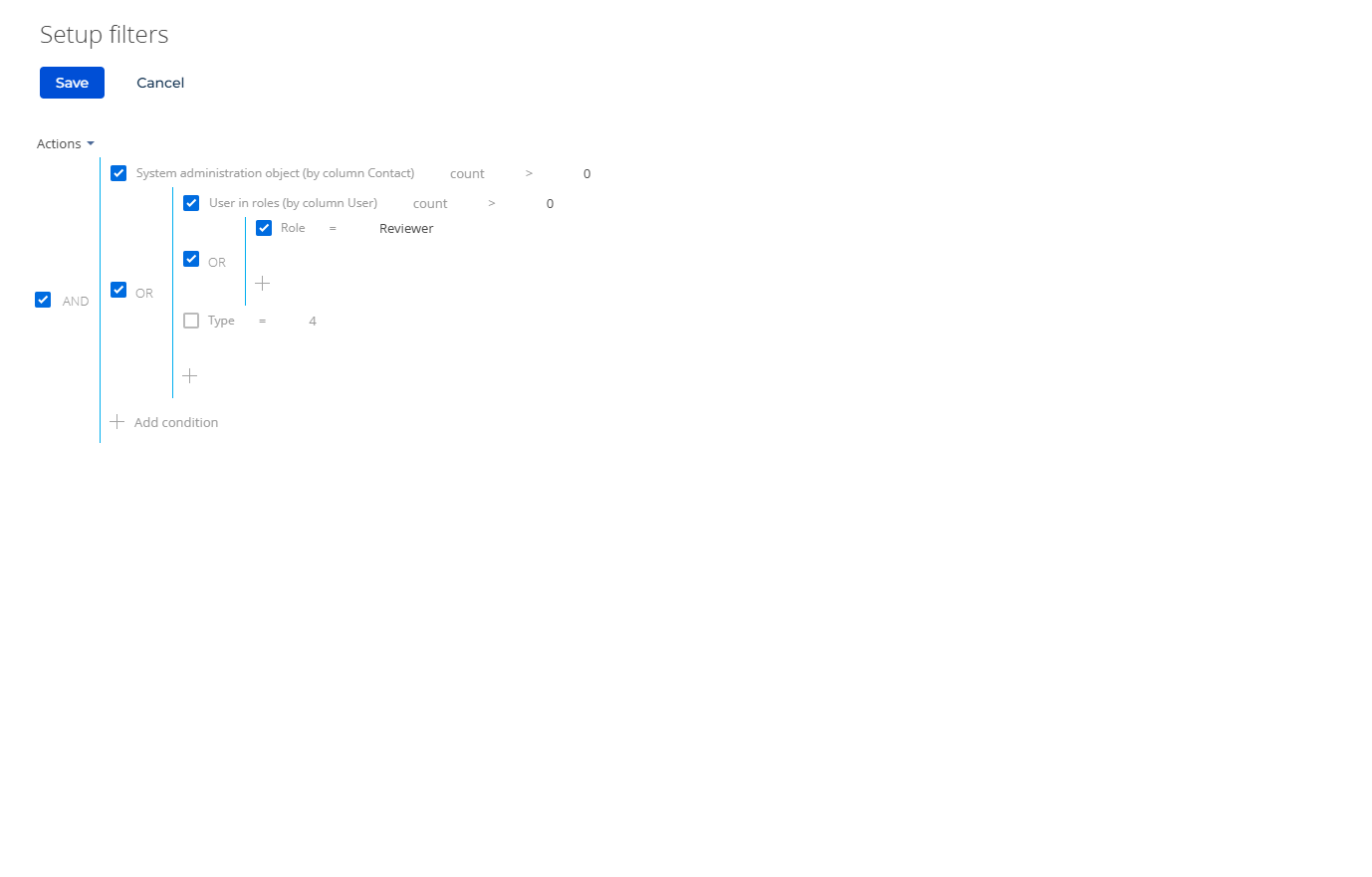
It would look like this - I typically also add Type=4 for users (although that’s a little redundant) and also add Connection Type=0 to get employee users (not external/portal users). 

Basically, from your screenshot, click "Quantity". Then set count > 0 (or click count to change to exists), then add the sub-conditions under that.

Ryan

It would look like this - I typically also add Type=4 for users (although that’s a little redundant) and also add Connection Type=0 to get employee users (not external/portal users). 

Basically, from your screenshot, click "Quantity". Then set count > 0 (or click count to change to exists), then add the sub-conditions under that.

Ryan

Ryan Farley,

Thank you Ryan for your time and help! This solution worked for me. 

Show all comments