Sales_Creatio
8.0

Is there an update on the release of this? Seems it has been on roadmap for a while but still does not appear in 8.3.2.

As a workaround does anyone know if it is possible to open an old Classic UI pivot dashboard from a button click on a Freedom UI section/page?

Like 2

Like

2 comments
Best reply

On the roadmap pivot tables currently shows that it's slated for Q12026, so hopefully soon!

As for alternatives for Freedom UI, there is this in the marketplace (not free). It's likely possible to use this method to load in a classic pivot list component, but I've not tried.

Ryan

On the roadmap pivot tables currently shows that it's slated for Q12026, so hopefully soon!

As for alternatives for Freedom UI, there is this in the marketplace (not free). It's likely possible to use this method to load in a classic pivot list component, but I've not tried.

Ryan

thanks Ryan. $70 per month for that so guess will have to hold fire until Creatio release this function.

Show all comments
#FreedomUI
#Printable
#lookup
#filter
Sales_Creatio
8.0

We have implemented a lookup-based filtering mechanism for Printables in Classic UI. The behavior is as follows:

  • A lookup field (e.g., Stage) is used as a filter.
  • Based on the selected lookup value, only the related Printables are shown.
  • For example, if there are 15 Printables in total and the user selects the “To Be Signed” stage, the system dynamically filters and shows only the 2–4 Printables that are relevant to the “To Be Signed” attachments.

This works correctly in Classic UI.

Now our customer has migrated to Freedom UI, and we need to implement the same functionality there. We have searched both Academy and Community, but all available examples of Printable filtering appear to be limited to Classic UI. We could not find any reference or implementation guidance for achieving lookup-driven Printable filtering in Freedom UI.

Has anyone implemented a similar scenario in Freedom UI, where Printables are dynamically filtered based on a selected lookup value or stage?

Any guidance, architectural approach, or sample implementation (Client schema, DataSource filtering, or UI Handler logic) would be highly appreciated.

Like 0

Like

1 comments

Hello, 


Hello,

In Freedom UI you can’t hide individual reports inside the Print report menu, but you can control the buttons.
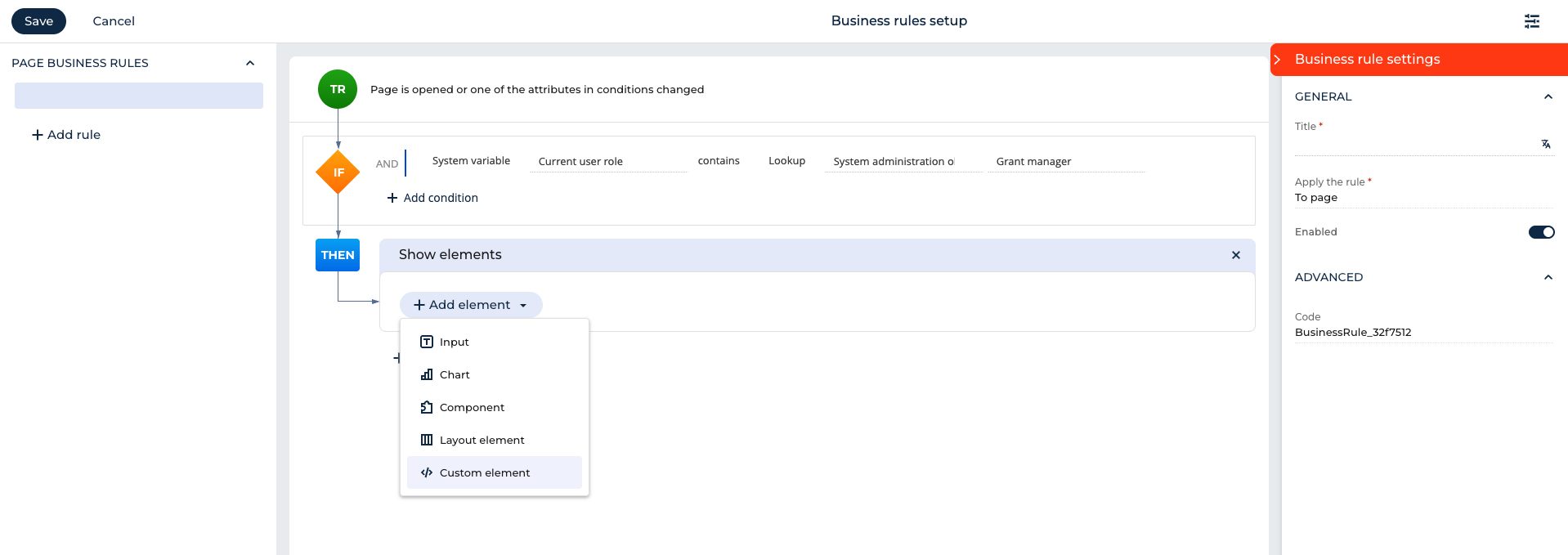
Add a Print report button to your page, then create a business rule on your lookup field: if it equals a certain value, show the button; otherwise hide it.

If you need different reports per scenario, add multiple Print buttons (e.g. “Print Customer Pack”, “Print Partner Pack”) and use rules so only the right one shows.

For full control (skipping the menu), add a custom button with a click handler that picks and runs the right report based on the lookup.

That’s the Freedom UI equivalent of conditionally showing/hiding printables.


Thank you for reaching out! 

Show all comments

Hi everyone
If you know some ways of the subject, could you support me please?

I am not an engeneer but just the use person, I am a sales person.
I would like to see the specific mail in Creatio, but not all of the mail.

How do I can bring it into the Creatio?

Also, I would like to know, what is the logic behind automatically selecting emails that are linked? I believe there are interactions with the same customer in both Opportunity and Lead. How does it automatically determine that? What's the key?

Sorry for all the talk, but I need your help.

Thanks!

Like 0

Like

4 comments

Good day, 

Thank you for reaching out to us. 

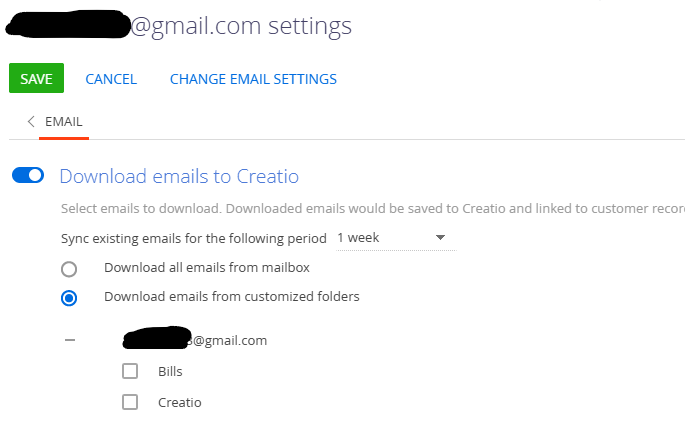
1. Regarding your questions on the possibility of synchronizing only particular emails into Creatio rather than all of the emails received by the mailbox, this can be achieved by following the steps below:

  1. Move the desired email(s) to a dedicated folder in your mailbox (e.g., "To import").
  2. In Creatio, go to the communication panel and click the email icon.
  3. Select "Synchronize email." Creatio will import emails from the folders you have configured for synchronization.
  4. To configure which email folders are synced, open your "Mailbox synchronization settings" and select only the relevant folders. Only emails from these folders will be imported.
    chose folders

More information on mailbox setup may be located in this Creatio Academy article hub.

2. When it comes to the automatic registration of emails, creating cases from them or tying emails to already existing cases, the overal mechanism mechanism is described in this article.

The details on how Creatio recognizes which emails should be added to the ongoing cases may be located here.

We hope this information helps!

Hi Nikita -san ,
Thank you, for your comment on this.

So I understand the approach of syncing a dedicated mailbox. Is there no other way?

For example, if I'm exchanging emails and think, "Oh, I want to save just this one as data in Creatio!", can I selectively import only specific emails into Creatio? I'm not sure if it's via import or integration, but if there's a method other than using a specific mailbox, please let me know.

Hello again,

Unfortunately, save for moving a separate email into a folder that you will synchronize, there are currently no means of targeted single-email synchronization.

Nikita Kudin,

Thank you for your quick support.

I understand. I will share this with our customer.

Thank you!

Sui

Show all comments
folders
folderpane
Sales_Creatio
8.0

Hello, we recently converted to FreedomUI and was wondering is there a way that our end users can adjust the size of the folder pane, like you could in ClassicUI? I know on the designer I can adjust the size, but would like to have our end users have the ability that they once had.

Like 0

Like

1 comments

Hello,

Unfortunately, it's not possible to adjust the size of the folder panel at this time. However, we've registered this idea in our R&D team backlog for consideration and implementation in future application releases. 
 

Thank you for helping us to improve our product.
 

Show all comments
Sales_Creatio
8.0

I am trying to figure out how my system is validating fields on an Opportunity.  We have two required date fields on the page, one for the closing date and another to capture the date the User is expecting the first shipment if the Opportunity is won.  

Currently, our validation rules require that the date the User enters in the first shipment field must be AFTER the close date (e.g. If closing date = n then the first shipment date must be at least n+1).  I want to adjust the rule so that the first shipment date can be the same as the closing date or later.

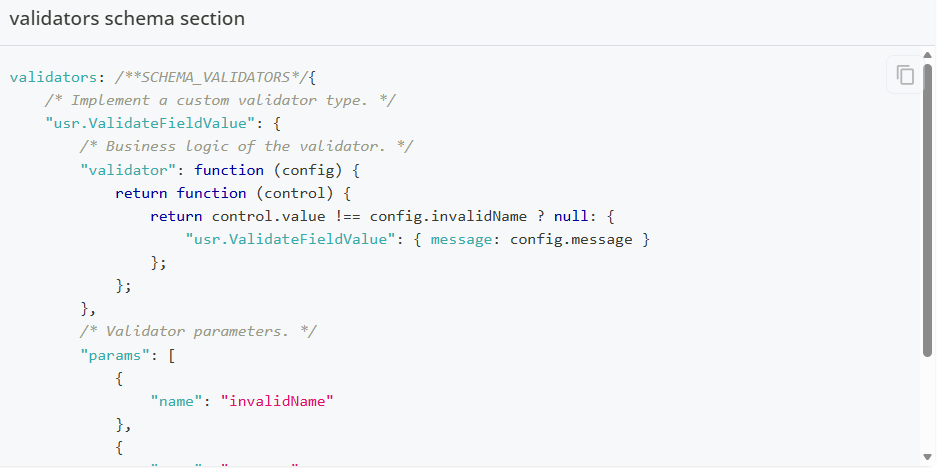
When I look for the validation section of the Opportunity page with the two fields I find this at the bottom of the script:

The academy shows a different script when describing validation schema (see below) which leaves me at a bit of a dead-end.  Any idea how validations might be implemented and how I might access the code?

Thanks in advance!


Like 0

Like

1 comments

Good day, Greg,

Thank you for reaching out to us. 

If we understand you correctly, the Academy page you are consulting with is "Implement the validation of a field value on a page". This article describes how code-based field validation can be implemented in Freedom UI and it only shows examples of such implementations.

If you are not locating any code in "validators" of your Opportunity pages, please make sure that:

  1. The logic is implemented in Freedom UI
  2. The logic is not implemented by some other means, such as Business Rules
  3. That you are verifying the code in the correct package.
    For example, out of the box, the Opportunities_FormPage code is spread out across several packages:
    Opportunities_FormPage

If the implementation is done via code, it may be located in a custom package that is not in the last position in the hierarchy. Alternative code-based methods of validation implementation may also have been implemented on your site. 

In the event you are still facing issues locating the logic responsible for date validation, please contact us on our <support@creatio.com> address so we may connect to your environment and examine its setup.

Thank you for reaching out to us!

Show all comments
OAuth
Incapsula
oData
Sales_Creatio
8.0

I have configured an OAuth account in Creatio. When I submit OData requests using Postman from my local environment, the request fails with the following error:

“Request unsuccessful. Incapsula incident ID:

Has anyone encountered this issue before?

I would like to understand whether this error is typically related to a misconfiguration on the Creatio side (for example, OAuth, user permissions, IP restrictions, or OData settings), or if it requires additional configuration or whitelisting on Creatio’s infrastructure side related to Incapsula.

For context:

  • The request is executed successfully from Postman locally, but consistently fails with the Incapsula error.
  • Authentication is performed via OAuth.
  • No detailed error response is returned beyond the Incapsula incident ID.

Any guidance or similar experiences would be greatly appreciated.

Like 0

Like

4 comments

Hello,

Could you please provide an extended version of the error to better understand the issue?

Sure. When making the call in Postman to https://my-instance.creatio.com/0/odata/MyTable

I get a 200 code but with the following message:


<html style="height:100%">


<head>

    <META NAME="ROBOTS" CONTENT="NOINDEX, NOFOLLOW">

    <meta name="format-detection" content="telephone=no">

    <meta name="viewport" content="initial-scale=1.0">

    <meta http-equiv="X-UA-Compatible" content="IE=edge,chrome=1">

</head>

<body style="margin:0px;height:100%"><iframe id="main-iframe"

        src="/_Incapsula_Resource?SWUDNSAI=31&xinfo=14-9563318-0%200NNN%20RT%281768398783812%2013%29%20q%280%20-1%20-1%20-1%29%20r%280%20-1%29%20B12%2811%2c748823%2c0%29%20U6&incident_id=153000480030609553-52193177030429710&edet=12&cinfo=0b000000&rpinfo=0&cts=6xwb1BMLFPW1EJ%2bmvV8UDNe2KFWyjZg%2fdeMlMfjgnZf9Xsa1RPnzOa2voMOgSfpa&cip=<my ip>&mth=POST"

        frameborder=0 width="100%" height="100%" marginheight="0px" marginwidth="0px">Request unsuccessful. Incapsula

        incident ID: 153000480030609553-52193177030429710</iframe></body>

</html>

Rommel Bocker,

I see that you also registered this issue directly for the support team and we have already provided a solution there. I will add the solution here as well.

The error you have encountered seems to be incorrect interpretation of the message that Creatio sent in response to the request. We have tested the provided example request with Postman and identified two blockers.

First request returned with the message: "Current user does not have sufficient permissions to use OData."
To fix this "Access to OData" operation permission need to be enabled for this user.

Then next request returned with the message": "Insufficient permissions to add record in object \"UsrObject\"."
To fix this you need to enable operation permissions for the object and configure it in a way to allow this technical user with a permission to create new records. This is valid only for creation of the new records with POST requests. Please refer to this article.

Thank you for your question!

Mira... thanks. The problem still remains. That's why I was posting this here, just to check if other people have similar situations and find the solution.

Show all comments
Issue_Adding_WhatsApp_Channel_in_Creatio
WhatsApp_Integration
Sales_Creatio
8.0

Hi Creatio Support,

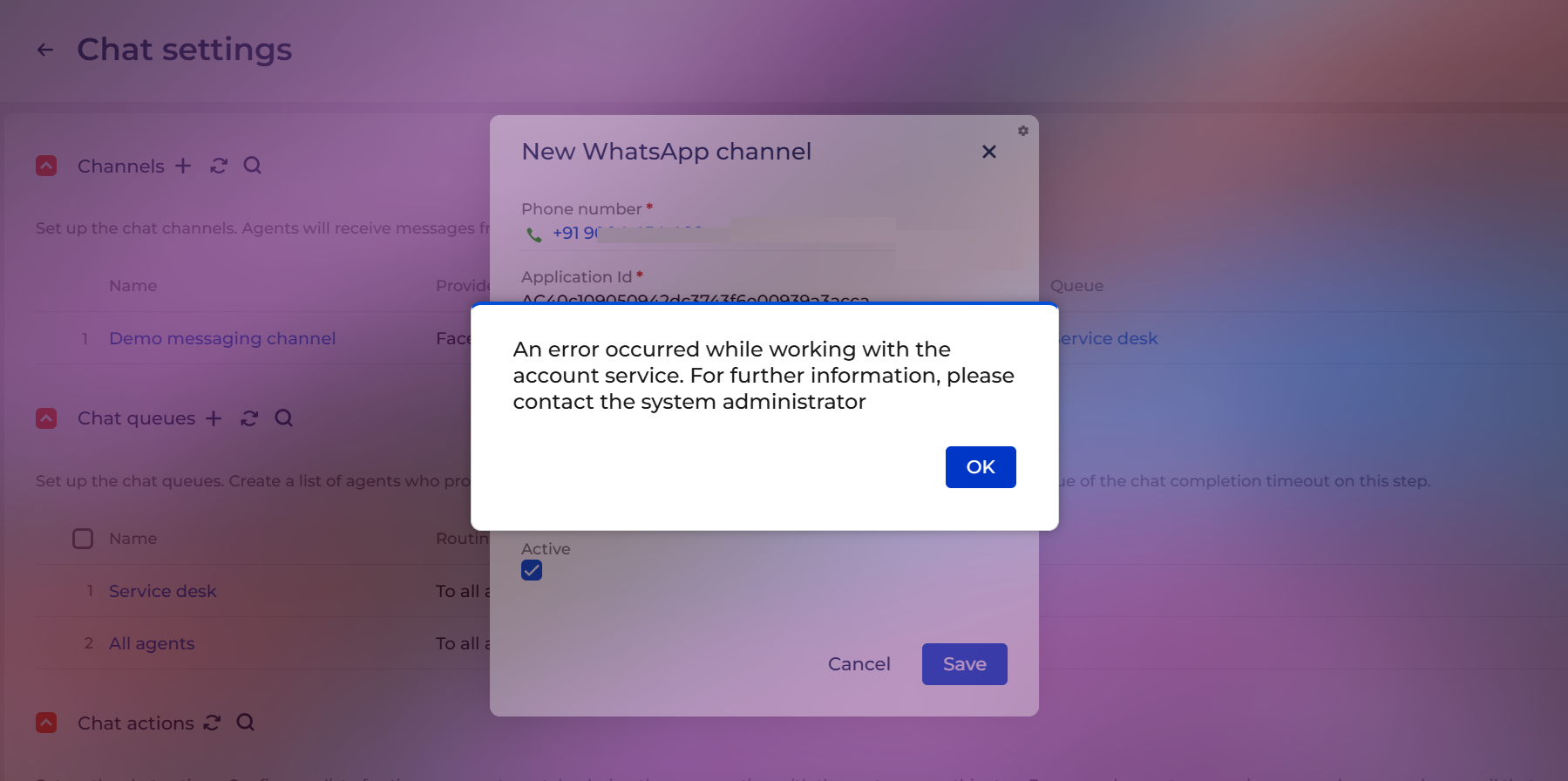
We are facing an issue while setting up the WhatsApp channel in Creatio.

For your information, I created a trial Creatio CRM instance to test the WhatsApp integration. I followed the steps mentioned in the link below:

Set up WhatsApp integration | Creatio Academy

The first step is marked as optional, so I skipped it. I created a Twilio account, but when I try to add the WhatsApp channel in Creatio, I receive an error. The steps mentioned in the document are:
 

  1. Set up a Twilio free trial account to get acquainted with the integration (optional). Read more >>>
  2. Set up a Twilio business account. Read more >>>
  3. Set up a WhatsApp chat channel in Creatio. Read more >>>

As mentioned in the same document, we verified the following system settings, and they are available in the system:

  • "Identity server Url" ("IdentityServerUrl" code)
  • "Identity server client id" ("IdentityServerClientId" code)
  • "Identity server client secret" ("IdentityServerClientSecret" code)

However, Creatio still shows an error when we try to add the WhatsApp channel in the Chat settings.

Please let us know what we might be missing. We would appreciate it if we could set up a quick call to review this issue.

Like 0

Like

3 comments

Hello,

If, as you mentioned, the system settings already contain the default values, please make sure that this account is connected to only one instance.

Additionally, we recommend generating a new webhook URL (navigate to
https://sitename.creatio.com/0/Shell/#Page/LandingiDesigner_Page → Other landing pages → Click to get your webhook URL) and then trying to reconnect the WhatsApp account.

If the issue persists after performing these steps, please contact us at support@creatio.com, and we will be able to carry out a more detailed analysis.

Yelyzaveta Shchyrova,

Thank you for sharing the details. After following the suggested solution, the WhatsApp channel was added successfully.

However, I am not receiving any WhatsApp messages when I send a message to the number used during the Twilio configuration.

For your information, I created a Twilio trial account by following the steps outlined in the link below. I am not sure if I am missing any required configuration.

Set up WhatsApp integration | Creatio Academy

Could you please let me know if anything is missing in the Twilio setup or on the Creatio side?

ANIKET RAMCHANDRA NANAVARE,

Hello,

To be able to identify the exact cause of the issue, we need to review your site configuration.

Please create a support case, and we will be happy to assist you further.

Show all comments
section
Naming
Sales_Creatio
8.0

Is it possible to use a business rule or some other tool to have alternative names for sections based upon user type or user role?

Example:  If User 1 logs in they see the section Leads, but if User 2 logs in they see the same section but with a different name?

Reasoning:

In public sector different departments depending on their role may want to use the lead object for different reasons.  IN the world of Economic development they may call it leads, but in the grants space they would call it funding considerations.  They both would have different DCMs but we are trying to not duplicate the lead object. just use it in two different ways.

Like 0

Like

4 comments


Something like this only for Element Name

The simplest approach is to create a new section with a different title based on the same entity. This allows you to assign a separate workplace to each department role.

Mohamed Ouederni,

Thanks.. I have some other logic that was build against the existing object trying to avoid going back and redoing it.  Appreciate the response.

Hello,
Changing the section name just based on the users will not work since Creatio do not support dynamic section names. As suggested, you may use two different sections based on the same object. Or, you can have different section names for different cultures. However, the last method won't work if all your users have the same culture.

Show all comments
number
errors
UIComponent
component
Sales_Creatio
8.0

Hi.

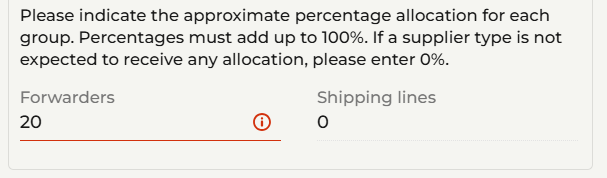
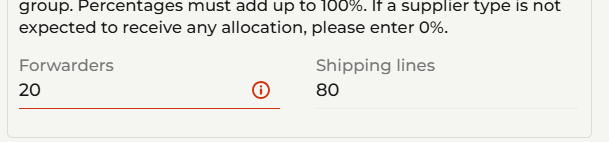
Please see the two images below -- I have a 2 number input components.  The sum of the two must equal 100.  When I put a value in the first, like "20", the line lights up red because 20+0 <> 100.  That's fine.

However, after I put "80" in the second box, the first one still has the red line indicating the original error.

Is there some way to get both lines back to black?

Thanks
Rob


Like 0

Like

1 comments

Hello,

Could you please describe how this logic was implemented on your side? If possible, we would appreciate it if you could share a screenshot or an example of the code you are using. This will help us better understand your setup.

Show all comments
Not_able_to_send_an_PDF_as_attachment_in_send_email_element
Sales_Creatio
8.0

Hi Everyone,

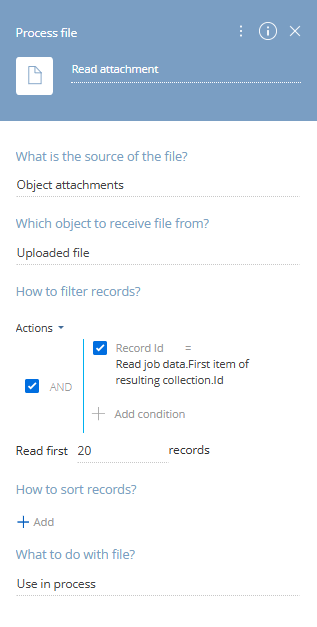
I have written an business process to send an email with attachment. I have added process file element and reading the files from "Uploaded file" object. Refer below:

Now, in my send email element I am attaching the files received from this element.


I am receiving emails, but the attachments are missing.


Can someone please let me know what I might be missing here?
 

Like 0

Like

1 comments

Hello.

From what you've shared, it looks like the process isn't retrieving the uploaded file as expected. To help pinpoint the issue, here are a few steps to take:
1. Turn on tracing for the business process. This will show whether the record ID and file attachment are actually being passed to the process at runtime.

2. Make sure that the RecordId used in the “Process file” element is the same ID as the one associated with the uploaded attachment. If you're triggering the process manually, double-check that the correct record is selected or passed in.

3. In your “Process file” element, you've selected the Uploaded file as the object. Confirm that the attachment was uploaded to this exact object. If the file was uploaded to a different object (e.g. another section or lookup), you’ll need to change the source object in the element configuration accordingly.

4. You can directly query the SysFile table (or the relevant attachment table) and check if the uploaded file is tied to the expected record ID and object schema.

Best regards,
Antonii.

Show all comments