Setup
Gemini
API
Sales_Creatio

How do I enable this in my demo org

Like 1

Like

1 comments

Hello Alekhya,

Please follow the steps below to set up your Gemini API key with Creatio:

  1. Make sure you are logged in to the Google account
  2. Access Google AI Studio:
    Go to https://aistudio.google.com/
  3. Create API Key
  4. Copy and Store the Key Securely:
  5. Add the API Key to Creatio:
    • Open Creatio and go to System Settings.
    • Locate the setting named “Gemini API key.”
    • Paste the key generated in Google AI Studio into this field and save your changes.

You can also follow instrucitons here for up-to-date instructions: 
https://ai.google.dev/gemini-api/docs/api-key

I trust this clarifies how to enable the enrichment.

Show all comments
webhook
webhooks
#array
Sales_Creatio
8.0

We use webhooks to add Leads, Calls, and CallAIAnalytics. Each different source of data and different JSON format.
First 2 cases work as expected using default business process to parse webhooks

But webhooks for 3rd case for AI analytics from calls is sending JSON with arrays of text fields instead of concatenated text field.

So we are encountering a critical type casting error when processing incoming data from the webhook using the Newtonsoft.Json library in a .NET environment.

Context:

  1. Data is being received via a webhook payload.
  2. The relevant data section in the JSON payload is structured as an array of strings (a list of mistakes/notes):

    JSON


    {
      // ... other fields
      "UsrEmployeeMistakes": [
        "Mistake 1 detail.", 
        "Mistake 2 detail."
      ],
      // ...
    }
  3. I am trying to map this value to the column <strong>UsrEmployeeMistakes</strong> within the entity <strong>UsrResidentAI</strong>.

The Technical Error:

When the system attempts to process the incoming JSON array, it throws a type casting exception:

An error occurred while setting the column value.
ColumnName: UsrEmployeeMistakes.
EntityName: UsrResidentAI.
Exception: Cannot cast Newtonsoft.Json.Linq.JArray to Newtonsoft.Json.Linq.JToken.

Analysis:

The webhook sends an array, which Newtonsoft.Json correctly parses as a <strong>JArray</strong>. However, the column UsrEmployeeMistakes (or the underlying property/setter) seems to be expecting a simple, single JSON element (JToken), possibly because it's configured to store a single string/text field in the database rather than a collection or a native JSON type.


My Question:

Given that I cannot control the array format from the incoming webhook:

What is the most robust way to handle this conversion in my processing logic? 


I am looking for the best practice and no-code or low-code is preferable.
Thank you
Leo

Like 0

Like

2 comments

Hi Leonid,

Using no-code or low-code will not be possible here, you may need to customize the business process to handle the specific format. You might consider contacting Creatio support support@creatio.com for assistance.

Eduard Dovydovskyi writes:

Hi Leonid,

Using no-code or low-code will not be possible here, you may need to customize the business process to handle the specific format. You might consider contacting Creatio support support@creatio.com for assistance.

Thank you Eduard
Any hints how to do this with business processes and code?
thank you

Show all comments
FreedomUI
tabs
hide
Sales_Creatio
8.0

Hi,
I have several tabs on the record view:


Switching between them works as expected. However, I need to conditionally hide one of the tabs (GUS). To achieve this, I started with adding the following entry to the viewConfigDiff:

{
	"operation": "merge",
	"name": "EvGusTabContainer",
	"values": {
		"visible": false
	}
}

At first glance, it seems to work correctly because the GUS button actually disappears. Unfortunately, as a result of this operation, the content of the side panel stops corresponding to the selected button. As you can see in the screenshot below, instead of showing the attachments, it displays the content from the VIES tab.


Is there any way to deal with this issue? If I remove the GUS tab instead of just hiding it, everything works as expected — but I need this to happen dynamically (for example, depending on user permissions or other circumstances), binding a view model attribute to "visible".

Like 1

Like

4 comments

Not sure why the panel would be showing the wrong one as I think I've done tab hiding like this before, but another approach to hiding tabs that might not have the same issue is using Page Business Rules if you're able? They're less versatile, but are no-code, and may avoid this issue. You'll find these tabs under the "Layout element" option for "Hide elements":

Harvey Adcock,

Hi,
Thank you very much for your response. Unfortunately, this suggestion didn’t solve the problem. Hiding the tab using a business rule does make its contents inaccessible, but the button itself is still visible. Trying to combine both approaches didn’t help either - it behaves the same way as before.
So far, the only working solution is hiding the button by DOM manipulation, but unfortunately, that’s not a elegant solution.

Hello, here is an example on how to do it dynamically:

  1. create a page parameter on FormPage and use it as attributes value in viewModelConfigDiff:

paramater

        viewModelConfigDiff: /**SCHEMA_VIEW_MODEL_CONFIG_DIFF*/[
            {
                "operation": "merge",
                "path": [
                    "attributes"
                ],
                "values": {
                    "IsUserSystemAdministrator": {
                        "modelConfig": {
                            "path": "PageParameters.UsrIsUserSystemAdministrator"
                        }
                    },


2. create a handler to set attributes value: 

handler

        handlers: /**SCHEMA_HANDLERS*/[
            { 
                request : "crt.HandleViewModelInitRequest", 
                handler : async (request,next) => {
                    await next?.handle(request);

                    // create model query and add filters
                    userRoleModel = await sdk.Model.create("SysUserInRole");
                    const filter = new sdk.FilterGroup();
                    //await filter.addSchemaColumnFilterWithParameter(sdk.ComparisonType.Equal, "SysRole.Name", "System administrators");
                    await filter.addSchemaColumnFilterWithParameter(sdk.ComparisonType.Equal, "SysRole", "83a43ebc-f36b-1410-298d-001e8c82bcad");
                    await filter.addSchemaColumnFilterWithParameter(sdk.ComparisonType.Equal, "SysUser.Contact", currentUserContact.value);
                        
                    const results = await userRoleModel.load({
                      attributes: ["Id"],
                      parameters: [{
                          type: sdk.ModelParameterType.Filter,
                          value: filter
                      }]
                    });
                    
                    // now set the attribute
                    request.$context.IsUserSystemAdministrator = (results.length > 0);

                }
            },


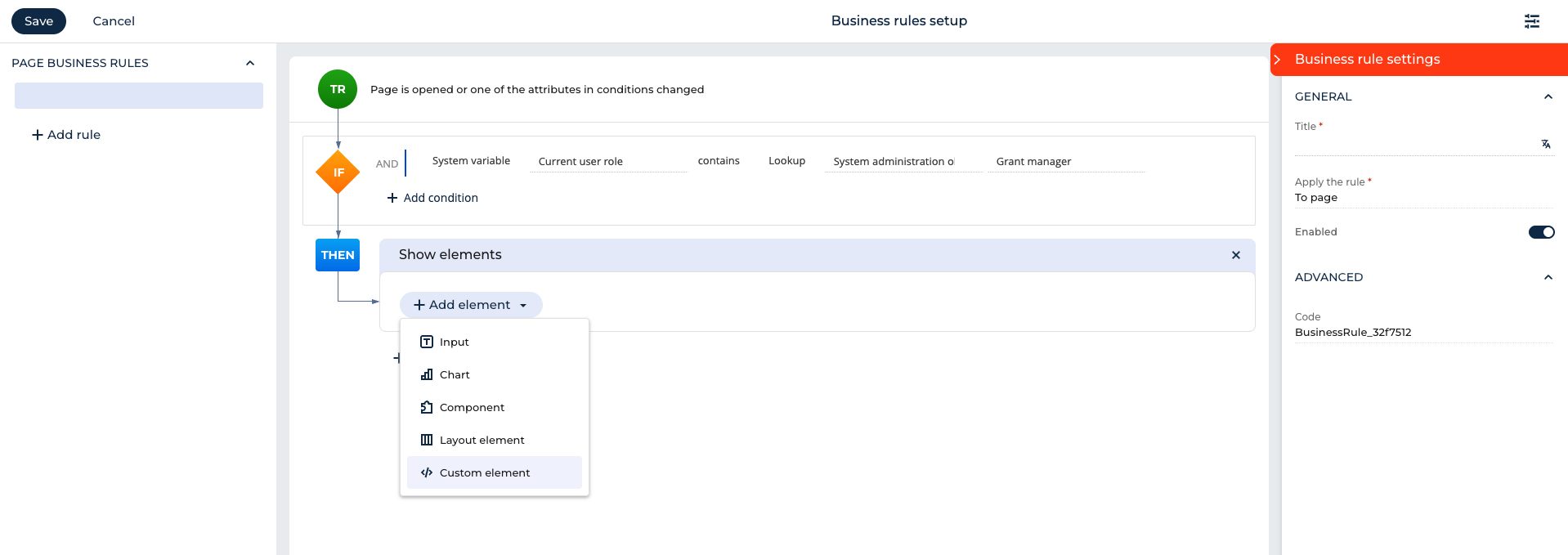
3. use Page parameter to show/hide tab or some other element on FormPage:

businessrule

Hello,
In addition, you could check the approach from here:
https://community.creatio.com/questions/how-can-i-hide-attachment-tabto…

Show all comments
#GlobalSearch
global search
Sales_Creatio
8.0

Hello

If new records (for example Accounts, Contacts, Opportunities, Orders, etc.) are added to Creatio via SQL commands, they are not indexed for Global Search.

I've already tried to set the value of some fields of the new records via Business Processes but they are not indexed.

How can I force the new records to be indexed for Global Search?

Thanks

Like 1

Like

2 comments

Hello!

Thank you for your question.

If new records (such as Accounts, Contacts, Opportunities, Orders, etc.) are added directly to the database via SQL commands, these records will not be indexed for Global Search.

As a result, Global Search will not be able to find records that were inserted directly into the database.

To include these records in the Global Search index, a reindexing of the corresponding section is required. This process cannot be triggered manually from the user interface.

  • For on-site (on-premise) clients, reindexing can be triggered via Swagger.
  • For cloud clients, since they do not have access to Swagger, they can contact Creatio Support, and we can perform the reindexing for their site through a support request.


Hello Valeriia,

Doing some tests, I noticed that after creating an opportunity via SQL, if a business process updates the Owner field, the opportunity is automatically indexed and returned by Global Search. If the test business process updates for example "Created By" or "Modified By"  fields the record is not reindexed. What kind of fields should be updated from a business process to force indexing of a record (for example an Opportunity)?

Thanks

Show all comments

We’d like to add our own field to the pre-chat summary, in addition to the standard source field.

How can we do that?

Like 0

Like

1 comments

Hello,

Unfortunately, it is currently not possible to customize the pre-chat summary using standard configuration tools.
Adding another field for display can only be done through development by modifying the OmniChatModule.

However, we have already registered this idea for our R&D team, and this feature may become available in future releases.

Show all comments

Hello,

i would like to add a multiple selection field to the mini page when creating a new account.

We still working with classic UI.
For the multiple selection, I am using the add-on
“Multi-select text field setup for Creatio.”

The lookup works, but it is only displayed on half of the mask.
However, when setting up the page, the container is displayed across the entire mask.

Perhaps someone here has an idea for me.

Thank you very much.

Like 0

Like

2 comments

Hello,

There is support available for this add-on: info@customerfx.com.

Best regards,
Ivan

Technically, the current version of that control doesn't support mini pages, however, you could tweak the layout with some CSS. I'll add it to the backlog to look at adding that at some point in the future.

Show all comments
functional roles
organizational roles
Sales_Creatio
8.0

Hello,

How can a matrix organizational structure be implemented in Creatio?
For example, a Sales Manager may have two supervisors — the Branch Manager and the Head of Sales for the entire company. The same setup can apply to all positions.

Currently, organizational roles have a Management role, while functional roles do not. How can both lines be reflected in the system?
Or will it be necessary to configure business processes to assign permissions for all possible objects (from Opportunity to Task)?

Thank you

Like 2

Like

1 comments

Hello.

Currently, there are no management roles for functional roles. The logic to be implemented depends on the business need for establishing such a hierarchical structure.
If we consider the inheritance of access rights by a manager, there are two possible approaches from a technical perspective:
- Create functional roles as organizational roles (although this is likely not the best option), or
- Configure the required logic using object permissions and business processes.

For example, we could add a rule on the object level so that when an employee with a specific functional role creates a record, a designated person (manager) is automatically granted permissions. Alternatively, more complex logic for granting access rights under different conditions can be implemented through business processes.

Best regards,
Antonii.

Show all comments
Freedom
business
process
task
notification
panel
remove
Sales_Creatio
8.0

Hello,

Is it possible to remove the Businness process tasks from the notification panel.

This gives us notifications that we don't use and risks missing other important notifications.

Business Process Task

Thank you !
Nicolas


Like 1

Like

1 comments

Hello,

Unfortunately, currently it is not possible to remove/hide the Business process tasks icon from the Notifications panel. However, we have registered this idea for the responsible R&D team and they will review the possibility of changing this logic in future.

Show all comments
Ecrype
Sales_Creatio
8.0

Hi,


Before 8.3.0, I was using this to retrieve at server side an encrypted password column.

     EntitySchemaQuery query = new EntitySchemaQuery(userConnection.EntitySchemaManager.GetInstanceByName(sSchemaName));
           query.HideSecurityValue  = false;
           var entity = query.GetEntity(userConnection, guid);
           var password = entity.GetTypedColumnValue<string>("PF1Password");

Now, the same code return *****.

Is there any new way to retrieve the encrypted value at server side for 8.3.0 ?


Thanks,

Like 0

Like

2 comments
Best reply

Hello Jerome,

Instead of using EntitySchemaQuery.HideSecurityValue to unmask the value of the encrypted string use EntitySchemaQuery.UnmaskColumnValues and set it to true

Here is the example:

var esq = new EntitySchemaQuery(userConnection.EntitySchemaManager, schemaName);
esq.UnmaskColumnValues = true;
esq.AddColumn(encryptedColumnName);
var entity = esq.GetEntity(userConnection, recordId);
var unmaskedString entity.GetColumnValue(encryptedColumnName) as string;

This doesn't work either: 

esq.HideSecurityValueSetting = new EntitySchemaQueryHideSecurityValueSetting(EntitySchemaQueryHideSecurityValueOption.None);

Hello Jerome,

Instead of using EntitySchemaQuery.HideSecurityValue to unmask the value of the encrypted string use EntitySchemaQuery.UnmaskColumnValues and set it to true

Here is the example:

var esq = new EntitySchemaQuery(userConnection.EntitySchemaManager, schemaName);
esq.UnmaskColumnValues = true;
esq.AddColumn(encryptedColumnName);
var entity = esq.GetEntity(userConnection, recordId);
var unmaskedString entity.GetColumnValue(encryptedColumnName) as string;
Show all comments
client_module
replacing client module
freeform
Sales_Creatio
8.0

I've create custom page, but when I open Section from Workspace it opens a List Page for the object by default.

Can you please help:
1) how to open Custom page (Freedom UI) from Workplace instead of List Page

2) how to add a custom page with 4 tabs. Each tab contains 2 Rich text (one for text, another for image) fields and below one Lists (with different filter criteria for each tab) from another data source?


Something like this:

Like 2

Like

3 comments

Hello,

1) In order to open not the list page but another page with other elements, you can make changes to the list page and remove the elements you don't need

2) You mean that you can't add different datasources to one page? Perhaps the following configuration instructions will help you:

https://academy.creatio.com/docs/8.x/no-code-customization/customizatio…

Halyna Parkhomenko,

What I'd like to achieve:
BACKGROUD CONTEXT (ISSUE IS BELOW):
I have object Real Estate and use self reference and lookup ObjectType to build 2 layers hierarchy: ЖК (Real Estate) - Квартира (the same object Real Estate Object)

If Real Estate Object has :
1) ObjectType lookup = "Квартира" & Parent ЖК filed is populated with another Real Estate Object, then it is child Квартира
2) ObjectType lookup = "ЖК" 
& ЖК filed is Empty then it is parent ЖК

What I'd like to achieve
Have a Landing page to show 4 Tabs:
Each Tab contains 2 Rich Text fields to show description from related filtered by ID Real Estate Object (ЖК)  and Editable List of Child records ("Квартира")

Both Rich Text fields and should be  
I'm getting error as my Main source was selected


Like that:

ЖК 1 (Tab):
---------------------------------------------------------------------------------------
 Інфо про ЖК (Rich Text)            |    Генплан  (Rich Text)
                                                        |
                                                        |
                                                        |
---------------------------------------------------------------------------------------


Квартира (List):
---------------------------------------------------------------------------------------
Name  |  Price | Status | Description | etc...


Each ЖК should be on separate tab as shown on image above (Object 1, 2, 3)


ISSUE:
I'm getting issue when Editing Rich Text fields on List Page. 
After I reload the page those fields still contain previous value.

If I add Save button, then getting an error (mandatory field is empty) because it tries to save new record instead of saving updates to Rich Text fields of corresponding filtered records shown on the screen.


Leonid,

You can enable live data update for your object. Also, check out this post, as it may contain useful information for your scenario.

Show all comments