How_to_Automate_a_Business_Process_Using_a_Dynamic_Filter
Sales_Creatio
8.0

Hello Creatio Support Team,

I need to implement a scenario where users create a dynamic filter during the day, and a business process should automatically run at night using that filter.

What is the recommended way to implement this in Creatio so that the BP correctly retrieves and applies the dynamic filter at runtime?

Like 1

Like

1 comments

You can get the filter from a user created folder in a process using code. Then you can use that filter with an EntitySchemaQuery. See https://customerfx.com/article/programmatically-using-section-folder-filters-in-processes-or-server-side-code-in-creatio/

Ryan

Show all comments
FreedomUI
Freedom_UI
minipage
Sales_Creatio
8.0

Hello. I'm trying to configure a button for Freedom UI that should open a page and pass a parameter (the ID of the page from which the button was clicked) to the new page. But none of the options I've found have worked. Maybe someone can help.

Here's what I'm trying to do:

When the button is clicked:

    handler: async (request, next) => {
      const recordId = await request.$context.Id;
      const handlerChain = sdk.HandlerChainService.instance;
      await handlerChain.process({
        type: "crt.OpenPageRequest",
        schemaName: "UsrAccountContactsForPortal_Minipage",
        $context: request.$context.Id,
      });

      return next?.handle(request);
    }

When the page is initialized:

	{
		request: "crt.HandleViewModelInitRequest",
		handler: async (request, next) => {
			const recordId = await request.$context.Id;
			console.log("Received Id:", recordId);
			return next?.handle(request);
		}
	}

Thank you.

Like 0

Like

1 comments

You can only pass default values (or really any values) to crt.CreateRecordRequest, not crt.OpenPageRequest. For that scenario, I've been using the browser's BroadcastChannel API to send it via messages to the opening page. You can see an example of that in the comments on this thread https://community.creatio.com/questions/open-custom-freedom-ui-page-custom-button-opportunity-edit-page-and-pass-opportunity

Ryan

Show all comments
homepage
Sales_Creatio_enterprise_edition
Sales_Creatio
8.0

Hello, community

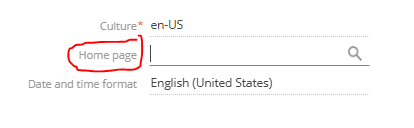
is there a way how to select Sales Home Page (0/Shell/#HomePage/SalesEnterpriseHomePage) as a user's Homepage?

Asking because I can't see it in the section list of the Homepage lookup


Like 0

Like

3 comments

Does anybody know if it's possible?

Greetings!

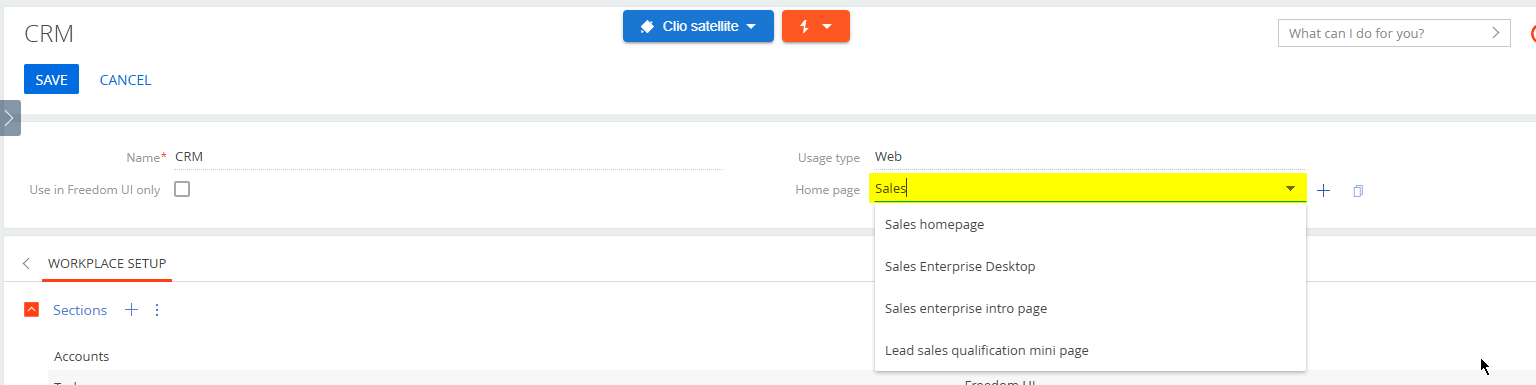
Thank you for your inquiry. Unfortunately Currently, this field only allows selecting sections. A Homepage differs from a section because it does not have a registered SysModule in the system.

If you want to set a Homepage for a specific workspace, you can do so in the Home page field in the workspace settings.


However, it will not be possible to install it separately for the user.

We understand that this is not ideal for your specific needs.

We want to assure you that we have created a request for our development team to implement this functionality in future versions of our application. We understand the importance of providing our clients with the best possible experience and will work hard to implement the changes you have suggested.

Thank you again for bringing this to our attention, and please do not hesitate to reach out if you have any further questions or concerns.

Have a nice day!

Daria Mudragel,

Thanks a lot!

Show all comments
bi
Sales_Creatio
8.0

Hello community,

does anybody know if there is a solution to enable Power BI like functionality for Creatio reports? I mean the similar filtering directly on a report's page, tree-like filters, multichoice, percent calculation and etc. 

 I know about Power BI connector for Creatio, but our users request to have these capabilities directly in Creatio, because they want to analyze live data in real time. 


Like 2

Like

6 comments

+1 - Reporting / Dashboard  upgrade live capabilities (non AI related) above and beyond what could be done with classic UI are more than welcome 

Hello,
The Power BI Desktop Connector for Creatio is intended for data extraction and modeling in Power BI Desktop. It is not a feature that adds Power BI-like report behavior directly inside Creatio UI.

If the requirement is to analyze live data inside Creatio, native dashboards and analytics widgets can cover part of that need: charts, indicators, pivot-style views, filters, and drill-down are available for operational analytics.

Official documentation:
Dashboards and widgets:
https://academy.creatio.com/docs/8.x/no-code-customization/category/analytics

Business data(filters, folders, etc.):
https://academy.creatio.com/docs/8.x/creatio-apps/category/business-data

But for advanced BI behavior such as:

  • tree-like or hierarchical filtering,
  • rich multi-dimensional slicing,
  • advanced calculated measures,
  • percentage logic across datasets,
  • flexible self-service analytics,

this is typically beyond standard Creatio analytics and would require custom development, a Marketplace add-on for Power BI.

So the answer is: partially yes for operational real-time analytics in Creatio, but not as a full Power BI equivalent out of the box.

Artem Udachyn,

thanks for the response. Is there any plans to enrich Creatio's built-in analytics capabilities?

Artem Evdokimenko,

Unfortunately, we are not aware of any such plans at the moment. However, you can follow the product release notes for future updates.

Artem Udachyn,

Are there any plans to make connecter to Power BI  cloud, not desktop only?

+1 a solution for the the power BI conector for cloud instances is essential

Show all comments
Sales_Creatio

We're a new client trying to get our production environment up and running with data loaded from our prior CRM (millions of records). We had been able to push updates and/or new records via the DataService adhering to the service limitations but our instance now seems to be unresponsive.

Has anyone else had this experience trying to bring in historical data? Are there any recommendations or guidance on making the process more painless?

Like 0

Like

5 comments

Often the unresponsiveness after loading a lot of data is due to Creatio's live update feature. Basically, many Creatio objects have live update enabled, which means for any add or update, it sends a signal back to the browser so the browser reloads the UI to show the updates/adds that occurred on the server. When loading in a large set of data, that causes a socket back to the browser for every single add or update, which the browser then reloads the data causing a request to be made back to the server to retrieve the newly added or updated data. So if you're loading a million records, that could also mean a million socket signals sent back the UI, and if your browser is open and viewing that record type, possibly a million requests to the server to load the data. All of that extra communication can cause things to get overwhelmed for large amounts of data to say the least. This feature is great for normal user activity, but when loading large amounts of data causes too much overhead. (I show below how to turn this feature off)

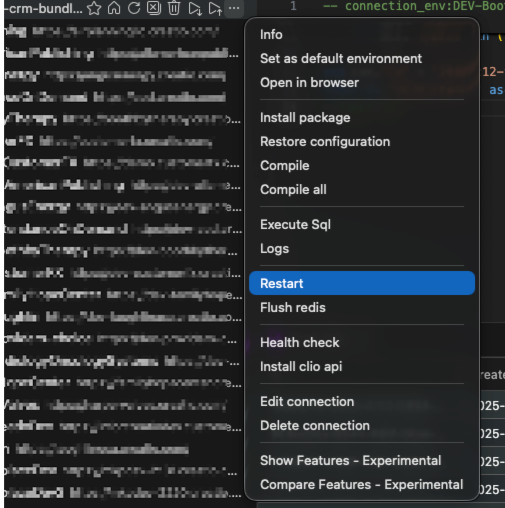
To get things responding again, you can restart the Creatio system which scraps all the pending socket requests.  Don't do it while the data is loading, but after or when paused. I use Clio Explorer for this. Once installed and you've registered the system (also need to install Clio API package in the system which Clio Explorer can do - refer to linked article), you'll see a restart option on the menu for the registered system.

However, if the system currently isn't responding at all, you might just need to contact support and they can restart the system from their end (but for next time, this option of using Clio is quick and easy).

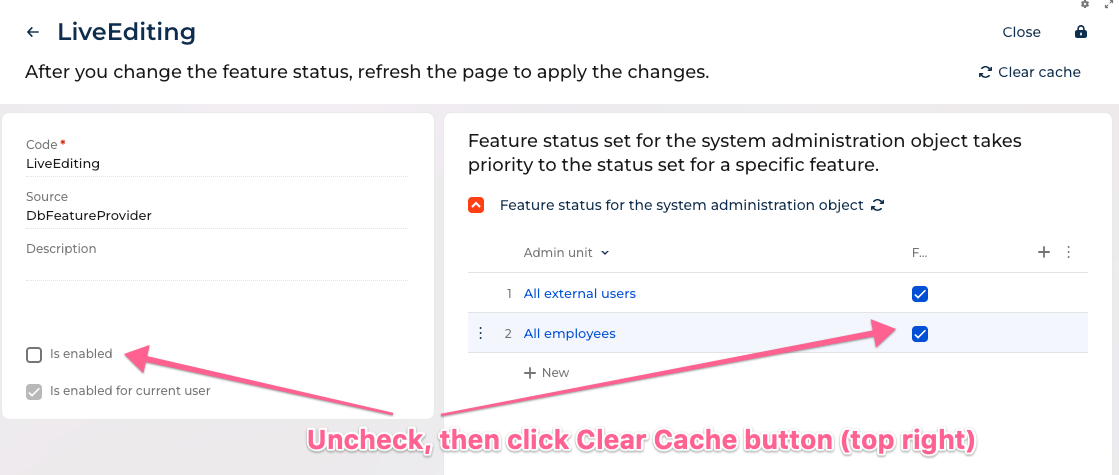
While you're loading the large amounts of data, you can turn off the Live Updates feature altogether. Then once the data is all loaded, turn it back on again. 

To turn off Live Updates for the entire system, go to the features page https://yourcreatiosystem/0/flags then search for the feature called LiveEditing and disable it (see below). Uncheck "Is enabled" (if checked) and also uncheck for "All employees" and also "All external users" (technically, only needs to get disabled for the user you're connecting via DataService or OData with, but I just turn it off for all). Then click Clear Cache button.

Now, it will no longer add all that extra traffic with sockets back to the browser and reloading of data from the server. Then once complete with the migration you can turn that back on again. 

Ryan

Brendan,

Hi Brendan, in general the best practice is to migrate large amount of data from the source DB to creatio via DB server tools outside of the system and then use the DB prepared before implementation. If you still want (or you no other option) to do it record by record, then I agree with Ryan's advice to disable live update. The second thing is that you have to control batches length and periodicity. Couple hundreds of records in a sigle batch, and batch every 5 minutes will be ok. The third thing is to move firstly active records from the source system (for instance lately edited by the timestamp of the record itself or it's connected records, for instance payments) by some triggered event and the rest historical data normally by batch outside of business hours etc.

Hi Dmitry, Hi Ryan, 

Both excellent advice and tutorials :) (Academy could use the upgrade ;) ) 

what kind of db server tools do you use with Creatio ?

Damien Collot,

for MS SQL - native SQL Management Studio and for profiling ExpressProfiler, for the Postgre SQL - JetBrains tools then :)

Damien Collot,

The idea is that you request a database backup from support, then do the migration directly to the database itself, then provide the database back to support to put back in place in the cloud. 

I've done a few large migrations this way and without question it is faster since you are doing things directly on the database level. If both the Creatio database and the source database are the same type of database such as MSSSQL or Postgres you can load millions of records into tables in seconds using insert into or using cross database queries, etc. If they're different database types you can still use things like MSSQL's import to load the data to Postgres or even add it as a linked server. However, a possible downside is that you no longer have the Creatio object model to do things automatically, for things like record access rights, etc - so you do have to also create those as well (or re-enable the record access rights after loading the data to let Creatio recreate those, if that scenario works and no special access rights are needed). Obviously, processes don't trigger for this approach so you need to make sure you account for any data added or updated normally from those. Also, loading attachments can be a problem with this approach. In prior versions the attachment file was stored in the database so you could load the file bytes in using a tool or custom code, however, now that the file is stored in outside locations such as S3, that approach no longer works.

Ryan

Show all comments
approval
Sales_Creatio
8.0

Hello community,

Does anybody know if there's a kind of connector between Creatio and Teams, that can be used for approval notification? For instance, if some approval is requested, Creatio pushes the user via Teams, user approves | rejects visa directly inside Teams notification, and the result is transferred back to Creatio.

Like 0

Like

1 comments

Hello Artem,

Unfortunately, there is no existing Creatio-Teams connector that meets your requirements. All available connectors can be found on the Creatio Marketplace.

Show all comments
Sales_Creatio
8.0

These really do not seem to work as well in Freedom UI and we get user complaints in relation to them. Main issues are:

  1. Only get a red dot rather than a number, which indicates how many outstanding items you have. User saying that are missing new notifications as you have to manually check, whereas before the number changing would indicate something new.
  2. Pop up notification is just a generic message rather than the actual title that has been set in the process
  3. Pop up messages do not always appear. Seems intermittent but sometimes you do not get a notification
  4. Sometimes you have to refresh your browser to see new notifications that you have received.

Is anyone else experiencing similar issues/frustrations?


Like 3

Like

6 comments

Also frustrating that the red dot is combined for several different types of notifications in that panel. So a red dot could be for a calendar/task, process task, general info, etc - since are all combined. You don’t know what the red dot is for until you open the panel to look. 

Agreed. As we are slowly rolling out Freedom UI it is the main thing that users complain about. Struggling to understand why Creatio have made this a worse user experience for such a fundamental part of the system.

Same daily frustrations from our clients and internal users. Red dot vs a (1) or (15) is not the same...

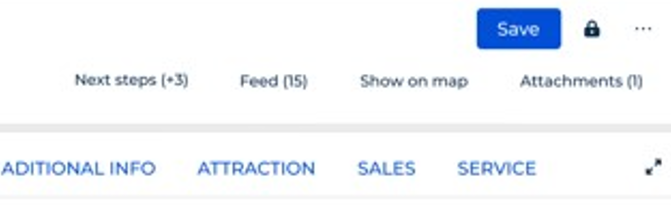
Also having on the page, have number next to Feed like Feed (1) or Next Steps (2) would be great to know if there's something there. Otherwise, it's clear visually on the page, but the tabs need to be opened manually to figure out if there's something. Kind of beats the usefullness of a "clean" design.

Hello,

Thank you very much for your detailed feedback.

From our side, we have already shared this information with the Product Owner and have thoroughly reviewed the current logic in question. We will further analyze this topic and consider possible improvements based on the findings and the feedback received.

We appreciate your time and effort in bringing this to our attention. 

Thank you for your cooperation.

Something like what we see in the presentation decks, both on page and in notification panel would definitely help :)

Halyna Parkhomenko,

Ok thanks. If we could at least get the number counter back against the main notification icon and also next to each sub notification type (once panel opened) that would help our users. 


Show all comments
Sales_Creatio
8.0

Hi,

I am wanting to send an email as part of an automated process, where a quote is provided. The quote data will come from the Opportunity and the Products within that, but the issue I need to solve is; how can I create an email which will allow multiple dynamic rows to be included in the email body.

Say I have 5 products in the opportunity, I need those 5 products to be displayed in a table form. Is this possible? If not, could I automatically create a printable, which I can then attach as an attachment to the email? Note - I am using the cloud version, which may impact things.

Thanks for any help!

Mark

Like 0

Like

1 comments

One approach is to create your own HTML table in the process by looping through the records. A sample of that approach is outlined here: https://customerfx.com/article/emailing-a-list-of-multiple-records-from-a-process-in-creatio/

Alternatively, you could create it as a printable, which can have tables of related data, and attach that to the email (using Process File element in a process to generate the printable to attach to the email)

Ryan

Show all comments
Dark
DarkTheme
DarkMode
Sales_Creatio
8.0

Is there plans to have a "dark mode" for the desktop version of Creatio? I found in the market place there is an app for the mobile app https://marketplace.creatio.com/app/dark-theme-mobile-application but wondering if this is in the roadmap for the desktop version?

Like 0

Like

1 comments

Hello, 


We have checked with RmD team . The plan to create possibility to switch Creatio web-version into dark mode has been already registered. We will add your customer voice to highlight impotency of such functionality to develop it in future Creatio versions. 


Unfortunately we are unable to provide you with ETA for now. 


Thank you for improving Creatio!  

Show all comments

Hi everyone,

We have received inquiries from customers regarding the following matters. We are seeking relevant case studies to response.

・Please tell me the approximate timeline required when switching systems.

Could you share various reference values based on your experiences?

For Enterprise companies, how many days did it take for implementation and development?

How many days did data migration take? etc.

 I'm looking to grow the Creatio community!

Thank you,


Sui

Like 0

Like

1 comments

Hello,

It is hard to estimate how long it would take without knowing the approximate size of the data you want to transfer and what else you would like to set up (for example, whether any integrations also need to be migrated). 

A very rough estimate would be several days, but it depends heavily on database size, customizations, and infrastructure complexity.


Show all comments