Studio_Creatio
8.0

Hey all , 

is it possible to add an attachment column in this expanded list , to add for each invoice an individual attachment.


Like 1

Like

2 comments

Hello,


At the moment, there is no such possibility with basic tools, to display a column in the invoice with attachments.


However, a task has already been registered in our R&D team to consider and implement such a feature in future releases. In case you would like to check what stage this task is at, I am sending you the task number: PR-30551. Feel free to share this number with us at any time and ask your questions.

That's an awesome idea !

Show all comments

How to update the SupportEmailBodyTemplate of ContextHelpSchema ?

The Code is a Localizable Strings, I want to update the Value (body) by a custom template. How can I achieve this ?

Like 0

Like

4 comments

Hello Naresh,

You can achieve your goal in a simpler way:

Go to System designer -> find "Translation" -> find key Configuration:ContextHelpSchema:LocalizableStrings.SupportEmailBodyTemplate.Value -> for required localization change data -> click the "Apply translations" button

Anhelina,

Hello Anhelina,

Thanks for the response, but I am trying to update the value of the Localizable Strings of "SupportEmailBodyTemplate" with some custom template. But the value itself has some URL encode embedded to the text, I want to update the text using JavaScript, or is there any other way I can do this ?

Let me know.

Thanks!!

Naresh Mamillapalli,

You can create a replacement of ContextHelpSchema. To do this: go to System designer -> Advanced settings -> Custom package -> Replacing view model -> in modal window fill "Parent object" with "ContextHelpSchema (ContextHelpSchema)" -> Apply -> Here you can write your custom template and change Localizable Strings.

Link to Academy resources for replacing schema: https://academy.creatio.com/docs/7-16/developer/development_tools/creatio_ide/development_in_creatio_ide#case-1185

P.S. Method prepareEmailConfig from ContextHelpSchema is filling SupportEmailBodyTemplate. Please, double check it when replacing and use a debugger to feel confident at all stages of change.

Best regards, Anhelina!

Anhelina,

Yes, I did that already by Replacing view model and adding another schema in my package, but the problem is with the value, how shall I update the value of "SupportEmailBodyTemplate", it is in the format of "body=%0D%0A****" etc., I just wanted to use the plain text in the value to replace with my custom template, but it is not working/taking the plain text. How should I achieve this ?

Thanks,

M Naresh

Show all comments
Studio_Creatio

Hi,

A few questions:

  1. When can we expect 8.1 to be released to our cloud environments?
  2. What happened to the roadmap at this link? https://academy.creatio.com/docs/release/creatio-roadmap?check_logged_i…. I'd like a copy of the roadmap.
  3. Are there any plans yet to implement recurring activities?

Thanks

Lewis

Like 0

Like

4 comments

8.1 is currently available for trials, but not sure when it will roll out to cloud environments. 

That link still works, but you need to be logged in (and flagged as a partner login) to view it.

I don't see recurring activities on that list.

Ryan

Thanks Ryan - appreciate you checking.


Would be nice for product owners at the client/account level to get access to the roadmap to plan and manage development activity accordingly. Creatio support - would appreciate it if I could get a copy.

Hello,


Access is currently limited to employees and partners with access to the Knowledge Hub. Please note that the roadmap will not be available publicly to our customers and leads in the near future.


Can I query why this is? Seems a bit unfortunate to not allow your customers to see what's coming in the near future.

Show all comments

Hello,

i want to make a custom module to display data in a freedom UI page,

but i can not figure out how to send the Id of the main entity to the module, in a freedom UI page.


The page context is sent to the module with the crt.HandleViewModelInitRequest handler, but i don't know how to retrieve id from that context object..


is there some documentation i can read about this please ?


Regards,

Patrice

Like 0

Like

2 comments
Best reply

Try this: 

const recordId = await request.$context.Id;

Ryan

Try this: 

const recordId = await request.$context.Id;

Ryan

Thanks Ryan, i did not figure $context hold a collection of promises !

Show all comments
FreedomUI
Studio_Creatio
8.0

How to make a field in the expanded list read-only by default or by a condition

Like 0

Like

6 comments

Hello,


You can customize a business rule to cover this need:

Set up business rules

Hi @Kalymbet .Can you guide little bit more. The link which you have shared that is not opening

These answers do not answer the question of how to make a specific field in a list read only. i.e. have an editable list, but make some columns always be read only for the user. I presume this isn't possible in Creatio currently though?

Harvey Adcock,

Did you find any solution to this? I also have some columns I wanna lock in detail list editing. I did the business rule for minipage of my detail but not working.

Edit:
I saw business rule when editing Schema. That fixed my problem.

Solem Khn,

I was able to adapt this community post answer to make only certain columns read only: https://community.creatio.com/questions/freedom-ui-handler-called-whenever-loading-list

As far as I'm aware, making specific columns in a list read only isn't possible using Business Rules as of 8.3.

Show all comments
FreedomUI
businessrules
object
Entity
Studio_Creatio
8.0

Hello Community!


I'm trying to fill a field with the result of a simple calculation (e.g. field A - field B).


However, when I create the business rule and select "set field" as action, I can only provide a constant value and not a formula...am I missing something?


Here is a screenshot of the 


I know that I can use a business process to achieve this, but this would be much more simpler and elegant I think.


BR,

Robert

Like 0

Like

4 comments
Best reply

It's not yet available in Freedom UI --> Creatio Roadmap indicates for Q4 2023 https://academy.creatio.com/docs/release/creatio-roadmap?check_logged_i…

I forgot to add that I use version 8.0.10.4735

It's not yet available in Freedom UI --> Creatio Roadmap indicates for Q4 2023 https://academy.creatio.com/docs/release/creatio-roadmap?check_logged_i…

Damien Collot,

Thanks Damien, at least I know that I did overlook something.

Hi Damien,

I do not have access to the link to the roadmap.

I get this message:

"

Access denied

You are not authorized to access this page.

"

Is it restricted?

It is very interesting information.

Thanks,

Luis

Show all comments
Studio_Creatio

Hello, is there a way to build a reports scheduler in Creatio platform? or is there an free product in marketplace that does this requirement??

Like 0

Like

1 comments

Hi Anas,


Yes, we have created scheduled process with [Process file] element. It can generate reports.


Kind regards,

Vladimir

Show all comments
image
send
API
webservice
Studio_Creatio
8.0
Hello. 
Hello.

I need to send an image through an API to convert it to base 64, I tried to do it using the Web service tool but it does not allow me to place an image or file field to use it from the bpm, I was looking for some information and I saw that it could be done using a script, I just haven't found a way to do it. Could you help me with some example or idea so I can do this please?


Like 0

Like

1 comments

Hello Laura, 


Please refer to this article for more detailed information about such functionality.  

Also, similar questions have already been discussed in the below posts, please review them for the detailed information:

https://community.creatio.com/questions/there-option-send-image-file-re…

https://community.creatio.com/questions/file-type-request-parameter-res…

Please inform us in case of any questions!

Best regards,

Anastasiia

Show all comments
Studio_Creatio
8.0

Dear Community,


We are having an issue while connecting to our plateform's mobile application for all users. An error occurs when we try to test it after setting up workplaces, list of sections, pages and details in the mobile app wizard config and binding workplaces data.


below is the error displayed in the message log:

Model Name: SM-A525F

Platform: Android

Platform Version: 12

Resolution: 412x867

IsHybridMode: true

RootAppDirectory: creatio

ApplicationVersion: 8.1.0

ApplicationMajorVersion: 8.1

UseNativeSynchronization: true

UseNativeImport: true

UseNativeExport: true

UseNativeLogout: true

UseNativeMetadataSync: true

UseNativeFullSynchronization: true

UseDataService: true

IsDevMode: false

CurrentDateTime: 2023-09-22T16:53:52.064Z

ServerUrl: Url

ContactId: 96b911ed-39f0-4ca1-b828-d816b829d145

CultureName: en-US


ApplicationRevision: null

WorkplaceCode: Chartering

ProductInfo: {"ProductName":"Creatio","ProductEdition":"studio","CustomerId":"111","Version":{"Major":8,"Minor":0,"Build":6,"Revision":3439,"MajorRevision":0,"MinorRevision":3439}}


Type: Terrasoft.ServerException

Message: Server request returned error

AdditionalInfo: {

"statusCode": 500,

"url": "platformUrl/ServiceModel/MobileMetadataService.svc/Load/Chartering/en-US"

}

Stack trace:

Class.getServiceFailureException(terrasoft-all-combined.js:34788:29)

Class.getExceptionFromResponse(terrasoft-all-combined.js:5953:19)

Function.getExceptionByType(terrasoft-all-combined.js:53101:41)

Function.getException(terrasoft-all-combined.js:53156:21)

Function.processFailure(terrasoft-all-combined.js:36719:55)

terrasoft-all-combined.js:36791:20

Object.callbackFromNative(cordova.js:295:52)

processMessage(cordova.js:1081:17)

processMessages(cordova.js:1104:9)

pollOnce(cordova.js:973:9)

pollOnceFromOnlineEvent(cordova.js:960:5)


Any help would be appreciated.


Thank you in Advance,

Mouna.

Like 0

Like

3 comments

Hello,


To resolve your issue please go to advanced setting -> Action -> generate source code for all schemas. Then make the "compile all". In case, if this issue continues to reproduce please send us the letter or register request via the portal with a detailed description of the problem. Add the information about the instance on which you have this issue and provide external access to this website. Also, please send the credentials for the mobile application. 

Viktoriia Hrynchuk,

What is the best way to provide external access to the website without dealing with GDPR problems?

I asked because I have same problem as described in the thread.

Michał Zieliński,

Just write to us at support@creatio.com and we will help you set up external access and solve the problem. 

Regards,
Anton

Show all comments
Studio_Creatio
8.0

Hi everyone, 


I have a question regarding filters within the Campaign feature. Here is the scenario.


We have an email that we want to send as part of a campaign, we will call it "Email A". Now, we only want to have "Email A" sent to our customers if:


A) They have not received "Email B" in the past 45 days.


AND


B) They have not received Email C this year.


How could this be setup as a filter within this campaign? Thanks in advance for any assistance. 


Best,


Lucas

Like 0

Like

4 comments
Best reply

Hello,


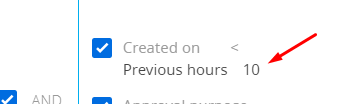
To implement your filtering logic please set up the filter like in this screenshot to the "Add audience" element: 

Hello,


To implement your filtering logic please set up the filter like in this screenshot to the "Add audience" element: 

Viktoriia Hrynchuk,

Thank you for this logic, it truly helps. In looking at this logic, regarding the "Bulk Email" recipient category, I assume there is also a "Trigger Email" recipient category, correct?


A few things to note here:

1) The emails involved in this scenario are trigger emails not bulk emails.


2) The selection "exists" in the criteria you noted does not exist in our platform. Is this something that needs to be added?

1)The two types of emails (bulk and trigger) are located in the one BulkEmails object. So when we created emails B and C we chose the trigger type of this email and then added this email to our filters which we set up in the previous letter. 

2)The 'exists' condition you can find if choose the field Quantity during the setup filters.


Viktoriia Hrynchuk,

Thank you so much for clarifying this. Now I understand how this logic works. I am still trying to learn my way around Creatio's campaign logic. So, many thanks for your assistance.

Show all comments