FileImport
ExcelEmport
Run Process
Parallel process
Studio_Creatio
8.0

Dear colleagues


I have a process that runs when a new record is inserted and ‘does stuff’, it works perfectly, but.


When I do a bulk upload from Excel to that object, the process runs in isolation, in parallel, for each row in Excel.


Is there any way that the process could ‘detect’ that the inserted record comes from an Excel import and wait for FIleImport process to finish loading and then process row by row of excel?
 

Or some another approach?


Thanks in advance,

Julio

Like 4

Like

4 comments

Hello!
 

A quick solution would be to add a timer—say, 10 seconds—after which the process will read the data and proceed with the flow. This would be the fastest approach.

Regards,
Orkhan

Orkhan,

Thanks Orkhan, I tried, but didn't works, so if several records are inserted on the "same" time, the 10 seconds are not a difference so all process instances are waiting the same 10 seconds.. :-(

The best approach I found is to import on temporary table and when done run a process who move records to final one, but I want to found some method to avoid this kind of approach.


Some ideas?


Regards 

Julio.Falcon_Nodos,

have you seen the following post https://community.creatio.com/questions/run-process-after-excel-import ?


Show all comments
hide
fields
conditionally
in
FUI
Studio_Creatio
8.0

I’m trying to hide fields in Freedom UI conditionally, but it seems this can only be done with code. Unfortunately, the online resources available did not help me that much. Any guidance would be greatly appreciated!

Like 0

Like

7 comments

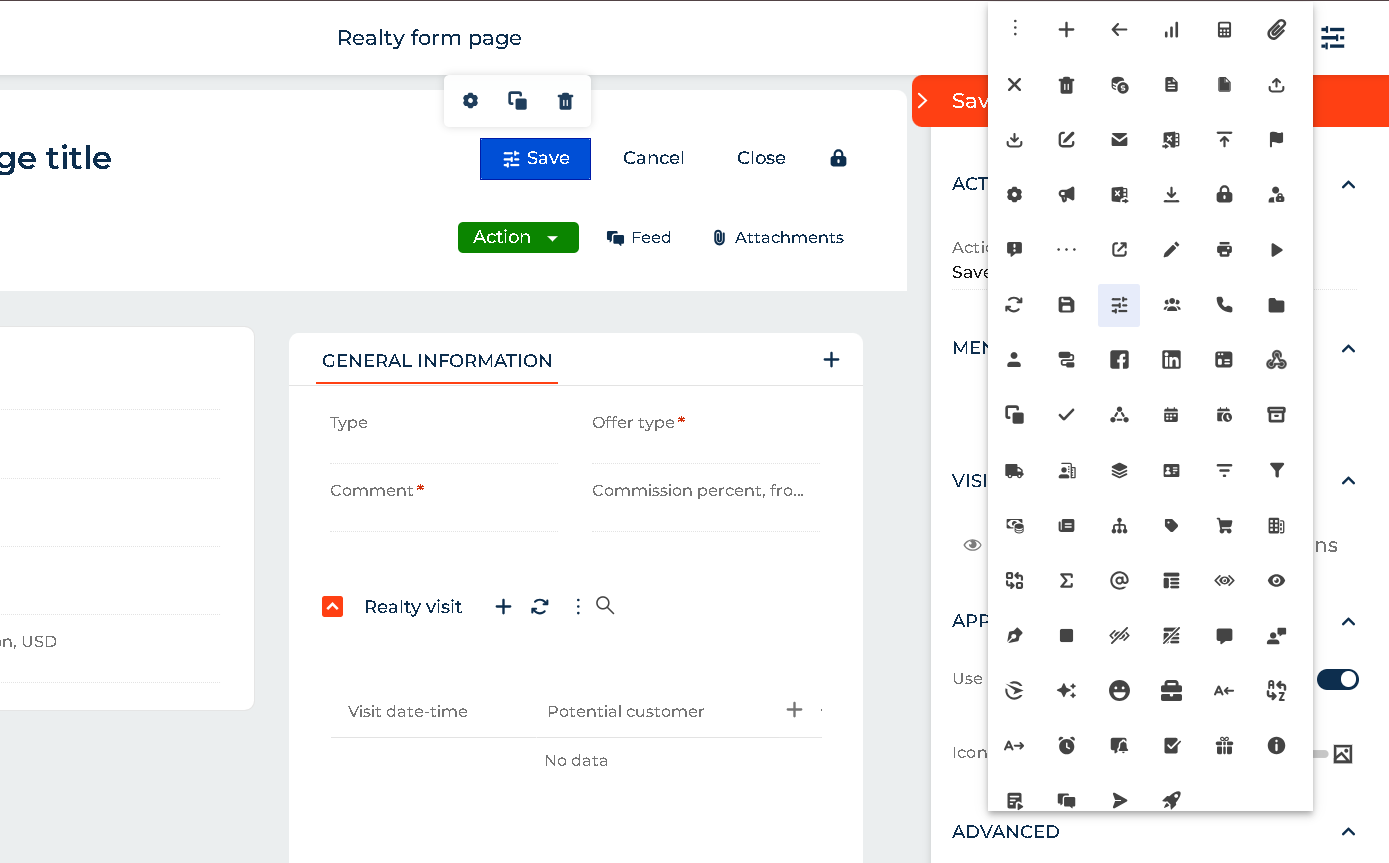
Dear Prachi, you have the option to hide/show in field property, see image


Then with business rules you enable to see or to hide the field as you need


Regards

Julio

Hi Julio, 
Thank you for your response. But then this is not triggered by condition, right? 

Hi


I'm not sure what your question is. You have business rules to hide or show fields, tabs, groups, etc.


Julio

Julio.Falcon_Nodos,

In Freedom UI. I did not see an option to do that by using business rules. 

Prachi Bhelkar,

You have access tu BR in this icon


There you must add a Page Bussiness rule, like you can see in the image

I do not see these options I do not know why. 

Prachi Bhelkar,

You are viewing the business rules on the object. You need to view the business rules on the page. Open the page for editing, then click the icon shown my Julio to view the page level rules (showing a hiding are page level rules, not object level rules - in the object you can only set object level rules)

Ryan

Show all comments
Studio_Creatio
8.0

Good afternoon and Happy Friday! Is there a way to confirm my text messages are getting delivered and read through Twilio?

Like 0

Like

5 comments

Hi Eric,

Are you talking about this Marketplace solution? https://marketplace.creatio.com/app/twilio-sms-connector-creatio

Oleksandr Bilousko,

SMS Message looks like what I am using, but not exactly. When sending a Text, this is what I am seeing . My version is not giving me an option to verify my text was delivered.

Eric J Buglar,


There are a few connectors to Twilio available on the Creatio Marketplace.
Unfortunately, I couldn't recognize the exact app you mentioned.
Could you please check your Application hub or Marketplace catalog and share the link to a certain app?

I am not sure if I have authorization to do so, but I will try. What do you need?


Eric J Buglar,


If you’re unsure, I recommend asking the individual responsible for administering Creatio in your organization to access the Application Hub. This tool provides an overview of all installed Marketplace apps.

For further guidance, you can refer to more details here: Application Hub Documentation.

Show all comments
testing
Studio_Creatio
8.0

Hi all,

This email for asking additional hints/clarifications.

We are preparing Creatio UI automatic testing using Selenium.

ID locator in Selenium is the most preferred and fastest way to locate desired WebElements on the page. Since IDs are unique for each element on the page, it is considered the fastest and safest method to locate elements.

We have noticed, performing a Creatio UI testing with Selenium, that ID locator method cannot be adopted with Creatio since the IDs are recreated during each Creatio login session.

In order to let Selenium properly works we had to use Xpath in order to find elements on a Creatio UI.

Do you confirm what we are experimenting with Selenium (i.e. no possibility to use ID locator)?

Best regards,

Stefano

Like 0

Like

1 comments

Hi Stefano.


The IDs of the elements are autogenerated each time the page loads, so using IDs is impossible during the tests. Theoretically, if it's possible with Selenium, you need to think on how the DOM tree can be retrieved using querySelector\querySelectorAll and using (once again if possible with Selenium) it instead of element IDs.

Show all comments

Hi Community,


We are inserting records in GivenName and Surname fields in Contact Table via API. We are seeing full name in the Name field in UI (which is a concatenation of GivenName and Surname), but the GivenName and Surname fields are blank. How can we get GivenName and Surname to display values?


Thanks

Like 0

Like

5 comments

Dear Puneet


You may have some considerations to treat contact names in Creatio:

  1. 1.- Adjust the System Setting called: ContactFieldConverter (Order of first/last names) to Creatio complete Full Name based on the specified selection
  2. 2.- You must select one of the provided choices to Creatio convert the Full name of the contact, see the image
  3.  

3.- Have in consideration Contact field names are as follows (Code/Title):

  • - Full name: Name
  • - First Name: GivenName
  • - Middle Name: MiddleName
  • - Last Name: Surname
  • 4.- Also, if you need to display some of the contact name fields, you need to add them in the Contacts_FormPage

Regards


Julio Falcón

Hello !

We're also adding API contacts
I don't fill in the GivenName or Surname when I create the contact, just the Name.
If I check the database, the GivenName and Surname have been filled in.

Julio Falcón (NoCode-Services),

Thanks Julio! My query is little different. I am sending GivenName and Surname using API. Creatio system is creating Full Name automatically using GivenName and Surname. In the contact section list I see Full Name populated; but GivenName and Surname are blank. How can I get GivenName and Surname to display on the section list? Screenshot:

Dear Puneet,


You must have in consideration to insert records in Creatio via OData or importing from excel, YOU MUST include all required fields, in this case Full Name is a required field, sou you need provide it in the API JSON.


Also if you provide this data in the JSON they must be inserted in Creatio. Can you share the JSON and Method you are using to insert on Creatio?


Try to use a tool like SQL Query to made a select to all records to see where are the data you 're inserting


Julio

I tried with this JSON and works

{
    "GivenName": "John",
    "MiddleName": "Fitzgerald",
    "Surname": "Kennedy",
    "BirthDate": "1990-01-01T15:24:00Z",
    "TypeId": "60733efc-f36b-1410-a883-16d83cab0980" 
}
Show all comments
support
Surveys
upgrade
Studio_Creatio
7.12

Kindly request for technical support to upgrade my creation on a test server environment.

bthiongo@dynagraph.net

Ben

+97143477724 ext 123

Like 0

Like

1 comments

Hello Ben,


Please contact our team on support@creatio.com so we can assist you with the site update.

Show all comments
Studio_Creatio
8.0

Hi All,


I need to create a web service to integrate with an ERP. I have a list with all endpoints, methods and parameters.


Is there a way where I can import the data from an Excel file into the web service in Creatio or any other way where I don´t have to create one by one?

Like 2

Like

1 comments

Hello!


Unfortunately, this option is not available. We will register the idea with our development team so they can implement the option to import services.


Thank you for helping make Creatio better!

Best regards, 
Orkhan

Show all comments
search
Records
multiple_record
list
Studio_Creatio
8.0

Hello.

Do you know if there is a way to search for multiple records?
For example, can I enter the name of a record and separate it with a comma or a semicolon from another so that the platform brings me both records in the search or several if I use the same sequence.

It would be something like Record1; Record2; Record3

Or do you know of any other way I can search for multiple records by name?

Like 0

Like

1 comments

Hello,

Basically, you can use advanced filter, where you can search for records using multiple keywords. As for the search component or global search, unfortunately the multiple search logic has not been implemented in there.

However, a task has already been registered in our R&D team to consider and implement such a feature in future releases.


Best regards,
Malika

Show all comments
chat
mobile
mobile application
whatsapp
Studio_Creatio
8.0

Dear community!


Does someone thinks about such a feature?

To let operator user work with chat channel from mobile application?

Maybe, Creatio team have it in the backlog?

Like 0

Like

1 comments

Hello,


Currently, there is no possibility to work with chats in the mobile application. However, we have already registered a task for our R&D team to explore the possibility of implementing this functionality in future.


Thank you for your question!

Show all comments
DCM
#progressbar
Studio_Creatio
8.0

Hi Community,

On change of a specific field's value, the case should be updated automatically without any user interaction or confirmation needed to replace the case.

I want the case to be automatically replaced based on its condition.

Like 1

Like

2 comments

Hello,

Any updates on the issue I'm currently facing?


Thanks

Hello!


This is basic system functionality—if a DCM has previously been used in requests (or other areas) and work has already been done in it, the system does not update it, as it may not be necessary for the user. Therefore, on the left side, you’ll see an icon that first prompts for confirmation to apply changes for the current request.

Regards,
Orkhan

Show all comments