Sales_Creatio_enterprise_edition
8.0

Hi community,

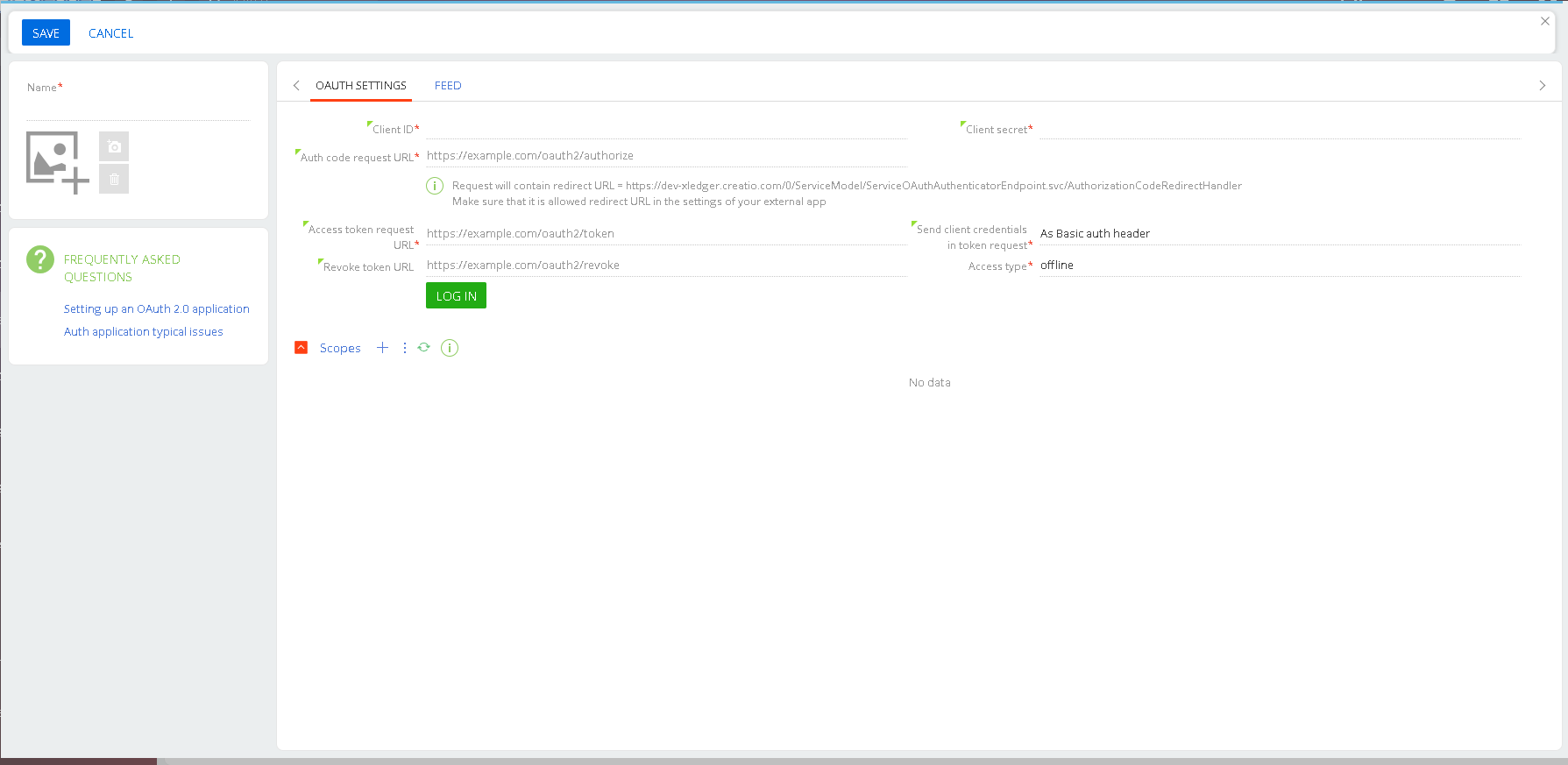
While upgrading onsite Creatio application from 8.1 to 8.3 , Iam getting the below error:

I did Generate all schemas and compile all before running the update script. If you have any suggestions, please free to drop a comment.


Thanks in advance.

Mani

Like 0

Like

1 comments

Hello.,

Such errors can occur if some of the required components are missing or if an incorrect version is installed. Specifically, .NET must be version 8 rather than version 9, so you will need to reinstall the correct version to ensure compatibility with Creatio. 

Additionally, it is essential to verify that all required system components are properly installed and configured. Check the general deployment procedure to confirm that every prerequisite is in place. Missing or incorrectly configured components, even minor ones, can cause errors during startup or impact the application's stability.

Best regards,
Antonii.

Show all comments
mobile
IOS
notifications
push notification
8.3.1
Mobile_Creatio
Sales_Creatio_enterprise_edition
8.0

I have followed this guide: https://academy.creatio.com/docs/8.x/no-code-customization/bpm-tools/bpm-process-examples/set-up-push-notifications-for-mobile-users but I am not receiving iOS push notifications when these are sent. I can see the Creatio notifications are being sent, as they appear in the Creatio mobile app when going to the notifications tab, but I never receive any iOS push notifications.


I am using Creatio 8.3.1 and the latest iOS app version 8.3.5, and am on the latest iOS version of 26.1. I am logged into the Creatio mobile app when sending the notifications.

Like 0

Like

3 comments
Best reply

Speaking to Creatio support, they (and actually it was Tomasz, so thanks again Tomasz!) recommended a few options to try to resolve it, and ultimately the one which worked was uninstalling & reinstalling the iOS app. Not sure what had gone wrong, but this did fix it, in case others are having similar issues.


The full list of steps they recommended trying was:

1. iOS Notification Permissions: Go to your device’s Settings → Notifications → Creatio and ensure that “Allow Notifications” is enabled for the Creatio app. Verify that banners, sounds, and badges are also enabled.

2. Reinstall the Creatio App: Uninstall and reinstall the Creatio iOS app. This will re-register the device token and can resolve token registration issues sometimes encountered on iOS.

3. Feature Flag in Creatio: Confirm with your Creatio administrator that the "UseMobilePushNotifications" feature is enabled for your user.

4. Test on Another Device/User: If possible, try logging into the app with your user profile on a different iOS device, and have another user on your device test notifications. This helps isolate if the issue is device-specific.

Hello,

Since you see the notification in the Creatio app but not as an iOS push, here are a few things to check:

Ensure the “Send push notification” sub-process in your BPM is configured correctly (related record IDs, entity).

Verify your iOS app has push permissions enabled and is properly registered with Firebase/APNs (certificates or token).

Make sure the app is synced and cache cleared if needed.

If everything seems correct and push notifications still don’t arrive, please contact Creatio Support at support@creatio.com . We can try to reproduce the issue on our side, inspect the configuration and provide the recommendations.

Best regards,
Tomasz

Tomasz Szpunar,

I am using the default Creatio app from the app store, and am using a cloud instance - from what I read in the documentation on these push notifications, the Firebase part is only required for on-prem, no? This is the part that mentions it:

https://academy.creatio.com/docs/8.x/no-code-customization/bpm-tools/bpm-process-examples/set-up-push-notifications-for-mobile-users


All other things mentioned I have checked a few times and all seem to be correct.

Speaking to Creatio support, they (and actually it was Tomasz, so thanks again Tomasz!) recommended a few options to try to resolve it, and ultimately the one which worked was uninstalling & reinstalling the iOS app. Not sure what had gone wrong, but this did fix it, in case others are having similar issues.


The full list of steps they recommended trying was:

1. iOS Notification Permissions: Go to your device’s Settings → Notifications → Creatio and ensure that “Allow Notifications” is enabled for the Creatio app. Verify that banners, sounds, and badges are also enabled.

2. Reinstall the Creatio App: Uninstall and reinstall the Creatio iOS app. This will re-register the device token and can resolve token registration issues sometimes encountered on iOS.

3. Feature Flag in Creatio: Confirm with your Creatio administrator that the "UseMobilePushNotifications" feature is enabled for your user.

4. Test on Another Device/User: If possible, try logging into the app with your user profile on a different iOS device, and have another user on your device test notifications. This helps isolate if the issue is device-specific.

Show all comments
package
8.3.1
Development
merge
object
Sales_Creatio_enterprise_edition
8.0

How can I properly merge 2 replacing Object schemas that are in different packages so that we can just end up with a single replacing Object schema in the desired package?


Say for example we have a replacing schema for Contact in one package, and another replacing schema for Contact in another package. Each of these changes adds 1 column, let's say UsrColumn1 in Package A and UsrColumn2 in Package B. In order to clean up the package structure, we want to merge this all into Package A, so there will be only 1 replacing Object schema for Contact. How can we go about doing this in Creatio?


Recreating the column in the Package A replacing Object schema will not be ideal, as there are BPs and other areas that may use the Colum UId, which would be different if recreating the same column name in Package A, so this will lead to breakages that have to be fixed on a case by case basis. Not tenable if there are more changes than just this toy example.


Would it be possible to merge them manually using the metadata's "Modifications" editor? As this allows editing and saving, so perhaps this is the expected way? The Modifications metadata also appears to be what gets saved to the file system in FSD (fileDesignMode), so it seems the most likely answer. This isn't great for ensuring every change is merged, as there seems to be a lot of "noise" in terms of lines that don't actually appear to be specific changes made in that replacing schema, but might be ok for basic column moving.


Are there any other options I'm missing? It would be so useful to have this kind of merging built into the platform, but I'm guessing it's not available to us.

Like 6

Like

11 comments
Best reply

best way for me. on development/sandbox system

  1. export schema metadata from both packages (save it for backup)
  2. open both schema metadata in editor (Visual Studio or any other)
  3. move desired columns from source schema to target. target package in my cases is lower in hierarchy (higher - if you look on Package Hierarchy in )
  4. change values of PackageUId (A5) in every column metadata
  5. change values of SchemaUId (A3,A4) in every column metadata
  6. add UId of moved columns to ~ MetaData.Schema.D2 array
  7. move all localizable values for moved columns from source schema to target
  8. import source schema metadata
  9. import target schema metadata
  10. generate source code for both (may be better for all same schemas)
  11. update database structure (target schema - first, cause it contains moved columns, then source schema)
  12. if everything good - compile all
  13. if not - import backed up schema metadata

    check data in moved columns

    if everything good: install app, containing both packages to the pre-prod system, check data in DB tables, check localizable values for column title, business-processes, may be pages. install to the prod system

    if you have source package and target package in different apps or there are standalone packages, - install target package first to avoid data loss

+1

+1

+1

Quick update on what I found when attempting manually merging the Objects' metadata (using the "Modifications package" area):

  1. It seems to work for the most part with a very simple change (2 columns in my case)
  2. It is time-consuming checking through the cryptically-named values and trying to cross-reference against the "Metadata (Ready-Only)" area, and liable to mistakes
  3. Some parts I just ended up ignoring the differences on, e.g. on Contacts there was a lot of supposed changes to "SynchronizeAnniversary" items, that were under MetaData.Schema.EG1.BK15 in the modifications package (MetaData.Schema.EventsProcessSchema.Mappings array in "Metadata (Read-Only)" area) as I don't believe there were any changes made there. This seems like it could be a point where things fall down though.
  4. One thing that isn't stored in the "Modifications package" diff is Localizable strings, so field names can't be manually merged in this way. I fixed this ad-hoc by setting the field names for the moved columns, but it's obviously not ideal. An alternative approach worth considering is exporting the Object schemas (resulting in a .md file) and doing a manual merge there, before re-importing into the desired package, as the .md files do have the localizable strings in them
  5. Another pitfall of this method was that some of the data couldn't just be copied over from the to-be-removed Object to the surviving Object, it had to be modified. Namely the "A3" and "A4" properties (corresponding to CreatedInSchemaUId and ModifiedInSchemaUId) as not setting them to the target package's UId's would throw errors when publishing the surviving Object

I might update further on attempting a .md file merge of a slightly more complicated setup.

Overall, it definitely doesn't seem to be an ideal way to perform this for more substantial sets of changes. Really would benefit from information from Creatio about how they would advise this to be done.

best way for me. on development/sandbox system

  1. export schema metadata from both packages (save it for backup)
  2. open both schema metadata in editor (Visual Studio or any other)
  3. move desired columns from source schema to target. target package in my cases is lower in hierarchy (higher - if you look on Package Hierarchy in )
  4. change values of PackageUId (A5) in every column metadata
  5. change values of SchemaUId (A3,A4) in every column metadata
  6. add UId of moved columns to ~ MetaData.Schema.D2 array
  7. move all localizable values for moved columns from source schema to target
  8. import source schema metadata
  9. import target schema metadata
  10. generate source code for both (may be better for all same schemas)
  11. update database structure (target schema - first, cause it contains moved columns, then source schema)
  12. if everything good - compile all
  13. if not - import backed up schema metadata

    check data in moved columns

    if everything good: install app, containing both packages to the pre-prod system, check data in DB tables, check localizable values for column title, business-processes, may be pages. install to the prod system

    if you have source package and target package in different apps or there are standalone packages, - install target package first to avoid data loss

Thanks Oleksandr, that more or less matches the approach I just did with the .md file (the file you get when exporting an individual schema) so glad to hear you have gone down this route and it seems to work. Very manual process though, especially when you see changes you don't expect to see like I was seeing with the SynchronizeAnniversary object ProcessSchemaMapping elements. Would be very useful to have this functionality built into the system!

+1

Hello,

Thank you for your idea. At the moment, we do not have user tools available for merging schemas.

We have created a task for the development team to review this suggestion and consider implementing it in future updates.

Regards,
Orkhan

Orkhan,

Thanks Orkhan, it seems to be a relatively popular request - I expect due to the changes in how Creatio handles custom development by creating new packages automatically in many cases, which are then often wanted to be condensed into a proper package structure for bundling into an app for deployment. Hope all this context will be conveyed in the dev task for consideration.

Any news on whether this has been added to the roadmap?

+1, it can quickly become messy and complex to resolve those kind of issues, a native functionality to merge Schemas of any kind without having to manually merge code would be a great addition to the Platform Functionality. 

Especially, as the knowledge needed to perform some of these steps is not documented officially and goes beyond what can be expected of No-Code Developers.

Best,
David

Show all comments
8.3.1
contacts
data
Sales_Creatio_enterprise_edition
8.0

What is the recommend, safe approach to hiding technical user contacts from regular users? Users such as Creatio ALM Integration, Creatio Maintenance, Email Supervisor, Supervisor etc will appear as regular Contacts to users for selection and even editing, but this ranges from frustrating/confusing to users up to being potentially dangerous to the platform stability.


I've considered record permissions as potentially the best solution, as that will hide them from the Contacts list, selection in lookups etc, but the risk is that this might cause issues for the platform - can anyone confirm whether they do or not? Another downside would be that data modified by these users would appear weirdly to users, since the lookup references a non-readable Contact in ModifiedOn, though this isn't so major. And another would be that these permissions would be manually maintained, so any new technical user contacts created (e.g. a new integration, or when the platform gets upgraded and new ones are introduced OOTB) would have to be remembered to have their permissions changed.


Another option would be to just hide those users from the Contacts list by filtering the list. This has the drawback of hiding those users from system admins, as well as not hiding them for selection from lookups on other Objects (which would require putting that filter into Business Rules on every Object in use - not very practical or maintainable).


Does anyone else have any suggestions? Would be good to get some clarity on this from Creatio as well.

Like 5

Like

5 comments

Hello Harvey,

Great question, +1 

Since there are quite a few technical users in the latest versions of OOTB Creatio I would also appreciate a official recommendation on this! :) 

Kind regards,
David

Hello!

Thank you for your request. That’s a good point, and we’ve already created a corresponding ticket for the development team to review and consider implementing feature in our system.

At the moment, it seems to me that the simplest solution would be to add filtering on the page. For example, a filter like “Show technical users,” which would be set to false by default. When enabled, it would display all contacts that have a technical user. Additionally, using business rules, this filter could be hidden from non-admin users.

Regards, 
Orkhan

Orkhan,

Thanks Orkhan. I feel like this is another case which would be aided by having a substantial logical layer between Objects and Page logic in Creatio - having what might essentially be a DB view over the Object (in this case Contact) which can have its own set of filters and calculated fields etc while still being based over Contact so that you could still use lookups to Contact and other Contact-based logic for it.

Orkhan,


Orkhan writes:

Hello!

Thank you for your request. That’s a good point, and we’ve already created a corresponding ticket for the development team to review and consider implementing feature in our system.

At the moment, it seems to me that the simplest solution would be to add filtering on the page. For example, a filter like “Show technical users,” which would be set to false by default. When enabled, it would display all contacts that have a technical user. Additionally, using business rules, this filter could be hidden from non-admin users.

Regards, 
Orkhan

MoreLess

Hello Orkhan, 

thank you for your reply! 

In that case, that would mean that those Contacts are still visible through lookups, unless a seperate filter is configured manually for every "Contact" Dropdown field, correct? 

Could you please elaborate regarding the approach of removing the record permissions these Contacts for normal business users? Does this come with any drawbacks? It seems like the most elegant and persistent solution to me if performed during initial system setup, but I might be missing something?

Kind regards,
David

+1 here 

Show all comments
Sales_Creatio_enterprise_edition
8.0

We are currently using CLASSIC UI  Enterprise 8.2.3  and make use of LEADS Section as the source of audience for a Bulk Email.

Can we still use the LEADS section in FREEDOM UI  ?  

The FREEDOM UI documentation only makes reference to CONTACT section.
 

Thanks for your help !


Like 3

Like

8 comments

Yes there's a full lead section in Freedom UI, with revised (simplified) lead process, but indeed have only seen bulk email (freedom UI version ) audiences based only on contact folders. 

Will the LEADS section be available as a selectable audience source in an upcoming release?

Hopefully yes.  If known...which release ?   (8.3. ?)

Francois Breault,

Hello,

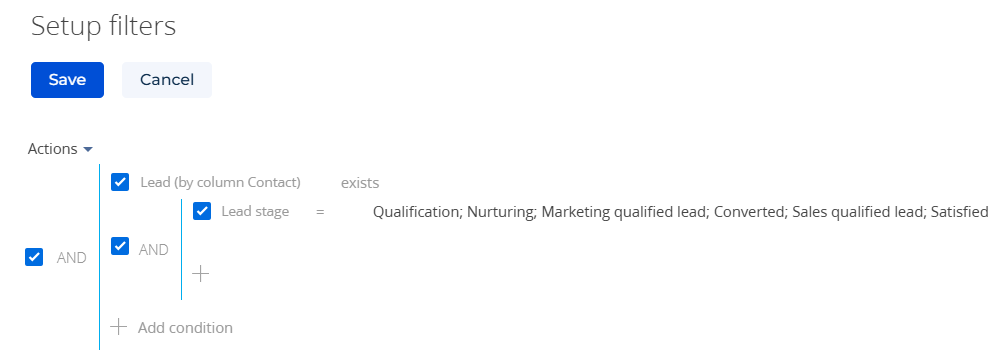
In fact, you can configure a folder in the Contacts section so that it includes all contacts associated with leads.

An example of such a filter is shown below:

Filter setup


After that, you can simply select this folder as your audience.

The problem in this method is that if the contact has 2+ emails, we cannot select which EMAIL to use for the Mass-Mailing.  By default, the system would use the LAST email input in the Contact Communication Option.  

When using the LEAD section (or a custom object), Each EMAIL is unique and can be used seperately.  A contact may have several emails (admin@..., info@...  name@cie   name@gmail )  and we may decide which email to use based on some criteria or tags.  (Invoice, Promo, News, Training...)


This is a MAJOR feature for Marketing B2B and could become a CRITERIA to choose OR NOT choose CREATIO for several companies.

Can we confirm if this feature WILL BE implemented within the coming RELEASES ?
I will NOT MIGRATE to NEW FREEDOM UI until it is.

If the feature will not be implemented...I will need to think of other options.

Thanks for your update.

Hello,

As mentioned earlier, we’ve already registered an idea for this enhancement, and our R&D team will review it for future releases.

We completely understand your point — when the audience is selected based on the Contact object, there’s currently no way to specify which exact email address the message should be sent to.

At the moment, the system uses only the primary email by design, since marketing campaigns are generally sent in bulk, and most users don’t need the ability to choose a specific contact address manually.

That said, we do see the value in making this process more flexible. Our team is already working on expanding the subscription management functionality, and your case will be taken into account as part of that effort. We’ll also continue gathering feedback from customers to better prioritize this improvement.

Hi Yelyzaveta,

I support François on this point, and I believe this flexibility should be addressed from a system architecture perspective. 

It would be optimal to introduce it as an extension of the Contact object or the Contact communication options entity. Ideally, this enhancement should be integrated with a GDPR-compliant module that is fully compatible with the FUI framework.

Thank you for taking this into consideration.

+1

Show all comments
JWT
Business Process
API
Sales_Creatio_enterprise_edition
8.0

I have an integration I'm setting up against a companys API sandbox environment. They have an authentication endpoint where I send my basic auth credentials as a JSON body parameter. In the response I receive a JSON web token and this request also works in Creatio via Test request.

However, subsequently when making requests with the web service against the API to extract company information for example, how do I attach the JWT Bearer as part of the Web service call?

I understand that first I would need to save the retrieved token from the auth call in a process parameter likely, but in the GET request for companies in the Web service API call, I dont see room to attach the access token anywhere as a header or anything.

Or am I suppose to set it up using the Authentication settings in the Web service, if so could anyone explain how to set it up as a ClientID and Secret are not revelant here:

Like 0

Like

2 comments
Best reply

What I have done is have 1 method for login, logout and hitting my endpoint. In my BP I call the login. Get the token. In my endpoint  method I  have the token as a header parmater and pass it  in the process. Then call the logout method.

What I have done is have 1 method for login, logout and hitting my endpoint. In my BP I call the login. Get the token. In my endpoint  method I  have the token as a header parmater and pass it  in the process. Then call the logout method.

keith schmitt,

Thank you Keith, this is the similar to the setup we worked out internally to use. With the difference that in order to handle refresh of the access token we use a separate process in the background which refreshes the token in a system setting which the endpoint processes can always refer to with in the header parameter.

Show all comments
Sales_Creatio_enterprise_edition
8.0

I want to create an activity and have the outlook event populate in both mine and my colleagues calendars (not the customers), I have tried to make my colleague the owner but this doesnt seem to work. Is there a way?

Like 1

Like

1 comments

Hello,

Basically, it is possible to create an activity with Creatio, the owner of which will be another user. And if this user synchronizes the mailbox with Outlook, then this activity will be synchronized accordingly.

I recommend checking:
- Whether the user synchronizes the activity with the Outlook calendar.
- Whether the user has rights to the meeting in Creatio. Perhaps the rights to this activity are automatically taken from the user.
- Whether there is additional filtering on the Outlook side.

Show all comments
FreedomUI
printables
MSwordReport
Sales_Creatio_enterprise_edition
8.0

Hello Community,

Is there any way Conditionally show or hide printables in FreedomUI, based on a certain Lookup Value. We are basically trying to achieve this https://customerfx.com/article/showing-or-hiding-printables-based-on-a-value-for-the-selected-record-in-creatio/ but in FreedomUI

Sasor

Like 0

Like

1 comments

Hello,

In Freedom UI you can’t hide individual reports inside the Print report menu, but you can control the buttons.
Add a Print report button to your page, then create a business rule on your lookup field: if it equals a certain value, show the button; otherwise hide it.

If you need different reports per scenario, add multiple Print buttons (e.g. “Print Customer Pack”, “Print Partner Pack”) and use rules so only the right one shows.

For full control (skipping the menu), add a custom button with a click handler that picks and runs the right report based on the lookup.

That’s the Freedom UI equivalent of conditionally showing/hiding printables.

Show all comments
Sales_Creatio_enterprise_edition
8.0

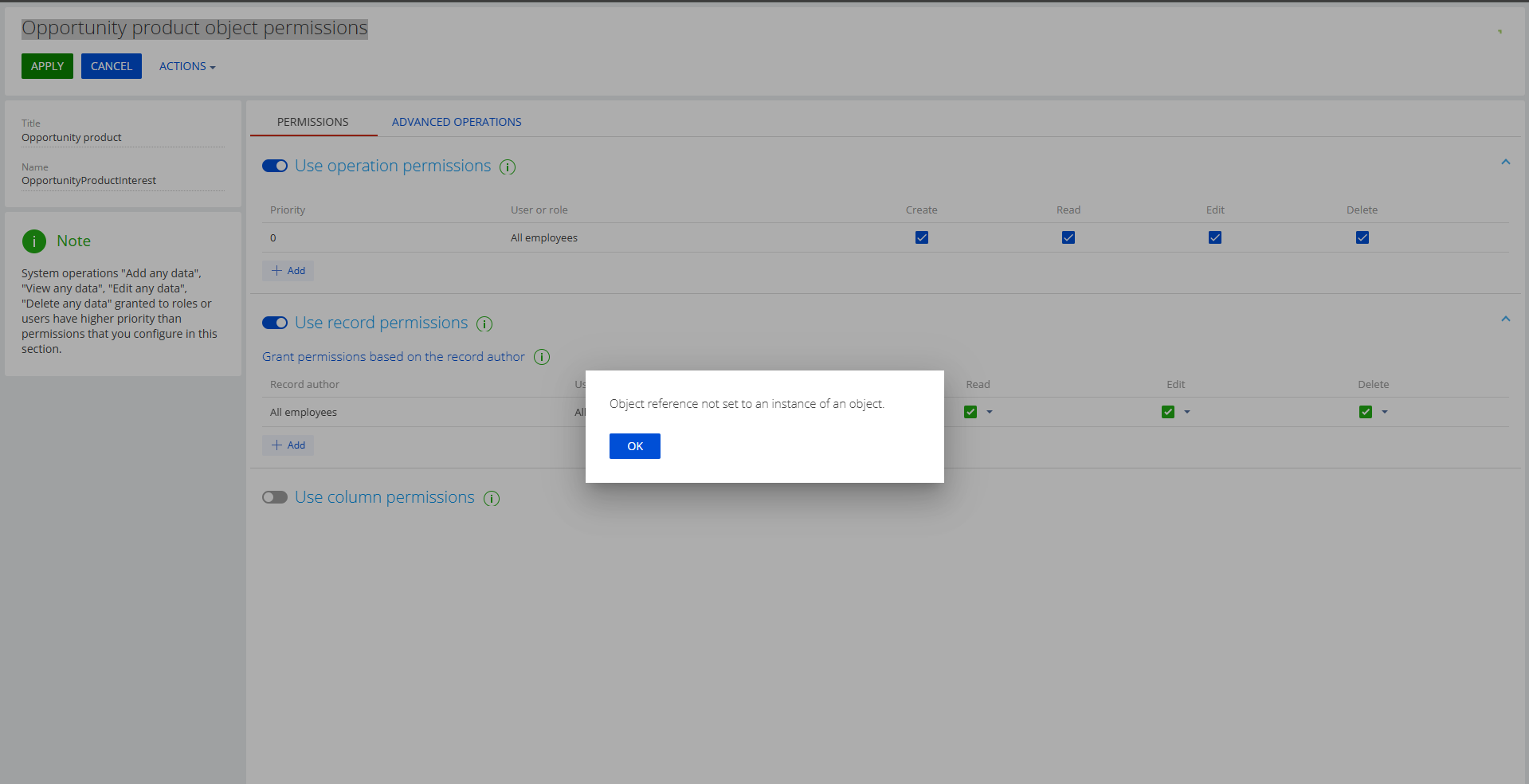
can update object record permission i got error object reference error

2025-09-17 09:33:22,658 [398] ERROR IIS APPPOOL\MASTERWORK Terrasoft.Core.Entities.Entity MoveNext - VwWorkspaceObjects (Id: [53f044d6-a2df-4209-8a52-3d19e2672b54])
System.NullReferenceException: Object reference not set to an instance of an object.
  at Terrasoft.Configuration.VwWorkspaceObjects_CrtBaseEventsProcess`1.CreateRightRecordsSchema(Guid entitySchemaId)
  at Terrasoft.Configuration.VwWorkspaceObjects_CrtBaseEventsProcess`1.ScriptVwWorkspaceObjectsUpdatedExecute(ProcessExecutingContext context)
  at Terrasoft.Core.Process.ProcessFlowElement.CallInternalExecute(ProcessExecutingContext context)
  at Terrasoft.Core.Process.ProcessFlowElement.ExecuteItem(ProcessExecutingContext context)
  at Terrasoft.Core.Process.ProcessFlowElement.Execute(ProcessExecutingContext context)
  at Terrasoft.Configuration.VwWorkspaceObjects_CrtBaseEventsProcess`1.ProcessQueue(ProcessExecutingContext context)
  at Terrasoft.Core.Process.ProcessFlowElement.OnExecuted(ProcessActivityAfterEventArgs e)
  at Terrasoft.Core.Process.ProcessFlowElement.Execute(ProcessExecutingContext context)
  at Terrasoft.Configuration.VwWorkspaceObjects_CrtBaseEventsProcess`1.ProcessQueue(ProcessExecutingContext context)
  at Terrasoft.Configuration.BaseLookup_CrtCoreBaseEventsProcess`1.ThrowEvent(ProcessExecutingContext context, String message)
  at Terrasoft.Configuration.VwWorkspaceObjects_CrtBaseEventsProcess`1.ThrowEvent(ProcessExecutingContext context, String message)
  at Terrasoft.Core.Entities.Entity.ThrowEvent(String message, EventArgs eventArgs)
  at Terrasoft.Core.Entities.Entity.OnUpdated(EntityAfterEventArgs e, Boolean trackChanges)
  at Terrasoft.Core.Entities.Entity.TriggerOnUpdated(Boolean trackChanges, EntityColumnValueCollection modifiedColumnValues)
  at Terrasoft.Core.Entities.Entity.d__368.MoveNext()
--- End of stack trace from previous location where exception was thrown ---
  at System.Runtime.ExceptionServices.ExceptionDispatchInfo.Throw()
  at System.Runtime.CompilerServices.TaskAwaiter.HandleNonSuccessAndDebuggerNotification(Task task)
  at Terrasoft.Core.Entities.Entity.UpdateInDB(Boolean validateRequired, Boolean trackChanges)
  at Terrasoft.Core.Entities.Entity.d__342.MoveNext()

Like 0

Like

1 comments

Hello, 

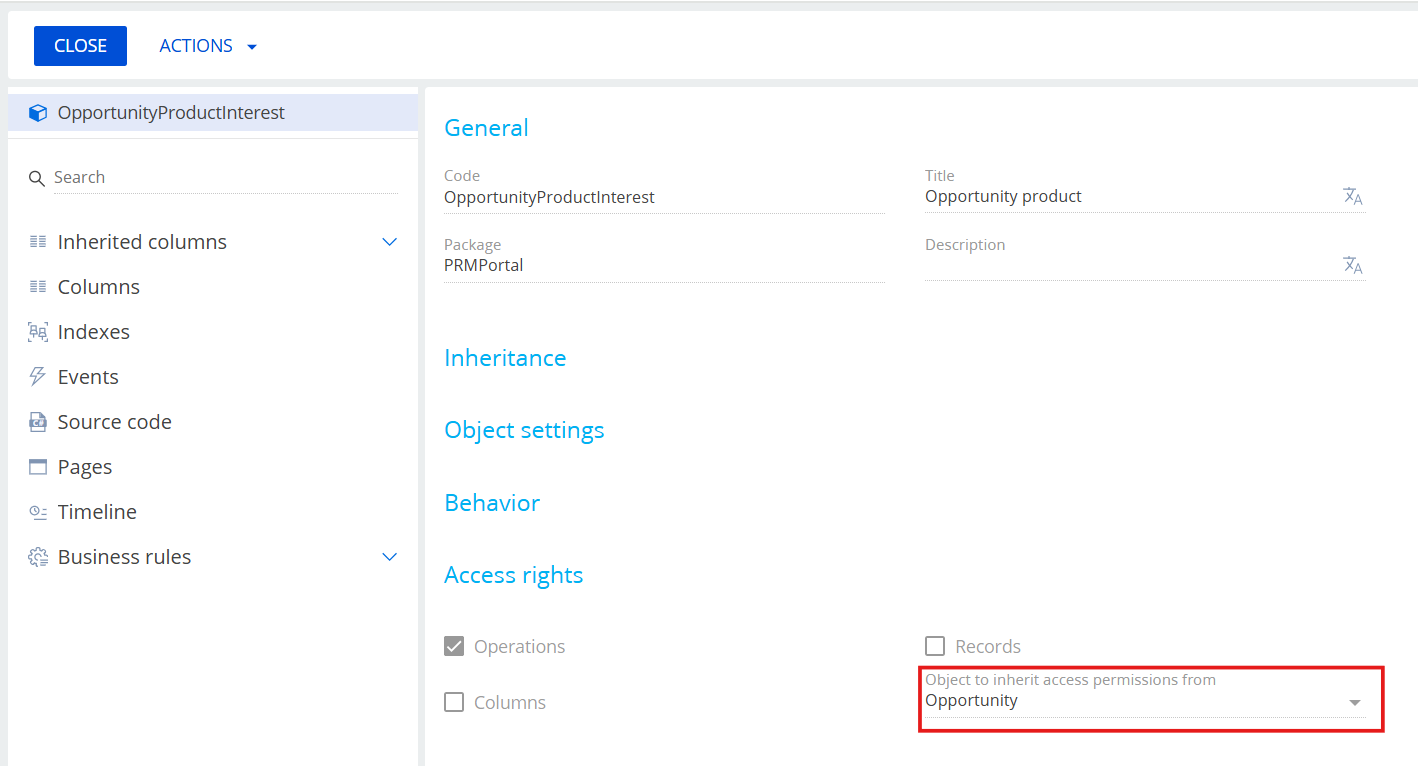
This error typically occurs if the object for which you are enabling permissions already inherits permission settings from another object. 

You can verify this in the system configuration by opening the object (see example screenshot): 

The solution is to find the lowest OpportunityProductInterest OpportunityProductInterest in the hierarchy (there are several) create a replacing object for it, remove the inheritance, and then publish the object. 

Please note that we recommend performing all the described changes during a maintenance window and on a test/dev site first.

Show all comments
RESTAPI
REST
oData
odata4
reporting
Sales_Creatio_enterprise_edition
8.0

Hi.  This is a question for anyone there who is knowledgeable in Creatio’s implementation of oData…

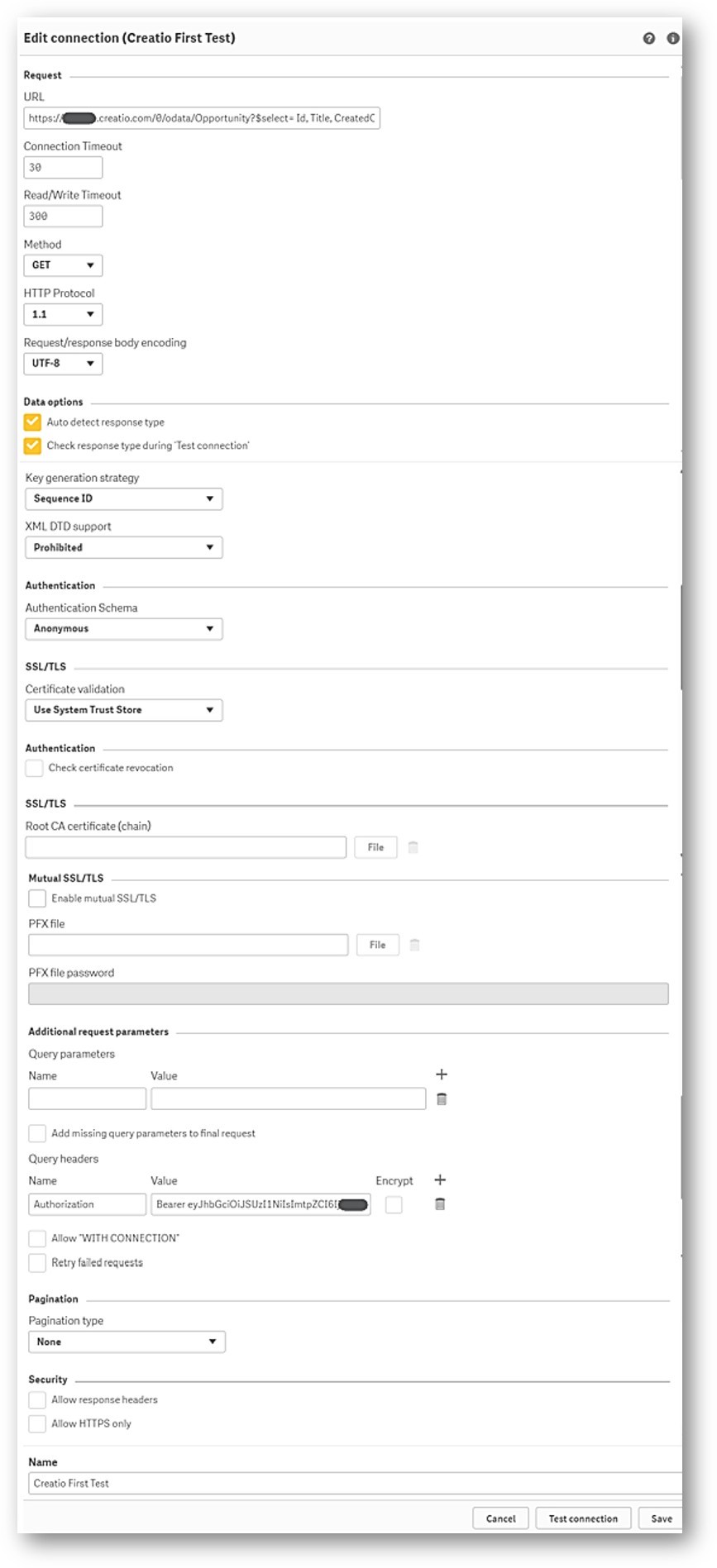
We're connecting our BI tool “Qlik” to Creatio via the OData service and in our first test we, of course, have hit the 20,000-record limit per request. To retrieve full datasets (e.g., from the 'Opportunities' table), we need to configure paging in the Qlik connector (using Qlik’s native REST connector).

Like other BI tools, there are several ways to do paging in Qlik -- depending how it is implemented by the oData provider.  
(I refer to this document at Qlik:  Loading paged data | Qlik Connectors Help )

Can anyone tell me which paging method is used by Creatio's OData feed?
Typical options are:

  • Next URL   (e.g., @odata.nextLink)
  • Offset   (e.g., using $skip/$top)
  • Next Token
  • Next Page   (using field values)
  • Custom
    • If a custom script using parameters like $skip and $top is required,  I'd need an example of how to structure the calls to loop through and get all records.

Thanks in advance for any guidance you can provide!
~~~ Rob

The screencap below is the configuration screen for the Qlik REST connector -- It will probably look like other BI vendors connectors.   The current connection works, as long as we limit the resultset to $top=20000:

qlik

Like 1

Like

2 comments

Creatio OData API uses $top and $skip to retrieve the data in pages. 

For example: 

Page 1 (first 1000)

https://creatiourl/0/odata/contacts?$top=1000&$skip=0

Page 2 (next 1000) 

https://creatiourl/0/odata/contacts?$top=1000&$skip=1000

Page 3 (next 1000) 

https://creatiourl/0/odata/contacts?$top=1000&$skip=2000

etc (I have no idea how that translates to your Qlik dialog)

Ryan


Hi Ryan --

Yes, that part I got working in Postman.  The tricks are:
1)  get the BI tool Qlik to connect using their REST connector
2)  configuring the connector to automatically do the skips, and load all the data
3)  configure the connector to automatically get a fresh security token from Creatio each time the connector is called.  (OR, make a token that doesn't expire)

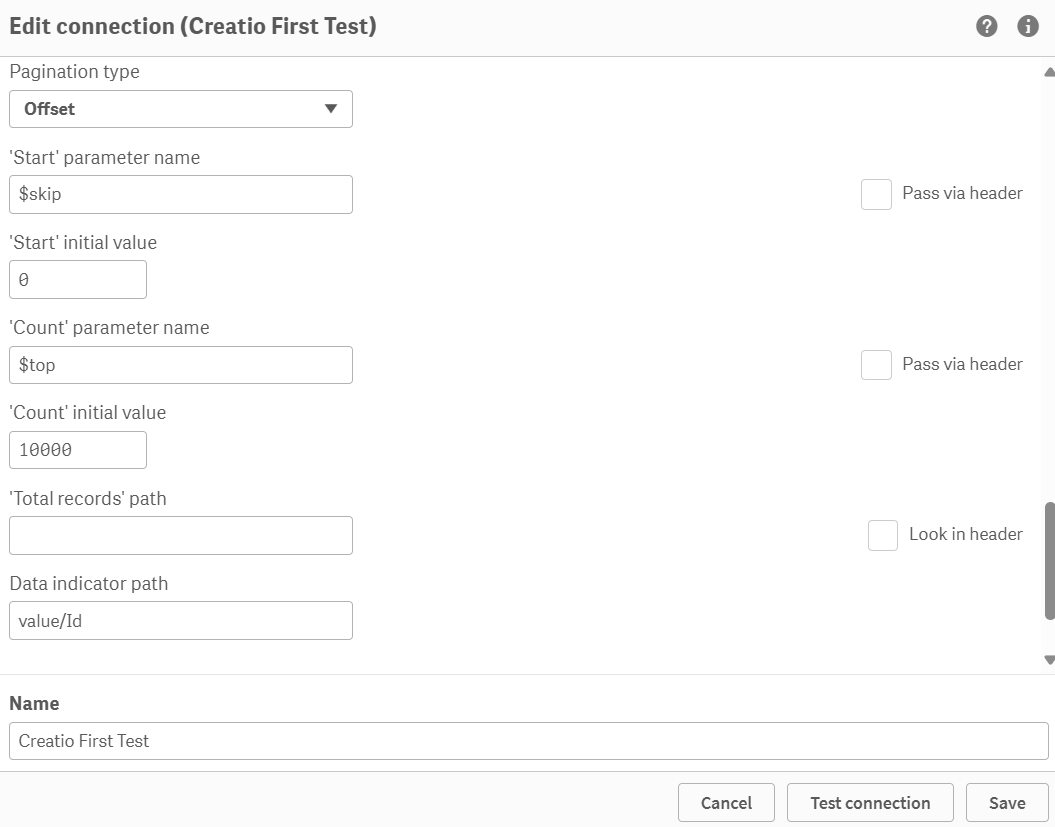
I got #1 and #2 ... working on #3.  I had to figure out which "pagination type" would work with Creatio's version of the oData implementation. 

Once I got "Offset" right, I was able to use the $skip and $top parameters to make the connector go get 10000 records, and loop until there were no more.  (This image is part of the Qlik REST connector settings)


pagination

--- regards,
---Rob

Show all comments