Filters
lookup
dropdown
FreedomUI
handlers
Sales_Creatio_enterprise_edition
8.0

Hi Community,

We have a requirement where we need to create a filter for a specific lookup (“Responsável”) based on the value of another lookup (“Empresa Interna”). You can see both fields in the image below.
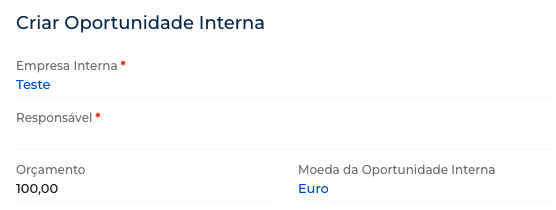
To achieve this, we tried implementing the filter using crt.LoadDataRequest, which works. However, the filter only executes once. This means that if we change the “Empresa Interna” value again, the “Responsável” lookup does not update accordingly.

So far, the only workaround we’ve found is to open the lookup in a Selection Window. In this case, the filter executes every time we open the lookup selection page.

However, this is not ideal, we need a way for the filter to execute multiple times when using the dropdown option.

Someone had an issue similar to mine https://community.creatio.com/questions/dynamic-lookup-filter-freedom-ui, but the solution is not clear enough.

How can we apply dynamic filters to a dropdown lookup in FreedomUI? 

Thank you.


Best Regards,

Pedro Pinheiro

Like 1

Like

3 comments
Best reply

Hi Pedro, please check my article here  https://community.creatio.com/articles/dynamic-change-some-quick-filter-content. The general idea is quite the same.  

Hello,

We want to inform you that there is now a way to configure such filters using a no-code method.

To achieve this, you can utilize Business Rules, which allow filtering of lookup field values based on another field selected on the page. This approach enables dynamic behavior without requiring custom development, making configuration more efficient and accessible.

For your convenience, we have included an article below that provides detailed guidance on implementing this functionality.
Filter lookup values based on another lookup

Hi Pedro, please check my article here  https://community.creatio.com/articles/dynamic-change-some-quick-filter-content. The general idea is quite the same.  

Dmitry S,

It's working. Thanks you!

Best Regards,

Pedro Pinheiro

Show all comments
Email
Outlook
MS Exchange
Activities
Sales_Creatio_enterprise_edition
8.0

Hi Community,

When calendar sync is enabled, all of the users' Outlook meetings and appointments flow into the Creatio Task list. To prevent clutter and ensure high user adoption, we need to create a Dynamic Folder that filters out personal Outlook blocks and only shows native CRM customer engagements.

The Goal: Segregate Activity records that originated in MS Exchange from those created natively in Creatio.

What we've tried: We looked for OOTB metadata to filter by but hit a wall:

  1. The GlobalActivityID column remains NULL even after a successful sync.
  2. The CreatedInStoreId in the SysSyncMetaData table is always stamped with the generic CRM local store GUID for ExchangeAppointments, making it unreliable for tracking the origin.

we want to know: Is there an Out-of-the-Box configuration, system setting, or recommended best practice to filter synced activities natively?


Regards,
Bala.

Like 2

Like

3 comments
Best reply

Greetings!

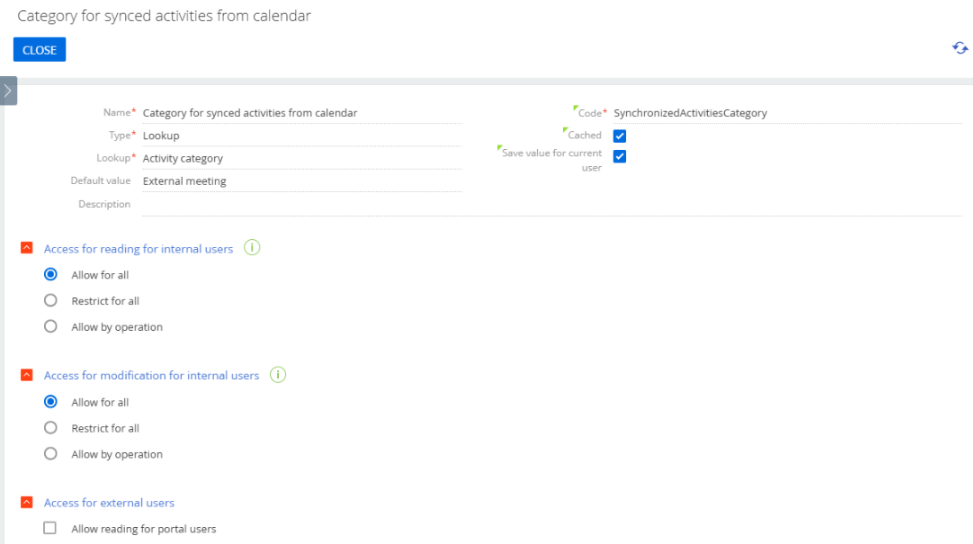
Starting from version 8.2.2, a system setting SynchronizedActivitiesCategory was created. This system setting allows defining a category for the activities that are synchronised from an external source.

You should create the system setting with the code 'SynchronizedActivitiesCategory'. After that, create a separate activity category, e.g., Outlook activities, or choose the existing one and define this category in the system settings.
 
After the above steps are done, all manually created activities will have the default category (unless you define a different one), all automatically synchronised activities will have the category specified by default in this system setting.

This option is available for Office365 / Exchange calendars only. It will not work for Google calendars.

Best Regards,
Creatio Support Team. 


Greetings!

Starting from version 8.2.2, a system setting SynchronizedActivitiesCategory was created. This system setting allows defining a category for the activities that are synchronised from an external source.

You should create the system setting with the code 'SynchronizedActivitiesCategory'. After that, create a separate activity category, e.g., Outlook activities, or choose the existing one and define this category in the system settings.
 
After the above steps are done, all manually created activities will have the default category (unless you define a different one), all automatically synchronised activities will have the category specified by default in this system setting.

This option is available for Office365 / Exchange calendars only. It will not work for Google calendars.

Best Regards,
Creatio Support Team. 


Nicholas Horbenko,

thank you - very helpful to know! 

Are you aware of any coming updates to the system settings reference in the academy? For example, as of now I'm unable to find any mention of this functionality in the in the Release Notes of 8.2.2, or any other Academy Article

David Örnek,

Thank you for your feedback.

This feature is planned to be described in detail within our Academy resources. 
At the moment, the feature is still in beta, so it has not yet been officially documented.

Show all comments
8.2
Formpage
FreedomUI
client code
Sales_Creatio_enterprise_edition
8.0

Is there any way to mark a field/set of fields as being unchanged on a form page from code? We have some parameter fields which do not link to the page's data source, and have a separate button for managing saving this data (we are on 8.2.0, so cannot use multiple data sources for the same page) but at the moment when saving this data the fields will remain "dirty" and so the regular Save button will be shown & a warning will show if the user tries to navigate away from the page. What we would like is for the custom parameter saving button to clear those fields when it's finished and then mark them as unchanged/non-dirty so that this is avoided.

Like 0

Like

7 comments

Hello Harvey,

Use this code to set values to such parameters, the "Unsaved changes" popup won't be triggered in this case:

request.$context.setValue({
	PageParameters_UsrTextParameter1_4ex6wda: "Test value for the text parameter",
	}, {
	preventStateChange: true
});

There are also additional parameters that can be specified (but to prevent the "Unsaved changes" popup the preventStateChange is enough):

request.$context.setValue({
	PageParameters_UsrTextParameter1_4ex6wda: "Test value for the text parameter"
}, {
	preventAttributeChangeRequest: true,
	preventRunBusinessRules: true,
	preventStateChange: true,
});

Thanks Oleg, but the request on this one is slightly different - given that these are page parameters with visible & user-editable fields on the page, when the user makes some changes to those fields and then clicks a button (which does not trigger a full save of page data), we want to be able to mark the specific fields as being "clean" from code in the same way that the OOTB Save button does for all fields on the page. Is this possible?

I'd love for the ability to just mark page parameters to not trigger the "is dirty" for a page at all. Sometimes I will use params for user interaction of some kind but there's no data to save for them, so I'd like to flag the parameters as something that doesn't trigger the need to save. I've not been able to find a way to do that :( 

Harvey Adcock,

No, those are treated as actual changes to the page the user made manually and should trigger the pop-up.

Oleg Drobina,

So there is no way to manually mark specific fields that are dirty as clean then, the only way to mark fields clean is to mark every field as clean via the save/cancel buttons?

Ryan Farley,

Agreed, being able to specify that specific Page Parameters should never trigger the page to think there is unsaved data would help out in quite a few scenarios I've worked with.

Hello,
We have registered this idea for our R&D team. Thank you for pointing this out.

Show all comments
Sales_Creatio_enterprise_edition
8.0

Hi,

Context : on the Account page I have:

  • A detail “Buildings” (object: UsrBuilding) linked to Account via the lookup UsrBuildingToAcc.
  • Inside Buildings, there is another detail “Apartments” (object: UsrApartments) linked to Building via the lookup UsrApartmentToBuil .

Need : 

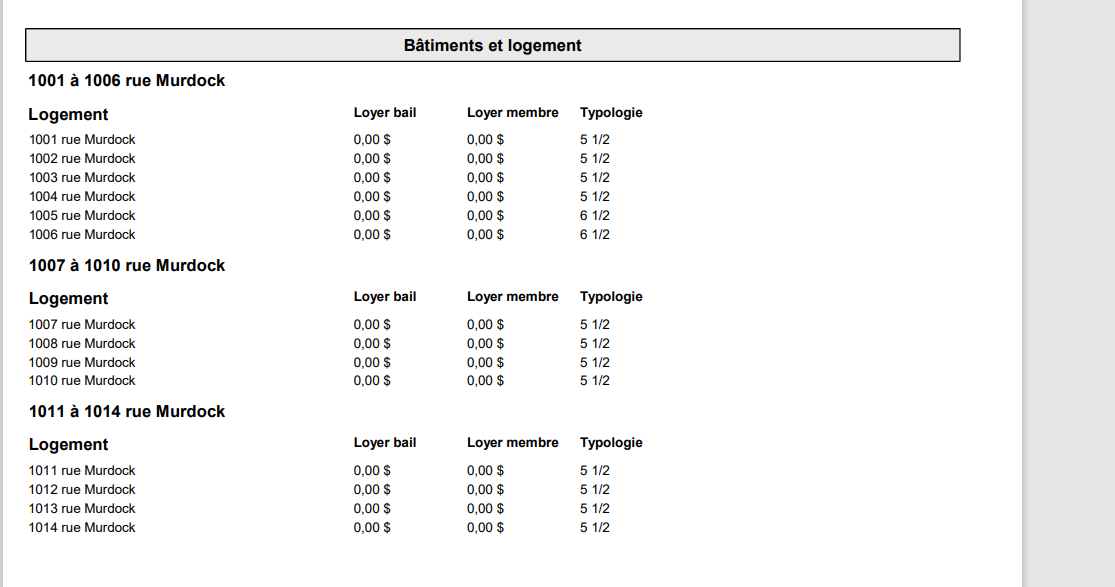
  • I need to generate a printable for the Account that contains the Apartments grouped by Building, similar to what is shown in the screenshot.

    If someone has idea about this issue, please let me know.

Thanks in advance.
 

Like 1

Like

2 comments

Greetings,

Thank you for your question. 

Unfortunately, this is not possible by default. On my side, I have added your case to the task for our development team to increase its priority.

However, perhaps you could find some suitable additions for your business task. For example:

https://marketplace.creatio.com/app/excel-reports-builder-creatio

+1 For more advanced functionalities using printables. Useful to have reports with text (not just Excel). but also for offers, etc... Example being able to add images on your opportunity which are then added to the template offer (construction designs for example). 

Show all comments
Sales_Creatio_enterprise_edition
8.0

I think I know the answer to this but is it still not possible to go to an added record (form page) automatically at the end of a process? At the moment you have to use the open edit page, which requires the user to save (complete step) and then takes them back to where the process started.

Like 0

Like

4 comments

Not without something custom. I typically will add something that listens for a message sent from processes with the Id of the record to navigate to. This way it opens normally like any page and doesn't leave a process task leftover if the user doesn't save.

Hi,

You are correct. At the moment, there is no out-of-the-box functionality that allows automatic navigation to the form page of a record created in a process at the very end of the process execution. The standard behavior when using Open Edit Page still requires the user to complete the page step, after which the process finishes and returns the user to the original context where the process was started.

If such navigation is required, it can only be implemented via customization. There is currently no built-in or declarative way to achieve this behavior using process elements alone.

thanks both. Is there any examples of code/set up required for this customization?

The typical approach is to configure the process so that it stores the Id of the created record in a process parameter. Then, a client-side customization (for example, page handler) starts the process and, once the record is created, uses that Id to open the corresponding edit page.

In short, this requires:
– a process parameter to hold the created record Id,
– logic in the process to assign that Id,
– and a client-side customization to perform the navigation.

Show all comments
Sales_Creatio_enterprise_edition
8.0

Hi All,

I seem to recall that there was a release note, that's it's possible to add mutiple items from a lookup to a single object. However I can't seem to find any info on it. Can someone please point me in the right direction?

Like 0

Like

2 comments

Hey Julia, 

this one? 

Set up Multiselect lookup component | Creatio Academy

Kind Regards, 
David

Another write-up of using the Multiselect control here: https://customerfx.com/article/using-the-new-multiselect-control-in-creatio-8-2-1-and-higher/

Ryan

Show all comments
lookups
Sales_Creatio_enterprise_edition
8.0

Hi.

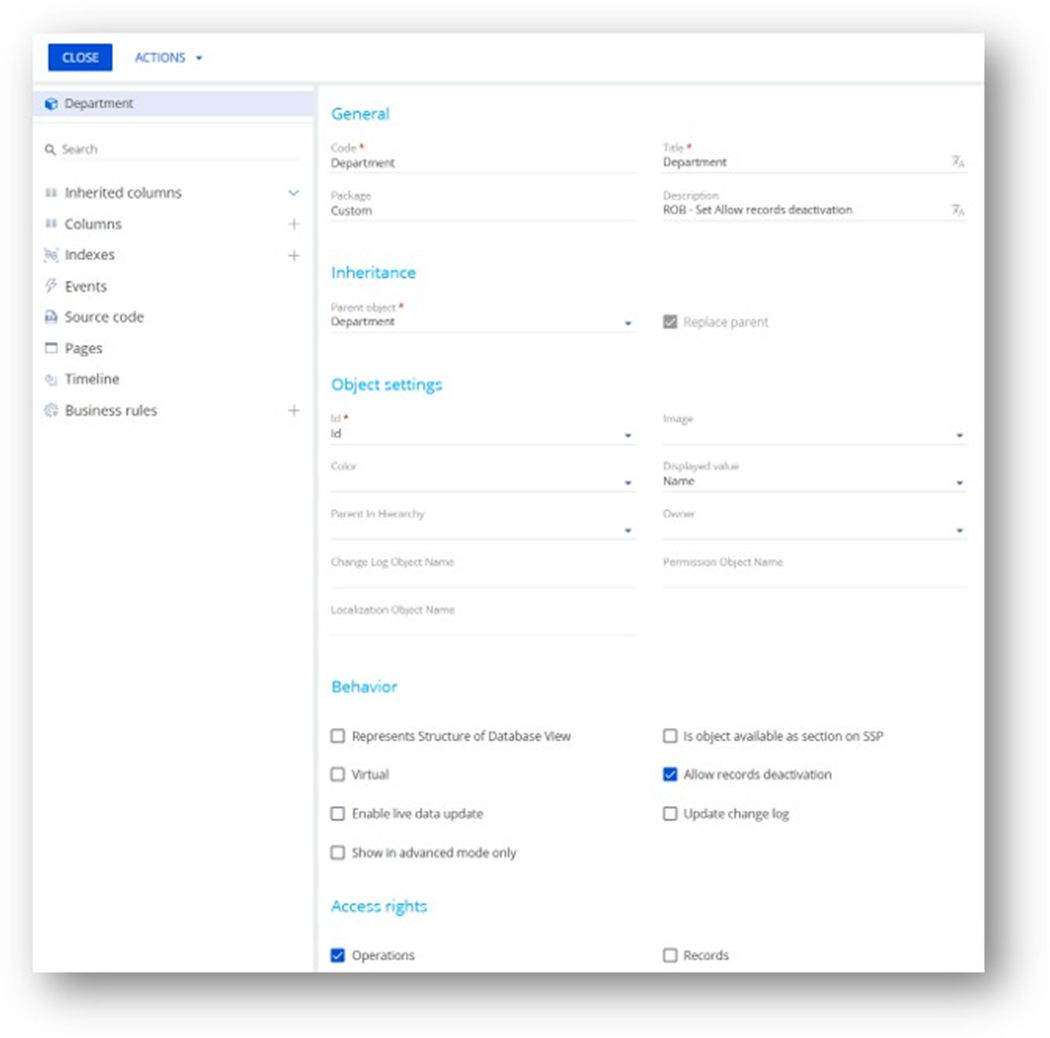
I wish to deactivate certain records in our Department table, since it is loaded with invalid records that were imported from SalesForce.  See first image below -- I enabled "Allow record deletion", and ran the package.

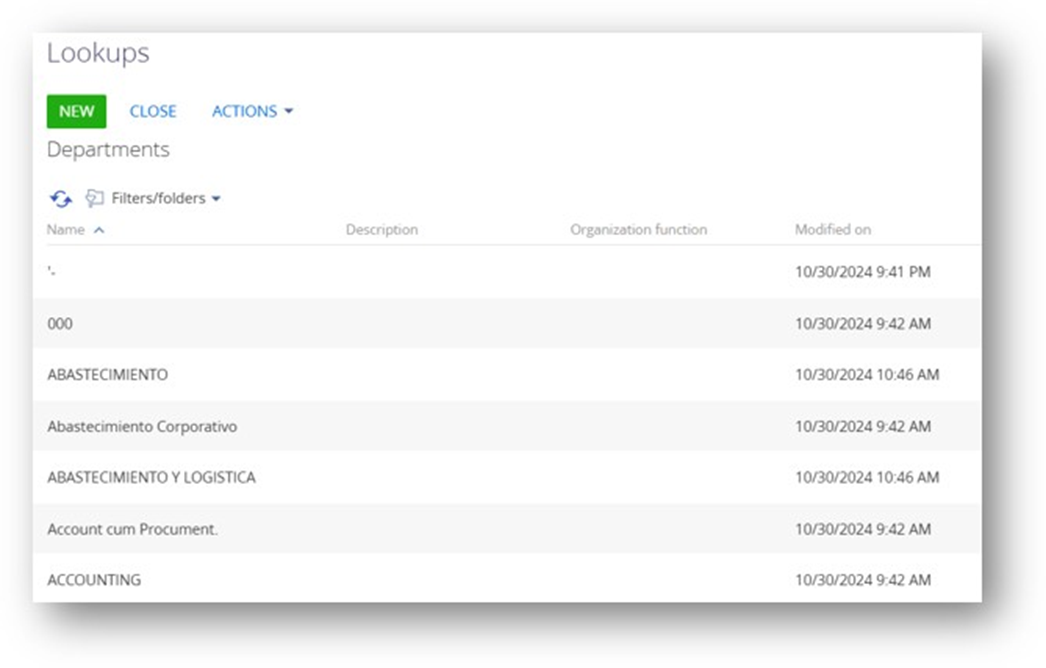
The Department list looks the same (see second image) with no option to disable a record.  Do I need to add a column or something?   

Thanks
Rob


Like 0

Like

4 comments

Hello Rob!

The "Allow record deactivation" option adds a new field to the object, which allows you to deactivate the record.

To deactivate (not delete) records in your Department table, please follow these steps:

1. In the Object Designer, ensure that you have enabled the "Allow record deactivation" property for the Department object.
2. After enabling, publish the object. This automatically adds the "RecordInactive" column—no need to add anything manually.

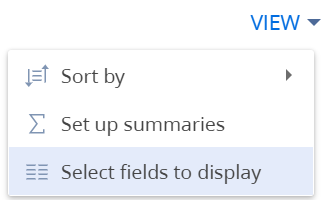
Once published, you can set records as inactive: To deactivate records, you can add field "Inactive" to the displayed fields, so you can manage it from lookups:


You can also use a business process or apply a bulk data operation to set the RecordInactive field to true for those records.

Best regards,
Alina

Hi.

In my screen captures, you can see that I did those steps ... I think I did them correctly --

I enabled the "Allow record deactivation" (see first image), and published, but no "RecordInactive" column appears (second image).

I did this in front of my Lead Creatio Developer, and he was not sure why the "RecordInactive" column did not appear.

Any suggestions on what to check next?
Thanks!
Rob

Rob Rudloff,

I can see that you have contacted our support team separately. We will continue the communication within that case.

Have a great day!

Rob Rudloff,

actually, column will not been added to a list of columns in lookup list (list profile setup). you have to add any column in the column setup for the list

and there you could select required columns including RecordInactive (Deactivated) column

Show all comments
organizational roles
data import
Sales_Creatio_enterprise_edition
8.0

Hi.

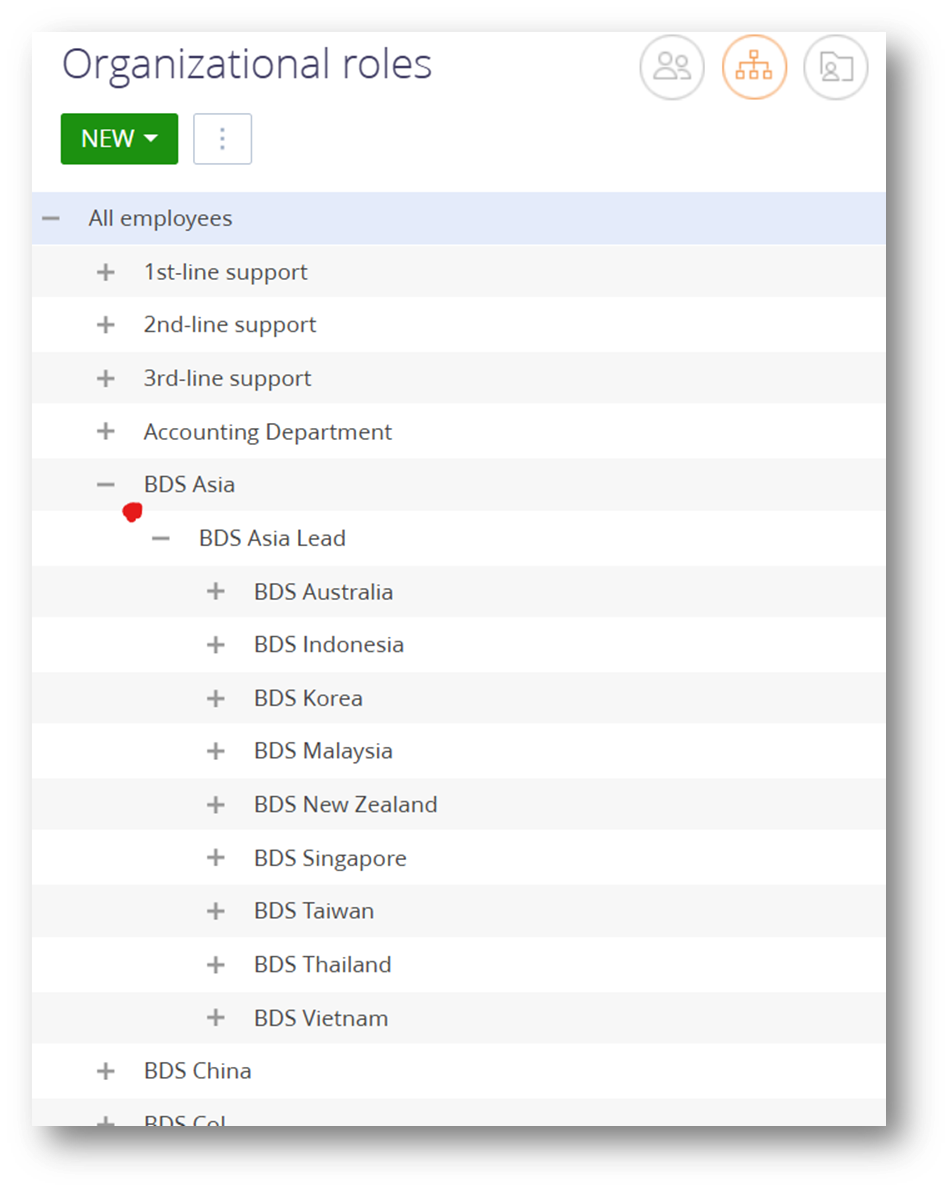
I need to add a role between two existing ones.  See example below.

I need to insert "BDS Asia Head" under "BDS Asia", but above "BDS Asia Lead", meaning that "BDS Asia Head" parent is BDS Asia, and the new role "BDS Asia Head" is the parent of "BDS Asia Lead".

As I understand it, I need to:

  • Add the new role using the "New" button.
  • Export the existing "Organizational role" structure to a CSV or XLS file
  • edit that file, and assign the proper parent ID's
  • Upload/Import that edited file

How do I export the roles with the role's ID's and parent ID's ?  (I can find no reference to this anywhere)

Also, is there a way to bulk "add" new roles?  I have 25+ new roles to insert.

Thanks
Rob

Like 0

Like

1 comments

Hello, 

You may refer to the following Community post description: 

Enable reorganization of organizational and functional roles | Community Creatio

Regards,
Orkhan

Show all comments
Hyperlink
Hyperlinks
action buttons
Sales_Creatio_enterprise_edition
8.0

Hi --
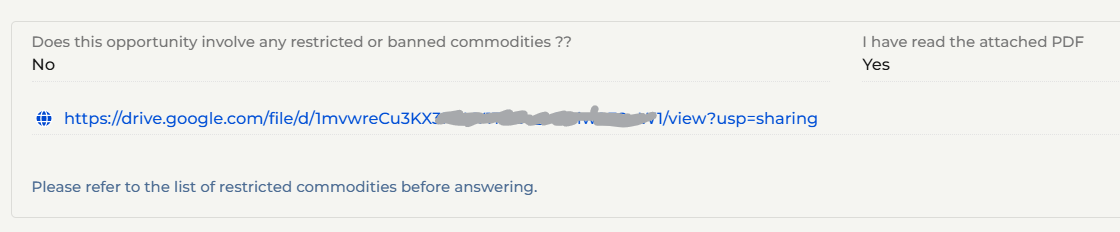
We want to put a button on a page that will open a PDF.  We decided one way to do this is to put a link in the page and post the PDF to a Google drive folder.  (see image below)

However, we show the link as the full web address, which looks sloppy/unprofessional.

Is there a way to make a small button that might say "See PDF" and open the link, or put text on the page like "Click Here to see PDF" ?
 

Alternately, is here a way to pop-up a "modal" form or page, where we could paste the text from the PDF?  (Users could click a button, see the pop-up form, then be forced to close that pop-up before continuing)

Any suggestions or alternative idea are appreciated.
Thanks
Rob

This is what we have now:

Like 0

Like

1 comments

You can add a button in the designer normally and then add your own request handler js code to handle the click event. See https://customerfx.com/article/adding-a-button-to-execute-custom-code-on-a-creatio-freedom-ui-page/

As for opening the PDF link, see https://customerfx.com/article/open-a-link-in-a-new-browser-tab-without-being-blocked-in-creatio/

Ryan 

Show all comments
component
visibility
Sales_Creatio_enterprise_edition
8.0


Hi.

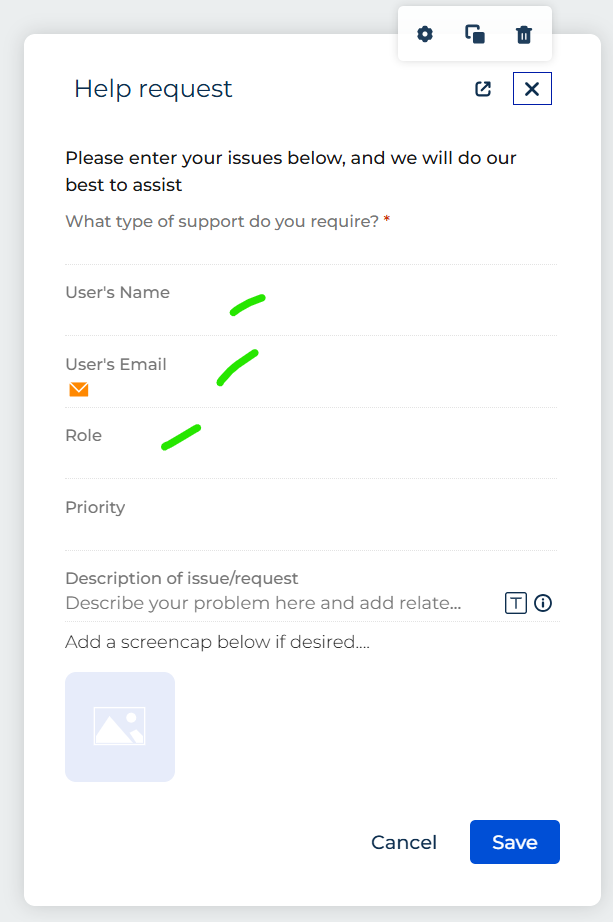
We are building out a simple "Help Desk" form as a test.  Depending on the selection made in a drop-down, we hide certain components.  However, the component is hidden, but the space is occupied remains.  So, our form remains long, and with empty space.  Is there some way to fix this?  (see images below)

Thanks!
Rob

Like 0

Like

3 comments

You'll want to use a flex container so the area can collapse when the elements it contains are hidden (either a Flex row or Flex column)

Ryan

Hello,
Please read this article regarding the flex containers, as Ryan said, it should help you achive your task.

That was the answer -- worked perfect.  Thanks!

Show all comments