


I have a lookup field on a detail (List of VAT options with an added column for the % values), im trying to use these now to calculate a value, how do I access the other column? I can access the VAT Code using this.get("UsrVatCode"), but want the associated column which as the % amount.
Like
2 comments
Best reply
17:08 Jan 30, 2023
var lookupId = this.get("RecordColumn").value;

var esq = this.Ext.create("Terrasoft.EntitySchemaQuery", {
    rootSchemaName: "INSERTOBJECT"
});

esq.addColumn("Insert Object column you wish to view");

esq.getEntity(lookupId, function(result) {
    if (!result.success) {
        this.showInformationDialog("Error");
        return;
    }
    this.showInformationDialog(result.entity.values.Column You wish to view);
}, this);
This is the code that I used to get it working, if anyone needs it.
17:08 Jan 30, 2023
var lookupId = this.get("RecordColumn").value;

var esq = this.Ext.create("Terrasoft.EntitySchemaQuery", {
    rootSchemaName: "INSERTOBJECT"
});

esq.addColumn("Insert Object column you wish to view");

esq.getEntity(lookupId, function(result) {
    if (!result.success) {
        this.showInformationDialog("Error");
        return;
    }
    this.showInformationDialog(result.entity.values.Column You wish to view);
}, this);
This is the code that I used to get it working, if anyone needs it.

17:50 Jan 31, 2023
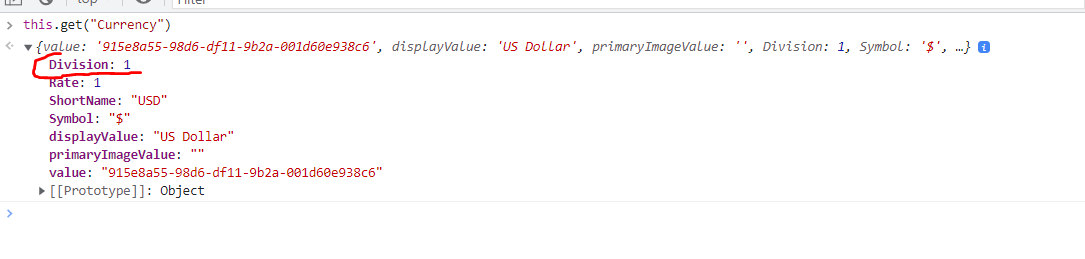
There is also another approach: in the schema in the attributes property you can specify your column in the following manner:
"Your_column_from_the_page": {
					"dataValueType": this.Terrasoft.DataValueType.LOOKUP,
					"lookupListConfig": {
						"columns": ["column_name_from_the_lookup_object"]
					}
				},
As an example we can see that in the ContractPageV2 there is this attribute:
"Currency": {
					"dataValueType": this.Terrasoft.DataValueType.LOOKUP,
					"lookupListConfig": {
						"columns": ["Division"]
					}
				},
and we have access to the value of the "Division" column from the "Currency" lookup:
Show all comments