

How to hide Menu buttons in "LeftPanelTopMenuModule" based on USER ROLES

Hello community,
I have a use case where I need to hide the menu buttons in the "LeftPanelTopMenuModule" for all users except for System Administrators in FreedomUI.
I tried using these community posts, but I am unable to hide the buttons for other users.
https://community.creatio.com/questions/hide-run-process-button-side-panel-roles-1
and https://community.creatio.com/questions/hide-run-process-button-side-panel-roles-replacing-client-module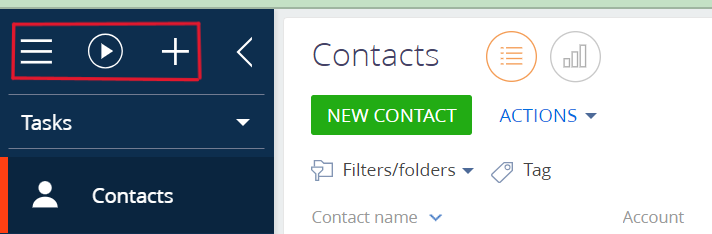
Could you please help me with this issue.
Thanks in advance
Goparna Nasina
Like

Hello,
There is no ready instruction for this case in Freedom UI unforutnately and according to the code there is no property to override and it's not obvious how to add it:
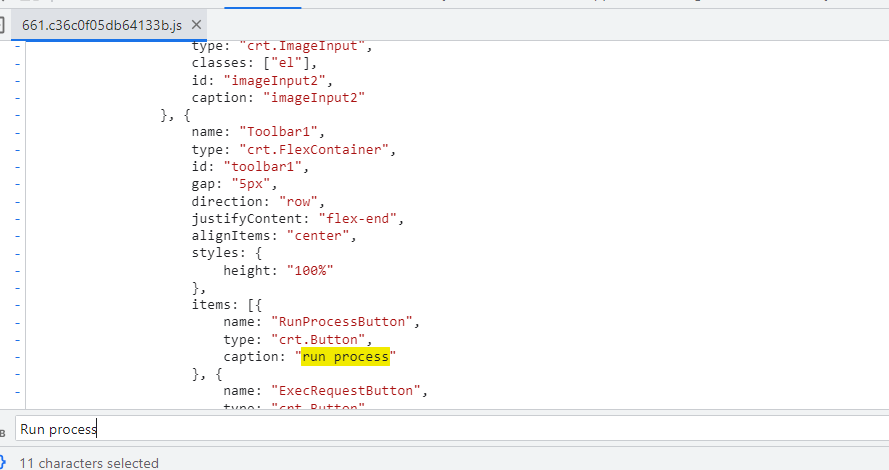
I will ask our R&D team to make it possible to control the visibility of this panel based on the user role. Thank you for reporting this question to us and helping us in making the app better!

Any news on this??
I need to hide the "New" + button, or the activity in the menu for that button

Hello,
Currently, the recommended approach to hide these buttons is the following:
- Add and enable the feature AllowCreateAngularSchema;
- In the configuration, replace the MainShell schema using the "Angular replacing view model" menu option
- Insert the code
define("MainShell", /*SCHEMA_DEPS/["@creatio-devkit/common", "css!CardSchemaViewModule", "css!MainShellCSS"]/*SCHEMA_DEPS/, function/*SCHEMA_ARGS/(devkit)/*SCHEMA_ARGS/ {
return {
viewConfigDiff: /*SCHEMA_VIEW_CONFIG_DIFF/[
{
"operation": "merge",
"name": "ShellHeaderToolbar",
"values": {
"runProcessButtonVisible": false,
"quickAddMenuButtonVisible": false,
"helpMenuButtonVisible": false
}
}
]/*SCHEMA_VIEW_CONFIG_DIFF/,
viewModelConfig: /*SCHEMA_VIEW_MODEL_CONFIG/{}/*SCHEMA_VIEW_MODEL_CONFIG/,
modelConfig: /*SCHEMA_MODEL_CONFIG/{}/*SCHEMA_MODEL_CONFIG/,
handlers: /*SCHEMA_HANDLERS/[]/*SCHEMA_HANDLERS/,
converters: /*SCHEMA_CONVERTERS/{}/*SCHEMA_CONVERTERS/,
validators: /*SCHEMA_VALIDATORS/{}/*SCHEMA_VALIDATORS/
};
});
In which
"runProcessButtonVisible": false,
"quickAddMenuButtonVisible": false,
"helpMenuButtonVisible": false
This hides the following buttons: Run Process, Quick Add, Help
Additionally, the "Settings" button can be hidden via the "CanOpenSystemDesigner" operation