I need to skip the mini-page which comes when we click "complete" on any user task in a DCM.As soon as the complete button is clicked the user task should be marked complete. Is there any way or examples to do so.
The method that is being called when clicking the complete button in the user-task is "execute" from the "ActivityDashboardItemViewModel" module. It checks if the item that needs to be completed has the mini-page or if it's an email activity or a process activity and then executes its logic. If none of the conditions are met the "execute" method from the "EntityDashboardItemViewModel" is called (parentMethod for the "execute" method in the "ActivityDashboardItemViewModel"). So in case you need to autocomplete the task you need to override the logic of this "execute" method (and unfortunately we don't have a specific example on this matter).
It seems we can not create the replacing schema for EntityDashboardItemViewModel or ActivityDashboardItemViewModel. Is there any suggestion where we can override the 'execute' method to add the custom logic?
Actually there is a possibility to override this logic:
1) Create the module with UsrActivityDashboardItemViewModel name and the following code (copied the original code from the ActivityDashboardItemViewModel):
define("UsrActivityDashboardItemViewModel", ["UsrActivityDashboardItemViewModelResources", "ProcessModuleUtilities",
"ConfigurationConstants", "EntityDashboardItemViewModel", "MiniPageUtilities"],
function(resources, ProcessModuleUtilities, ConfigurationConstants){
Ext.define("Terrasoft.configuration.UsrActivityDashboardItemViewModel", {
extend:"Terrasoft.EntityDashboardItemViewModel",
alternateClassName:"Terrasoft.UsrActivityDashboardItemViewModel",
Ext: null,
sandbox: null,
Terrasoft: null,
columns:{/**
* Process element identifier.
*/"ProcessElementId":{
type: Terrasoft.ViewModelColumnType.ENTITY_COLUMN,
dataValueType: Terrasoft.DataValueType.STRING},
/**
* Indicates if button "Execute" was clicked.
*/"ExecuteButtonClick":{
type: Terrasoft.ViewModelColumnType.ENTITY_COLUMN,
dataValueType: Terrasoft.DataValueType.BOOLEAN}},
/**
* @inheritdoc Terrasoft.BaseDashboardItemViewModel#initIconSrc
* @overridden
*/
initIconSrc: function(){
var iconSrc = resources.localizableImages.IconImage;this.set("IconSrc", iconSrc);},
/**
* @inheritdoc Terrasoft.EntityDashboardItemViewModel#addQueryColumns
* @overridden
*/
addQueryColumns: function(esq){this.callParent(arguments);
esq.addColumn("Title", "Caption");
esq.addColumn("Type");
esq.addColumn("StartDate", "Date");
esq.addColumn("Owner.Name", "Owner");
esq.addColumn("ProcessElementId");},
/**
* @inheritdoc Terrasoft.BaseDashboardItemViewModel#getProcessElementUId
* @overridden
*/
getProcessElementUId: function(){returnthis.get("ProcessElementId");},
/**
* @inheritdoc Terrasoft.BaseDashboardItemViewModel#execute
* @overridden
*/
execute: function(options){
console.log("test");
var schemaName =this.get("EntitySchemaName");
var hasMiniPage;const parentMethodArguments = arguments;const parentMethod =this.getParentMethod();
Terrasoft.chain(
function(next){this.showBodyMask();if(Terrasoft.Features.getIsEnabled("OpenEditPageInDcm")){this.hasMiniPageForMode(schemaName, Terrasoft.ConfigurationEnums.CardOperation.VIEW, next, this);return;}
hasMiniPage =this.hasMiniPage(schemaName);
next(hasMiniPage);},
function(next, hasMiniPage){this.hideBodyMask();if(!this._isEmailActivity()&&this.isActivity()&& hasMiniPage){this.showMiniPage(options);return;}
var elementUId =this.get("ProcessElementId");
var recordId =this.get("Id");
var config ={
procElUId: elementUId,
recordId: recordId,
scope:this,
parentMethodArguments: parentMethodArguments,
parentMethod: parentMethod
};if(ProcessModuleUtilities.tryShowProcessCard.call(this, config)){return;}
parentMethod.call(this, parentMethodArguments);},
this);},
/**
* Returns true if it is task activity entity.
* @private
* @return {Boolean} True if it is task activity entity.
*/
isActivity: function(){
var executionData =this.get("ExecutionData");
var schemaName =this.get("EntitySchemaName");returnthis.Ext.isEmpty(executionData)||(executionData && schemaName === executionData.entitySchemaName);},
////TODO #CRM-33987/**
* Returns if current activity is email.
* @returns {Boolean} Returns if current activity is email.
*/
_isEmailActivity: function(){
var activityTypes = ConfigurationConstants.Activity.Type;
var typeLookup =this.get("Type");return typeLookup.value=== activityTypes.Email;},
/**
* @inheritdoc Terrasoft.BaseDashboardItemViewModel#onExecuteButtonClick
* @overridden
*/
onExecuteButtonClick: function(){this.set("ExecuteButtonClick", true);this.callParent(arguments);},
/**
* @inheritdoc Terrasoft.BaseDashboardItemViewModel#onCaptionClick
* @overridden
*/
onCaptionClick: function(){this.set("ExecuteButtonClick", false);this.callParent(arguments);},
/**
* @inheritdoc Terrasoft.MiniPageUtilities#openMiniPage
* @overridden
*/
openMiniPage: function(config){if(this.get("ExecuteButtonClick")){
var status ={
name:"ActivityMiniPageStatus",
value:"Done"};if(config &&this.Ext.isArray(config.valuePairs)){
config.valuePairs.push(status);}else{
config.valuePairs=[status];}}this.callParent(arguments);}});});
the only modification was console.log("test") to check the override.
2) Create a replacing view module for the SectionActionsDashboard with the following code:
I tried in a different instance, the error didn't come. But when I click on "Complete", it refers to the ActivityDashboardItemViewModel in stead of SKSActivityDashboardItemViewModel.
Also, I can see initDashboardConfig referencing to the correct schema, but still execute method is not,
Most probably, the issue happens because you d didn’t add the code to this schema that checks if these actions are enabled.
There are actually two places you need to add this. Once to the section page and once to the edit page for the section. An edit page can be seen in two different modes, (1) edit mode (where you're only displaying the edit page, this is what you're getting when you refresh the page while in edit mode) and (2) combined mode, this is actually the section page, where it displays the context of the section list you were on with the edit page on the side.
With this in mind, you need to add the action menu in both the edit page and the section page for it to appear in both modes.
The method you've used is correct and in case the column is not removed from the minipage using this code after the page was refreshed it means that either these columns have a different name or the incorrect parent module was selected when replacing the module.
I have a requirement that when I change the case manually from New to PO Issued, it need to check whether the amount in Include Tax from Amount details and the sum of all the Amount from RR Allocation Table is Equal or not. If not equal then a Pop-up will come and the stage change back to previous one.
Can anyone help me how to configure the requirement in the backend ?
I am afraid there is no ready OOTB logic to perform checks when changing the stage, as well as there, are no OOTB pop-up windows, but there is a work-around:
To have a pop-up windows element in business processes you will need the following marketplace solution:
You will need to create a Business Process that will be triggered as the stage is changed and check whether the values are equal. In case they are not - show the pop-up window and return the case to the previous stage. Should the values be fine - the Business Process won't change anything.
I hope our recommendation helps you to solve this task.
I have created a business process for the requirement but sometimes the pop-up window is coming and sometimes it is not coming. So I want to achieve it through code in the backend.
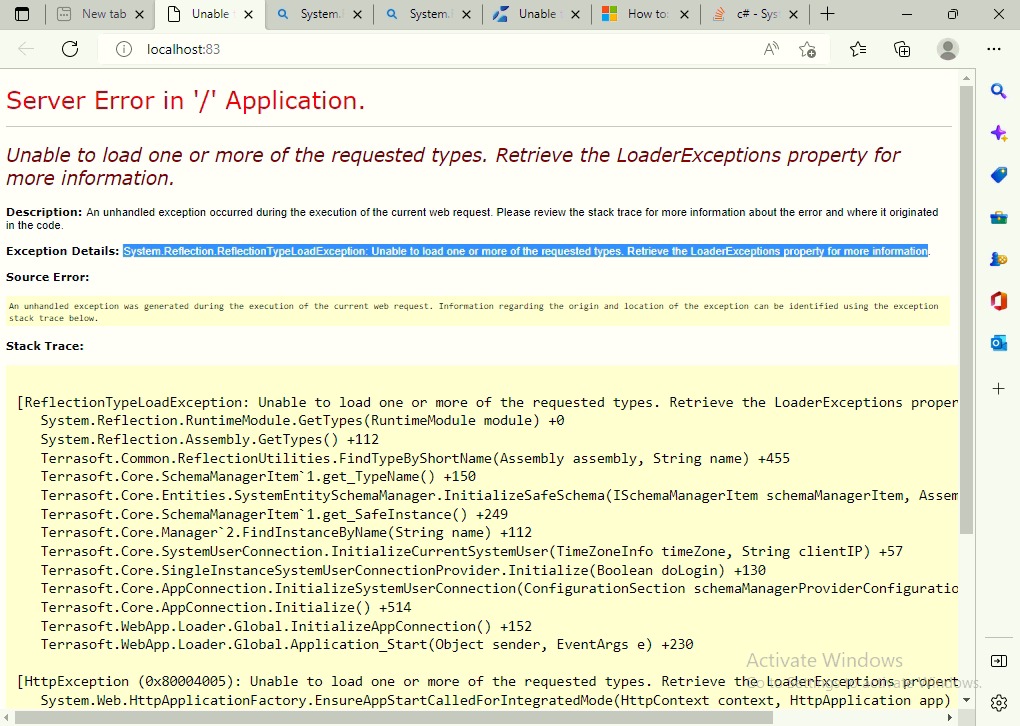
We are currently integrating our contact page via landing page functionality in Creatio, however we are getting below error. Any idea how we can fix this?
I want to get value from a column "X" present in Parent Section "A" into the edit page of Child Section "B" which is present as detail in Section "A". Can anyone guide me how i can achieve it without using ESQ.
I need to get the values dynamically i.e. if the value of field changes in parent section, i need to get the updated value.is there a way in which i can use this.get() for it?
You'd either need to do ESQ from the detail page to read the parent record, or you could do it as a process that fires when the parent is updated to update the detail row(s).
I want to add an static page showing a custom message or an image on the section dashboard using Dashboard widget. Is this task achievable? For image, I do not want to use the web page element.
// CreatedOn is the 1st month (January)
esq.Filters.Add(esq.CreateFilter(FilterComparisonType.Equal, "CreatedOn", EntitySchemaQueryMacrosType.Month, 1));// CreatedOn is the first day of the month
esq.Filters.Add(esq.CreateFilter(FilterComparisonType.Equal, "CreatedOn", EntitySchemaQueryMacrosType.DayOfMonth, 1));// CreatedOn is in the year 2022
esq.Filters.Add(esq.CreateFilter(FilterComparisonType.Equal, "CreatedOn", EntitySchemaQueryMacrosType.Year, 2022));
// CreatedOn is the 1st month (January)
esq.Filters.Add(esq.CreateFilter(FilterComparisonType.Equal, "CreatedOn", EntitySchemaQueryMacrosType.Month, 1));// CreatedOn is the first day of the month
esq.Filters.Add(esq.CreateFilter(FilterComparisonType.Equal, "CreatedOn", EntitySchemaQueryMacrosType.DayOfMonth, 1));// CreatedOn is in the year 2022
esq.Filters.Add(esq.CreateFilter(FilterComparisonType.Equal, "CreatedOn", EntitySchemaQueryMacrosType.Year, 2022));
We are looking for a for a way to impose a character limitation on a string value that is different than the standard settings.
For example, the user enters a job number as a string and we want to restrict entry to only 10 characters. Is there a way to do this? Obviously not OOTB but with some customization?
We have a requirement to add attachments in mail by reading the attachment from a custom attachment detail. To achieve this, we are using a Send email with attachments Marketplace application.
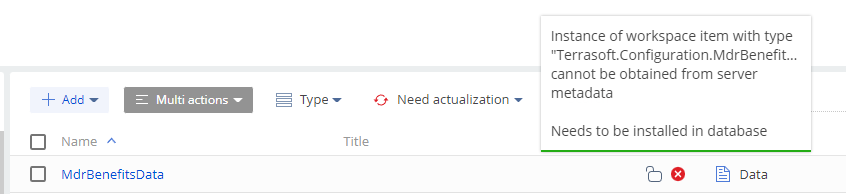
The issue with the above application is, it is getting installed successfully. But when accessing the element in business process its settings is not opening also getting some error in the console. (refer the screenshot attached)
We are aware of this issue. R&D department fixed this bug in version 7.18.4. If you have an earlier version of the application, we recommend updating it to the current version.