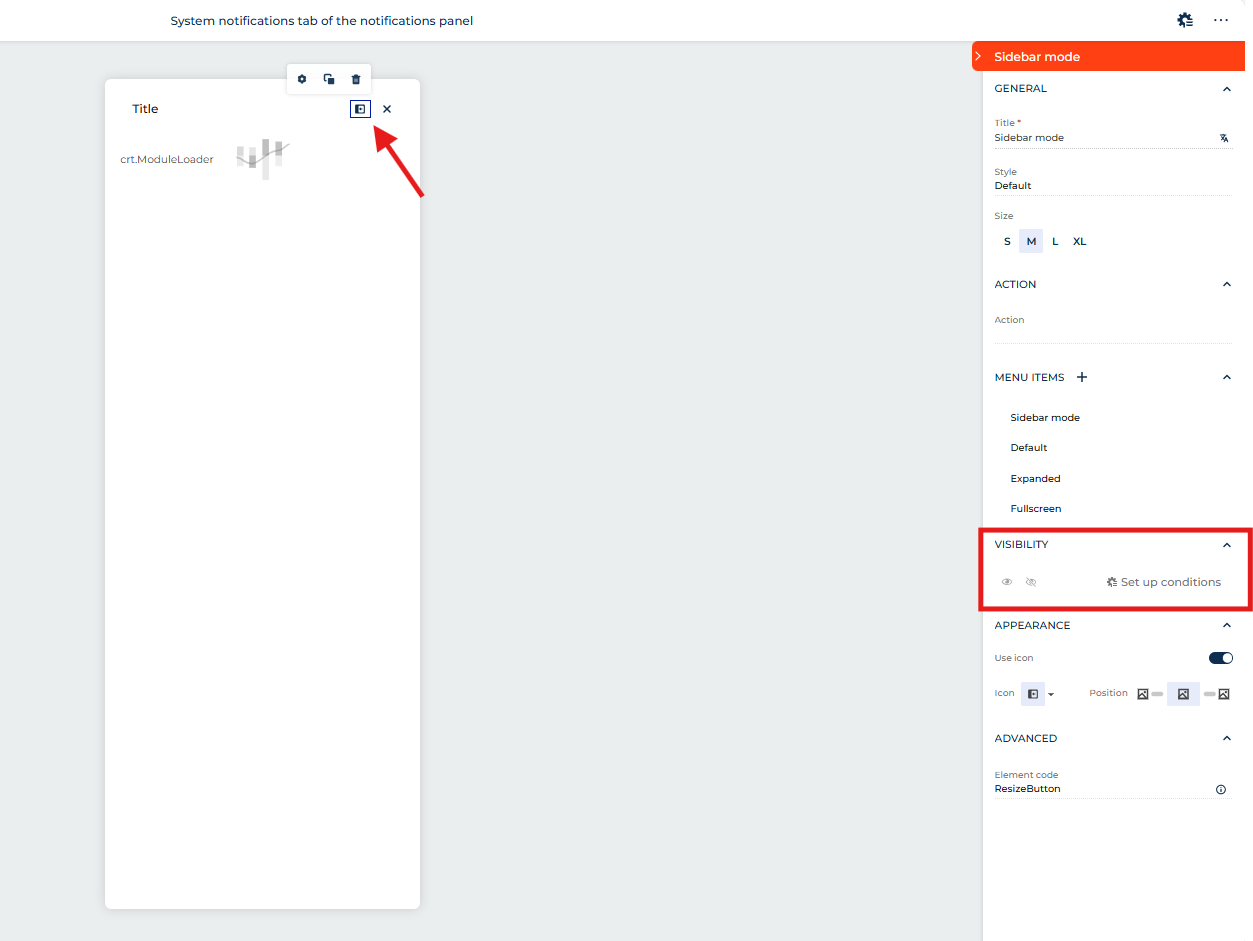
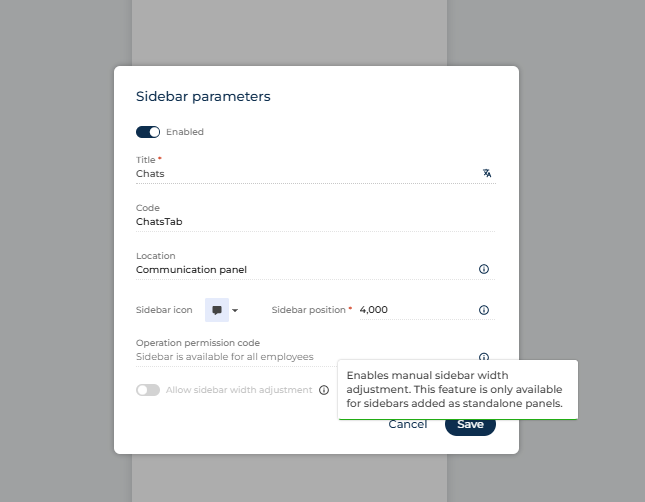
That is set in the Sidebar properties. To view that, you'll need to view the Page settings, click the three-dot button on the top right, then select "Page settings". On that panel you'll see a button for "Manage sidebar parameters". There's an option for that there.
Since you appear to be modifying the out of the box Chats panel, it could be that this sidebar possibly has that bound to an attribute, making it not enabled (there is a page Parameter for AllowSizeAdjustment for sidebars) or maybe it uses a different base page type?
I am using Creatio 8.3.1 and the latest iOS app version 8.3.5, and am on the latest iOS version of 26.1. I am logged into the Creatio mobile app when sending the notifications.
Speaking to Creatio support, they (and actually it was Tomasz, so thanks again Tomasz!) recommended a few options to try to resolve it, and ultimately the one which worked was uninstalling & reinstalling the iOS app. Not sure what had gone wrong, but this did fix it, in case others are having similar issues.
The full list of steps they recommended trying was:
1. iOS Notification Permissions: Go to your device’s Settings → Notifications → Creatio and ensure that “Allow Notifications” is enabled for the Creatio app. Verify that banners, sounds, and badges are also enabled.
2. Reinstall the Creatio App: Uninstall and reinstall the Creatio iOS app. This will re-register the device token and can resolve token registration issues sometimes encountered on iOS.
3. Feature Flag in Creatio: Confirm with your Creatio administrator that the "UseMobilePushNotifications" feature is enabled for your user.
4. Test on Another Device/User: If possible, try logging into the app with your user profile on a different iOS device, and have another user on your device test notifications. This helps isolate if the issue is device-specific.
Since you see the notification in the Creatio app but not as an iOS push, here are a few things to check:
Ensure the “Send push notification” sub-process in your BPM is configured correctly (related record IDs, entity).
Verify your iOS app has push permissions enabled and is properly registered with Firebase/APNs (certificates or token).
Make sure the app is synced and cache cleared if needed.
If everything seems correct and push notifications still don’t arrive, please contact Creatio Support at support@creatio.com . We can try to reproduce the issue on our side, inspect the configuration and provide the recommendations.
I am using the default Creatio app from the app store, and am using a cloud instance - from what I read in the documentation on these push notifications, the Firebase part is only required for on-prem, no? This is the part that mentions it:
Speaking to Creatio support, they (and actually it was Tomasz, so thanks again Tomasz!) recommended a few options to try to resolve it, and ultimately the one which worked was uninstalling & reinstalling the iOS app. Not sure what had gone wrong, but this did fix it, in case others are having similar issues.
The full list of steps they recommended trying was:
1. iOS Notification Permissions: Go to your device’s Settings → Notifications → Creatio and ensure that “Allow Notifications” is enabled for the Creatio app. Verify that banners, sounds, and badges are also enabled.
2. Reinstall the Creatio App: Uninstall and reinstall the Creatio iOS app. This will re-register the device token and can resolve token registration issues sometimes encountered on iOS.
3. Feature Flag in Creatio: Confirm with your Creatio administrator that the "UseMobilePushNotifications" feature is enabled for your user.
4. Test on Another Device/User: If possible, try logging into the app with your user profile on a different iOS device, and have another user on your device test notifications. This helps isolate if the issue is device-specific.
We've been live on Creatio for about 4 months now and one struggle our team is having, is keeping up with returned communication within cases.
For example:
Consultant emails Customer from Case, and changes Case stage to waiting on customer.
Customer responds to email and case is updated. But here is where we are lacking a notification to the consultant so they know the information they need and were waiting on has been returned.
I"m sure there is some feature or workflow that's being missed. Can anyone advise and type of workflow or setting that can turn on email or message notification when the communication is returned from our customers?
is it possible to hide some of the elements on the top right side (communication panel, notification panel). Some of the users wont use any of these, and I would like to hide it, not to bother them why are these there.
I would also like to be able to do this - for example noteworthy events and approvals are sections of the notification panel our users will never have a need to interact with, so it would be better if they weren't shown to users.
Additionally, it would be nice to be able to prevent some of the Business Process tasks from appearing for users - we have loads of them generated as part of a Lead Management flow, but users are unlikely to be interacting with those through there. It would be better for them to be kept out so that other Business Process task notifications don't get lost in the noise.
We have a situation where we work with a partner on our support service and therefore when we add their email address to our case we generate a circular communication that keeps both our cases open. The following is the workflow:
Open case
Add our partners support@ email address to case, so all three parties see communications
Case resolved
Partner service desk platform closes the case
Our platform (Creatio) sends an email asking for feedback on the case to both the case contact (customer) AND the partner
This causes the partners system to automatically reopen the case on their end
How can we at step 3.2 prevent the partner email being sent?
With the basic tools of the application, it is impossible to filter to whom exactly to send an email with a request to evaluate the work. However, you can achieve this by customizing the basic process of sending a feedback request to a contact in a case (Reevaluate case level request process).
I have created a business process, which is simply notifying a user that a new record has been created within a Project. I can create the notification in the way I want, however when clicking on the link in the notification window, it simply takes the user to the Project list page and not the Project page itself i.e. the detail page.
I have used the Parent entity ID column and set this to the Project ID value, as you can see in the screenshot below. This I expected it to work. Performing a trace shows the correct Project ID value for the record in question, so I am not sure what is wrong.
I have the following data structure in place within the 'Notification' object for creating a new record:
To - Lookup to specific contact
Object - Lookup.Section Object(View).Project
Time - System - Current Date & Time
ParentEntityID - Project ID
Source - (I have tried a number of sources - Lookup > Owner, Lookup > Contact, Specific User via Process Parameter causes a foriegn key constraint error)
Unique Caption ID - RecordID from signal
Before I added Source and Unique Caption ID clicking the Notification link in the notification panel took me to the Project summary page. Adding these two as indicated in your reply above causes no action i.e. no page change occurs.
The notification is being created, although it is in the System Messages section, but the link is just not taking me to the Project.
Anything else you can guide me with would be very much appreciated.
For those that come along after this, this is how:
Title - What you want to display in the notification subject
To - Lookup to specific contact
Object - Lookup.Section Object(View).Project
Time - System - Current Date & Time
Unique Caption ID - RecordID from signal
The issue was that I had ParentEntityID included, which once I removed that allowed the link to work. I read a previous Blog on this subject which had this value.
Regarding data import, how does the system recognize and track data imports into specific objects?
For instance, when I click on the link ("Open imported records") provided in the data import notification, I wanted to know how the system knows which object it's associated with and in which object/table is that information being stored?
It tags the records. Each record imported has a tag added of the date time of the import. When you click that link from the notification it opens the section and sets a filter for that specific tag.
It tags the records. Each record imported has a tag added of the date time of the import. When you click that link from the notification it opens the section and sets a filter for that specific tag.
I wanted to send a notification when data is imported in a particular object. As you stated above "when we click on notification it opens the section", how can I get that section details or which table in database is the section id stored for that particular import?
When user clicks "Follow the feed" (e.g. in exact Document), they expects to receive notification in CTI-panel on every Feed/Comment added to that Document.
However notifications do not appear. Is it normal behavior or anything wrong?
And is there any option to notify users about Feed/Comment added to the Document they follows?
We have such a situation that numbers of notifications in CTI panel appears, but no notification is shown here. Or quantity of notifications differs from red number shown. And this situation is for many users.
Based on the shared information, I can assume that the issue may relate to the Visa object.
You may have a record in the SysModuleVisa table (this table stores the Visa's configuration) which refers to a schema that does not exist.
Due to this fact, that there is a reference to a scheme that does not exist, we cannot count the number of Visas. Therefore, the notification counter does not work.
You can find the mentioned record using this script:
select smv.* from SysSchema ss
right join
SysModuleVisa smv on smv.VisaSchemaUId=ss.[UId]
where ss.id is null
If the solution provided above doesn't solve your issue, please contact the Creatio support team via support@creatio.com, so we could proceed with investigation.
We would like the system to notify the user before closing the record if there are unsaved changes to the page/record. Seems maybe this was a feature in the past and I'm hoping there is just a system setting for this?
It's not a feature or system setting, but oob logic and it's working without any additional settings. For example, when you have applied changes to the record and about to close it - press "Close" button - without saving it first, system will notify you with a pop-up window about the unsaved changes. But the functionality doesn't cover closing the whole browser tab, in this case there will be no notification.
If for some reason the functionality stopped working on your site, please contact us at support@creatio.com, so we could investigate the issue.