organizational roles
functional roles
Access Rights
permissions
Sales_Creatio_enterprise_edition
8.0

Hello Community,

We want to achieve the following but cant find the right way to do it.

We have two Organizational Roles 

  • Europe
  • Asia

We have two functional roles 

  • Marketing
  • Sales

We want:

  • Europe/Marketing to see only Europe/Marketing records. 
  • Asia/ Marketing to see only Asia/ Marketing records. 


Same applies to Sales. 

  • Europe/Sales to see only Europe/Sales records,
  • Asia/Sales to see only Asia/Sales records.

Can this be achieved somehow?

Sasor

Like 0

Like

4 comments

++

Sasori Oshigaki,

Hello , this Code should work 
{
  request: "crt.LoadDataRequest",
  handler: async (request, next) => {
    // Check if this is your MultiSelect's data source
    if (request.dataSourceName !== "MultiSelect_lf952eo_List_Items_DS") {
      return await next?.handle(request);
    }
 
    try {
      // MAIN filter group for the lookup
      const filter = new sdk.FilterGroup();
      filter.logicalOperation = sdk.LogicalOperatorType.And;
 
      // Build a nested OR group for the 3 roles
      const roleOrGroup = new sdk.FilterGroup();
      roleOrGroup.logicalOperation = sdk.LogicalOperatorType.Or;
 
      // Role 1
      await roleOrGroup.addSchemaColumnFilterWithParameter(
        sdk.ComparisonType.Equal,
        "[SysAdminUnit:Contact:Id].[SysUserInRole:SysUser:Id].SysRole.Name",
        "Marketing"
      );
 
      // Role 2
      await roleOrGroup.addSchemaColumnFilterWithParameter(
        sdk.ComparisonType.Equal,
        "[SysAdminUnit:Contact:Id].[SysUserInRole:SysUser:Id].SysRole.Name",
        "Sales"
      );

 
      // Add the OR group to the main filter
      filter.add(roleOrGroup);
 
      // SDK workaround for versions < 8.1.1 (copy items)
      const newFilter = Object.assign({}, filter);
      newFilter.items = filter.items;
 
      // Push the filter into the request
      request.parameters.push({
        type: "filter",
        value: newFilter
      });
 
      return await next?.handle(request);
    } catch (error) {
      console.error("Error filtering contact list:", error);
      // Continue with original request if filtering fails
      return await next?.handle(request);
    }
  }
}

Hello Sasor,

To achieve the requirement where specific organizational and functional roles can only see records relevant to their combination (e.g., Europe/Marketing can only see Europe/Marketing records), you can configure access permissions in Creatio by following these steps:

1. Create Organizational Roles:
Ensure you have the organizational roles "Europe" and "Asia" set up in the system.
 

https://academy.creatio.com/docs/8.x/setup-and-administration/administration/user-and-access-management/user-management/organizational-roles


2. Create Functional Roles:
Ensure you have the functional roles "Marketing" and "Sales" set up.
 

https://academy.creatio.com/docs/8.x/setup-and-administration/administration/user-and-access-management/user-management/functional-roles


3. Assign Users to Roles:
Assign users to the appropriate combination of organizational and functional roles (e.g., users in Europe/Marketing should be assigned to both the "Europe" organizational role and the "Marketing" functional role).
 

https://academy.creatio.com/docs/8.x/setup-and-administration/administration/user-and-access-management/user-management/assign-a-user-role


4. Configure Record Permissions:
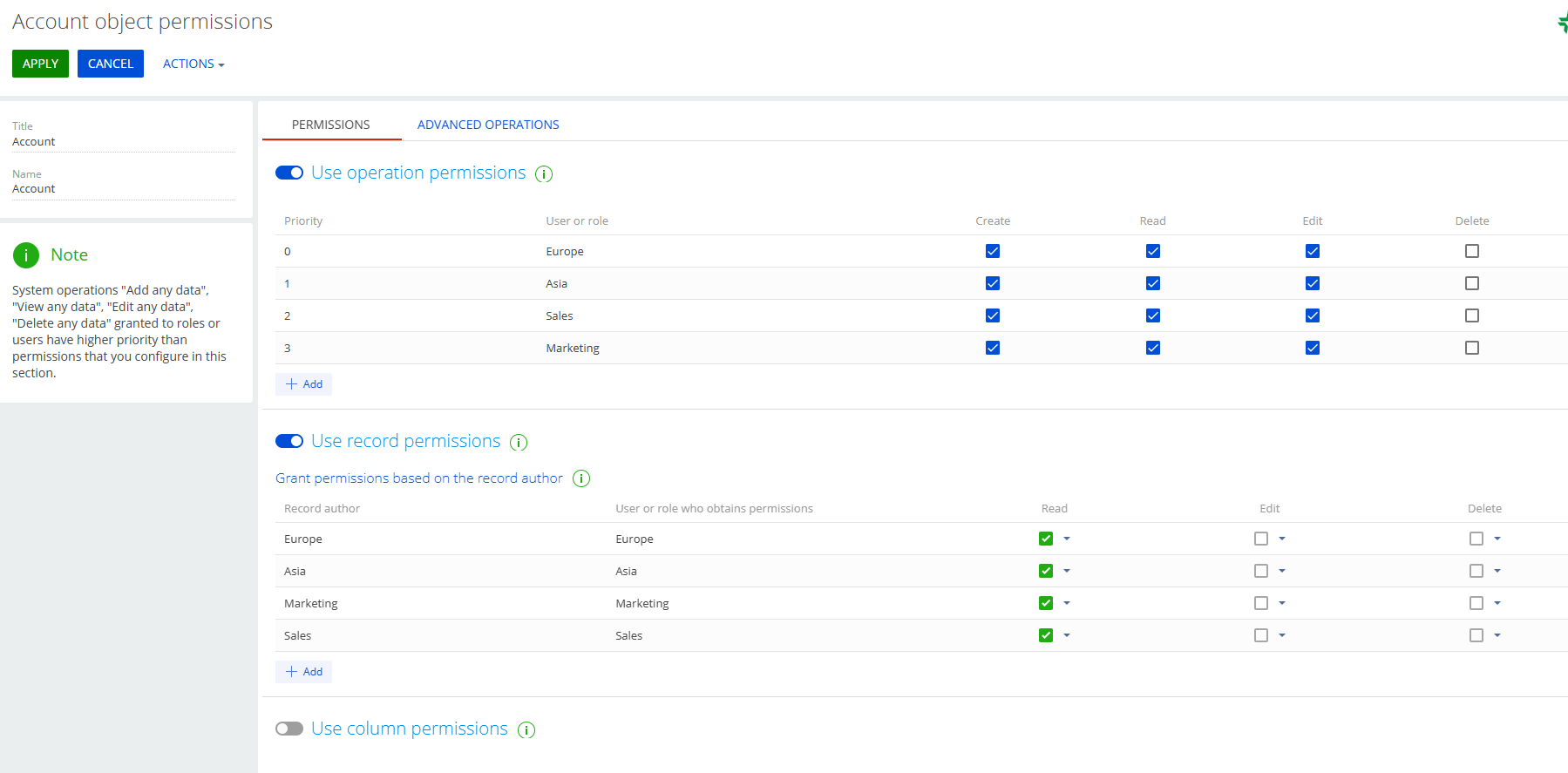
- Go to the System Designer and open the Object permissions section.
- Select the object for which you want to configure permissions (e.g., a specific entity or section).
- Set up record-level permissions to restrict visibility based on both organizational and functional roles.
This can be done by creating filters or conditions in the access settings that check for both role types assigned to the user.


https://academy.creatio.com/docs/8.x/setup-and-administration/administration/user-and-access-management/access-management/record-permissions


Let me know if you have any more questions - happy to help further.

Hello Valeriia,

Thank you for the answer. Are you suggesting that this combination might achieve what we need?

Thank you 

Sasor

Show all comments
Access Rights
roles
functional roles
organizational roles
Sales_Creatio
8.0

Hello Community,

We have some roles that have been established for a long time. As the company hierarchy structure is changing, we need to group some of these roles together.

Example:

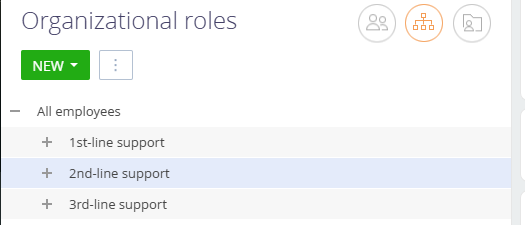
Group the existing 1st-Line Support, 2nd-Line Support, and 3rd-Line Support under a single group called SUPPORT. We want to do the same with some functional roles as well.

How can this be achieved?

Sasor


Like 0

Like

5 comments

+++

Hey Sasori, 

It is possible to create a hierarchy for organization and functional roles. While you have one highlighted/selected with your cursor, press "new" then select new division. 

Unfortunately, there is no way that I know of to re-arrange hierarchy so you would have to re-create 1st-line support, 2nd-line support, etc. 

I know these are tied to support functionality out of the box, so be careful if you delete them. May want to create the new ones first, then work on updating business processes, then delete the old ones. 

Example: In this image, to create 1st-line support within "support" select "Support" > New+ > Division.

Hi Joshua,

Thank you. I only mentioned the support groups as a reference. We have custom roles that we need to re-organize. I think the correct way to do it, is via scripts in SysAdminUnit table, but i need some confirmation prior to proceeding.

Sasor

+++

Hello,

There is no out-of-the-box functionality in the system to group user roles as described.

However, this can be achieved by updating the ParentId field of the user role records. You can implement this change either through a business process or directly via an SQL query.

Best regards,
Ivan

Show all comments
Studio_Creatio
DCM
changes
Access Rights
8.0

Hello


I been trying to block the record so the users can't make changes or erase the record at some point of the process to do that I am changing the access rigths of a record using the element Change Right in the DCM.


But I the record can still be modified and erase ( the user that I use to make the test is not a System Administrator) can you help me to know what Im doing wrong? 


Also it is posible that the owner of the record can't modified the information or i can't take away this right? 


Thank you.

Like 0

Like

1 comments

Hello!


My apologies I am not sure about your setting due to a lack of knowledge of your language. But basically here is an example of how you can set elements to remove rights from the case for All employees role:


Basically you are not able to remove rights from the Owner of the record, so this could be the reason.


Show all comments
Entity
object
view object
view
8.1
recordpermission
Access Rights
Sales_Creatio_enterprise_edition
8.0

Is it possible to create an entity based on a view (so with the "Represents Structure of Database View" checkbox checked, and with the view created using a SQL script) that inherits its record permissions from a "real" entity? I tried to do so by simply checking the record permissions checkbox and specifying the parent object in the "Object to inherit access permissions from" field of the entity, but this doesn't seem to work.


My setup is that we have the OOTB Leads entity, and then I've created a view over the top of it taking all columns but with a filter condition, to be used for reporting over Leads while filtering out certain Leads that should never be included in reporting so we have a more consistent reporting basis and don't have to make sure to include those filters in every widget. I added 2 columns to the view based on the Id and LeadName columns called UsrBaseLeadId and UsrBaseLeadName, which then have a lookup column UsrBaseLead added over them in the view-based entity. This lookup is then used as the "Object to inherit access permissions from" for the view-based entity.


There aren't any errors thrown in the logs when trying to do this, but non-super-users just can't see any of the records. When I tried to check a record in the view's permissions, I could see that the SysRights table for the view entity doesn't exist, so I tried creating that rights "table" as a view in the database that took its data from the Rights Table of the real entity, but while that seemed to work inasmuch as I could check a record's access rights and see that the correct rights were there and was even able to modify those rights, it didn't make it visible to a non-super-user.

Like 1

Like

3 comments
Best reply

It would be great to have the view be able to inherit permissions from some object that the view has as a lookup column. However, I don't believe that is possible. What I typically do is this:

  1. Create a view and include as a column some other object that has permissions (for example, if the view includes an Opportunity lookup column and the account has permissions)
  2. Anywhere the view is used, include a filter condition that some column on that related object is not null (that would never be null). Plus it cannot be the Id or the column used as the display value. Example, if my view has a lookup for Opportunity, I could use Opportunity.Stage is filled in.
  3. Using this approach, the user will only see the rows corresponding to the related record that they have access to, since if they cannot view the related opp the Stage will return a null value. 

It's not ideal and definitely not secure, but it does limit the view rows to what the user can see on the related object.

Ryan

Anybody have any experience of working with such a setup?

It would be great to have the view be able to inherit permissions from some object that the view has as a lookup column. However, I don't believe that is possible. What I typically do is this:

  1. Create a view and include as a column some other object that has permissions (for example, if the view includes an Opportunity lookup column and the account has permissions)
  2. Anywhere the view is used, include a filter condition that some column on that related object is not null (that would never be null). Plus it cannot be the Id or the column used as the display value. Example, if my view has a lookup for Opportunity, I could use Opportunity.Stage is filled in.
  3. Using this approach, the user will only see the rows corresponding to the related record that they have access to, since if they cannot view the related opp the Stage will return a null value. 

It's not ideal and definitely not secure, but it does limit the view rows to what the user can see on the related object.

Ryan

Yeah that's a clever workaround, many thanks Ryan! Agreed about the security aspect, but for the the cases where it's just about having those record permissions used to define non-security visibility as I currently have for the base entity it will work for now.


It would definitely be good for the view entities to be able to inherit permissions from lookup columns though, and feels like it would be a relatively quick win for Creatio to add, as most of the functionality around that would already exist. It could even be done in a no-code way by enabling the creation of these view-based entities directly in the config, effectively adding a logical layer to the platform which would be great for filtered views into the data and adding virtual calculated fields. So much utility to be had with such a logical layer.

Show all comments
role
lookup
Access Rights
Studio_Creatio
7.18

Hello Community,


I have requirement that to provide access of a particular custom lookup to a organizational role who can add, edit, and delete items in the lookup. 


Regards,

Jagan

Like 0

Like

2 comments

Hello,


Unfortunately, it is not possible to grant permissions to selected users/roles to access particular lookups. At the moment, it is possible to manage permissions only for all users/roles at once.

Bogdan,

I have been able to achieve this with a business process.

Show all comments
Access Rights
recordpermission
Sales_Creatio
8.0

Hello community,

I have a use case where i need to grant access rights to new owner in Lead when the owner gets changed.I want to remove the access rights of the old owner.

By default, Creatio grants maximum access permissions to record author and the record owner.

I have tried to give access to the new owner and revoke the access permission to old owner using Change access right Business process element . Since the old owner is the record author ,that user can able to see ,edit,delete the record .I want to remove the access rights of the old owner. 

Can anyone help me on this ?

Like 1

Like

1 comments

Hi!


If you remove all roles/users from default permissions (managed by records access rule settings), users who created the record and records owner will still be able to see/edit/delete the record. 


To change this behavior, there are several options: 

- open the record in the System Designer and set the rule for the author to grant himself the rights for "not reading" the record


- the database command to remote the specific rights in the sys[object]right table. You can check some details on the example of granting the rights and change the logic of the provided script: https://community.creatio.com/questions/there-way-provide-record-creato…

Here are some more details on how these system tables impact the record permissions: https://community.creatio.com/articles/what-database-tables-should-i-ta…

- design a business process with the "Change access" element to remove the rights from the record author


Hope this info helps you with the described case.

Show all comments
CustomerPortal
caseworkflow
portalusers
8.0.6
Access Rights
Financial_Services_Creatio_lending_edition
8.0

Hi Creatio!

I'm creating a Customer Portal and I am phasing an issue when I try to add DCM panel into page.

Cases workflow appear on the the section page :

But when I try to logg-in as user portal (role: All portal users) Cases workflow do not appear in the Customer Portal.


In the console log I receive "response status: 403 (SecurityException)".

Please what is your suggestion to fix this issue?

Thanks,

Like 2

Like

7 comments
Best reply

Hi all,


I want to share with you solution that Creatio support team helped me.

You have to check in object permissions if  "Portal Users" have permission to use  "SysDcmSettings" .

Hello Aurora,


Could you please let us know what portal license do you have on this local instance?


Also, could you please verify whether this DCM object is added to those lookups in order to be visible to portal users?


And one last question, does it appear on the portal the DCM for the cases section?


Hello,

I am having the same problem. I added the DCM object to both lookups, and I am also having an error in the console.


I check the DCM in the cases section, and I can see it.

Hello All!


Please check the following article for steps on how to add DCM to the portal: https://community.creatio.com/articles/enable-dcm-portal-users


In case you would still receive the error - please contact us on support@creatio.com

As I see it - this error is not the same for all and would require an individual approach.


Best Regards,

Dan

Bogdan,

Hello Bogdan,

The portal license that I am using in my local instance are as in the photo attached:

Is added object of Application Form (section) but not the case object (should be with the name "Application Form case in the Portal) :

Related to the last question DCM does not appear in the portal section (but as you can see to the image attached the section of the task appear but no the stages one).

Thanks,

Denis Bidukha,

Hi Denis, 

Images attached to the link are not clear.

And another question please , this solution is available for  the latest version of Creatio ?

(I am using Creatio  v8.0)

Thanks,


Aurora Leka,


Hi! The pictures are not representative anyway as they are made in Old UI. The information should be still relevant though. Please check if the specific portal user has required access rights and it the object has an "SSP available " checkbox checked.


If that did not help - please contact Support individually for investigation to be held


Best Regards,

Dan

Hi all,


I want to share with you solution that Creatio support team helped me.

You have to check in object permissions if  "Portal Users" have permission to use  "SysDcmSettings" .

Show all comments
our_company
Access Rights
Contact
all_employees
Sales_Creatio_enterprise_edition
8.0

We're setting up access rights in our system and the contacts under "Our Company" are being assigned the access right of "all employees". How can we prevent all of our users from seeing the "Our company" account and contacts under that account? We are using record permissions for each organizational role to only see accounts and contacts within that role, but we want users to see all accounts under the organizational role of "all employees" with the exception of "our company".

Like 1

Like

1 comments

Hello Teresa,

If there is a need to restrict access to one specific record you can delete the access rights for this record directly on this record page with a help of "Set up access rights" option. Still the record will be available for the system administrators.

If you need to change the access rights for the contact records connected to this account, it can be done with a hep of custom business process that will read all the contact records where the Account = the_needed_account_record and with a help of "Change access rights" business element will delete or grant needed access permissions.

I'd also suggest to test the solution first on test- or dev- site before applying it in the production site.

Best regards,

Anastasiia

Show all comments
Access Rights

Hi,

I have a business task to allow users "know" about a record they search for even though they don't have permission to view that record.

Meaning: The process before adding a contact is first to make sure the contact does not exist in the system. sometimes a user doesn't have permission so he can't see the record and adds it.

We are looking for a way to let the user know that the contact exists but he just does not have permission to view it. I rather add an option for him to request access straight from Creatio but that's less important if he can know that record exists and ask our support to give him access it will work too.

Any ideas?


Thanks,

Chani


Like 0

Like

1 comments

Hello,


we have solved similar task with Stored procedures. 

1) Create stored procedure with input parameters (Contact name, Contact surname)

2) Procedure returns set of found existing records, but with limited information (e.g. Contact name, surname, country, date of birth and owner)

3) These records are displayed to user when he enters Name or Surname, but just for information

4) We also save found records into special detail to see what information user has ingored entering new Contact


We did the same for Accounts, Leads (for names, web, email domain etc) and Communication options


Kind regards,

Vladimir

Show all comments
Sections
Access Rights
Service_Creatio_customer_center_edition
8.0

Hello,


I have created custom sections on the dev environment, and installed the package to the production environment.

When i try to apply object permissions in production, only the existing sections appear and not my custom sections.

Noting that i can see my sections in the workplace management interface.


Has anyone encountered this problem before ?


Thank you

Maarouf

Like 0

Like

1 comments

Hello,


You need to check several options:

- Сheck that the object has no publishing errors, and compile the application. 

- Check the rights to the section/workspace and that the user has the right license.

- Check the mapping in the SysModul table. It is possible that the section was added to the same workplace twice and there are some duplicates at the database level, in this case, the section will simply not show up. You need to delete the entries at the database level and add the section again.


If the above tips do not help, it is better to contact technical support.

Show all comments