

How to calculate exponent in Creatio without Code (CSharp) / No Code

Hi All,
Question please, I have form that must calculating exponent function.
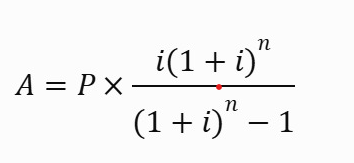
i = (B / 100) / 12
A, B, P, n --> all fields in form, so we can get that value exactly.
Need advice for No Code method in Business Process please, thank you.
Like

Hi,
You can do this in a business process with no code. Process formulas in Creatio are compiled as C# expressions, so you can use Math.Pow inside a formula field even though the formula editor has no "power" button.
Process layout
[Signal: record added / modified (fields P, B, n)]
        ↓
[Read data: the record]
        ↓
[Formula: i]  →  [Formula: Pow]  →  [Formula: A]
        ↓
[Modify data: set field A]
1. Start signal
- Use an Object signal on your object, triggered by "Record added" or "Record modified".
- For "modified", tick only the fields P, B, n. If you leave A ticked, writing A starts the process again and it loops.
- You can use a button on the page that runs the process instead.
2. Read data
Read the record by Id = Signal.Unique record Id.
3. Process parameters
Add three Decimal parameters: i, Pow, Result. Fill each one with a Formula element:
i
[#Read data.First item of resulting collection.B#] / 100m / 12m
Write
100m/12m(decimal literals). If B is an Integer field,B / 100does integer division and gives 0.
Pow = (1 + i)ⁿ
Convert.ToDecimal(Math.Pow(Convert.ToDouble(1 + [#i#]), Convert.ToDouble([#Read data.First item of resulting collection.n#])))
Math.Powworks withdoubleand Creatio fields aredecimal, so the formula converts to double and back.
Result = A
[#i#] == 0
  ? [#Read data.First item of resulting collection.P#] / [#Read data.First item of resulting collection.n#]
  : Math.Round([#Read data.First item of resulting collection.P#] * [#i#] * [#Pow#] / ([#Pow#] - 1), 2)
The
i == 0branch covers a 0% rate (B = 0). Without it the formula divides by zero, because the payment is then just P / n.
4. Modify data
Update the same record (Id = Signal.Unique record Id) and set A = [#Result#].
Notes
- One formula is possible. You can put the whole calculation into one formula inside Modify data, but three separate parameters are much easier to debug: you can see each value in the process log.
- Check the result. With P = 10 000, B = 12, n = 12, you should get A ≈ 888.49.
- Live value on the page. The process runs after the record is saved, so A appears only after save and refresh. If you need A to update while the user types, a business process won't do that; you'd need a page handler, which means code.