


Hi,
I want to open specific page via business process. The button was clicked from mobile and it will run the business process. I checked the execution diagram and it seems worked. However the mobile does nothing and it seems stucked.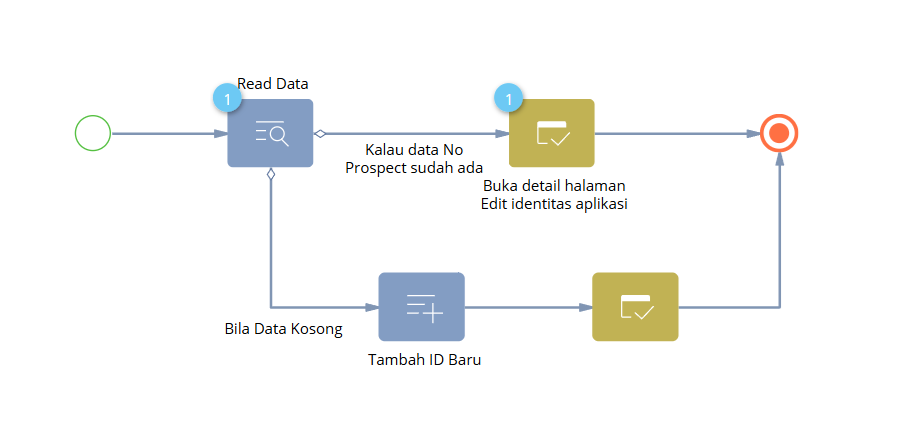
Like

Hi,
Your process is probably fine. What fails is the hand-off at “Open edit page”: the Creatio mobile app most likely never handles the message that tells a client to open the page. So the process sits waiting on that element, which is why the diagram looks right while the phone does nothing.
How to confirm
- In the process log, check the “Buka detail halaman…” element. If it shows “in progress” rather than “completed”, the process is waiting for a client that never answers.
- Press the same button in the web app as the same user. If the page opens there, the problem is mobile-only.
- Optionally, keep a browser tab open as that user and press the button on the phone. If the page pops up in the browser, the phone is just ignoring the message.
- Check your Creatio version. Starting a process from a Freedom UI mobile button (
crt.RunBusinessProcessRequest) is only supported in Creatio Mobile 8.3.4 and later (Academy handlers reference).
How to fix it: let the process do data only, and do the navigation on the mobile side
-
A (recommended): no process. Bind the button to a mobile custom request handler, built with
@creatio/mobile-commonand theEnableMobileSDKfeature (overview). The handler:- looks up the record by No Prospect;
- if it’s found, opens it with
crt.UpdateRecordRequest(orcrt.OpenPageRequest); - if not, opens a new record with
crt.CreateRecordRequest, with No Prospect pre-filled.
A handler written for the web (a
usr.*schema handler) won’t work on mobile. - B (8.3.4 and later): keep the process, but only for data. Remove both “Open edit page” elements and keep Read Data / Add Data. Start the process with
crt.RunBusinessProcessRequest, then open the record from the mobile side. - C (before 8.3.4): start the process from a record change. Have the button set a field, and let a signal-started process do the data work. Navigation still has to happen on the mobile side.
If the web test (step 2) also fails: the process may be running in background mode, from a background or batch connection, or with “Show execution page” turned off. In those cases the server skips sending the message entirely and the symptom looks the same.
Also cancel the runs already stuck on “Open edit page” in the process log so they don’t pile up.