I am excited to share the results of voting for the most anticipated improvements in Creatio filtering tools with you. 453 participants from all over the world voted between January 17 and 24, 2020. Almost all participants selected three improvements, according to the voting conditions. The average number of selected options per participant was 3.3.

If you know what can make Creatio products even better, more useful and more convenient, you are always welcome to post your suggestions in the section “Ideas” of Creatio Community. The development team will definitely consider them. In the “Ideas” section, you can also view suggestions from other Community Members, participate in their discussion and vote for the ideas you support.

Thanks to everyone who participated in this voting! In two weeks we will share the estimated time when the improvements will be available in Creatio products. 

Here is the rating of improvements according to the number of votes

#1 – Comparing field values ​​in filters. Users will be able to select a field and compare it with a value in another field of the same data type. For example: select all accounts where the payment amount is less than a specific invoice total; select all customer requests, where the actual response time exceeds the planned response time.

#2 – Aggregate filters and filters by related objects. Currently, users face difficulties when filtering by reverse connection and implementing aggregate filters. For example, it is a complicated process to get a list of customers who made purchases in a given period or some time ago. We plan to make filtering by related objects more intuitive and convenient.

#3 – The ability to filter records from one or more dynamic groups. We plan to enable selection of several dynamic groups in the filtering conditions and application of filters to them. As a result it will be possible to get data that correspond to common conditions from different dynamic groups.

#4 – Working with the advanced filter. Currently, grouping and moving multiple conditions in advanced filters is complicated and is not obvious to the user. We plan to simplify working with groups of conditions in filters.

#5 – Standard filters. Quick access to frequently used filters in each section. Users can shorten the list of available fields in a filter and reorder the fields in the list.

#6 – Visibility of the applied filters. The users often do not notice that the data in the section is filtered. We plan to make the currently active filters more prominent.

#7 – Accessing the advanced filter. Currently, switching to the advanced filtering mode is complicated and is not obvious to the user. We plan to make it more intuitive and simple.

Like 0

Like

Share

1 comments

FYI if anyone was hoping for #6 (better visibility of selected or applied filters), I do have a free add-on in the marketplace that does this as well https://marketplace.creatio.com/app/filter-highlighting-creatio

Ryan

Show all comments
Training
Development
developer

What will you do during the course? You will learn how to set up configurations on the Creatio platform, create new objects, lookups, pages, sections, details, as well as program custom and server logic. Additionally, business processes development, standard customizations, implementation of web services and integrations will be covered.

Who is the course for? It’s for the beginner Creatio platform developers who require practical platform development skills and methods for configuring design solutions.

Format: Practical online course, guided by a trainer of Creatio Academy.

Language: English

Dates: January 21-24, 2020

Detailed program of the course: http://bit.ly/35P8gZN

Price for one participant: $700

Sign up for the course: http://bit.ly/2QSko89 (Note that if you are not currently registered at Creatio Academy you will need to register first.)

Like 0

Like

Share

0 comments
Show all comments
Development
Development Guide

Hi

In order to increase our developers' productivity, we're looking for ways to test server-side C# code before using it in process designer task script.

I've followed this guide: https://academy.creatio.com/documents/technic-sdk/7-15/developing-configuration-server-code-user-project

In the onsite scenario and after enabling file system mode and recompiling the application, I got this error message:

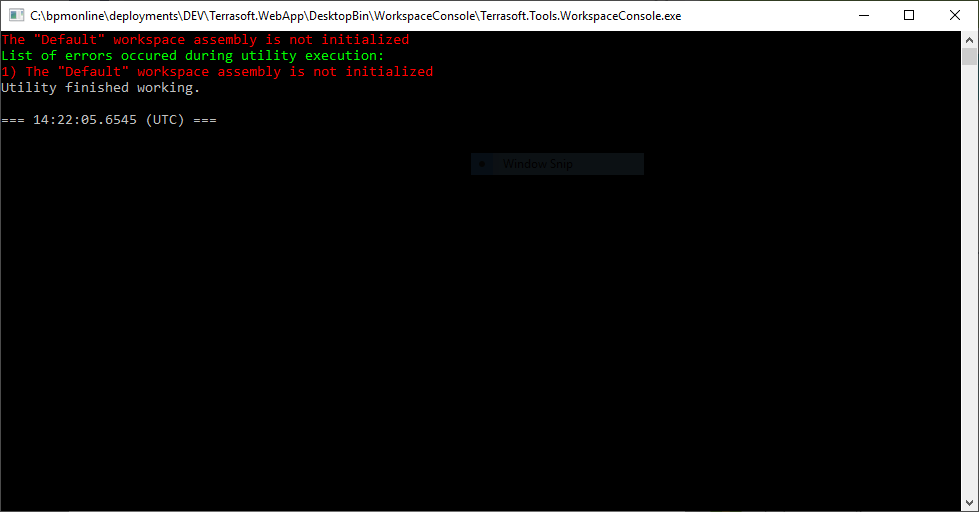
The "Default" workspace assembly is not initialized


PS: The second method worked well (Cloud Executor) but it didn't allow debugging which is cruicial for our developers.

Thank you

Mohamed

Like 0

Like

2 comments

Hi Mohamed,


I checked on my end - there is key missing in workspace arguments: confRuntimeParentDirectory. In this key you should specify path to [rootAppFolder]\Terrasoft.WebApp


For example:

-filename="C:\Users\D.Smishchenko\source\repos\ExecutorLibrary\ExecutorLibrary\bin\Debug\ExecutorLibrary.dll" -typeName=ExecutorLibrary.Executor -operation=ExecuteScript -workspaceName=Default -confRuntimeParentDirectory="C:\bpmonline\7.15.0.634_SalesEnterprise_Marketing_ServiceEnterprise_Softkey_MSSQL_ENU\Terrasoft.WebApp"


Thank you. We will transfer this to our academy team to include the changes.


Regards,

Dmytro

Dmytro Smishchenko,

Thanks! It's working now.

Show all comments
Development
event handler
detail
7.13_()
studio

Hi,

I would like to know how can i trigger 'someMethod' by adding, editing or removing something in my detail.


Like 1

Like

4 comments

Dear Pedro,

Please find the options to trigger your custom method:

adding:

you can override the addRecord method of BaseGridDetailV2 to launch your custom method along with parent realization.

editing:

You can create a new attribute on the page schema, which will trigger method "methodName" based on the changes in indicated columns:

"Probability": {
    // Determination of the column dependency.
    "dependencies": [
      {
        // Depends on the "Stage" column.
        "columns": [ "Stage" ],
        // The name of the handler method for the "Stage" column change.
        // setProbabilityByStage() method is defined  in methods property
        // of schema object.
        "methodName": "setProbabilityByStage"
      }
    ]
  }

delete:

you can override the basic deleteRecords method on the detail schema, so to run your custom method after, or before parent realization of the method.

Regards,

Anastasia

Anastasia Botezat,

 Hi,

I've tried to override "deleteRecords" method on my detail schema page, and didn't work, I think its because of package dependencies but I'm not sure.

Pedro Pinheiro,

The "deleteRecords" method does work on the detail schema. Please debug the code, so to narrow down the possible cause. Here is an instruction on the client side debug:

https://academy.bpmonline.com/documents/technic-sdk/7-13/client-code-debugging

Regards,

Anastasia

Anastasia Botezat, I manage to fix my problem using "onDelete" instead of the "deleteRecords" method.

Thanks for your response.

Show all comments
Development
script task
7.13_()
studio

Hi,

I have a EntityCollection and i would like to know how can i add Objects to that EntityCollection in my ScriptTask.

EntityCollection ec = Get("ProcessParameter1");

var entity;

ec.Add(entity);

Set("ProcessParameter1",ec);

Like 0

Like

1 comments

The Add method is correct. Additionally, I'd not recommend using a simple list instead. 

Show all comments

Hi,

I want to know what is the purpose of the files inside the 'bin' folder (Terrasoft.Configuration - > bin), and can I delete these files or not , because the size of this folder is too big.

Like 0

Like

1 comments

Dear Mohamad,

Those files present in bin folder are libraries that store core logic of the application and we strongly don't recommend to delete anything from there since it will destroy the application completely. Those files are core logic and "heart" of the application so they are not supposed to be deleted.

Best regards,

Oscar

Show all comments

When I compiled my bpm'online application an error occured (error : Object reference not set to an instance of an object) , what I need to know is the reason of this error, also I want to know if the compilation process has log files somewhere , and how can I access them.


Like 0

Like

1 comments

Dear Mohamad,

This error does not include any meaningful information that can explain what happened. I recommend you to check the logs (Error file in directory like %windows%temp%bpmonline%) - it should contain details of this error. 

Best regards,

Angela

Show all comments
studio
7.11
7.12
Development
detail


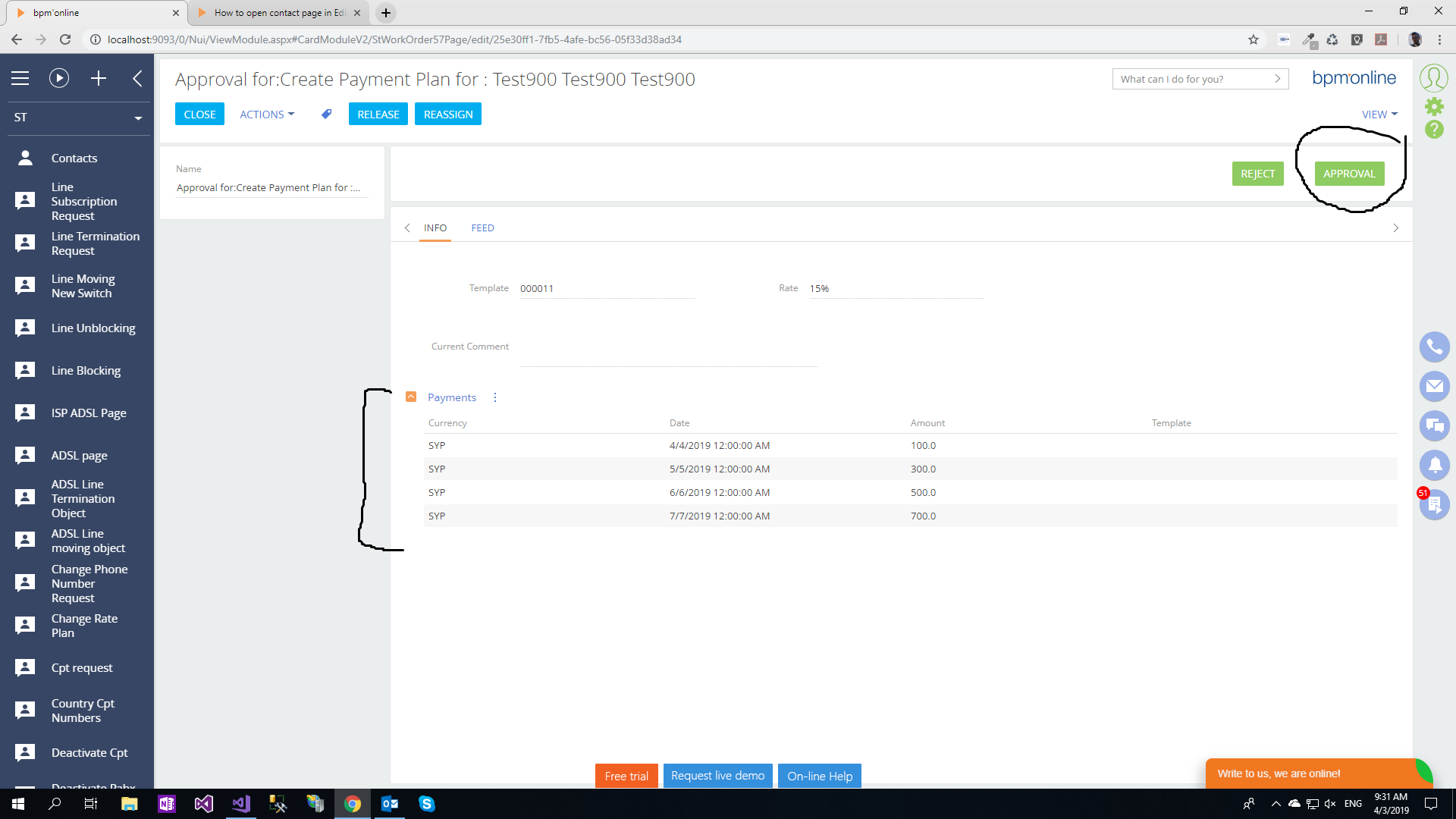
I have a button in a page , when I press that button , it performs a save and close operation.Also in this page I have a virtual detail, the problem is that when I press the button no data is saved in the page object when the page is in combinet Mode , if I refresh the page (no longer in combinet mode) and click the button the data is saved

- The code of the Approval Button is :

onApprovalButtonClicked: function(){
		 		
		 				 		
var self= this;
self.set("StStatus", {value: "BFBE5A54-08C6-4830-AE3F-09969C626C4B", displayValue:"Closed"});
self.save();
if (self.tryShowNextPrcElCard()) {
	return;
}
var isLastProcessElement = self.get("IsProcessMode") && !self.get("NextPrcElReady");
if ((self.get("IsInChain") || self.get("IsSeparateMode")) || isLastProcessElement) {
if (!self.destroyed) {
	self.sandbox.publish("BackHistoryState");
}
return;
}
self.sandbox.publish("CloseCard", null, [self.sandbox.id]);
self.hideBodyMask();
						
}


- it gives me that error when the button is pressed:

Uncaught Terrasoft.UnsupportedTypeException: Message DetailValidated is not defined in CardModuleV2 (SectionModuleV2_StWorkOrder1Section_CardModuleV2) module 


Like 0

Like

4 comments

Hello Mohammad,


To fix the issue please flush Redis and compile all items. That should do the trick. 


Regards,

Alex

Hi,


I know this posts was old.

But how was this fixed?


Thanks,

Solem.

Dear Solem,


Please, refer to the comment from Alex:


To fix the issue please flush Redis and compile all items. That should do the trick. 


Best Regards,

Ivanna

Dear Ivanna Yatsura,


I actually did that but I still got the error.


Message GetMasterEntitySchema is not defined in CardModuleV2 (SectionModuleV2_AccountSectionV2_CardModuleV2) module 

I was following this https://community.creatio.com/articles/add-iframe-modalbox.


Thanks,

Solem

Show all comments

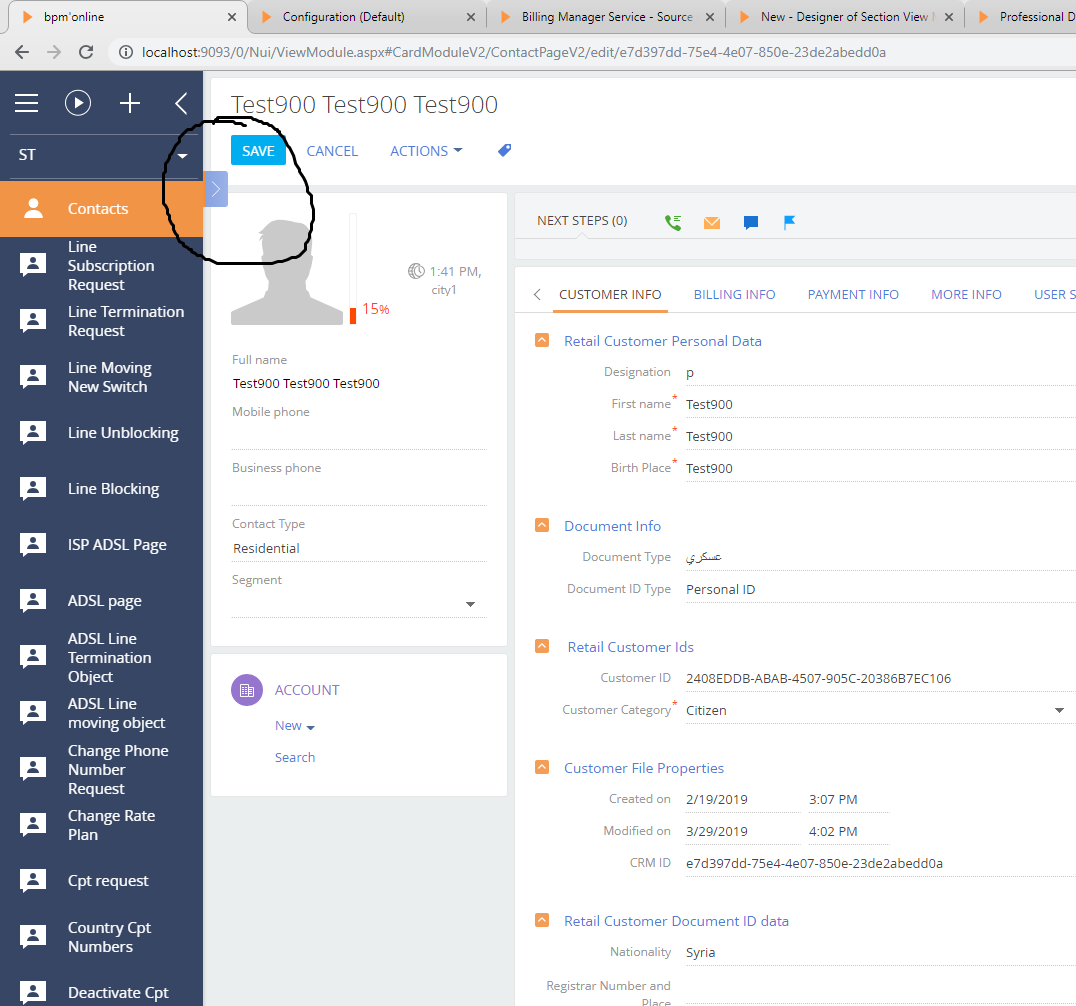
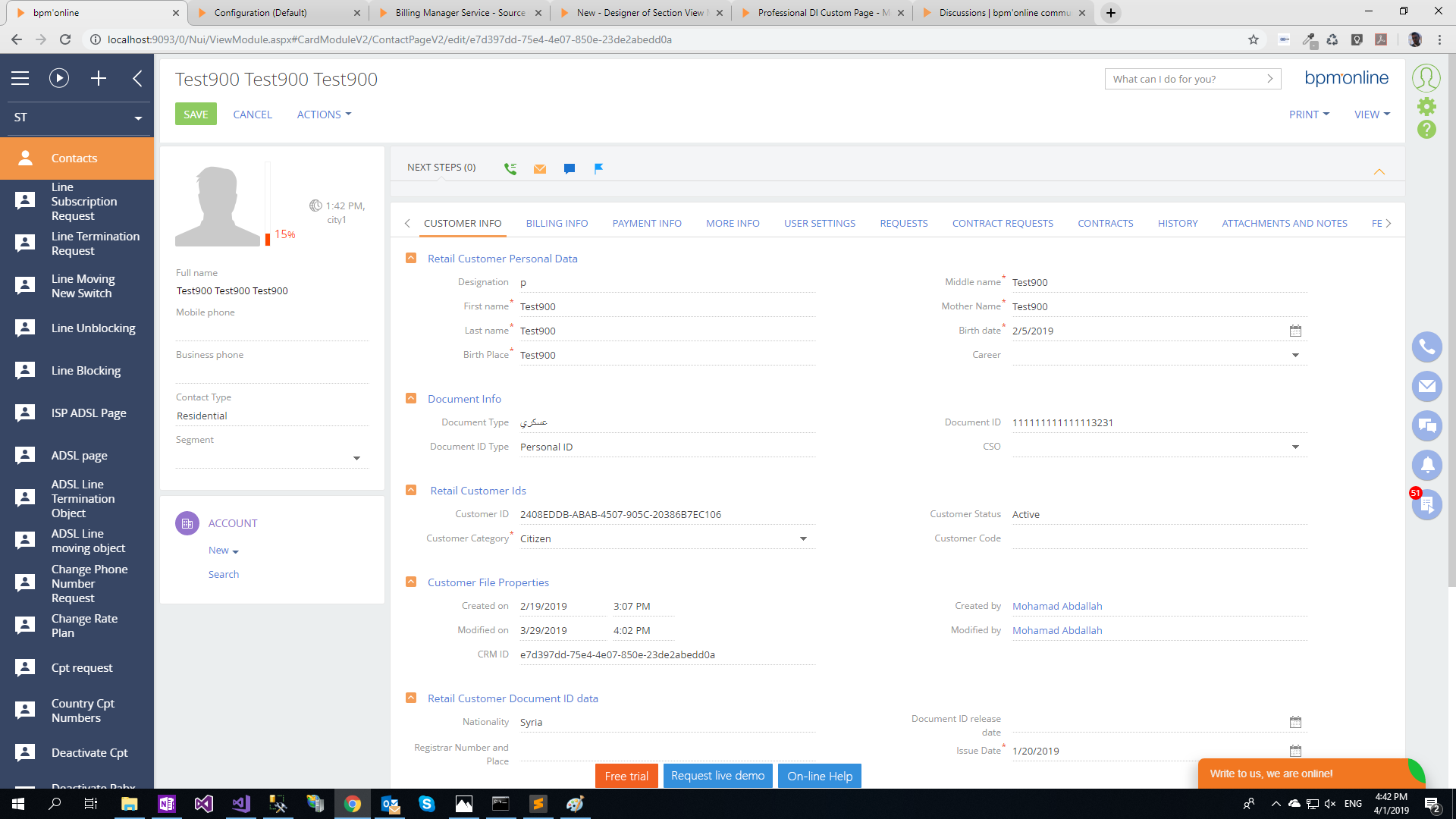
In the contact section page , when I click on a contact record , it opens in combinet mode, what I want is when I click on any contact record in the contact section page in first time, I want to open the contact record in Edit mode not in combined mode.

- Combined mode

yy

- when I refresh the page , it's no longer in combined mode 

Like 0

Like

1 comments

Dear Mohamad,

Unfortunately, this is a hard encoded functionality and the basic application tools do not allow to set it up. We already had similar request and our R&D team will consider developing the functionality that will allow to set up the vertical view in the future application releases. 

Best regards,

Dean

Show all comments
data binding
default permissions
system configuration
sysadminunit
add a workplace
Development

Understanding of core system tables are really important for a successful work with bpm'online on advanced level. Especially, if you work as a system administrator or a developer. The article in the attached file can be useful if you want to gain more knowledge on the topic. 

Like 2

Like

Share

0 comments
Show all comments