Discussion
devlabs
Development

Hello everyone. Starting with the version 6.0.2.3  Clio team has added support for versioning argument when creating new FreedomUI component

clio ui someApplicationName -v usr --package SomePackageName --empty -version 8.0.4

without --version parameter project will be created with last released Creatio version


* clio ui command requires clio workspaces 


Also you can seen examples on YouTube

0 comments
Show all comments
Discussion
developer
Development

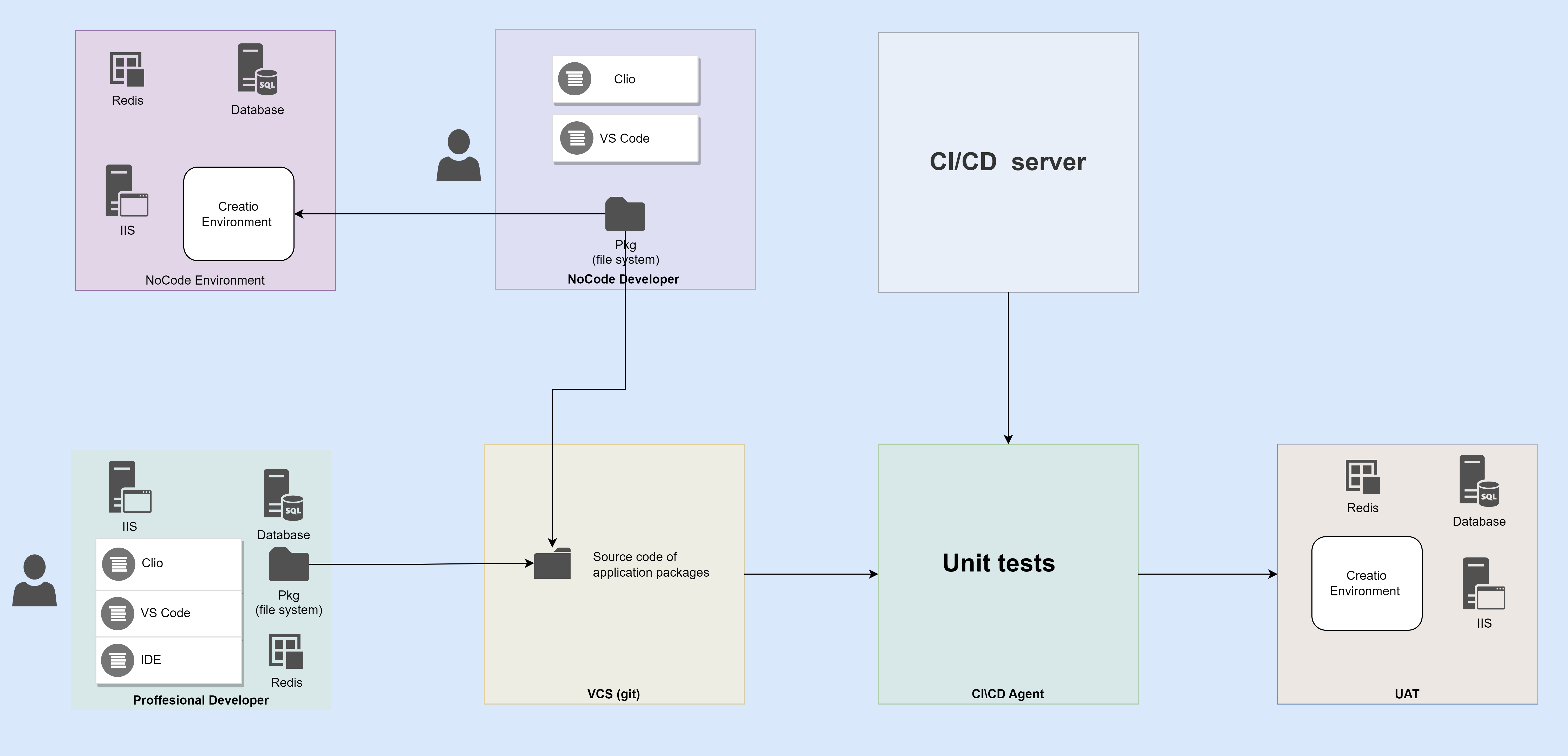
Our vision for team development is powered by Clio Team. In our most recent update, we added new features to Clio's products to create a comprehensive development workflow for the Creatio platform. You can find detailed instructions on how to implement these features by following this link.

File attachments
0 comments
Show all comments
custom_components
angular
componen
FreedomUI
Development

Hi,


I have been working on adding new custom components using the new freedom UI following the below Creatio article.

https://academy.creatio.com/docs/developer/front_end_development_freedom_ui/remote_module/implement_a_remote_module/overview


After doing some additional research I was able to add some custom components successfully. But I'm kind of stuck on where I need to pass the data from Creatio's side to that specific angular component. Please refer to the below screenshots of my code snippets and if anyone has any idea on what I'm missing can you guide me or provide some resources to get more idea on this?


Below is the "card.component.html" file:


                    Free Image
                
                
                    Free Image


                {{val}}
                {{val}}
            
            
                Free Image


 As in the above, from using ngFor I'm adding cards based on the data which are coming from the "valuelist". Below is the example of the "card.component.ts" file:


import { Component, EventEmitter, Input, OnInit, Output, ViewEncapsulation } from '@angular/core';
import { CrtInput, CrtOutput,CrtInterfaceDesignerItem, CrtViewElement } from '@creatio-devkit/common';


@Component({
  selector: 'mlcgd-card',
  templateUrl: './card.component.html',
  styleUrls: ['./card.component.scss'],
  //encapsulation: ViewEncapsulation.ShadowDom
})

/* Add the CrtViewElement decorator to the Textpromt component. */
@CrtViewElement({
  selector: 'mlcgd-card',
  type: 'mlcgd.Card'
})

/* Add the CrtViewElement decorator to the InputComponent component. */
@CrtInterfaceDesignerItem({
  /* Manage the element layout in the library of the Freedom UI Designer. */
  toolbarConfig: {
    caption: 'Card View',
    name: 'CardView',
    /* The path to the component image. */
    icon: require('!!raw-loader?{esModule:false}!./icon.svg'),
    defaultPropertyValues: {
      label: 'Card View'
    }
  }
})

export class CardComponent {

  valuelist:string[] = [];

  constructor() {}

  @Input()
  @CrtInput()
  /* ...............The input value. */
  public value: string = 'Lakindu, Chinthana, Deshan';

  @Output()
  @CrtOutput()
  /* ................Track input value changes. */
  public valueChange = new EventEmitter();

  ngOnInit(): void {
    this.valuelist = this.value.split(',')
  }
}

As you can see in the above code snippet I have a string called "value" and I have hardcoded 3 values for that. What I need to achieve is without hardcoding the data I need to get those data from the Creatio's end like from a field. So to do that I need to modify the code which is gonna add to the viewconfig array in the client schema. Please refer to the below Code snippet. And I need help with modifying it accordingly to pass the data from Creatio to the component.


{
				"operation": "insert",
				"name": "Card_hs3upn6",
				"values": {
					"type": "mlcgd.Card",
					"label": "Card View",
					"value": "$MLCGDName"
				},
				"parentName": "FlexContainer_08awxs2",
				"propertyName": "items",
				"index": 0
			}

Kind Regards,

Lakindu

Like 4

Like

5 comments

Hello,

You can find an example of working with the field value in these articles.

https://academy.creatio.com/docs/developer/front_end_development_freedo…

https://academy.creatio.com/docs/developer/front_end_development_freedo…

They described information on how to create a validator/converter for the value in a field.

Hello,


Thanks for sharing this but I'm afraid this might not be the one that I'm looking for. Anyways do you have anything related to dashboards? Like adding a new dashboard element using a remote module?


I was able to add some components there but for the moment I am kind of stuck at passing the data to the created component using the remote module.

Unfortunately, no, we don't have such examples.

To be honest, the remote module is quite a fresh feature, which means that currently, it doesn't have much logic. If possible, it would be better to use other methods to add your business logic.

Lakindu Yasomith,

Maybe this article can help you:

https://academy.creatio.com/docs/developer/front_end_development_freedo…


If not, please let us know. Maybe you can describe your case in more detail for support@creatio.com.

Lakindu Yasomith,

Hi,


I'm also working on a custom component and have the same issue.

Did you find a solution to this?


Br,

Robert

Show all comments
developer
Development
Marketing_Creatio
8.0

Hello colleagues,


I'm looking for a certified Creatio developer who can help us develop a Creatio addon to provide specific functionality to the Bulk/Trigger email template editor (mainly the ability to insert a photo taken from a provided URL into a field in some detail connected to the contact to whom the email will be delivered and enable that when clicking on the image, it is redirected to a URL provided in another field of this detail...).


This is a necessary requirement of a potential client of ours, with this solved (knowing that it is possible to solve it, how much it costs and the time it takes), we can win this client ?


Please could someone help us or know who can?


You can write to me at JulioFalcon.Nodos@gmail.com to share details or write me a WhatsApp at +34 623 17 46 59


I am available in the CET time zone, so I live in Spain


Thanks in advance

Like 2

Like

0 comments
Show all comments
8.0
Development
Studio_Creatio

Hi Community,


I am trying to create a new freedom UI section from the application hub. After giving a name "Requests" for the section, the section gets created with the name. But in the backend the code of the object and its associated pages are auto generated in the format "UsrApp_qbm8q4f". 


Is there a way to generate the code as "Usr[SectionName]", every time I create a new section instead of some random auto generated text which is not a developer friendly code?


Regards,

Sourav

Like 3

Like

3 comments

Hello,


There is no possibility to change its code.


We've registered it in our R&D team backlog for consideration and implementation in future application releases. Thank you for helping us to improve our product.

Definitely needed for 8.1 ?

Hi Everyone,


Is this issue sorted? is there a way to stop the random code?


Regards

Deshan

Show all comments
edit page
tabs manipulation
Development
developer
Service_Creatio
8.0

Hi,


is there a way to change to name of the browser tab depending on which page you're in?

Example: You're in a case and want to have the case number displayed in the browser tab name for a better overview.

Like 0

Like

3 comments

Hello,


You can customize only the favicon and the company's name in the browser tab. Detailed instruction can be found in the Add corporate logo Academy article

Unfortunately, there are no ways to customize tabs according to your business task at the moment. The idea to extend the possibility of browser's tab customization is already accepted by our R&D team. 

Hi,

Is this still not doable in the current version? I forced Tab name updated but it kept reverting back to "Creatio"

Hello,

Unfortunately, there is no such option at this time. We've registered it in our R&D team backlog for consideration and implementation in future application releases. It may change in future releases.

Currently, you can only change it to another product name by changing the ProductName system setting.

Thank you for helping us to improve our product.

Show all comments
columns
detail
EditableDetail
#editable list
fields
Development
Sales_Creatio_enterprise_edition
7.18

 Hi community,

I'm trying to disable the columns of an editable detail to make them read only and I have read many articles about it, but I'm still having a problem that I can't fix.


I wrote this code in the GridDetail to disable the fields but I noticed that for some of the columns of the detail is not working.

getCellControlsConfig: function(entitySchemaColumn) {
    if (!entitySchemaColumn) {
        return;
    }
    var columnName = entitySchemaColumn.name;
    var enabled = (entitySchemaColumn.usageType !== this.Terrasoft.EntitySchemaColumnUsageType.None) &&
        !this.Ext.Array.contains(this.systemColumns, columnName);
    var config = {
        itemType: this.Terrasoft.ViewItemType.MODEL_ITEM,
        name: columnName,
        labelConfig: {visible: false},
        caption: entitySchemaColumn.caption,
        enabled: enabled
    };
    if (!this.values.IsEnabled) {
        config.enabled = false;
        //config.labelConfig.enabled = false;
        //this.set("Is"+columnName+"enabled", false);
    }
    if (entitySchemaColumn.dataValueType === this.Terrasoft.DataValueType.LOOKUP) {
        config.showValueAsLink = false;
    }
    if (entitySchemaColumn.dataValueType !== this.Terrasoft.DataValueType.DATE_TIME &&
        entitySchemaColumn.dataValueType !== this.Terrasoft.DataValueType.BOOLEAN) {
        config.focused = {"bindTo": "Is" + columnName + "Focused"};
    }
    console.log(config);
    return config;
},

Debugging I have discovered that the detail adds to the labelConfig the property "enabled" which is binded to an attribute ("isProductenabled").

I tried to force the property writing it in the method and I also tried to set the attribute manually, but it's not working... do you have any idea?


Let me know.

Thanks in advance.


Best regards,

Luca

Like 0

Like

5 comments
Best reply

Luca Tavasanis,

While I was debugging I have noticed that the properties of the labelConfig that enabled some of the fields where added in the method: "applyBusinessRulesForActiveRow: function(id, gridLayoutItems)" and to fix the issue I just added this method in the client module.

You can lock the fields in the editable detail using business rules on the page for the detail, rather than in code. On the page for the detail, add a business rule to make the field not editable. Something like 

Condition: Boolean true = Boolean false (something that is never true)

Then: Make field editable (the condition is never true, so field is never editable)

The business rule will apply to the detail list and the fields will not be editable in the detail list.

Ryan

Hi Ryan,

I'm actually working with the BaseGridDetail so I can't lock it with a business rule... do you have any other idea?


Thanks anyway.

Luca

Luca Tavasanis,

IIRC to do it in code I usually do it like this (but unable to verify if this is correct at the moment)

getCellControlsConfig: function(entitySchemaColumn) {
    // get config from base 
    var config = this.mixins.ConfigurationGridUtilities.getCellControlsConfig.apply(this, arguments);
    var columnName = entitySchemaColumn.name;
				
    // if this is the column I want to disable
    if (columnName === "UsrMyColumn") {
        Ext.apply(config, {
            enabled: false
        });
    }
				
    return config;
}

Hopefully that gets you closer, of course, if you're wanting to disable all, you could just remove the if to check the column it's for.

Ryan

Ryan Farley,

I just tried what you suggested but unfortunately it's not working... it returns an error when I use this.callParent(arguments);.

Thank you anyway.


Luca

Luca Tavasanis,

While I was debugging I have noticed that the properties of the labelConfig that enabled some of the fields where added in the method: "applyBusinessRulesForActiveRow: function(id, gridLayoutItems)" and to fix the issue I just added this method in the client module.

Show all comments
system settings
cache
Creatio
Development
Client-side
Sales_Creatio_enterprise_edition
7.18

Hi community,

I'm trying to read the value of a custom system setting in creatio from the client-side, but I noticed that even if my setting has the flag "Cached" it results undefined when I try to get the value using this code:

var test = Terrasoft.SysSettings.cachedSettings.UsrSysSettingTest;


while when I use the asynchronous way it works fine.

Code for the asynchronous way:

Terrasoft.SysSettings.querySysSettingsItem("UsrSysSettingTest", function(sysSettingTest) { 

       var test = sysSettingTest; //here is defined

}, this);


Do you know why this is happening?


Let me know.

Thanks in advance,

Luca

Like 0

Like

5 comments
Best reply

Hi everyone,

I discovered that the problem with the cached setting was the type of it. To fix the issue I simply had to change the type from Text (500) to Text (250), I tried to do the same in other environments and I had the same result.

Hope it can help.


Best regards,

Luca

Hi Luca,


I was able to reproduce this behavior using the following steps:


1) Create a system setting

2) Don't relogin to the app and execute both commands you've shared in the developer console


As a result synchronous call returns undefined, async call returns value.


You need to relogin to the app to start using the setting value synchronously (if it won't help try flushing Redis).


Best regards,

Oscar

Hi Oscar,

I've actually logged into the app many times, I even closed the browser and flushed Redis, but I still have this issue.


Is there anything else I can do?

Thanks.


Best regards,

Luca

Luca Tavasanis,


Does this issue occur in another browser? In my case cached system setting was fetched properly after relogin and the issue is not in the rights for the setting since you can fetch it asynchronously.


Best regards,

Oscar

Oscar Dylan,

Yes, I have this problem also in other browsers.


Best regards,

Luca

Hi everyone,

I discovered that the problem with the cached setting was the type of it. To fix the issue I simply had to change the type from Text (500) to Text (250), I tried to do the same in other environments and I had the same result.

Hope it can help.


Best regards,

Luca

Show all comments
Development
Business Process
OrderProducts
Opportunity

Hi everyone,

I'm looking for a way to customize the Add order based on opportunity BP.

I added some fields to the 'product in opportunity' object, like: discount amount, discount %, semester and schoolyear. Added semester and schoolyear to the product in order object too (discount amount, discount % fields are already exist there).

Now, I want these values to be copied when creating an order from an opp, just like the other fields of the product in order do.

I found this process does the order and creates the products  

https://beable.creatio.com/0/Nui/ViewModule.aspx?vm=SchemaDesigner#process/be82d4e0-4638-4058-975d-050a3dcff8b5

but don't know how to extend the script there (the script that adds the products in on the Adding opportunity products to order  element. 

Is there a way to get to the function that are being executed in that script?

Adding the element's script here.

Thanks in advance,

Chani

if (ProductItems.ToString() != "" || IsCopyAllProduct) {
	var copyProductsOperation = Factories.ClassFactory.Get<
		Terrasoft.Configuration.CopyOrderProductsFromOpportunityOperation>(
		new Factories.ConstructorArgument("userConnection", UserConnection));
	copyProductsOperation.Execute(new Terrasoft.Configuration
		.CopyOrderProductsFromOpportunityOperation
		.CopyOrderProductsArgs {
			OpportunityId = CurrentOpportunity,
			OrderId = NewOrder,
			IsCopyAllProducts = IsCopyAllProduct,
			ProductItems = ProductItems
	});
}
return true;


Like 0

Like

5 comments

Hi Chani,


You can create your own process and modify the script-task in the way you need or you can copy products from the opportunity to the created order using the "Add data" process element and the sub-process that will receive a collection of OpportunityProduct records.


Now step-by-step:


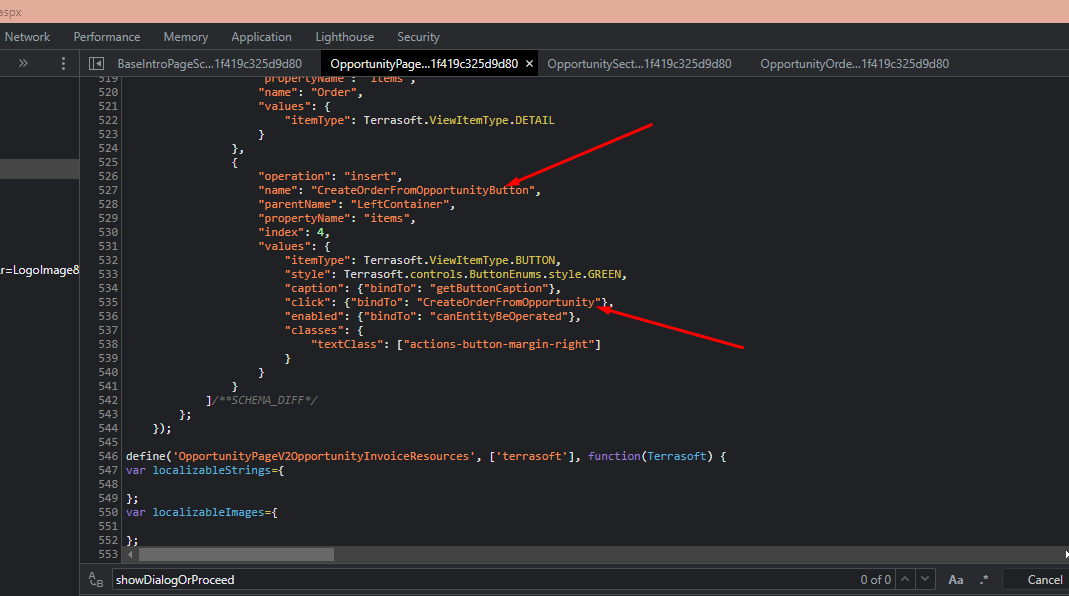
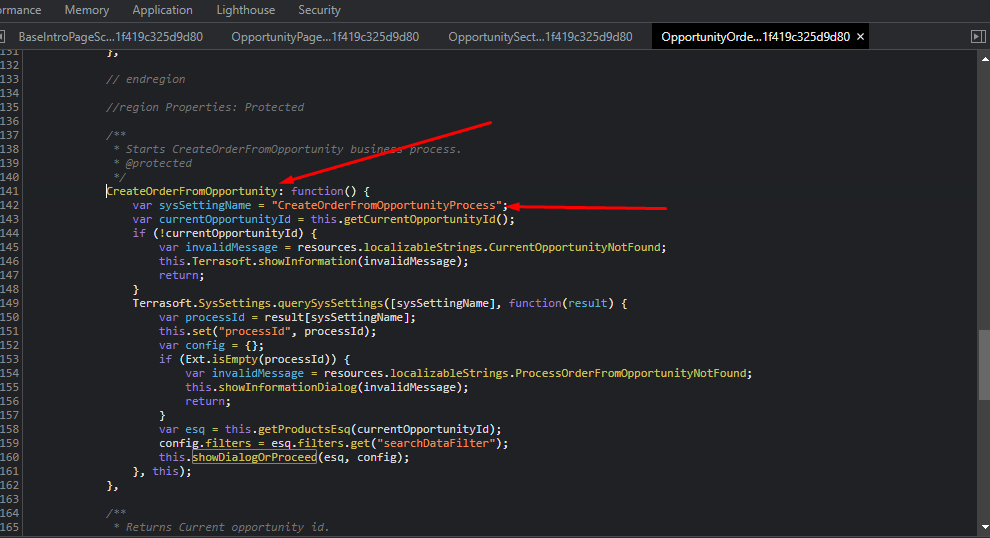
1) In the OpportunityOrderUtilities schema there is the CreateOrderFromOpportunity method that is called upon clicking the "New order" button on the opportunity page:


this is the code of the button:

and here is the method itself:

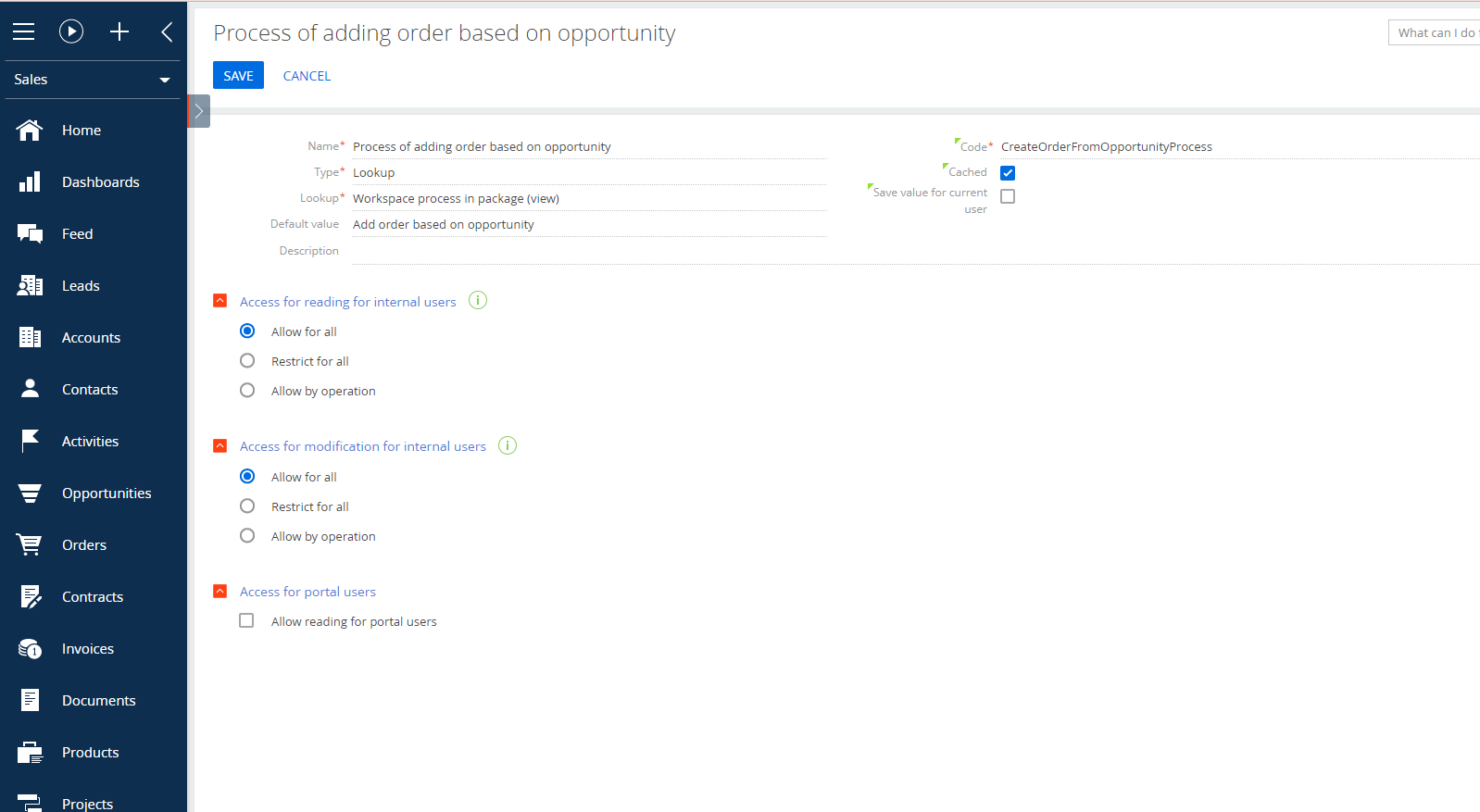
As we can see here the method reads the value for the system setting with "CreateOrderFromOpportunityProcess" code. By default the value for this system setting is "Add order based on opportunity":

So we can place any process with the simple start signal there.


2) You can either create your own script task in the newly created process (use the code from the original OOB process as an example or paste it and extend in the new process). Or in the new process you can use the collection of records read from the OpportunityProduct object and if the number of records is greater than 1 you can pass this collection to the sub-process that will add data to the created order (the object is OrderProduct).


So you need to select one of these two options: either extend the script-task or use the collection of records and a sub-process.


Best regards,

Oscar

Oscar Dylan,

Thank you.

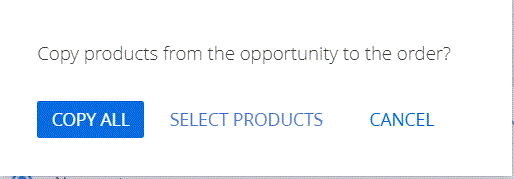
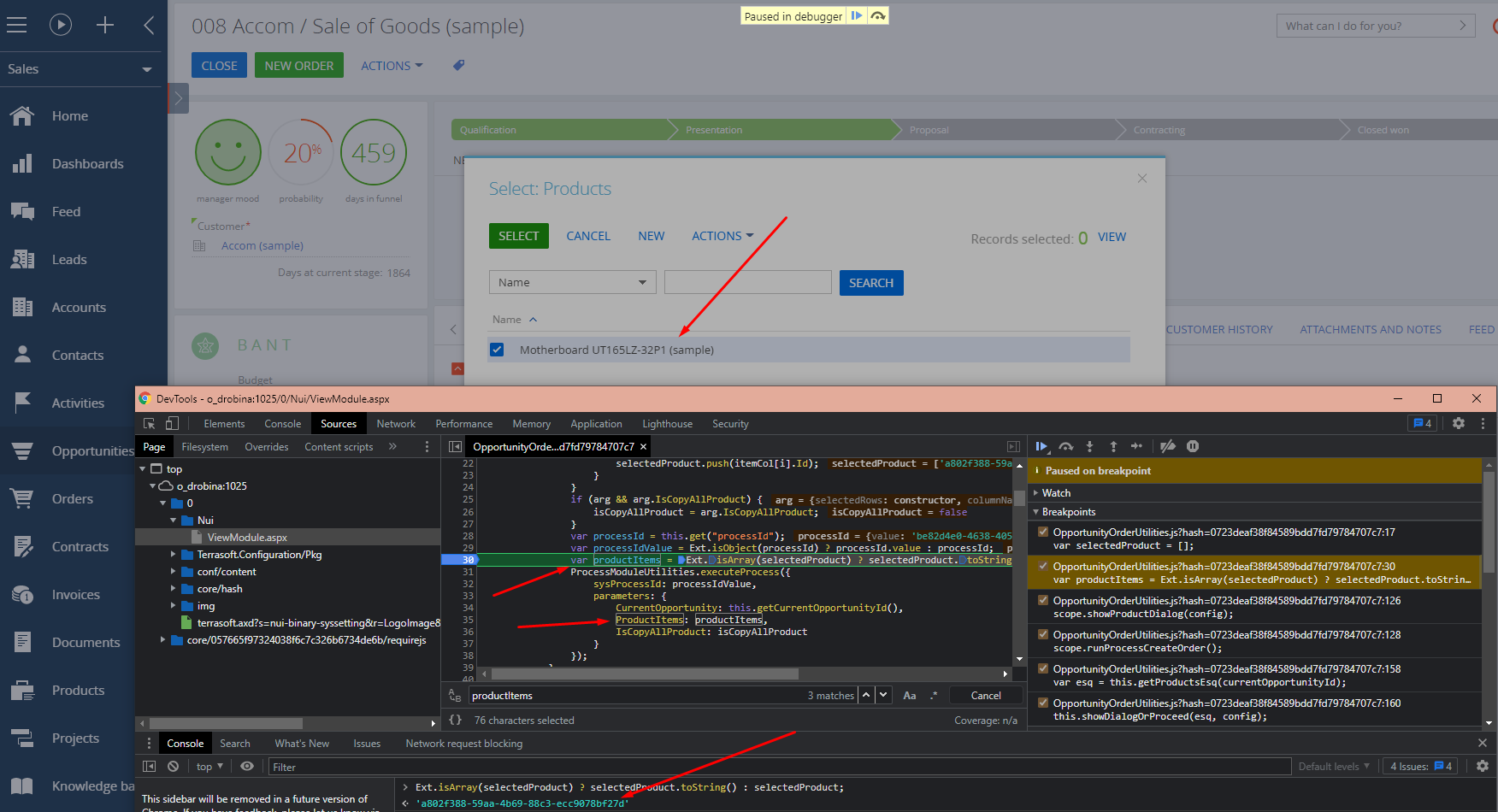
But I do want to use the option of selecting products (see pic), how can I have that and get the products list to use in the add data element?

I tried looking in the  Add order based on opportunity BP, but I only see a text parameter for products list.


Chani Karel,


This is a part of the showProductDialog method of the same OpportunityOrderUtilities module. This will be called regardless of if the process is changed or not. Once products are selected, they are passed to the runProcessCreateOrder method. The list of selected products will be passed as an array of ID's to the process:


Best regards,

Oscar

Oscar Dylan,

Thanks

Chani Karel,

Hello Chani i have the same task can you please share with us the solution that you developed for this task. Thank you 

Show all comments
Development
Studio_Creatio
7.18

I configured my local Creatio environment to work in file system mode and setup Visual Studio 2019 as described in Creatio documentation.

I Created a package from Creatio UI setting to be compiled in a separate assembly.

I see that in Pck folder the Package folder has been created with a visual studio project file (csproj file) in "Files" package subfolder.

I created a Business Process in Creatio with a script task and I see that the corresponding "cs" file is created in "Autogenerated/Src" package subfolder and it appears on visual studio.

If I update that cs file, changing something in the script task method the changes are not replicate to Creatio.

I used the "Update Packages from file system" action but the "No changes found" popup appears. I tried compiling the project in Visual Studio, using the external tools to run "WorkspaceConsole" as described in Creatio Documentation but nothing goes from file system to Creatio.. actually I see the Creatio script task version to overwrite my file system file. 

Am I doing something wrong? How can I correctly work with my custom package in file system mode and let my changes to be seen from Creatio?

Thanks

Like 0

Like

1 comments

Dear Massimiliano,


Thank you for your question!


We have checked this information with our developers and they have confirmed that there is no ability of editing a Business Process in a file system mode.


Hope this clarifies!


Thank you!


Danyil

Show all comments