Email
Outlook
MS Exchange
Activities
Sales_Creatio_enterprise_edition
8.0

Hi Community,

When calendar sync is enabled, all of the users' Outlook meetings and appointments flow into the Creatio Task list. To prevent clutter and ensure high user adoption, we need to create a Dynamic Folder that filters out personal Outlook blocks and only shows native CRM customer engagements.

The Goal: Segregate Activity records that originated in MS Exchange from those created natively in Creatio.

What we've tried: We looked for OOTB metadata to filter by but hit a wall:

  1. The GlobalActivityID column remains NULL even after a successful sync.
  2. The CreatedInStoreId in the SysSyncMetaData table is always stamped with the generic CRM local store GUID for ExchangeAppointments, making it unreliable for tracking the origin.

we want to know: Is there an Out-of-the-Box configuration, system setting, or recommended best practice to filter synced activities natively?


Regards,
Bala.

Like 2

Like

3 comments

Greetings!

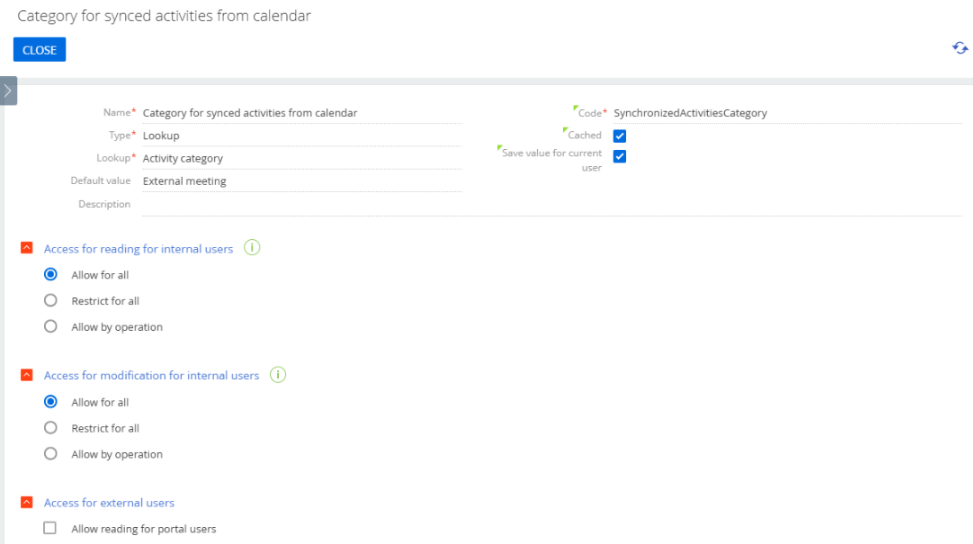
Starting from version 8.2.2, a system setting SynchronizedActivitiesCategory was created. This system setting allows defining a category for the activities that are synchronised from an external source.

You should create the system setting with the code 'SynchronizedActivitiesCategory'. After that, create a separate activity category, e.g., Outlook activities, or choose the existing one and define this category in the system settings.
 
After the above steps are done, all manually created activities will have the default category (unless you define a different one), all automatically synchronised activities will have the category specified by default in this system setting.

This option is available for Office365 / Exchange calendars only. It will not work for Google calendars.

Best Regards,
Creatio Support Team. 


Nicholas Horbenko,

thank you - very helpful to know! 

Are you aware of any coming updates to the system settings reference in the academy? For example, as of now I'm unable to find any mention of this functionality in the in the Release Notes of 8.2.2, or any other Academy Article

David Örnek,

Thank you for your feedback.

This feature is planned to be described in detail within our Academy resources. 
At the moment, the feature is still in beta, so it has not yet been officially documented.

Show all comments
Outlook

Hi,

We’re looking for a way to sync emails selectively to Creatio. I know we can set up folders and sync only specific ones, but that requires users to manually drag emails, which adds an extra step.

Do you know of a better solution or an add-on that could help?

Thanks in advance,
Chani

Like 0

Like

2 comments

Using a specific folder is the only option. However, you don't need to only rely on the user to copy emails there. It's possible to setup mailbox rules to do that automatically as well.

Ryan

Thank you Ryan.

Is there any plugin that we could purchase that would smooth the process?

Show all comments
calendar integration
Outlook
invitations

Hi,


I’m working on syncing the Creatio calendar with Outlook. When an event is created in Outlook, Teams meeting links and email invites are sent automatically. In Creatio, this requires manually clicking the "Send Invitations" button (see screenshot).


Is it possible to trigger the "Send Invitations" button via a business process? I’d like invites to go out automatically when a business process creates an event in Creatio.


Any guidance or solutions would be greatly appreciated!


Like 0

Like

2 comments

Hello!

Thank you for sharing your question about automating the "Send Invitations" functionality in Creatio.
 

Currently, the out-of-the-box functionality in Creatio does not provide a direct way to trigger the "Send Invitations" action via a business process. 
However, this can be achieved using development tools by implementing custom logic.
 

Kateryna Naboka,

Thanks Kateryna!

Show all comments
Outlook
Studio_Creatio
8.0

Hello Everyone, 

Is there Steps how to Configure emails like xyz@outlook.com. This email is personal email and does not belong to any organization but want to connect it in Creatio. I did revied the guides but there is nothing related this "@outlook.com". 
i have already Create the app pasword but still not Configuring. Please find attach some of the Screenshots.

Like 0

Like

3 comments

Hi,
 

The issue is that Outlook no longer supports Basic authorization.
 

For more details, please refer to:
Deprecation of Basic Authentication in Exchange Online.
 

Therefore, without using the Azure portal, it is not possible to add an Outlook mailbox using a password or app password.
 

It is necessary to register an OAuth 2.0 application as outlined in this article:
Set Up OAuth Authentication for MS Office 365.
 

Thank you for reaching out!
 

Best regards,
Pavlo

Hi Pavlo,


If it's not possible with password and app password. How we'll configure individuals outlook email in Creatio?

Hello!
 

Unfortunately, this is not possible.
Best regards,
Kate

Show all comments
calendar
Outlook
8.0

Hi Academy,


We would like to understand if it is possible to distinguish between activities imported from Outlook (calendar synchronization) in Creatio, from those activities that are opened directly in Creatio. Can you help us?


Thank you in advance!


Like 0

Like

1 comments

Hi,


No, there are no clear markers indicating the difference between imported activities from Outlook because it involves two-way synchronization logic, and the same activity may later be resynchronized, for example, by another user or when the activity changes on the Outlook side.

These activities are always identical.

We will inform the development team about this need and assess the possibility of implementing a mechanism that would allow distinguishing them.


Thank you for reaching out!

Show all comments
Outlook

Hi everyone,


is it possible, to set up the outlook calendar synchronization only from the Creatio platform? We would to add tasks in the creatio platform, but we don't want to see the other outlook tasks in and meetings in creatio, that are in our outlook calendar. 


Thanks, Timea

Like 2

Like

8 comments

Hello!


Unfortunatelly, this feature has been removed in version 8.0.2. In newer versions the new mechanism has been implemented. Now seamless integration is available in Creatio calendar instead. 


The one-side synchronization feature might be returning in future. Please stay tuned for updates!


Hanna Skalko,

Hi,

The one-way calendar sync from Creatio to Outlook is a feature we would also really like to use. Can you please prioritize it and let us know when this is available? Thank you!

Esther M,

Hello!


The Creatio development team has already been informed about this idea. 


Thank you for being an active part of the Creatio community and helping us to improve our products!

Hi Hanna,

Any news about this feature. 


We want choose if an activity on calendar will sync or not with outllok calendar. Is there any parameter to make a specific recod not to sync.


Thanks!

Hello,


This feature is currently acknowledged by our R&D team, but no estimates for its release are available at the moment.

Hi,


+1 for this idea

The sincronization of calendar really needs some more options

It is one area where creatio has taken a step back


Rgds

Luis

Hi, 

+1

I agree, this is something we are struggling for our clients' sales team and our own sales team. The synchronisation possibilities are limited and not. 

(Synchronising everything, upon synchronisation in one direction we have "meetings" then in the other its "todos", etc...)

We need more options and flexibility with this. For daily work of users, current options are not optimal.

Damein

+1
It'd be really helpful to have the flexibility to choose which activities get synced from Creatio to Outlook rather than all or nothing. In 7.18, there was the option to sync activities based on folders in Creatio which was of great use.

Show all comments

We would like to remove the synchronization of our outlook calendars and instead manually add items that need to be logged through Creatio.   We have toggled off the auto synchronization, but would to confirm if/how we need to fully remove the sync, or does toggling the auto Synch off, remove the synchronization all together? Also, is it possible to bulk remove any previously synced activities created from the calendar sync?

Like 0

Like

1 comments

Hello Marianne,


It Should be enough to toggle off synchronization, To remove previous e-mails, please create a lookup based on the activity object, then it can be filtered by type "email"  and files can be removed then

Show all comments
Outlook
outlook connector
Email
Service_Creatio
7.17

Is this add-on no longer available, no longer functioning? We used this add-on from the marketplace called "SmartCloud Connect for bpm'online" for the last few years. It was free and it was great as it functioned to send 1 specific email to Creatio from a user's outlook mailbox instead of syncing all emails. Now we started seeing this error just this week:


I see there are 2 other outlook add-ons that are paid subscriptions, does anyone use those and enjoy them?


Our concerns with syncing all emails using Creatio's standard email sync feature is that unwanted emails will get synced and be visible to other users, for example a manager discussing pay or status of an employee in an email and other users seeing that once it syncs to Creatio. Is Creatio working on any enhancements so using their standard outlook sync service so that users can have more specific control on which emails they sync?

Like 0

Like

2 comments

Hi, Mitch


This add-on was removed from Creatio Marketplace since it is no longer supported by the developer.


We indeed published two new Outlook add-ons in the meantime. If you are interested in their functionality, you can request a live demo.

Ivan Leontiev,

What are the two new Outlook add-ons? Just to confirm, are you referring to the Kewl Outlook Connector and bglobal Outlook add-on?

Show all comments
7.17
Outlook
IPM.Activity
IMP.Activity

Hello Creatio !


We've notice a bug in 7.17 with Creatio Outlook Connector. 

Apparently when you add Office 365 mailbox account in Creatio and add a Journal entry in Outlook - Creatio thinks that this is an email, and pull it to CRM as an email.

Its looks like this (see attachment).


I've tried to reach Creatio support with this, they told me thats an Outlook problem that Creatio pulls journal entry as an email. Funny it is.


Question is: will this gonna be fixed or in order to use Creatio Outlook connector we must dont use Journal in Outlook?


File attachments
Like 0

Like

0 comments
Show all comments
Outlook
Owner
synchronization

Hi,

Is there any workaround to allow all users sync contacts to Outlook, despite the owner of the record?

Like 0

Like

1 comments

Dear Kavian,


As for now, there is no such functionality. R&D team responsible for this functionality is already working on implementing it in the future releases.


Best regards,

Angela

Show all comments