


Hi all,
I am running a process to deserialise a JSON string from a webhook and pass the results (an email address and a state) into a sub process.
The deserialisation step works as I can see the results which have been passed into the collection of records parameter in the process log (only 1 in this sample):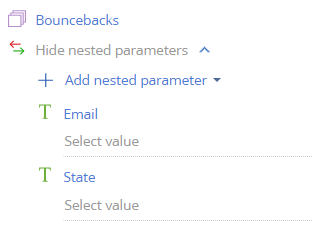
Parent process
                {
            "Parameter": "Bouncebacks",
            "Value": {
                "Before execution": [
                    {
                        "email": "billy.bob@river.com",
                        "__state__": "bounced"
                    }
                ],
                "After execution": [
                    {
                        "email": "billy.bob@river.com",
                        "__state__": "bounced"
                    }
                ]
            }
        }
I pass this collection into a sub-process but the values don't appear to pass in correctly:
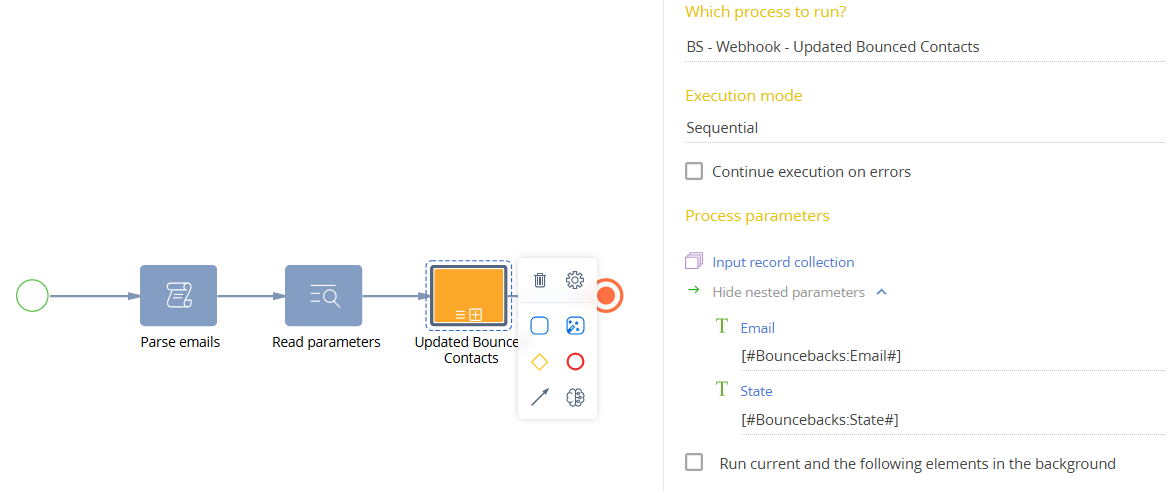
//Sub process
        "Process parameters": [
        {
            "Parameter": "Email",
            "Value": {
                "Before execution": null,
                "After execution": null
            }
        },
        {
            "Parameter": "State",
            "Value": {
                "Before execution": null,
                "After execution": null
            }
        }
    ]
I cannot figure out why not. Any ideas?
Like

Hi Cris, you can pass parameters to the process and execute it directly from the script element where you're parsing JSON like this:
UserConnection userConnection = Get<UserConnection>("UserConnection");
IProcessEngine processEngine = userConnection.IProcessEngine;
IProcessExecutor processExecutor = processEngine.ProcessExecutor;
var nameValues = new Dictionary<string, string>();
nameValues["Parameter1"] = someValue1.ToString();
nameValues["Parameter2"] = someValue2.ToString();
processExecutor.Execute("UsrProcessName", nameValues);
this line
processExecutor.Execute("UsrProcessName", nameValues);will always execute the latest active version of the process. So if you create new version of the UsrProcessName it will be run without need to update the script. Naturally this code should be included into your original cycle where the parsing itself is performed.
Hello.
Passing parameter values of collection types is not supported for compiled process schemas.
Therefore, to resolve this, it is recommended to create a new process schema.
The diagram contains task elements that include source code, so the code logic should be moved into a source-code schema. Then, in the business process schema, create an instance of that class and call its methods.
Best regards,
Antonii.
Hi Cris, you can pass parameters to the process and execute it directly from the script element where you're parsing JSON like this:
UserConnection userConnection = Get<UserConnection>("UserConnection");
IProcessEngine processEngine = userConnection.IProcessEngine;
IProcessExecutor processExecutor = processEngine.ProcessExecutor;
var nameValues = new Dictionary<string, string>();
nameValues["Parameter1"] = someValue1.ToString();
nameValues["Parameter2"] = someValue2.ToString();
processExecutor.Execute("UsrProcessName", nameValues);
this line
processExecutor.Execute("UsrProcessName", nameValues);will always execute the latest active version of the process. So if you create new version of the UsrProcessName it will be run without need to update the script. Naturally this code should be included into your original cycle where the parsing itself is performed.