

Full name not populating from contacts created from landing page

Hello,
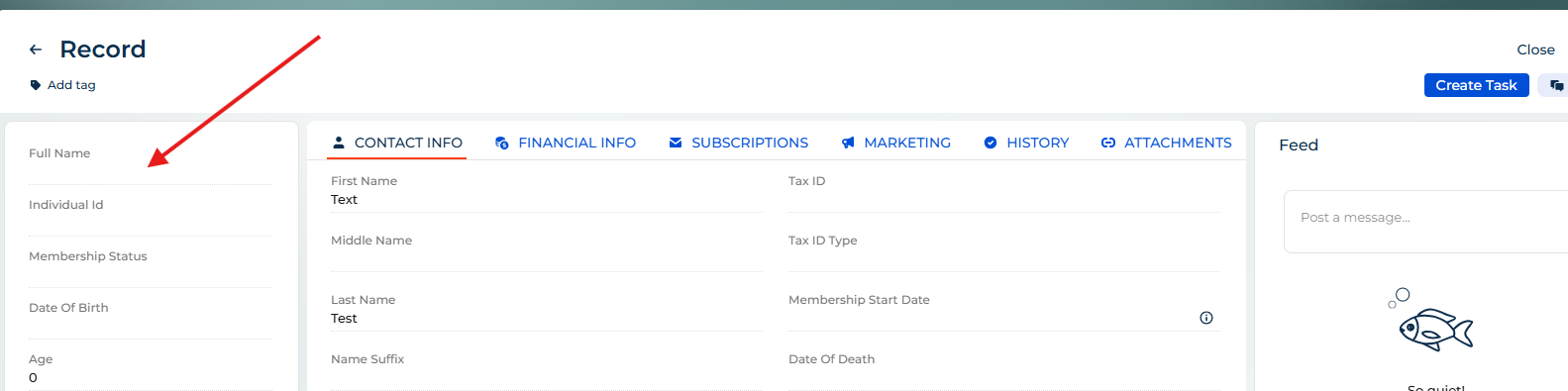
When contacts are created through a landing page the "full name" is not populating. First and last name are filled in the landing page, but the automatic concatenation is not working for full name. Thanks!
Like
Hello,
Please check the mapping fields configuration your landing page settings. Ensure that the "Full name" field is added in the landing page. If the mapping is set for first and last name only, the "Full name" will not be populated automatically, so you need to make sure that the correct field is added.

Hello Matt,
I tried the same scenario by creating a contact through a landing page with First name and Last name populated, and the Full name was generated correctly in my case.
So this may not be a standard platform limitation. It could be specific to your environment/configuration. I would suggest checking:
1.Whether the landing page fields are mapped to the standard first name and last name fields.
2.Whether there are any custom processes, object events, or integrations overriding the Contact Full name.
3.Whether the issue happens only for landing page contacts or also when contacts are created manually.
Prabhath Surya,
It works as it should when records are created manually. The first and last name fields are populating. If there are any edits on the page the full name is populating as it should automatically. The landing page is just using basic "out of the box" features. I am using Version 8.3.2.