

How to manage 1 CONTACT with multiple EMAIL Addresses ?

Hi everyone,
I hope to hear from many of you!
We are currently using Creatio 8.2.3 and are preparing to migrate to version 8.3.4. While testing the new features, I noticed that some parts of the architecture have changed and that certain basic features are no longer available in Freedom UI.
Creatio 8.2.3 and 8.3.4
- You cannot add an audience from the Leads section to a bulk email in Freedom UI.
- However, you can add the audience from the Leads section in Classic UI, then edit and send the bulk email from Freedom UI.
- In Classic UI, you can specify the audience source, such as Contact, Lead, Account, or another configured object.
Creatio 10.x
- Has support for using the Leads section as an audience source been removed entirely?
- Creatio 10.x appears to support only Contact filters when building a bulk email audience.
- It no longer seems possible to use Leads as the audience source directly from the Bulk Email module.
- We can only use Lead-related criteria to filter Contacts—for example, “All Contacts that have a related Lead record.”
- The trial environment I set up does not appear to include Classic UI.
Our B2B use case
We operate in a B2B model, where a single Contact can have multiple email addresses, such as:
- business email;
- personal email;
- admin@ address;
- info@ address;
- invoicing email.
We currently use the Leads section to manage these addresses:
1 Lead = 1 email address associated with a Contact
As a result, one Contact can be associated with multiple Leads and, therefore, multiple email addresses.
We have also added qualifiers—checkbox fields—to each Lead, such as:
- Promotions;
- Newsletter;
- Events;
- Personal communications;
- Invoices.
These qualifiers let us determine which types of communications can be sent to each specific email address.
When creating a bulk email, we currently:
- build the audience from the Leads section in Classic UI;
- switch to Freedom UI;
- design and send the message from Freedom UI.
Questions
- If Freedom UI only supports Contact-based audiences, how can we determine which of a Contact’s multiple email addresses should be used for a specific bulk email?
- Are there plans to support Leads—or custom objects—as bulk email audience sources in Freedom UI?
- Are there plans to support multiple selectable email addresses for a single Contact when building a bulk email audience?
Are we the only Creatio customer with several email addresses associated with a single Contact?
Like

The only option for adding a non-contact audience to a bulk email is to continue to use the classic bulk email section. The Freedom UI version does not support anything but contact sources which is extremely disappointing. I have several Creatio customers that will remain using the classic bulk email section indefinitely just for this reason.
This makes so many scenarios no longer possible since you cannot add a non-contact audience. For example, emailing event participants about an event - no longer possible! Sure, you can build a filter of contacts that are an event participant, but you have no way to reference the event without adding the participant itself as the audience. Not to mention using custom sections as an audience source. In any scenario, you can no longer reference any data outside of the contact. So much functionality lost!
For now, the only option is to use the classic section instead of the new Freedom UI section. I do hope that changes in the future, however, when I asked support if the functionality was planned for Freedom UI they told me it currently is not 👎🏻

Hello,
In the 10x version, it seems it's possible to have a new subscription model that provides multiple emails for the same contact. I haven't tested this feature: What's New in Creatio 10x | Creatio AI Summer - YouTube
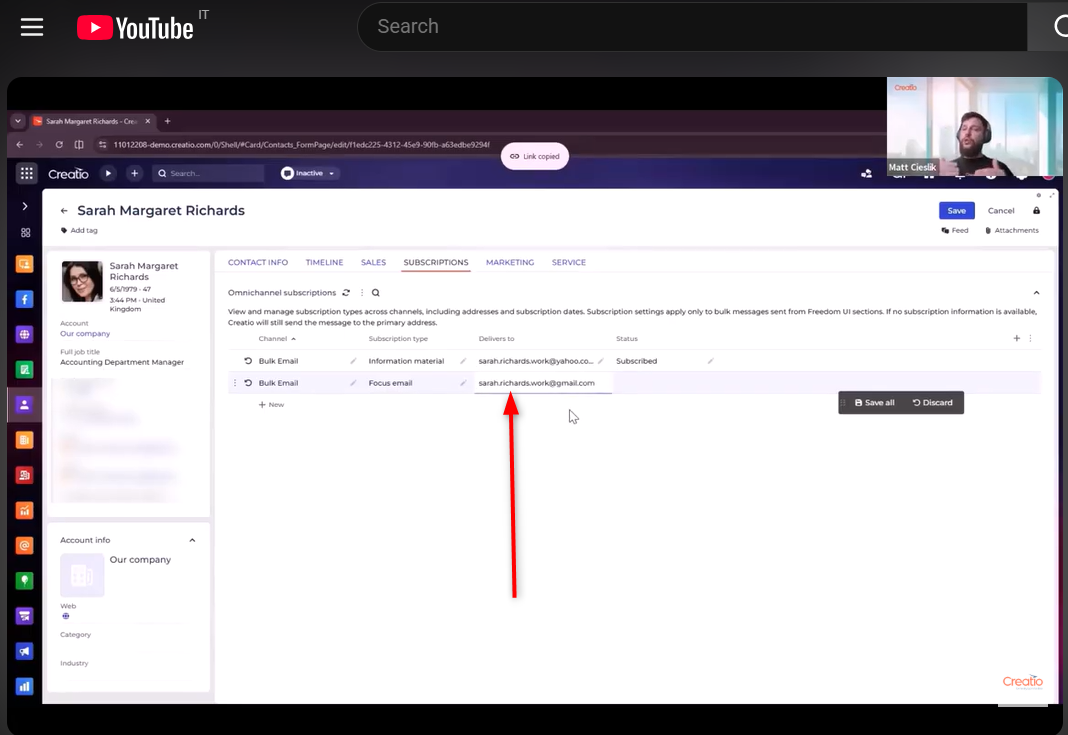

More clarification on the reasoning from Creatio is more than welcome, this is quite a setback. A lot of good stuff has been brought for marketing lately, but this makes use of segmentation more cumbersome. Is it because of the arrival of the new "Segments" app in Creatio 10.0.0 ?
Stefano Bassoli writes:
Hello,
In the 10x version, it seems it's possible to have a new subscription model that provides multiple emails for the same contact. I haven't tested this feature: What's New in Creatio 10x | Creatio AI Summer - YouTube
Interesting, I wonder how that works with the new unsubscribe page accessible for the contact - is it able to handle multiple email adresses for the contact or only the main one ?
Ryan Farley,
We have just come across this issue. Does seem very short sighted as it has meant we have to create contact records for all leads before adding them to an email campaign. Glad others have picked this up, so hopefully they resolve it, because our workaround is far from ideal.