


Hi all,
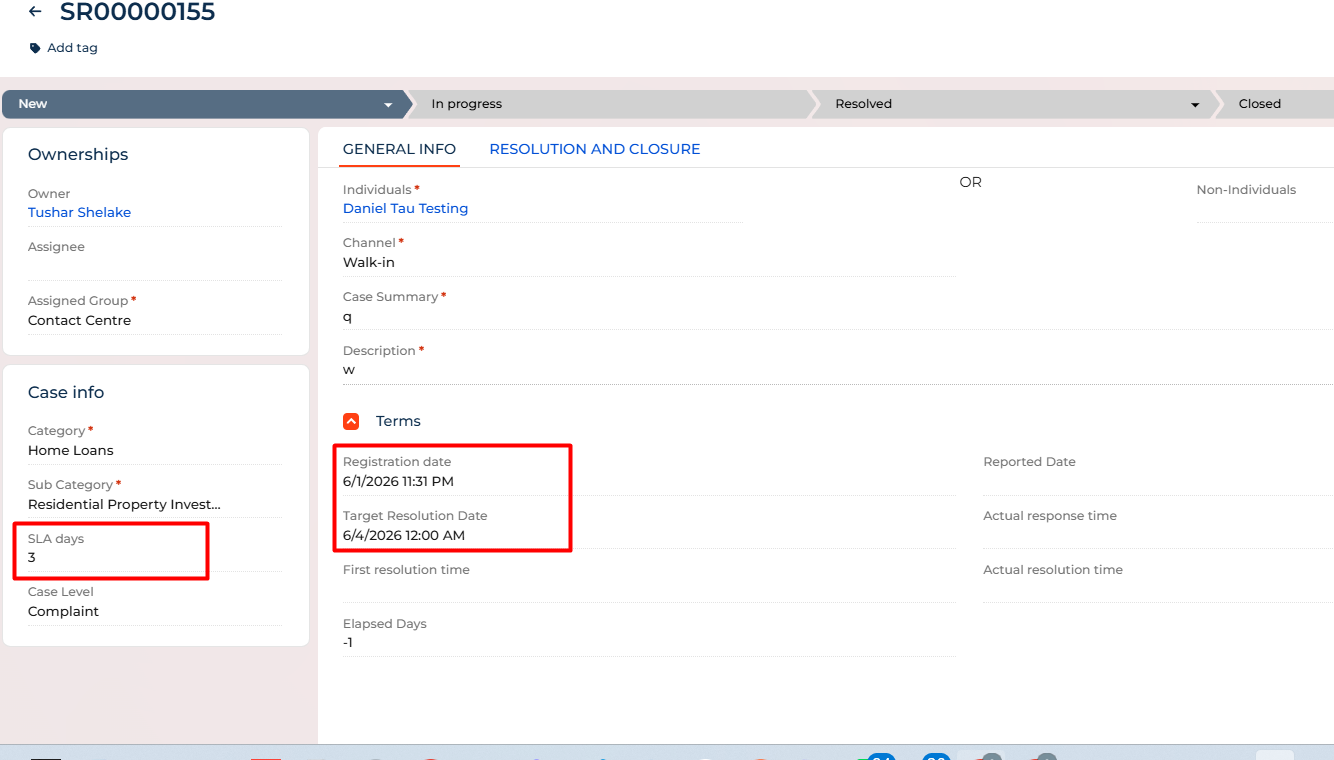
On case page we have - Target resolution date (DateTime), Registration date(DateTime) and SLA days (integer) fields. Formula for Target Resolution date = Registration Date + SLA days.
But the target resolution date is correctly showing the date part but not the time part for time part it is always showing the 12:00 AM. I have tried using BP, writing script task, writing source code, but nothing is working. Can anyone please help.
 Many thanks.
Like
Hello,
We reviewed the described behavior and found that the value is most likely being converted to a Date type at some point in the process. When this occurs, the time portion is removed, and the value is saved as 12:00 AM (midnight).
To preserve both the date and time, we recommend using a DateTime expression and adding the required number of days with the AddDays method instead of using date-only arithmetic.
Please try the following expression: [#Registration date#].AddDays(Convert.ToDouble([#SLA days#]))
This approach adds the SLA days to the original DateTime value while preserving the time component.