

What's the best architectural approach to building a package hierarchy for a Creatio project?

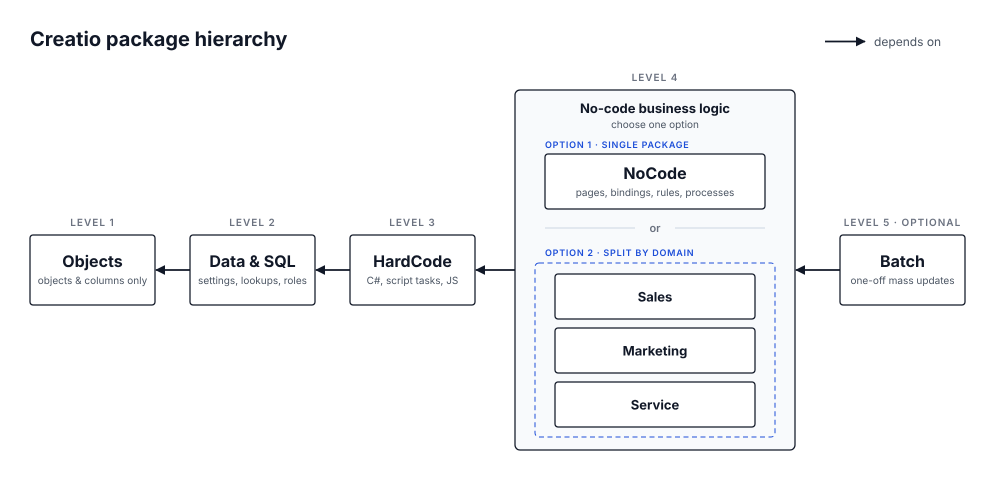
One of my current projects has a complex and tangled package hierarchy. That made me ask myself: if I were designing a new application on the platform from scratch, which approach would I choose?
I'm a big fan of DDD, so I started thinking about how to split schemas so that each package represents an architectural layer of the application, while still keeping development convenient for both no-code and hard-code developers.
A simple split by schema type doesn't work: objects, pages and business processes can depend on each other cyclically. So some schemas have to be split or partially duplicated across packages to keep the hierarchy acyclic. Source code could, of course, be made fully independent of everything else, but that doesn't guarantee stability: code often depends on system settings and populated lookups. Isolating it completely at the very bottom of the hierarchy didn't seem like the best idea either.
I won't walk you through my whole thought process, so let's get straight to the point. The architecture below is my personal preference. I don't claim it's the only right answer (otherwise there would be no question mark in the title). It's the result of my reasoning, my experience, and the pain I'd like to minimize when a release with critical bugs has to be rolled back, without breaking the overall CI/CD approach.
The diagram shows the overall structure. Below I go through it level by level, top to bottom, and explain each decision.
Level 1 — Data model
The package that all packages below depend on. It contains only objects and their columns, and nothing else: no filters, no default values, no required flags.
Why:
• Rollback. If a critical bug reaches production but users have already filled in new columns or tables, we can roll back the business logic (processes, pages) without losing their data.
• Ownership. This package can be entrusted to a more experienced analyst who won't create columns only to delete them later, who pays attention to the data model and takes responsibility for it. New analysts often struggle here, and the data model ends up cluttered with junk columns and objects with default names.
Level 2 — Data and SQL
Data bindings and SQL scripts: system settings, lookup values, roles, SQL scripts. It sits at level 2 because it depends only on the database structure (Level 1), while business processes, source code and column default values depend on it.
A separate data package also lets you quickly move data from dev/test to production when new lookup values are needed. Or the other way around: if someone created roles or lookup values directly on production, by accident or on purpose, you can bring them back to dev without breaking data integrity. Yes, that happens too. Rarely, but it does.
Level 3 — Source code
Business processes with script tasks, user tasks, source code, Angular components, JS modules. All of this essentially depends only on data and the database structure.
Why:
• Hard-code developers get a simpler workflow: the whole project's code can be compiled locally into a single DLL.
• On deployment we know exactly which package to compile to apply the new code. When source code is scattered across several packages, you either have to guess where a schema lives or compile the entire system, which simply takes longer.
Level 4 — No-code business logic
There are two options, depending on the size of your project.
Option 1: a single package containing object replacements (no new columns) with column business rules and default values, pages and their bindings, business processes without script tasks, add-ons, cases, marketing campaigns and no-code web services. This is the analyst's main workspace, where all no-code business logic lives. It depends on all three packages above and acts as an interface layer: business rules and processes only invoke the source code and define how everything is connected.
Page bindings live here, next to the pages they point to, rather than in the data package. A binding depends on its page, so keeping them together means that rolling back this level never leaves bindings pointing to pages that no longer exist.
Option 2: the same idea, split into several packages by domain or application area, for example Sales, Marketing, Service, CRM. Each package has the same internal structure as in option 1, but contains only the logic for its part of the application, or overrides a specific part of the base platform.
Level 5 — Batch processes (optional)
The last, optional level for one-off batch processes used for mass data updates when needed.
Scaling to large projects
Of course, on a very large project you may end up with packages that contain a lot of schemas. But that is the natural outcome of practically any architecture. Nothing stops you from applying this approach several times: if your project consists of several applications, each of them can have its own hierarchy built the same way.
If you've read this far, you probably care about clean architecture on the platform as much as I do. So please leave a comment: challenge it, criticize it. As I said, I don't claim to have the final answer, and I'd genuinely like to hear other perspectives and think about what I could improve. Thanks!

Really good & interesting write up, thanks Artem.
I guess the difficulty around applying this kind of architecture in a strict way is when you have multiple projects/work areas happening in the same Creatio instances.
e.g. a single client that has a marketing project and a sales project running at the same time. The problems come around having to share certain objects (e.g. Contact, Account) and apply modifications to each of them, and sometimes having inter-dependent logic.
This difficulty is often compounded by the difficulty of moving specific bits of config between packages to resolve such issues (e.g. if a column has been created on an object in one package, but it turns out it would make sense to move that to another package, moving a single column addition to another package is not simple).
I would say Creatio also doesn't lend itself to this kind of working so well with the current development tools around selecting specific packages that you want to work in. For the most part, it's a pain switching between packages unless you're creating & opening all the schemas from the advanced config page, and it's currently a very workaround-heavy space. E.g. if you open the page designer for a page you want to create a new replacing schema for, Creatio will (by default) put it in a newly-generated package with a semi-random name which you have to be careful to avoid. If you also wanted to add a column while on this page, it would add that column to a replacing object in that same package as well, causing issues to a nicely structured package hierarchy like the one you have laid out - again compounded by the difficulty of moving partial config for a schema between packages/merging schema config between packages. I think improving this in Creatio would be great for most workflows, but I don't expect to see it any time soon unfortunately.
I really would like to see more ways of working shared around Creatio development like this (so many thanks for sharing this!) and would love to know what Creatio's own internal development looked like, because we all come across so many of these difficulties that don't seem to have great solutions currently.
Harvey Adcock,
Thanks a lot, really valuable points, and I agree with all of them.
Yes, this architecture requires strict discipline and shared practices inside the team, sometimes even separate dev environments for hard-code and no-code developers, merged through git and CI. But "no-code" still contains the word "code". No-code developers work at a higher level of abstraction, but they are still engineers, and they should follow the chosen architecture, best practices and development style just like their hard-code colleagues do.
As for shared objects across parallel projects, that's actually one of the main reasons I put all columns into a single Level 1 package from day one. When marketing and sales both need to extend Contact or Account, the columns go to the same place regardless of which project asked for them. That also largely removes the "move a column to another package" problem: if columns never start in the wrong package, there's nothing to move.
The tooling is the real cost here, and you're absolutely right about the page designer and auto-generated packages. That's why I'm writing CI scripts that check which schemas ended up in which package and block anything misplaced. Not elegant, but it keeps the structure from silently eroding.
I'd also love to know how Creatio structures its own internal development. Maybe someone from the Creatio team could share a few words here.