


Hi, community!
Recently noticed that while executing crt.CreateRecordRequest programmatically I cannot pass default values for page attibutes that are not schema fields. I am aware about defaultValues parameters for CreateRecordRequest and it works correctly for page fields so they are filled in, but no such behaviour for attributes. Maybe it possible to access defaultValues array in the opened page in HandleViewModelInitRequest and set a attribute value manually, but I didn't find the way to do it. Any advices on this are much appreciated.
const handlerChain = sdk.HandlerChainService.instance;
await handlerChain.process({
	type: "crt.CreateRecordRequest",
	entityName: "MySuperEntity",
	$context: request.$context,
	defaultValues: [{
		attributeName: "SomeField", //this is MySuperEntity field and it's filled in the form page correctly
		value: "SomeValue"
	},
	{
		attributeName: "SomeAttribute", //this is MySuperEntity_FormPage attribute and and it's empty in request.$context.SomeAttribute in HandleViewModelInitRequest
		value: "SomeAnotherValue"
	},
});
Like

As a workaround approach, I've been using BroadcastChannel API to pass other attribute (non-model) values to the opened page. See the comment in this thread from Edward https://community.creatio.com/questions/open-custom-freedom-ui-page-custom-button-opportunity-edit-page-and-pass-opportunity
Ryan

Dmitry S,
Can you please clarify what is someValue1 and someValue2 in your example? As far as I can understand, you are setting attribute value inside same page in the HandleViewModelResumeRequest.
My scenario is slightly different, I am trying to pass the attribute value from another page. So for instance - I have a button on a page1, this button has a custom click handler, where I call CreateRecordRequest with some parameters. In result page2 opens and I want to set it attribute with the value from the parameter i passed in CreateRecordRequest. I hoped it works automatically, but it's not. I tryed your HandleViewModelResumeRequest code with little modification, but attribute value still is null for me.
			{
				request: "crt.HandleViewModelResumeRequest",
				handler: async (request, next) => {
					await next?.handle(request);
					setTimeout(() => {
						const a = request.$context.SomeAttribute; //a is null here
					}, 300);
				}
},Sergejs Sokolovs,
You are sending something from parent page to child page ok. So in data model of the created child page you have them, yes? And page is opened.
So, you can get them on the created page as
const attribute = await request.$context.UsrAttributeName; or the problem occurs when you're trying to fill smth virtual? Which exists on the page, but not present in the entity itself? if so, I'll check this tomorrow.
BTW.
as a workaround you can do the following:
- You can create some process like this one with open preconfigured page element. You can configure some process parameters, which will receive data you want to display. You can link these process parameters to the desired page. On the page are all of those parameters accessible.
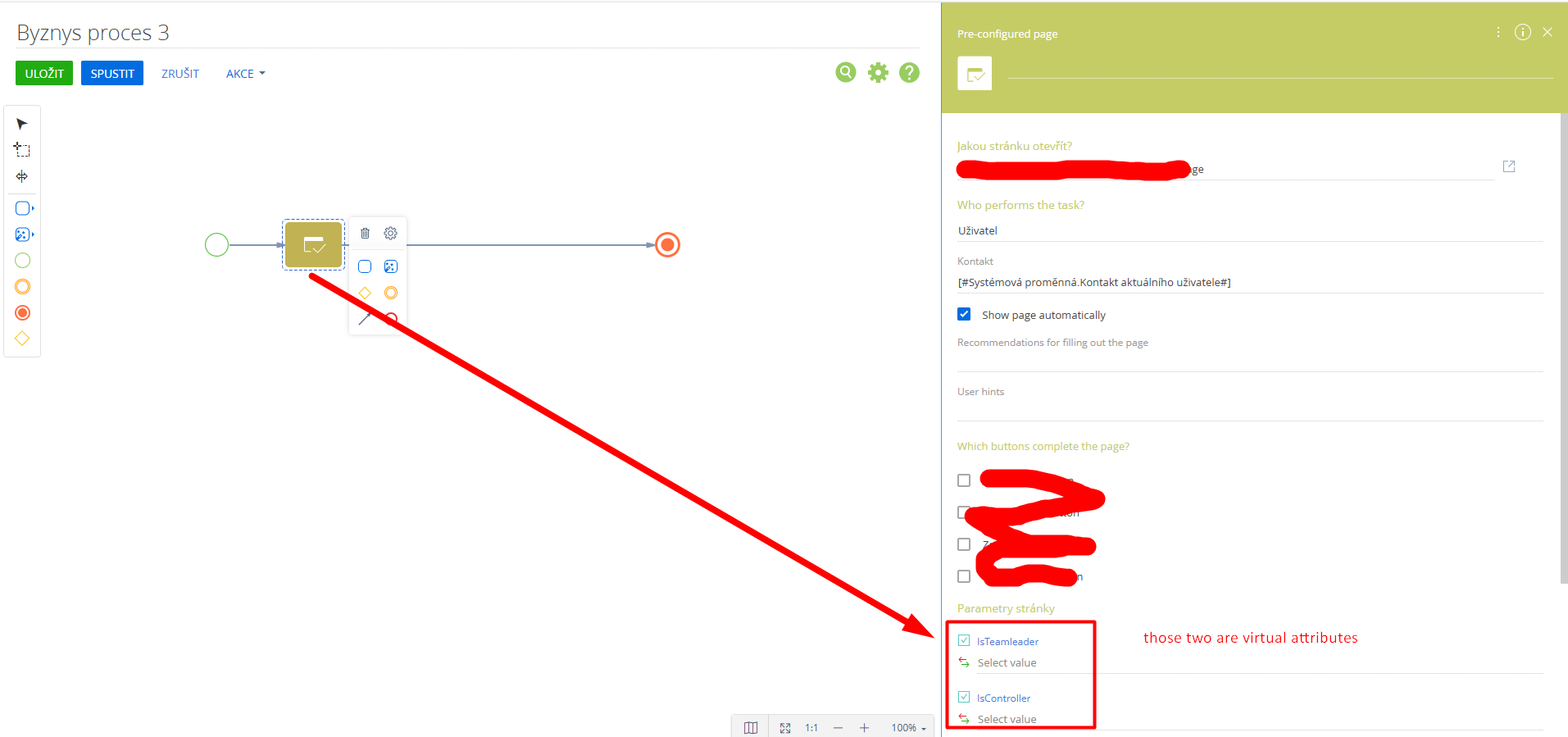
2. Instead of using record handlers you can run this process from some custom handler on the page somehow like this (also not forget to define ProcessModuleUtilities). Process should open page with all required fields filled.
["@creatio-devkit/common", "ProcessModuleUtilities"], function (sdk, ProcessModuleUtilities)You can use something similar from FD sdk indeed, this example was taken from FD page, but it uses CI logic.
const printableId = reportTemplate.value;
const args = {
	sysProcessName: "UsrGenerateContractByTemplate",
	parameters: {
		ContractId: contractId,
		PrintableId: printableId
	}
};
ProcessModuleUtilities.executeProcess(args); As a workaround approach, I've been using BroadcastChannel API to pass other attribute (non-model) values to the opened page. See the comment in this thread from Edward https://community.creatio.com/questions/open-custom-freedom-ui-page-custom-button-opportunity-edit-page-and-pass-opportunity
Ryan
Ryan Farley,
Yeah, already started to think about that solution, but hoped there is more native one. It's little bit frustrating, that params are not supported, but it's great that we have a workaround. Thanks!

Yes, the current way to implement the desired logic is to use a workeround, more on it here https://community.creatio.com/articles/passing-data-between-freedom-ui-pages-creatio.
As for a more native approach, it is still in development.