

getting error in Script task element in Business process.

I am trying to design the Business process in Creatio where i am trying to read response returned by 3rd party web service which returns the response in XML.
For processing the XML response, i have added the new class (source code) in my package with name CustomerHelper which i added in my package.
now when I add Script task element and add below code into it, it shows error as below.
Code from script task :-
string xmlResponse = Get("ResponseAPI");
var names = Terrasoft.Configuration.CustomerHelper.ParseCustomers(xmlResponse);
Terrasoft.Configuration.CustomerHelper.CreateAccounts(UserConnection, names);
return true;
Error I received as given below.
The type or namespace name 'CustomerHelper' does not exist in the namespace 'Terrasoft.Configuration' (are you missing an assembly reference?) CS0234 37
The type or namespace name 'CustomerHelper' does not exist in the namespace 'Terrasoft.Configuration' (are you missing an assembly reference?) CS0234 35
This same process worked for me using Creatio cloud but I am getting above error when I do it in Creatio On premise.
Does anyone have any suggestion what i am doing wrong while doing it in Creatio On-premise
Like

(1) Are you sure that the namespace for the class in the source code is correct? (2) Does the source code schema and the process exist in the same package? (3) Are the methods you're using static? (I don't see where you've used new to create an instance of the class, so assume they're static?)
Ryan Farley,
- yes, the CustomerHelper class I have defined is in Terrasoft.Configuration namespace.
I also tried creating new namespace (mynamespace) instead of Terrasoft.Configuration and used it in the USING section of Process designer but there it it resulted into error as mynamespace does not exist in the current context.
- Yes, source code and process exist in same package.
- yes it was static but I even tried without static and also created new instance of class before using it but same issue is causing.
For your information, this same code worked in Creatio cloud but on Creatio on-premise it is not working.
Hello Vikas Panchakshari,
Check the type of the package where your source code schema is located. It could be a problem of types visibility.
Open properties of the package and locate the Compile into a separate assembly checkbox: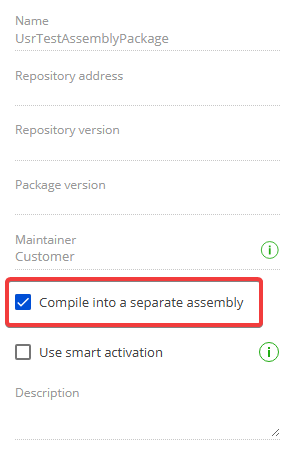
Uncheck it, click Apply and run your process again.