

Possibility to control visibility/availability of custom row toolbar items in the attachment list

Hello!
As far as we know, there is an option to bind visibility/disabled properties of crt.MenuItem to some custom attribute. For example:
"rowToolbarItems": [
	{
		"type": "crt.MenuItem",
		"caption": "Some Option",
		"visible": "$SomeCustomAttribute",
		"clicked": {
			"request": "usr.SomeCustomRequestHandler",
			"params": {
				"recordId": "$AttachmentList.AttachmentListDS_Id"
			}
		}
	}
]
But what if we need to change this attribute value dynamically according to some condition on a specific condition in each attachment, for example, show our custom menu item only for attachments, which have Description column filled.
In simple list we can you crt.HandleViewModelAttributeChangeRequest, which is called on selection change inside the list. There we can get selection state out of the list, see selected items id and perform with them any operations we like (database query, syssettings check, etc) including changing value of the custom attribute. But in the attachament list there is no request being called to do such thing.
What are the options to manage the attributes from the attachment list?
Like

The only way I've been able to handle this scenario is to have the handler do the check and alert when the action isn't available due to whatever conditions. Binding in nested properties like the visible property of a nested rowToolbarItem collection item, doesn't work.
The only way I've been able to handle this scenario is to have the handler do the check and alert when the action isn't available due to whatever conditions. Binding in nested properties like the visible property of a nested rowToolbarItem collection item, doesn't work.
Ryan Farley,
Yeah, thanks Ryan, made the same thing already - handling availability with showing some messages to user inside the click handler. Very unfortunate that there's no other option.

Sergejs Sokolovs,
crt.FileList uses the default crt.DataGrid feature set, where row selection is turned off. Because selection is disabled, the grid never updates selectionState, so crt.HandleViewModelAttributeChangeRequest is not triggered. If you need the attachments list to trigger that request, try the following:
...
viewConfigDiff: /**SCHEMA_VIEW_CONFIG_DIFF*/[
    ...
    },
    // This is your Attachments component in the page schema
    {
        "operation": "insert",
        "name": "FileList_t7inelh",
        "values": {
            "type": "crt.FileList",
            ...
            // Add this part to enable row selection event
            "features": {
                "rows": {
                    "selection": {
                        "enable": true
                    }
                }
            }
        }
    },
    ...
],
...Eduard Dovydovskyi,
Are you sure this works when attachment list is in gallery mode? I tried to add your snippet to standard AttachmentList from PageWithTabsFreedomTemplate, and crt.HandleViewModelAttributeChangeRequest still not being triggered. I have even added the selectionState property to values, but still no luck.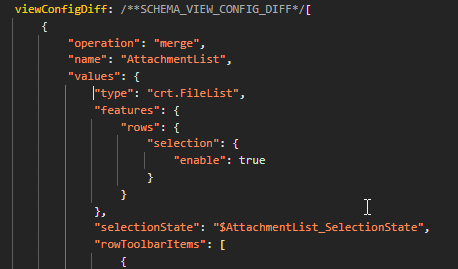
Sergejs Sokolovs,
If viewType is a gallery, crt.FileList uses the crt.Gallery function set instead of crt.DataGrid, so the solution will not work. viewType must be a list for the proposed solution to work.