


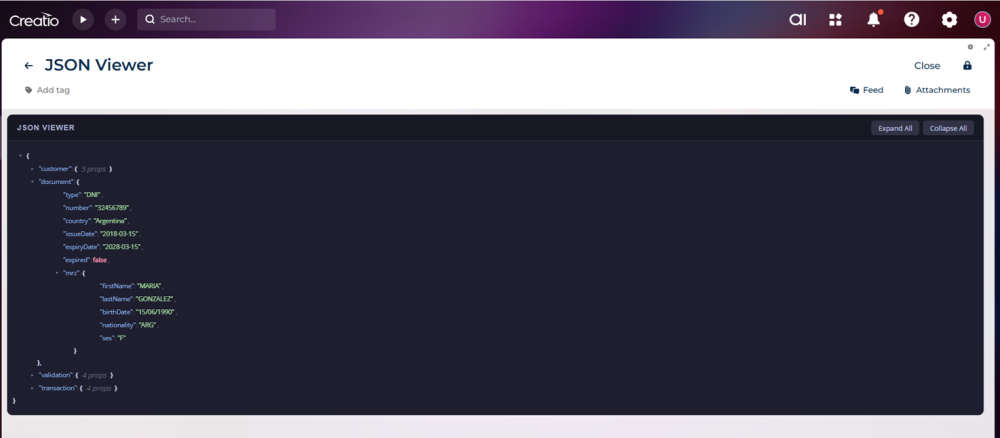
When working with external integrations and web services, it's common to store JSON responses in text fields within Creatio. The problem? Reading raw JSON in a plain text field is painful for end users.
I built a custom Angular component that renders any JSON string as an interactive, collapsible tree — directly inside a Freedom UI page.
What it does:
• Displays JSON as an expandable/collapsible tree
• Color-codes data types (strings, numbers, booleans, nulls)
• Expand all / Collapse all buttons
• Dark theme with encapsulated styles
The interesting part — Property binding
The trickiest part of the development was figuring out how passes properties to custom Angular elements. The key was using the @CrtInput decorator with propertyBindable: true, which tells the framework that the property accepts binding from the viewModel. Once that was in place, the component binds cleanly to any viewModel attribute using standard Freedom UI syntax.
This means you can feed it data from entity fields, external service responses, or values computed in handlers — all without touching the component itself.
If you're working with JSON data in Creatio and want to give your users a better experience, feel free to reach out via direct message.


That's amazing! Is there an easy way to export the JSON content from this component?
Paulo Victor Figorelli,
Hi Paulo! How are you? Do you mean to export as Text, for example a button to copy and paste the json? or automatically to download the json content in a file for example? That's a good feature to add. It's simple. I'll add it.