filter
section
list

Hi guys, 

I've applicated a filter on the section'Acteur' and it works on web : 

but in the mobile application it doesn't work : 

If you have a solution please help me , any information can be a good help .

thank you <3 

Like 0

Like

3 comments

Greetings,


The fact is that the synchronization settings work if the operating mode of the mobile application is set to offline.

In this case, all the data with which the system must work in the workplace which we synchronize enter the system during the initial synchronization and, accordingly, the conditions in the filter are imposed on them.

Mykhailo Zeleniuk  

hi

yes the synchronization settings work but it still didn't work 

Greetings,


Please take note that your synchronization settings need to be set offline.

You can find more on our Academy page here:

https://academy.creatio.com/docs/developer/architecture/microservices/m…

Show all comments
Freedom
UI
filter
Service_Creatio
8.0

Hello Community,


In the new Freedom UI, I need that in the dropdown field 'Responsible' (contact object) appear only the data that are of 'Type = Employee' (contact attribute).


I know how to do it in the previous versions but not in the new one.

In the new one I can't find the way to make this filter, can you help me?


Thank you very much!

Like 0

Like

1 comments

Hi,


Currently in Classic UI, an inactive value will not appear in a lookup choice on a form page but will be available for selection when configurating a process or a filter.


Can you give us the ability (the sooner the better) to make some values also inactive for filters/processes in Freedom UI? It is super confusing for our users....


Bonus: Ability to do this both for classic & freedom UI


Thanks,


Damien

4 comments

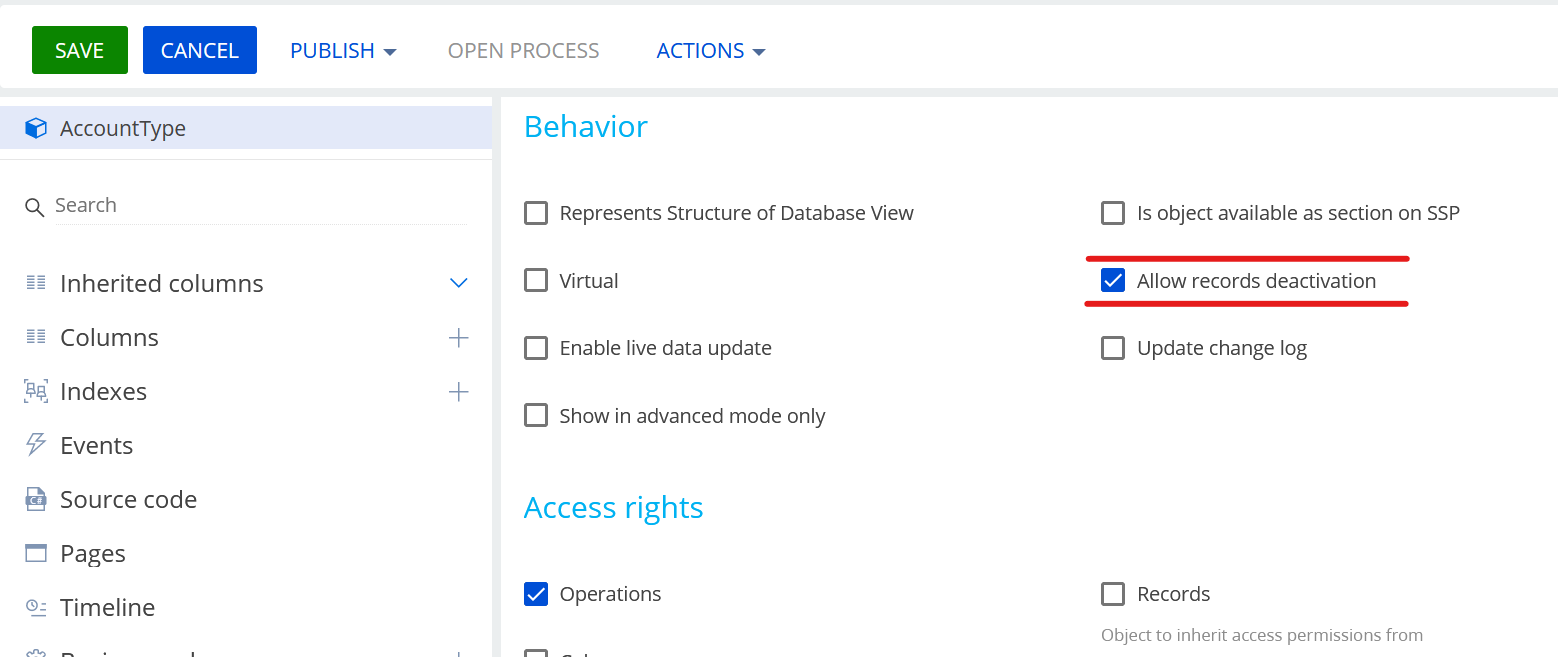
As a reminder, inactive values are available to use on any object created /replaced when you activate the feature "allow records deactivation"


Hello Damien,


Thank you for your feedback and idea.


I have noted your suggestions for our R&D team. We will take into account all the feedback you have provided and strive to incorporate this improvement in future versions of our product.


Thank you for your valuable feedback and idea. We greatly appreciate your help in enhancing our product.


Best regards, 

Orkhan

Orkhan,


Thank you, this is a recurring theme popping-up for all our clients as well as our internal users.

Hi,


any news on this functionality ?


Cheers,


Damien

Show all comments

Hello,

We are using an out-of-the-box detail created by Creatio with code "OpportunityTeam" in the Opportunity section and would like to remove a filter on it.   The Contact lookup on the detail object "Opportunity participant" is being filtered by the Account lookup on the Opportunity object.  This means that users can only add contacts to the "OpportunityTeam" detail which have the same account as the account listed on the opportunity.  We do not want this behaviour so are looking for how to remove it.


There are no business rules on the Opportunity section page or the detail causing this filter.  Does anyone know which schema or perhaps mixin is causing this filter?


Thank you for your help!

Like 0

Like

0 comments
Show all comments
filter
look up default values
Sales_Creatio_team_edition
8.0

Hi community,

I have a list of warehouses that contains the "Primary" field. It's only one of them that can be a primary warehouse.

When a user creates an order, I want the "Warehouse" field can be set automatically to the primary warehouse.

How to do this?


Thank you.

Like 1

Like

6 comments
Best reply

I has solved this problem by adding parameter "this" into the "result.collection.each()".

It will be shown as "result.collection.each(function(), this)"

esq.getEntityCollection(function(result) {
	debugger;
	if (!result.success) {
		// For example, error processing/logging.
		this.showInformationDialog("Can't set the location.");
		return;
	}
	result.collection.each(function(item) {
		var primaryWarehouse = {value: item.get("Id"), displayValue: item.get("SceName")};
		this.set("SceWarehouse", primaryWarehouse);
		return;
	}, this)
}, this);


You can Use Business Rule for auto populating Some fields. 

https:/academy.creatio.com/docs/user/customization_tools/ui_and_business_logic_customization/business_logic/setup/set_up_a_new_business_rule


Hi smit suthar,


I have tried to use the "Set field value" action, but it's too simple.

I want to set the value of "Warehouse" with a primary warehouse.

Note: The "Warehouse" section has the "Primary" (boolean) field.

So, for example; I have 2 warehouses, "A" and "B". And, I set the warehouse "B" primary field as TRUE. Then, when the user creates an order, the "Warehouse" field of the order will be filled by "B" automatically.


Do you have any other ideas?

Hello David Chandra,


Based on the shared information I can assume that your business task can be fully covered with a help of business rules functionality. 

If you'd like to expand the customization you can consider designing the custom business process that will read the needed columns from a page and apply changes with a Modify data element or even with script-task element where you can specify the custom logic with code. 

Alternatively, you can implement your business task with a help of additional development, but we do not have a specific ready to use example of such implementation. 


Best regards,

Anastasiia

Hello Anastasiia,

If we use the Business Rule means, we have to save the order and then use "added data trigger" to set the warehouse value.

Do you know how to set the warehouse value before we save the new order?


Regards,

David

Hello Anastasiia,


I managed to create a function in the page source code as below:


/* Overload the base Terrasoft.BasePageV2.onEntityInitialized method that is called after Creatio initializes the schema of the record page object. */
onEntityInitialized: function() {
	/* Call the parent implementation of the method. */
	this.callParent(arguments);
	/* Call the handler method that sets the [Location] column value. */
	this.setWarehouse();
},
/* The handler method that sets the [Warehouse] column value. */
setWarehouse: function() {
	/* The [Warehouse] column value. */
	var location = this.get("SceWarehouse");
	/* Checks whether the mode of the new record is set. */
	var newmode = this.isNewMode();
	// * If the value is not set and the mode of the new record is set. */
	if (!location &amp;&amp; newmode) {
		/* Get the contact's location by using ESQ */
		const userContactId = Terrasoft.SysValue.CURRENT_USER_CONTACT.value;
		const esq = this.Ext.create(Terrasoft.EntitySchemaQuery, {
			rootSchemaName: "SceWarehouse"
		});
		esq.addColumn("Id");
		esq.addColumn("SceName");
		esq.addColumn("Primary");
		const esqFirstFilter = esq.createColumnFilterWithParameter(Terrasoft.ComparisonType.EQUAL,
				"Primary", true);
		esq.filters.add("esqFirstFilter", esqFirstFilter);
		esq.getEntityCollection(function(result) {
			debugger;
			if (!result.success) {
				// For example, error processing/logging.
				this.showInformationDialog("Can't set the location.");
				return;
			}
			result.collection.each(function(item) {
				var primaryWarehouse = item;
				this.showInformationDialog(primaryWarehouse.get("SceName"));
				this.set("SceWarehouse", primaryWarehouse);
			})
		}, this);
	}
}

The "showInformationDialog" function is able to show the correct record.

But, the "SceWarehouse" is still not populated.

Note: "SceWarehouse" field is a lookup based on the "SceWarehouse" section.


Could you help?


Thank you.

I has solved this problem by adding parameter "this" into the "result.collection.each()".

It will be shown as "result.collection.each(function(), this)"

esq.getEntityCollection(function(result) {
	debugger;
	if (!result.success) {
		// For example, error processing/logging.
		this.showInformationDialog("Can't set the location.");
		return;
	}
	result.collection.each(function(item) {
		var primaryWarehouse = {value: item.get("Id"), displayValue: item.get("SceName")};
		this.set("SceWarehouse", primaryWarehouse);
		return;
	}, this)
}, this);


Show all comments
date
filter
folder
Sales_Creatio
7.18

Hi,

Is it possible to use system date in advanced filter somehow? Small example of what I try to achieve:

Like 0

Like

4 comments

Dear Taras,


Could you please specify exactly what information you expect to receive from the system Data filter, we do not fully understand the needs of your request.


Best regards,

Pavlo.

I expect to see just current date there. The main goal is to make filter display 0 records whenever it is used on Sundays

Taras,


It won't be possible to add a condition like in your screenshot. Are we interested in a specific filter all in any filter in the section (for example disable displaying data in some section on Sunday)? If so we can restrict loading data to grid on Sundays using:

loadGridData: function() {
					var currentDate = new Date();
					var currentDayNumber = currentDate.getDay();
					var restrictDataLoading = currentDayNumber == 0;
					if (restrictDataLoading) {
						return;
					}
					this.callParent(arguments);
				}

This should be added to the section schema (like ContactSectionV2). If we are interested in a specific filter in the context of loadGridData we can read current filters using this.getFilters().getItems() and in case a needed filter is found - use additional current day check and restrict grid data loading. 

Thanks! This should work for me, I will try

Show all comments

Hi Team,


I would like to modify the filters for the list of Product Displayed while adding products in OrderProduct (In Order record).


Step 1: How does the add button event open ProductSelectionSchema?

Step 2: Need to update the filters in ProductSelectionSchema?

The Product selection schema has "loadGridData" method that calls "getProductInBasePriceListEsq" where the BasePriceList is taken and filtered.

Also, in OOTB the Account and its price list are sent to ProductSelectionSchema and how do the values are transferred?


Below are the filters required,

1.Dont need to display any base price list for any products.

2.Filter the Product Price List only if it has start date.

3.Filter the Product Price List only if end date is empty or null.

4.Need an additional parameter to filter the Product (price list table, column is grade).

i.e., Grade column value is passed from Order page and it has to be compared in ProductSelectionSchema.


Note: Date filters or other filters are not applying and it always shows the base price list. And how to get the values from OrderPageV2 to ProductSelectionSchema (if it is through message mechanism, how the OOTB Account and its pricelist is transferred and what are the schemas and where it is defined both subscription and publish of basepricelist)

define("ProductSelectionSchema", [],
function() {
return {
    methods: {
      init: function(callback, scope) {
            this._initViewActionItems();
            this.set("CurrentDataView", "GridDataView");
            this.set("DataViewToChange", "GridDataView");
            this.moneyModule = MoneyModule;
            this.initAttributeDefaultValues();
            this.callParent([function() {
                this.Terrasoft.chain(
                    this.initEntitySchema,
                    this.initProfile,
                    this.requestMasterEntityData,
                    this.loadCurrencyRates,
                    this.initCurrencies,
                    function() {
                        this.loadGridData();
                        this.subscribeSandboxEvents();
                        this.Ext.callback(callback, scope);
                    },
                    this
                );
            }, this]);
        },
 
 
    getProductInBasePriceListEsq: function(basePriceList) {
        var basePriceListProductEsq = this.getBaseESQ("Product");
        var productPricePrefix = "[ProductPrice:Product:Id].";
        basePriceListProductEsq.rowCount = 40;
 
        basePriceListProductEsq.addColumn("Price", "ProductPrice");
        basePriceListProductEsq.addColumn(productPricePrefix + "Price", "Price");
        basePriceListProductEsq.addColumn(productPricePrefix + "Currency", "Currency");
        basePriceListProductEsq.addColumn(productPricePrefix + "Tax", "Tax");
        basePriceListProductEsq.addColumn(productPricePrefix + "Tax.Percent", "DiscountTax");
        basePriceListProductEsq.addColumn(productPricePrefix + "PriceList", "PriceList");
        basePriceListProductEsq.addColumn(productPricePrefix + "DBLStartDate", "StartDate");
        basePriceListProductEsq.addColumn(productPricePrefix + "DBLEndDate", "EndDate");
        basePriceListProductEsq.addColumn(productPricePrefix + "DBLProductGrade", "DBLProductGrade");
 
        basePriceListProductEsq.filters.addItem(this.Terrasoft.createFilter(this.Terrasoft.ComparisonType.EQUAL,
            productPricePrefix + "Product.Id", "Id"));
        basePriceListProductEsq.filters.addItem(this.Terrasoft.createColumnFilterWithParameter(
            this.Terrasoft.ComparisonType.EQUAL, productPricePrefix + "PriceList.Id", basePriceList.value));
 
        /*basePriceListProductEsq.filters.addItem(this.Terrasoft.createColumnFilterWithParameter(
            this.Terrasoft.ComparisonType.LESS_OR_EQUAL, productPricePrefix + "DBLStartDate", today));
        basePriceListProductEsq.filters.addItem(this.Terrasoft.createColumnFilterWithParameter(
            this.Terrasoft.ComparisonType.EQUAL, productPricePrefix + "DBLEndDate", null));
 
            Need Filters
            1.Dont need to display any base price list for any products.
            2.Filter the Product Price List only if it has start date.
            3.Filter the Product Price List only if end date is empty or null.
            4.Need an additional parameter to filter the Product (price list table, column is grade).
            i.e., Grade column value is passed from Order page and it has to be compared in ProductSelectionSchema.
 
 
        */
 
        basePriceListProductEsq.filters.addItem(this.Terrasoft.createColumnFilterWithParameter(
            this.Terrasoft.ComparisonType.EQUAL, productPricePrefix + "DBLProductGrade", productGrade.value));
 
        this.applyAdditionalFilters(basePriceListProductEsq);
        this.initializePageableOptions(basePriceListProductEsq);
        basePriceListProductEsq.filters.addItem(
            this.Terrasoft.createColumnFilterWithParameter(this.Terrasoft.ComparisonType.EQUAL,
                "IsArchive", false));
        return basePriceListProductEsq;
    },
    },
    diff: []
};
});


Any support on this case is appreciated!


BR,

Bhoobalan Palanivelu.

 

Like 0

Like

3 comments

Hello Bhoobalan,


Regarding the first question, the add button is defined in the ProductDetailV2 schema from the ProductCatalogue package. In this part:

onProductSelectionButtonClick: function() {
					var isCardChanged = this.isCardChanged();
					if (isCardChanged) {
						var args = {
							isSilent: true,
							messageTags: [this.sandbox.id]
						};
						this.set("OpenProductSelectionModule", true);
						this.sandbox.publish("SaveRecord", args, [this.sandbox.id]);
					} else {
						this.loadProductSelectionModule();
					}
				},


Regarding the second part where you need custom filters, pleast contact us at support@creatio.com specifying each request and each question in detail in order to understand the business task and what is the current issue.


Best regards,

Dariy


Dariy Pavlyk,

Thanks for sharing this!


Is it possible to make the Product object in the Opportunity section (OpportunityProductInterest) to open the product catalogue?

What are the steps to be carried out to make this OpportunityProductInterest open the product catalogue list?


BR,

Bhoobalan Palanivelu.


Bhoobalan Palanivelu,


We're glad to see that you were able to achieve this functionality as mentioned in these articles

https://community.creatio.com/questions/enable-product-catalog-list-ord…

https://community.creatio.com/questions/enable-product-catalog-list-ord…


Unfortunately, as it's mentioned there, it wouldn't be possible to set up a product catalogue using our OOTB object, as it is already implemented for other functionalities. 


Best regards,

Dariy

Show all comments

in my case, I am trying to add a column to the account industry lookup. 

it should be filtered by selected Category.


Like 0

Like

2 comments

Hello Samiha, 


You cannot add any new columns here as it's a base object and located in a base locked system package. 


If you want to simply add more options to the account Industries lookup, you can do it directly in the Lookup section (System Designer - Lookups - Industries) :

Hope it clarifies!

Best regards,

Anastasiia

You need to create a replacing object and select "AccountIndustry" as the parent. Then you can add new columns to the lookup object. 

Ryan

Show all comments

Hi community,


I would need to show, on the lookup filter, only the fields that are proper to a section page. 


In other words, if I have many section pages for the same page, how can I hide all the fields in the filter lookup that are not related to the concerned section ?


For example, for the "Case" section page of the "Service" workplace, I have two sections. One for the after sales service and one for the customer service.


How can I hide all the fields in the filter lookup that aren't concerned by the related page ?


Many thanks,

Jonathan


Like 0

Like

1 comments

Hi Jonathan,


Your business task could be implemented only by development. 


Please refer to the corresponding community port here


Best regards,

Bogdan

Show all comments
LookupSection
filter
Studio_Creatio
7.18

Hello,


I have a lookup with certain columns. One of the column is a lookup and I need to filter this column based on certain conditions.


Is there an example of how to do this?


Thanks

Like 0

Like

3 comments

Hello Shivani,


If I understand your business task correctly, you would like to apply the filtration for lookup columns on some record page.

This can be achieved with a help of business rules functionality. 

More detailed information about it can be found in the below and related articles:

https://academy.creatio.com/docs/user/no_code_customization/ui_and_busi…


Should you have any questions, please let us know!


Best regards, 

Anastasiia

Anastasiia Zhuravel,


That was not my requirement. Apologies if I was not clear before. Let me try to state the use case again.

In the lookup section, I have a Lookup table as follows

The highlighted column is a Lookup pointing to SysModule table. I need to filter out certain sections and not show all the sections that comes in the pick list by default. Since the lookup section is different from other sections like Contact or Leads, I cannot use the solution you provided. 


I believe I need to create a client module to override BaseLookupConfigurationSection. It would be great if you could give me an example.


Thanks

Hi Shivani,


unfortunately this functionality is not possible at the moment. We will create a request for the  R&D department so they can develop this functionality in future releases.


Best regards,

Dariy


Show all comments