Static_Filter
filter
Table
tasks
8.0

I am trying to make a filter system so that the record only appears to the user who is assigned a task (in the list page)
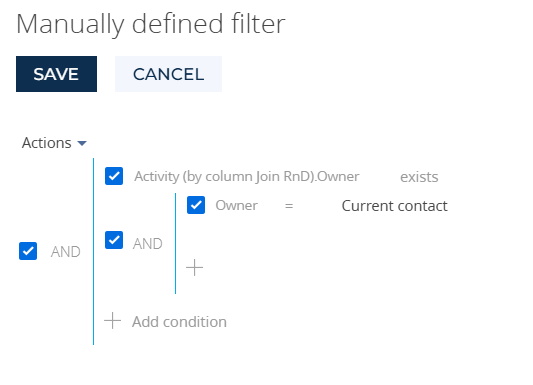
this is my configuration

however when i create a new record and the task is given to a user (SalesJKT1) the task(Open Edit Page Notification) is shown on SalesJKT1 but the record is not showing for SalesJKT1 

How do i make it so that the table only shows the records that are currently being done by the user

Stages
New => Fill 1 Column => Approval => Done/Rejected
New = the task is given to the user who creates it(in this case SalesJKT1 so only SalesJKT1 can see the record)
Fill 1 Column = SalesJKT1 fills the column and save then go to next stage(still only SalesJKT1 can see)
Approval = SupSalesJKT Approves(only SupSalesJKT can see the record at this stage, so the SalesJKT1 Can no longer see the record)
Done/Rejected = SalesJKT1 can see the record but SupSalesJKT cannot see the record

Like 0

Like

1 comments

Hello Michael,

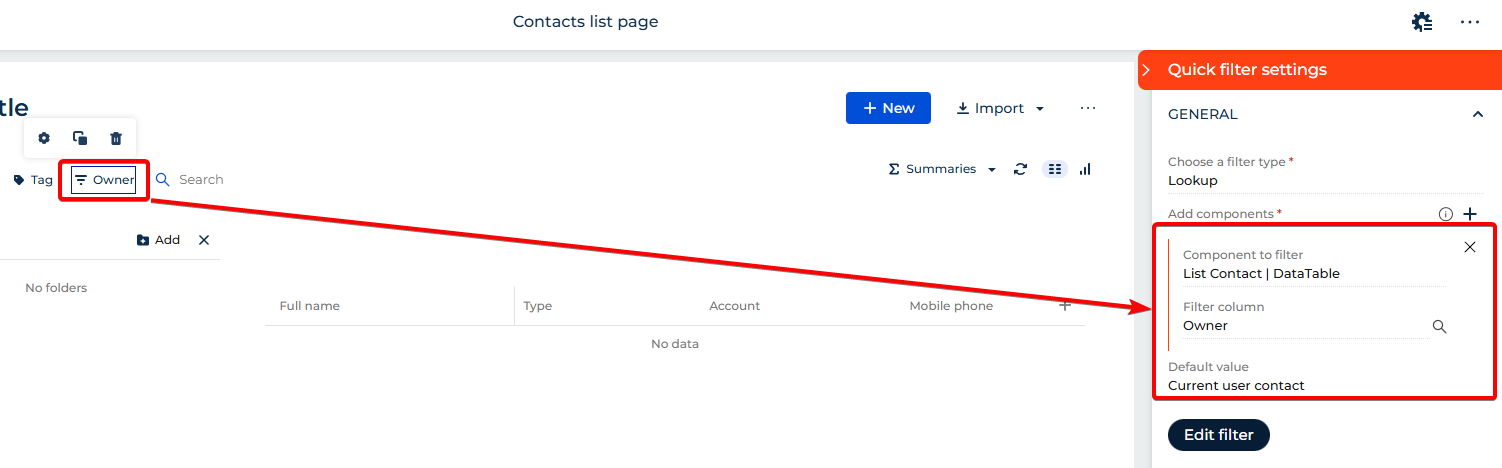
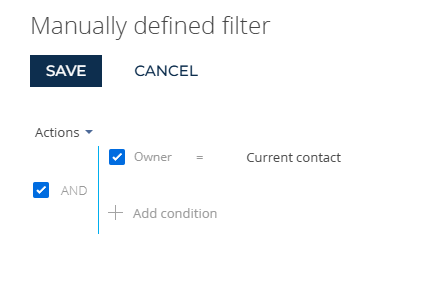
It looks like in your filtration you are using aggregated column, which is likely the cause for this behaviour, because with your filtration you will see only records that have connected activity where owner is current user. I suggest trying to set filtration directly by column owner, for example:

or

This way, the list page will always show records where the current user is the assigned owner, regardless of the related activities.

If your ownership changes throughout the process (SalesJKT1 → SupSalesJKT → SalesJKT1), make sure the process updates this field accordingly during each stage transition.

Show all comments
hide
funnel_chart
remove
filter
graph
Sales_Creatio
8.0

The funnel shows all possible stages, after which it outputs data only to those fields that we filter. And it is necessary that the filtered fields are not shown, hidden or deleted. It will not be possible to get it through the observer because it comes as one monolithic object, not different fields
For example hide the second and the third row.

Like 1

Like

3 comments

Greetings!

Unfortunately, this logic can currently be implemented only through development tools. However, we have already registered an internal idea to add this functionality in future product versions.

Thank you once again for bringing this to our attention — your request helps us increase its priority and makes its implementation more likely in upcoming releases.

Have a nice day!

What development tools?
I tried to do it using the code on the page, but it didn't work

Noting this is a second post with the same question. Please refer to the first one where the answer is already posted.

Show all comments
Charts
filter
Service_Creatio
8.0

Hello,

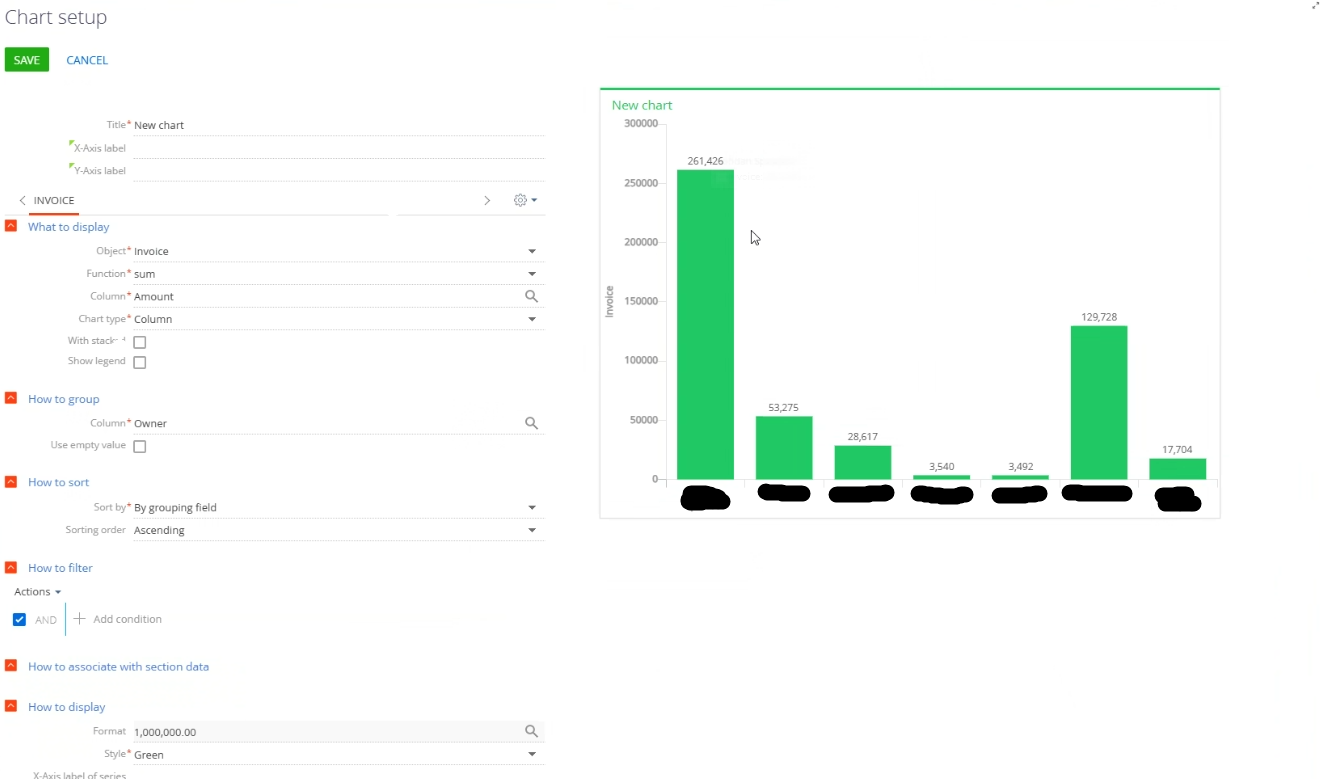
On the Case page, I want to add a chart showing the yearly sum of a numeric field, filtered by the contact who created the case, but I can't find a way to do this. If the chart object is Contact, the Column option cannot be selected the numeric field of the Case. If the chart object is Case, it cannot be filtered or associated with the Created By contact.


Is there a way to do this?

Thank you in advance.

Regards.

Like 0

Like

2 comments

Hello Carlos,

Hope you are fine.

It should be possible to create such a chart.

As we, however, don’t have full visibility into your exact setup and configuration, we are unable to provide a precise, step-by-step solution. 

Instead, we have used a different object to illustrate the general concept and give you an overview of how it can be implemented.
In attachment, please refer to the steps that could be taken.

You can also filter this data by date, such as by year, or by other criteria according to your requirements.

In case of additional questions, please let us know.

Best Regards,

Ryad
 

Ryad Krache,

Hi Ryad,

With the solution you're proposing, thousands of contacts will appear. That's why, as I mentioned, I need a way to ensure that only the case creator's information is visible to the people who will be managing the case.

Thanks for your reply anyway.

Best Regards,

Carlos

Show all comments
filter
8.2.3
Studio_Creatio
8.0
I have quick filter and i wanna set dynamically filters for each quick filter (related Filter).
Do you have solutions for my case? try to bind the value but not worked.
 
{
                    "operation": "insert",
                    "name": "QuickFilter_kp8pw59",
                    "values": {
                        "layoutConfig": {
                            "column": 9,
                            "colSpan": 2,
                            "rowSpan": 1,
                            "row": 1
                        },
                        "type": "crt.QuickFilter",
                        "config": {
                            "caption": "#ResourceString(QuickFilter_kp8pw59_config_caption)#",
                            "hint": "",
                            "icon": "filter-column-icon",
                            "iconPosition": "left-icon",
                            "defaultValue": [],
                            "entitySchemaName": "BsiArea",
                            "recordsFilter": {
                                "filterType": 6,
                                "items": {
                                    "byRegion": {
                                        "filterType": 1,
                                        "comparisonType": 3,
                                        "isEnabled": true,
                                        "leftExpression": {
                                            "expressionType": 0,
                                            "columnPath": "BsiRegion"
                                        },
                                        "rightExpression": {
                                            "expressionType": 2,
                                            "parameter": {
                                                "dataValueType": 10,
                                                "value": "SelectedRegionId"   // bind ke attribute
                                            }
                                        }
                                    }
                                }
                            }
                        },
 
Updated :
 
handlers: /**SCHEMA_HANDLERS*/[
			{
				request: "crt.HandleViewModelAttributeChangeRequest",
				handler: async (request, next) => {
					const regionQFAttrName = "QuickFilter_Region_Value"; // Region
					const areaQFAttrName = "QuickFilter_Area_Value"; // Area
					const outletQFAttrName = "QuickFilter_Cabang_Value"; // Outlet
 
					if (request.attributeName !== regionQFAttrName && request.attributeName !== areaQFAttrName) {
						return next?.handle(request);
					}
 
					const areaQFFilterAttrName = "QuickFilter_Area_ComboBox_List_Filter";
					const outletQFFilterAttrName = "QuickFilter_Cabang_ComboBox_List_Filter";
					const areaRegionColumnName = "BsiRegion";
					const outletRegionColumnName = "BsiRegion";
					const outletAreaColumnName = "BsiArea";
 
					const areaFilter = new sdk.FilterGroup();
					areaFilter.logicalOperation = sdk.LogicalOperatorType.Or;
					const outletFilter = new sdk.FilterGroup();
					outletFilter.logicalOperation = sdk.LogicalOperatorType.And;
					const outletFilterByRegion = new sdk.FilterGroup();
					outletFilterByRegion.logicalOperation = sdk.LogicalOperatorType.Or;
					const outletFilterByArea = new sdk.FilterGroup();
					outletFilterByArea.logicalOperation = sdk.LogicalOperatorType.Or;
 
					if (request.attributeName === regionQFAttrName) {
						let currentAreaValue = await request.$context[areaQFAttrName];
						const needAdditionalConfigurateoutletFilter = Array.isArray(currentAreaValue) && currentAreaValue.length > 0;
 
						if (Array.isArray(request.oldValue) && Array.isArray(request.value) && request.value.length > request.oldValue.length) {
							currentAreaValue = [];
							request.$context[areaQFAttrName] = [];
							request.$context[outletQFAttrName] = [];
						}
 
						if (Array.isArray(request.value) && request.value.length > 0) {
							for (var i = 0; i < request.value.length; i++) {
								await areaFilter.addSchemaColumnFilterWithParameter(sdk.ComparisonType.Equal, areaRegionColumnName, request.value[i].value);
								await outletFilterByRegion.addSchemaColumnFilterWithParameter(sdk.ComparisonType.Equal, outletRegionColumnName, request.value[i].value);
							}
							outletFilter.add(outletFilterByRegion);
						}
 
						request.$context[areaQFFilterAttrName] = areaFilter;
 
						if (needAdditionalConfigurateoutletFilter) {
							for (var i = 0; i < currentAreaValue.length; i++) {
								await outletFilterByArea.addSchemaColumnFilterWithParameter(sdk.ComparisonType.Equal, outletAreaColumnName, currentAreaValue[i].value);
							}
							outletFilter.add(outletFilterByArea);
						}
 
						request.$context[outletQFFilterAttrName] = outletFilter;
					}
 
					if (request.attributeName === areaQFAttrName) {
						const currentRegionValue = await request.$context[regionQFAttrName];
						const needAdditionalConfigurateoutletFilter = Array.isArray(currentRegionValue) && currentRegionValue.length > 0;
 
						if (Array.isArray(request.value) && request.value.length > 0) {
							for (var i = 0; i < request.value.length; i++) {
								await outletFilterByArea.addSchemaColumnFilterWithParameter(sdk.ComparisonType.Equal, outletAreaColumnName, request.value[i].value);
							}
							outletFilter.add(outletFilterByArea);
						}
 
						if (needAdditionalConfigurateoutletFilter) {
							for (var i = 0; i < currentRegionValue.length; i++) {
								await outletFilterByRegion.addSchemaColumnFilterWithParameter(sdk.ComparisonType.Equal, outletRegionColumnName, currentRegionValue[i].value);
							}
							outletFilter.add(outletFilterByRegion);
						}
 
						request.$context[outletQFFilterAttrName] = outletFilter;
					}
 
					return next?.handle(request);
				}
			},
			{
				request: "crt.HandleViewModelInitRequest",
				handler: async (request, next) => {
					const regionQFAttrName = "QuickFilter_Region_Value";
					const areaQFAttrName = "QuickFilter_Area_Value";
					const currentRegionValue = await request.$context[regionQFAttrName];
					const currentAreaValue = await request.$context[areaQFAttrName];
					const hasRegionValue = Array.isArray(currentRegionValue) && currentRegionValue.length > 0;
					const hasAreaValue = Array.isArray(currentAreaValue) && currentAreaValue.length > 0;
 
					if (!hasRegionValue && !hasAreaValue) {
						return next?.handle(request);
					}
 
					const areaQFFilterAttrName = "QuickFilter_Area_ComboBox_List_Filter";
					const outletQFFilterAttrName = "QuickFilter_Cabang_ComboBox_List_Filter";
					const areaModelColumnName = "BsiRegion";
					const outletRegionColumnName = "BsiRegion";
					const outletAreaColumnName = "BsiArea";
 
					const areaFilter = new sdk.FilterGroup();
					areaFilter.logicalOperation = sdk.LogicalOperatorType.Or;
					const outletFilter = new sdk.FilterGroup();
					outletFilter.logicalOperation = sdk.LogicalOperatorType.And;
					const outletFilterByRegion = new sdk.FilterGroup();
					outletFilterByRegion.logicalOperation = sdk.LogicalOperatorType.Or;
					const outletFilterByArea = new sdk.FilterGroup();
					outletFilterByArea.logicalOperation = sdk.LogicalOperatorType.Or;
 
					if (hasRegionValue) {
						for (var i = 0; i < currentRegionValue.length; i++) {
							await areaFilter.addSchemaColumnFilterWithParameter(sdk.ComparisonType.Equal, areaModelColumnName, currentRegionValue[i].value);
							await outletFilterByRegion.addSchemaColumnFilterWithParameter(sdk.ComparisonType.Equal, outletRegionColumnName, currentRegionValue[i].value);
						}
						outletFilter.add(outletFilterByRegion);
 
						request.$context[areaQFFilterAttrName] = areaFilter;
					}
 
					if (hasAreaValue) {
						for (var i = 0; i < currentAreaValue.length; i++) {
							await outletFilterByArea.addSchemaColumnFilterWithParameter(sdk.ComparisonType.Equal, outletAreaColumnName, currentAreaValue[i].value);
						}
 
						outletFilter.add(outletFilterByArea);
					}
 
					request.$context[outletQFFilterAttrName] = outletFilter;
 
					return next?.handle(request);
				}
			}
		]/**SCHEMA_HANDLERS*/,

Like 1

Like

3 comments

any one have idea?

Hi Fransetya Alfi Syahrin,

If I understand you correctly you are trying to dynamically change the filter value (SelectedRegionId).
Although there is no OOTB solution, you can try the following approach:

const quickFilter = await request.$context.QuickFilter_kp8pw59_Items_0_Arg_0;
quickFilter.target.customFilter.items.byLanguage.rightExpressions[0].parameter.value.value = SelectedRegionId; // assuming that SelectedRegionId is a variable that stores the Id

Hi Eduard Dovydovskyi,

Do I just add this _Items_0_Arg_0?

Show all comments

Hello Creatio Community,

I’m working on creating a custom complex filter logic in a User Page JS and ran into a problem.

The following code works fine:

filter.addSchemaColumnFilterWithParameter(
    sdk.ComparisonType.Equal,
    "[TableA:TableB].ColumnX.Id",
    "1048f156-620f-4e01-8796-a43ee5182dcc"
);

However, this does not work:

filter.addSchemaColumnFilterWithParameter(
    sdk.ComparisonType.Equal,
    "[TableA:TableB].ColumnX.Id",
    "[TableA:TableB].ColumnX.[TableC:TableD].ColumnY.Id"
);

It seems like addSchemaColumnFilterWithParameter does not accept two expressions as parameters (i.e., the second argument as a schema column and the third argument as another schema column instead of a value).

Is there any other function or approach that allows passing two schema column expressions to create a complex filter like this?

Like 1

Like

1 comments

Hello,

The method addSchemaColumnFilterWithParameter is designed to compare a column with a fixed value and does not support comparing two expressions directly.

Here is an article from Creatio documentation that explains the correct way to build such filters:
createFilter allows to compare one schema column to another.

Example:
var esq = Ext.create("Terrasoft.EntitySchemaQuery", { rootSchemaName: "YourObject" });
var columnCompareFilter = esq.createFilter(
   Terrasoft.ComparisonType.EQUAL,
   "[TableA:TableB].ColumnX.Id",
   "[TableA:TableB].ColumnX.[TableC:TableD].ColumnY.Id"
);
esq.filters.add("ColumnCompare", columnCompareFilter);

This will compare the values of the two schema column expressions instead of using a constant parameter.

Show all comments

Hello Creatio Community,

I’m trying to implement a custom filter for a contacts dropdown on my mini page, and I need help constructing it properly.

The filter has two main conditions combined with AND:

  1. The first condition itself has two sub-conditions depending on whether a certain column is null or not:
    • If the column is not null, get a string value from the related column1id table and compare it with the contacts.
    • If the column is null, get an ID value from the related column2id table, then use that ID to retrieve a string for comparison with the contacts dropdown.
  2. The second condition involves a specific field ID:
    • Use this ID to filter contacts who have a checkbox selected that corresponds to this ID.

How would you tackle retrieving data from data source? How can I build a filter that applies these conditions properly with AND logic between them? 


Edit: Question no.  2:
Would it be possible to do all the filtering logic in JS (manually send a query to the database) and somehow push the result to the dropdown as datasource?

Like 8

Like

3 comments

Hello,

Could you please clarify if you are setting up a Business rule or an advanced filter in a group/folder?

Mira Dmitruk,

Hello,

I am creating a filter using JavaScript in the page Source Code. Something similar to this, but more complex filter logic with JOIN to more than one tables:
Filtering a lookup in Freedom UI - Help needed | Community Creatio

I am also wondering, would it be possible to do all the filtering logic in JS (manually send a query to the database) and somehow push the result to the dropdown as datasource?

Hello! You don’t need to replace the lookup’s datasource — the recommended way in Freedom UI is to intercept the lookup load, read any helper values you need with the SDK’s Model class, and then add your filter before the query runs. That way you can check whether column1id is null, fetch the right string from the related table, and combine it with an EXISTS filter to only return contacts with the right checkbox set. Both conditions go into the same filter group so they apply together.

Show all comments
filter
call
resuls
FreedomUI
Sales_Creatio
8.0

Dear,

Sorry to bother you with a beginner's question, but on the call page, in Freedom UI, I can't filter the results by activity type.

I tried using business rules, but I can't figure out how to do this filter.

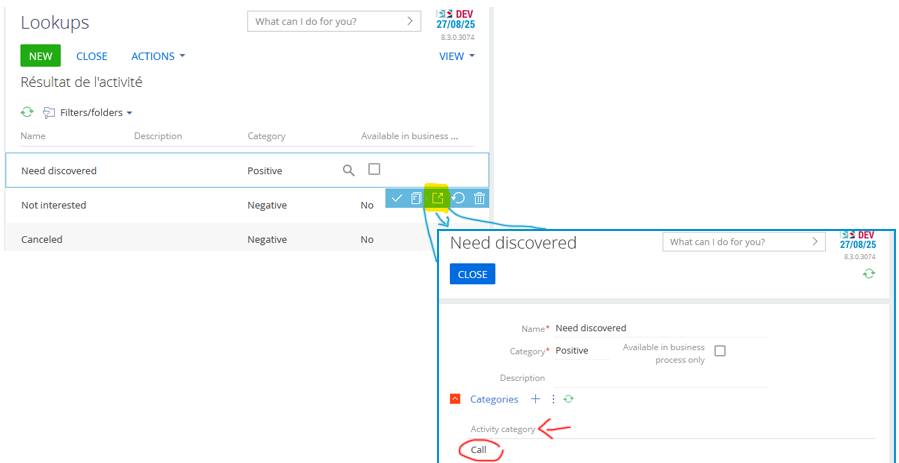
In each Result Activity Lookup, you have an activity category:

Activity Category

On the call page, all results are actually displayed on the Freedom UI.

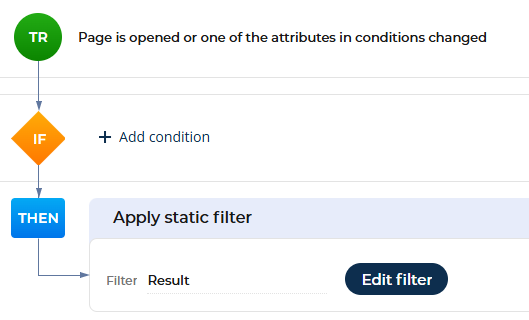
So i go to the business rules but i didn't find how to filter the results with the call category.

business rulecategory

I must be missing something

Thank you !
Nicolas

Like 0

Like

2 comments
Best reply

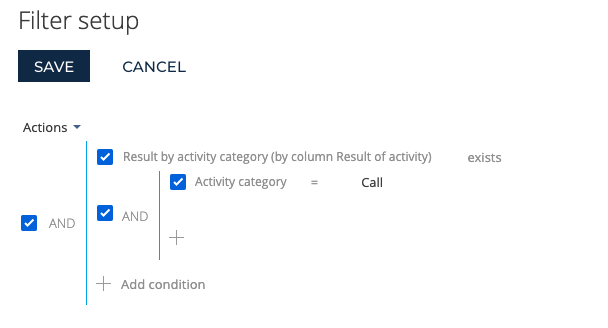
The filter would need to look like this 

Click + by Result of Activity, then select "Result by activity category (by column Result of activity)" and then quantity (you could set as Count > 0 or click count to change to Exists). Then add inner condition for Activity category.

Ryan

The filter would need to look like this 

Click + by Result of Activity, then select "Result by activity category (by column Result of activity)" and then quantity (you could set as Count > 0 or click count to change to Exists). Then add inner condition for Activity category.

Ryan


Thank you Ryan for the help,
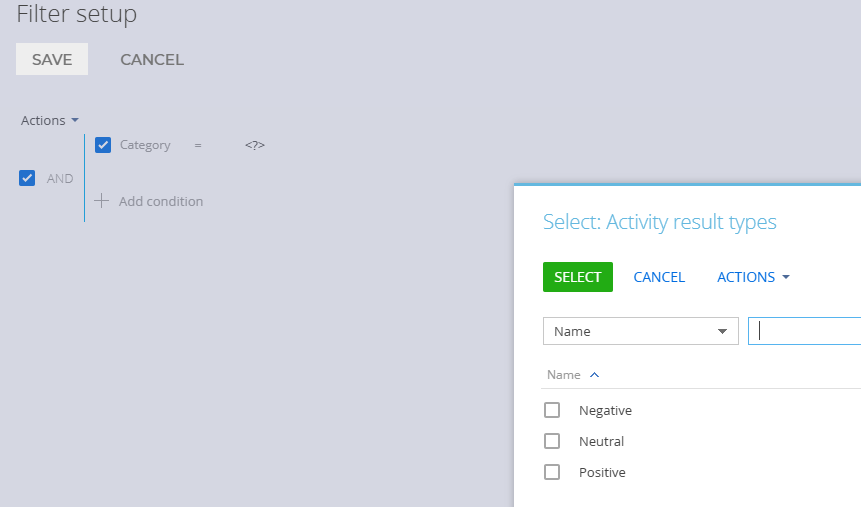
I tried several ways but I was never able to select the category of results. I had to select the results one by one. This will force me to edit the filter if we add new results.
filter

Show all comments
detail
newitem
filter
Sales_Creatio
8.0

Dear,

When adding a new element to a detail, I would like to know if it is possible to filter these elements.

For example, in the account competitors detail below, I would like to only display accounts whose type is competitor.


Competitor


So in the page that appears how to filter the accounts by type ?

Select competitor

Is it possible to do this type of filter or do you have to go through an intermediate page ?

Thank you !
Nicolas

Like 0

Like

1 comments

Hello!

Yes, it is possible to filter the records available in the lookup when adding a new item to a detail in Freedom UI.

To do this, you can set up a static filter on the list component or mini page that opens when you add a new record. For your use case — displaying only accounts with the “Competitor” type — you can apply a filter on the Type field of the Account object.

You can find more information about setting up static filters in Freedom UI in this article:


https://academy.creatio.com/docs/8.x/no-code-customization/customizatio…

If you're working specifically with a lookup field on a mini page, you can also filter its values by setting up a business rule:

https://academy.creatio.com/docs/8.x/no-code-customization/customization-tools/ui-and-business-logic-customization/freedom-ui-business-rules


Thank you!


Show all comments
filter
NoBusinessRules
folders
8.0

i am trying to configure/make  a filter system that let's me select a set of options based on another set of options, basically a filter system for lookups based on lookups, what i understand is using business rules like so...

if Provinsi = DKI Jakarta 

then Kota = (Dropdown => Jakarta pusat, Jakarta Barat, Jakarta Utara, etc)

if Provinsi = Aceh

then Kota = (Dropdown => Aceh Selatan, Aceh Utara etc)


now im trying to find a better way to filter the dropdown without going through them 1 by 1 i want to do it for 5 fields

Provinsi, Kota, Kecamatan, Kelurahan, Kode Pos

and each one needs to have the right option values

can anyone suggest a better way to handle this since i have no idea on how to do this

Like 0

Like

4 comments
Best reply

Michael Fernando Handoyo,

Hi Michael, 

I updated the screenshots in the article to reflect the current version of Creatio. https://customerfx.com/article/how-to-make-dependent-lookups-in-creatio-formerly-bpmonline/

Ryan

You can set them up as dependent lookups by adding a Provinsi column to the Kota lookup and then just one simple business rule to filter. See https://customerfx.com/article/how-to-make-dependent-lookups-in-creatio-formerly-bpmonline/

Ryan

Ryan Farley,

ok the tutorial stated for an older version of creatio(formerly bpm'online) but how do you do it on the newer version where do i find the subcategory and category folders? is it in lookup folder?

Michael Fernando Handoyo,

Hi Michael, 

I updated the screenshots in the article to reflect the current version of Creatio. https://customerfx.com/article/how-to-make-dependent-lookups-in-creatio-formerly-bpmonline/

Ryan

Ryan Farley,

thank you, now it is easier to understand

Show all comments
filter
TimeLine
Freedom
Sales_Creatio
8.0

Dear,


I would like to filter activities in the timeline by activity category :

do not display activities if their category corresponds to a given value.


I haven't found any articles or requests in the community to do this. I can not find where to apply this filter on the timeline object.


Thank you !

Nicolas

Like 0

Like

1 comments

Dear,


Thank you for reaching out to us.


Unfortunately, in the current system configuration, such an option for advanced filters is not available for the Timeline.


However, we have submitted a request to our R&D team to explore the possibility of implementing this feature in future versions of the system.


Please let us know if you have other questions.


Have a nice day!

Show all comments