Access Rights
roles
functional roles
organizational roles
Sales_Creatio
8.0

Hello Community,

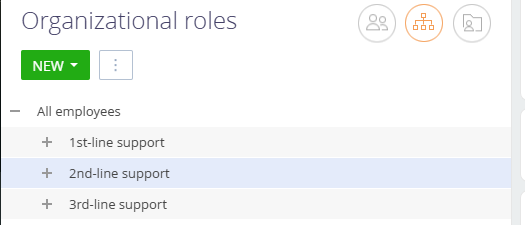
We have some roles that have been established for a long time. As the company hierarchy structure is changing, we need to group some of these roles together.

Example:

Group the existing 1st-Line Support, 2nd-Line Support, and 3rd-Line Support under a single group called SUPPORT. We want to do the same with some functional roles as well.

How can this be achieved?

Sasor


Like 0

Like

5 comments

+++

Hey Sasori, 

It is possible to create a hierarchy for organization and functional roles. While you have one highlighted/selected with your cursor, press "new" then select new division. 

Unfortunately, there is no way that I know of to re-arrange hierarchy so you would have to re-create 1st-line support, 2nd-line support, etc. 

I know these are tied to support functionality out of the box, so be careful if you delete them. May want to create the new ones first, then work on updating business processes, then delete the old ones. 

Example: In this image, to create 1st-line support within "support" select "Support" > New+ > Division.

Hi Joshua,

Thank you. I only mentioned the support groups as a reference. We have custom roles that we need to re-organize. I think the correct way to do it, is via scripts in SysAdminUnit table, but i need some confirmation prior to proceeding.

Sasor

+++

Hello,

There is no out-of-the-box functionality in the system to group user roles as described.

However, this can be achieved by updating the ParentId field of the user role records. You can implement this change either through a business process or directly via an SQL query.

Best regards,
Ivan

Show all comments

Hello,

In Creatio Studio, is it possible to give a user permissions to add users to any role, except to the sys administrator or supervisor roles? If so, how?

Thanks,

Jose

Like 0

Like

1 comments

Hello,

Unfortunately, it's not possible to implement such a logic due to the specifics of the system.

Show all comments
approval
roles
8.0

how do i make it so that anything under 250m requires 2 approvals from 2 different roles? all i got so far are these

should i use the stages case? or should i use the business rules? 

here's how i want to make it, 

if the limit amount recommendation is 250mil or higher then it requires the approval from 3 different roles to pass, if it is 50mil-250mil it requires the approval of 2 different roles to pass, and if it is under 50mil it requires the approval of only 1 role to pass,


can anyone provide me with a way to implement this into creatio, with images if possible or detailed instructions


i am using creatio version 8.2.2

Like 1

Like

2 comments
Best reply

Hello.


A more reliable and flexible solution for your task would be to implement a business process that triggers upon the creation or modification of a record. This process can check the value of the "Limit Amount" field, and if it meets or exceeds the specified threshold, initiate an Approval workflow using the "Approval" process element.
 

The Approval element provides extensive functionality:

  • It allows you to define one or multiple approvers (users, roles, or dynamically set participants).
  • You can customize the approval conditions and logic, including escalation or repeated approvals.
  • The process can branch based on the outcome (approved/rejected), enabling you to build comprehensive approval flows.
     

You can learn more about the capabilities of this element in the Academy article:  Approval process element – Creatio Academy.

This approach ensures greater flexibility, maintainability, and future-proofing for your use case.

Best regards.
Antonii.

Hello.


A more reliable and flexible solution for your task would be to implement a business process that triggers upon the creation or modification of a record. This process can check the value of the "Limit Amount" field, and if it meets or exceeds the specified threshold, initiate an Approval workflow using the "Approval" process element.
 

The Approval element provides extensive functionality:

  • It allows you to define one or multiple approvers (users, roles, or dynamically set participants).
  • You can customize the approval conditions and logic, including escalation or repeated approvals.
  • The process can branch based on the outcome (approved/rejected), enabling you to build comprehensive approval flows.
     

You can learn more about the capabilities of this element in the Academy article:  Approval process element – Creatio Academy.

This approach ensures greater flexibility, maintainability, and future-proofing for your use case.

Best regards.
Antonii.

Antonii Viazovskyi,

thank you, i'll try and implement this method, i thought that this method could only be done through business rules, i hadn't even considered business process


Show all comments

We need to manage users such way, so they are unable to change table/grid arrangement unless they have specific role.

Like 0

Like

7 comments

Would this be for a Freedom UI list or a classic list?

Ryan Farley,

Freedom UI

Davit Gharagebakyan,

I believe currently there's no way to do this without some some CSS tricks. I typically add some code that executes globally and adds an attribute to the body tag - in this case you'd check if the user is a member of a role, then add the tag, so the body is something like this:

<body user-is-admin="true" .... >

Then add CSS globally that will only apply if that attribute is true. 

Here's an article with a similar approach that does this for portal (external) users only (instead of checking if the user is a portal user, you'd check if the user is in the role) https://customerfx.com/article/applying-global-css-styles-in-the-creatio-portal-formerly-bpmonline/

As far as the CSS to hide the ability to modify the list columns, that would be this (assuming you want this to apply to all lists) - Note, this HIDES the ability to edit the list layouts:

crt-data-table crt-button[data-qa="add-columns-button"], 
crt-data-table crt-button.crt-column-toolbar {
    display: none;
}

Ryan

Thank you very much. Worked for me

Looks like you can find all of the possible options for setting these grid list features in the code by adding a breakpoint (I found this by searching for "features.columns." using Chrome's search all sources feature, ctrl+shift+f):


e.g. I have disabled row toolbars, column toolbars (the ones you get by clicking on each column's 3 dot menu), resizing, rearranging (dragAndDrop), and sorting, and these all take effect as expected and make the list basically static & read only. Currently working on 8.1.3.


Example of the page code to apply this for me:

			{
				"operation": "insert",
				"name": "DataGrid_p5zr1sl",
				"values": {
					"type": "crt.DataGrid",
					"features": {
						"rows": {
							"selection": false,
							"numeration": false,
							"toolbar": false
						},
						"editable": {
							"enable": false,
							"itemsCreation": false
						},
						"columns": {
							"adding": false,
							"toolbar": false,
							"dragAndDrop": false,
							"editing": false,
							"resizing": false,
							"sorting": false
						}
					},
					/* rest of the data grid setup */
				}
			}

Thanks for your insight, but that will not work for me, because that construction does not support "$Attr" values, only constants

Davit Gharagebakyan,

That's frustrating, didn't realise that as my current use case is consistent for all users. Would be good to be able to control these via attributes though, Creatio!

Show all comments
permissions
account
roles
Sales_Creatio
8.0

Here is my explanation:

Our organization has several departments, but we use the same Object. For example in the case is Account

We have already set up Organizational Roles. For Example

  1. Country 1 Sales Team
  2. Country 2 Sales Team

(I'm not allowed to give you the real name of those departments)

Each Team will handle some records in Account


So how could I filter Account based on the Organizational roles?

Like, if an employee from Country 1 Sales Team access the Account, they only see the records that their team needs to handle but not mix up with records from other teams


I hope the community could help me with this. Many Thanks!

Like 0

Like

4 comments

Hi Bao,


I think, such filter can do this


Kind regards,

Vladimir

Vladimir Sokolov,

Hi Vladimir,


That's a great idea! We tried and seems okay for now!


But, I have a further question.

As my try, a team member from Country 1 team could able to see the folder used for Country 2 Sales Team when they use the filter function. We want to separate the view of both teams and don't allow Country 1 team could see any record from Country 2 team

So, How can I able to do that?

Bao Phan,

Here you need to write Process that changes access right to record when record is added and Owner or Team are changed 

https://academy.creatio.com/docs/user/bpm_tools/process_elements_refere…


Thank you, Vladimir Sokolov


Sorry for my late reply

I didn't get any notification about the reply

But thank you!

Show all comments
permissions
roles
organizational roles
functional roles

Hi 

When I log in as sales manager I can't see my accounts. But when I enter as a supervisor, I see that the owner of this account is exactly this owner

Like 0

Like

1 comments

Hello,

Please check the permission settings in the Object Permissions section.


Perhaps the manager role does not have permission to view records in the Accounts section

Show all comments
portal users
organizational roles
functional roles
roles
organizational
7.18

Hello community,

I am trying to understand the logic of why we can not add an organization (Account) to an organizational structure of the system. I have seen some of the documentation and tables that link to VwSysAdminUnit and VwSspAdminUnit but I can not find out why they are not displayed in the user interface the same as in the portal organizational structure.

Portal

System

Like 0

Like

1 comments

Hello,


Such logic was implemented only for portal users since the Self-service Portal was designed only for them and they could be from different companies (accounts).


Best regards,

Bogdan

Show all comments
organizational roles
roles
functional roles

Hi All,


I need to get the contact organizational role hierarchy, i.e., Parent roles of a Contact.

Like 0

Like

3 comments

Hello!


The hierarchy can be set up in the Organizational roles section. Organizational roles are user groups that represent company units, departments, or subdivisions in the organizational structure. More detailed information can be found in the User management - Organizational roles Academy article. 


Otherwise, you can create a relationship diagram directly on the Contact page that will show all internal and external contact and account relationships as a chart. The relationships can be depicted with either a vertical hierarchy or a horizontal connection. Please take a look at the Relationships between accounts and contacts Academy article. 


Best regards, 

Olga.

Can we get this on server side using c#?

I Set up the organizational role hierarchy.

for example we have a field like RM on Lead page which is contact lookup and we need to get the organizational role hierarchy, i.e., Parent roles of a selected RM(contact lookup).

i.e., RM >> Branch Manager >> Cluster Head >> IBU Head.

Hi Yelda, 


In the SelectType parameters, indicate you choose parents or children.


This is enum : 


public enum HierarchicalSelectType

{

Children,

Parents

}


Best Regards, 


Bogdan L.

Show all comments
Discussion
websocket
roles
message

Hello community,


There are many business cases where a live update/refresh is needed on the Web client whenever an update happens on the server (say via API integration). This article explains how to send a message to all users or a specific user from the server to the client.


Would love a way to send a message to all users of a functional or organizational role. Right now, we will need to programmatic fetch all SysAdminUnitIds of that role and send a message to all users in a loop.


Aside, Say there are 10 users (out of 100 total) belonging to a specific user role. Is it/ How much of a performance disadvantage is to send the message to all the 100 users (We can filter the rest 90 on the UI) as against identifying and sending to the specific 10? This depends on the underlying WebSocket implementation and how it is managed by Creatio. 

3 comments

Hello Shrikanth,


Thank you for this idea! Yes to send the socket message to the client for a specific role the list of SysAdminUnit Ids should be formed and processed one by one on the server-side. I will share this idea with the core R&D team so they could develop an additional method that could post a message to a user role separately. Thank you for helping us in making the application better!


Best regards.

Oscar

Oscar Dylan,

Thanks Oscar. Can you also clarify on my other question at the end? - 


Aside, Say there are 10 users (out of 100 total) belonging to a specific user role. Is it/ How much of a performance disadvantage is to send the message to all the 100 users (We can filter the rest 90 on the UI) as against identifying and sending to the specific 10? This depends on the underlying WebSocket implementation and how it is managed by Creatio.

M Shrikanth,


This is a question that is not easy to answer. Perform tests and compare the application performance using different scenarios of sending a message to 10, 50 and 100 users and see how it influences the system.


Best regards,

Oscar

Show all comments
Administrator
roles
Access Rights
7.17

Hi community!


How I can achieve case:

Only users assigned to the System administrator role are possible to change the Lead stage if its value is final positive (from final positive to any other). For each other stages, all users can change this value. 


I need a solution like the business rule: if the user's role is Admin & the stage is Satisfied then the stage is editable.


Other fields should be editable (cannot remove edit access to the record on the Satisfied stage)


Like 0

Like

1 comments

Dear Paulina,


This can be achieved by using a case setting. Just add intermediate stage between final and any other stage and use option "Restrict this stage to specific users or roles" for all roles except Admin. This will allow to change the record from the final stage only to them and mark that the stage was changed for ordinary users. 


Best regards,

Angela

Show all comments