filter
Role Based Filteration
roles
Financial_Services_Creatio_lending_edition
7.17

Hi

I have applied filtration logic for one Contact lookup field in a section edit page based on User Role and role-based contacts alone getting listed in that field. But when I put the same filter in portal edit page of the section for the same lookup field, it is not showing the contacts. 

Please find below the used code.

Case: Users having Role Id : 'KYC', has to be listed in the lookup field.

Filter code:  Inside Attributes,

"GlbKYC": { 

// Attribute data type.

"dataValueType": Terrasoft.DataValueType.LOOKUP,

// The configuration object of the LOOKUP type.

"lookupListConfig": {

"filters": [

function() {

var filterGroup = Ext.create("Terrasoft.FilterGroup");

filterGroup.add("IsKYC",

Terrasoft.createColumnFilterWithParameter(Terrasoft.ComparisonType.EQUAL, "[SysAdminUnit:Contact].[SysAdminUnitInRole:SysAdminUnit].SysAdminUnitRoleId", "C14E5787-4BF5-4FA8-A407-96FB942A02E2"));

return filterGroup;


}]}},

Kindly help to resolve this.


Regards

Abinaya

Like 1

Like

1 comments

Hi Abinaya,


SysAdminUnit object is not accessible from the portal due to security reasons and creating filtration using this object is not possible for portal users. Also it is not recommended to use "Sys" objects on the portal since system objects have restrictions in the application core related to the portal.


You need to create a separate object to store connections between system users, their roles and contacts. This custom object will be accessible from the portal and you will be able to execute filtration under a portal user.


Best regards,

Oscar

Show all comments
roles
permissions
7.15_()

Hi Community,

I have this scenario below.

I want to give record permission per Area, I have 100 plus areas, so basically i need also to maintain all these areas as organizational role to assign the role properly. Now these areas are not fixed, it is changing from time to time. Another new area record might be added on the next day, so we need again to manually add this new area as a new organizational role. Also we need to add the users under this newly added added organizational role.


Any suggestion what could be the best approach for this scenario? is it good practice to maintain so many organizational roles? in my case it will be 100 plus and counting.

Like 0

Like

1 comments

Hi Fulgen,


The suggestion is to a new column to SysAdminUnit table with link to Area. So whenever the new Area is added to the system, system will automatically check if there is a role with this area and if not - create a new role. Also, I believe when you are adding users to the role, you are following some logic (e.g. user.Contact.Area = area) so after this operation you can also automatically add users to that role.


Please note that it is a complex task so will have to think about structure and the way you want to run this procedure. If the record is added in the UI you can handle it by business process for example, but if areas are created from some kind of integration - you would need to come up with different approach depending on the integration that you are using. The structure of organizational roles is also important. I suggest you to create a new role 'Area roles' and when you are checking if the role exists, or creating a new role - this role should be the parent role.


Regards,

Dmytro

Show all comments
organizational roles
roles
organizational

Hello, 

Dear Community I've one question :

When adding data, the rights are added by default on "All employees", is it possible to change this group by default?

Like 0

Like

4 comments

Dear Rocher,

There are no basic tools to achieve your business task. Even if you remove all employees role from the users list of role, he or she will still have it on the database level. This logic can only be changed with the development tools but we would not recommend to do it since  there  are a lot of application functions  associated with All employees role. Removing it from the users might lead to inappropriate application performance.

Best regards,

Dean

Dean Parrett,

Thanks a lot for your answer, but I'm curious (and on a demonstration platform) so, you said that is possible to change that by the development tools, where exactly can I change this group by default?

Best regards, 

Dear Rocher, 

You can try to update the default All employees role id associated with the user.For example, as you see the user doesn't have any roles selected http://prntscr.com/q26wjn, however she still has All employees on the database level. You would need to update the sysadminunitroleid with the id of required role  http://prntscr.com/q26ywo instead of All employees role id. I do not guarantee that it would help you to achieve your business task since we do not have any examples of any similar changes in the default roles logic. 

Best regards,

Dean


Dean Parrett,

Thanks for your answer, it is really nice of you! 

Best regards 

Show all comments
Discussion
functional roles
organizational roles
roles

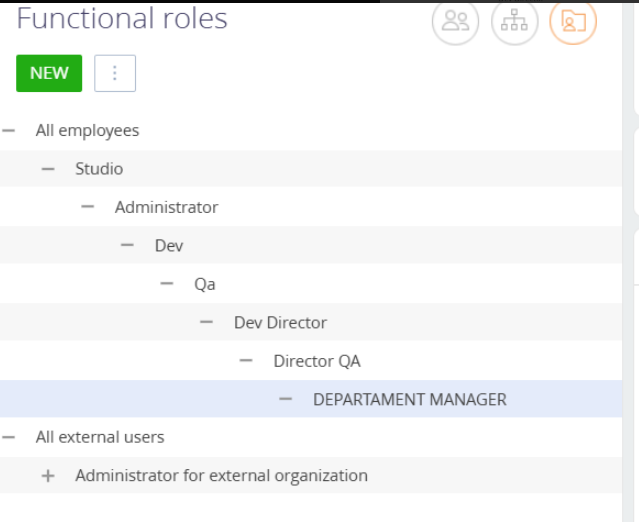
Enable drag and drop or list sorting and in/outdenting to reorganize Organizational roles and Functional roles.  This will enable easily correcting mistakes in the the structure and implementing changes due to changes in a company structure.

4 comments

Dear Janine,

Thank you for this idea! We do have this problem of creating of graphical hierarchy of roles so to make the process of modification much more easier and quicker registered for our R&D team and deploying of such logic is planned for one of future versions. Your idea raised the priority of this problem and we can hope seeing this functionality in one of nearest versions! Thank you for helping us to make our application better!

As for now changing of roles on code level is to risky and demands changes in core, so lets wait for an update from our R&D team.

Best regards,

Oscar

Is there any way to make the re-organization happen? If we do this via scripts, is the SysAdminutUnit table the only one involved?

++++

Sasori Oshigaki,

Greetings,

In theory, you can modify the roles using SQL scripts; however, this process requires caution and a good understanding of the database structure.

Key Tables:

The main tables responsible for organizational roles and their hierarchy are:

  • SysAdminUnit: contains information about system roles and users.
  • SysAdminUnitInRole: links users to roles.
  • SysAdminUnitRole: defines functional roles assigned to users.

To modify the role hierarchy, the ParentRoleId field in the SysAdminUnit table is crucial, as it determines the hierarchical structure.

Risks of Direct Changes:

  • Data consistency issues: Direct updates may result in inconsistencies and performance problems.
  • Not recommended for production: Such changes should only be performed in a test environment after thorough validation.
  • No built-in UI support: Creatio currently does not offer interface-based tools for drag-and-drop or hierarchy reordering of roles.

Although we do not recommend using SQL scripts for production environments, you may apply them for internal testing if needed. Our general recommendation is to wait for full platform support via the UI.

Important Before Running:

  • Back up your database.
  • These scripts modify the ParentRoleId, which defines the role structure.

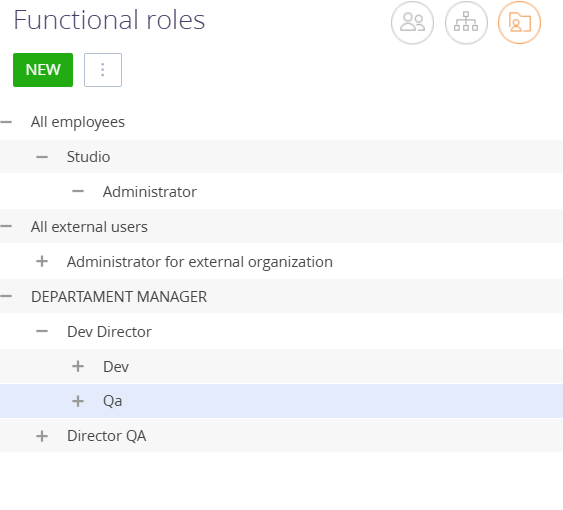
Example Scenario:

You want the role hierarchy to be:

  • DEPARTAMENT MANAGER at the top,
  • Dev Director and Director QA under it (same level),
  • Dev and Qa under Dev Director (same level).


Role Links:

Role \ New ParentRoleId

DEPARTAMENT MANAGER \ NULL (top level)

Dev Director \ 62ed9c49-9475-4a96-bca8-648822800b9d

Director QA \ 62ed9c49-9475-4a96-bca8-648822800b9d

Dev \ bc11e256-8578-4642-954b-1e60893a0715

Qa \ bc11e256-8578-4642-954b-1e60893a0715

SQL Script:

-- DEPARTAMENT MANAGER — top-level (no parent)
UPDATE public."SysAdminUnit"
SET "ParentRoleId" = NULL
WHERE "Id" = '62ed9c49-9475-4a96-bca8-648822800b9d';
 
-- Dev Director and Director QA — children of DEPARTAMENT MANAGER
UPDATE public."SysAdminUnit"
SET "ParentRoleId" = '62ed9c49-9475-4a96-bca8-648822800b9d'
WHERE "Id" IN ('bc11e256-8578-4642-954b-1e60893a0715', '24e0365f-68f5-4c9a-9106-43bb48e638f7');
 
-- Dev and Qa — children of Dev Director
UPDATE public."SysAdminUnit"
SET "ParentRoleId" = 'bc11e256-8578-4642-954b-1e60893a0715'
WHERE "Id" IN ('9937d0b2-ba45-4f47-9ea3-45328553ff00', 'aa929414-46e7-4e4e-8211-6e92a688d57f');

Outcome:

  • DEPARTAMENT MANAGER becomes the root.
  • Dev Director and Director QA are on the second level.
  • Dev and Qa are on the third level, both under Dev Director.


    Regards,
    Orkhan
Show all comments
roles
functional roles
organizational roles

We're setting up our functional and organizational roles and have a growing company.  How can I change the hierarchy of organizational and functional roles without deleting and recreating the roles? If I delete a role, how will that affect the processes that reference it?

Like 0

Like

3 comments

Dear Janine,

First of all please don't delete "All employees" and "System adminsitrators" roles from the application, because they are essential for correct work of the system. Also we don't recommend deleting of roles, just rename them if you have a need to do it (just open roles tree and use a role you need to rename and after that you will be able to do that in this field http://prntscr.com/mwg2ct). If you delete a role then you will need to find all processes where it is used and add newly created role. In other words - if you delete a role that is used somewhere then it will prevent processes from being executed. Please rename available roles or create your new ones. Meanwhile we have a problem registered for our R&D team about displaying of roles and creating of ways to easy delete them if it is needed. I will notify them about your request so to raise the priority of this problem. Thank you for helping us to make our application better!

Best regards,

Oscar

Oscar Dylan,

Renaming a role doesn't work when the role needs to be in a different location in the hierarchy.  I would want the processes to fail and need to be updated if the wrong people are being assigned to roles.

Janine White,

Then please create a separate role that you need to use and find all processes where you used the previous role and update the business process so to use newly created role. This is the only way how it can be done now.

Show all comments

Hi Community!

How are you? I hope you can help me!

I have configured in Account two lookup fields with "VwSysRole" as dictionary to associate roles with the account

but after adding them, I can not update the entity (BD), it throws an error.

However, I have a business process that takes those values ​​as parameters to set Access Rights in certain situations, and that works correctly. For example, when an account is added

How could you update the DB or what dictionary could I set in those fields to be able to associate the roles with the account without generating inconsistencies in the DB?

King Regards,

Ezequiel

Like 0

Like

1 comments

Unfortunately you will not be able to create a field linked to the VwSysRole view in the account object. VwSysRole is not a table. It's a view and it doesn't allow all of the operations that you can do with a table. 

Additionally, account is a unit that is not related to the system roles. Simply, you can't login with an account. Even contacts are not linked to system roles directly. 

Only admin units that you can find in the system section "System users" are linked to roles directly. Basically, when the system decides what permissions you should have, the system looks at the login credentials that you used and it doesn't look at your contact or an account.

Show all comments
ESQ
roles
7.11
studio

Hi everyone!

How are you?

I hope you can help me

I want know if a user have associated a functional role in his organization role.

Example: User: "apaez", Organization Role : "Operador Arcor", Functional Role: "Operador Empresa"

The user "apaez" is asocciatted the "Operador Arcor" Organization Role and "Operador Arcor" Organization Role is associatted "Operador Empresa" Functional Role

The query that builds in SQLServer is the following:

SELECT * FROM SysUserInRole ur

  JOIN SysFuncRoleInOrgRole a ON ur.SysRoleId = a.OrgRoleId

  JOIN VwSysRole sr ON a.FuncRoleId = sr.Id

Where sr.Name = 'Operador Empresa'

AND ur.SysUserId = '20abeba5-5327-45aa-a5c2-07c41ac1fdf2'


How can I replicate it in ESQ (Client)?

King Regards,

Ezequiel!


Like 0

Like

2 comments

Maybe this example can help

	function getUserSaveRights(callback, renderTo, scope) {
		var currentUser = Terrasoft.SysValue.CURRENT_USER.value;
		var sysAdmins = ConfigurationConstants.SysAdminUnit.Id.SysAdministrators;
		var esq = Ext.create("Terrasoft.EntitySchemaQuery", {
			rootSchemaName: "SysUserInRole"
		});
		esq.addColumn("SysRole");
		esq.addColumn("SysUser");
		esq.filters.add("SysUser", Terrasoft.createColumnFilterWithParameter(
			Terrasoft.ComparisonType.EQUAL, "SysUser", currentUser));
		esq.filters.add("SysRole", Terrasoft.createColumnFilterWithParameter(
			Terrasoft.ComparisonType.EQUAL, "SysRole", sysAdmins));
		esq.getEntityCollection(function(response) {
			if (response && response.success) {
				var result = response.collection;
				var isSysAdmin = (result.collection.length !== 0);
				callback.call(scope, renderTo, isSysAdmin);
			}
		}, this);
	}


Federico,

Thanks for you help!

I was able to solve the query in the following way:

var esq = Ext.create("Terrasoft.EntitySchemaQuery", {
						rootSchemaName: "SysUserInRole"
					});
esq.addColumn("[SysFuncRoleInOrgRole:OrgRole:SysRole].FuncRole.Name", "RolFuncionaAsociado");
 
var esqFilter = esq.createColumnFilterWithParameter(Terrasoft.ComparisonType.EQUAL, "SysUser.Id", userId);
var esqFilter2 = esq.createColumnFilterWithParameter(Terrasoft.ComparisonType.EQUAL, "[SysFuncRoleInOrgRole:OrgRole:SysRole].FuncRole.Name", nombreRol);
esq.filters.add("esqFilter", esqFilter);
esq.filters.add("esqFilter2", esqFilter2);
esq.getEntityCollection(function (result) {
   if (!result.success || result.collection.collection.length == 0) {
		// error processing/logging, for example
		this.showInformationDialog("Data query error");
		return;
   }
   debugger;
   this.set(nombreRol, true);
   return;
}, this);

King Regards!

Ezequiel

Show all comments
roles
7.11
studio

Hi!

How are you?

I hope you can help me!

How can I get the role of the user loggued in?


I need to get the user's role to be based on this, set fields like readonly, or hide some tab.

Thanks!


Regards,

Ezequiel

Like 0

Like

2 comments

Hello!


You can use the following global variable

var currentUserId = Terrasoft.SysValue.CURRENT_USER.value;

Following that, build ESQ Select query.

You can find an example in the following article: 

https://academy.bpmonline.com/documents/technic-sdk/7-11/getting-query-…

Finally, Select from SysUser or SysAdminUnitInRole to obtain roles.

Hello,

Is that Select query from SysAdminUnitInRole still available ? I got an error :

ErrorCode: "SecurityException", message: "Current user does not have permissions for the "SysAdminUnitInRole" object", stackTrace: undefined, errors: Array(0)


I get my role with Select Query in SysUserInRole

Show all comments