Hello,

How can I make text search case-insensitive in the Read data element of a business process?


Different third-party systems write the same code using different letter cases, and because of this the business process doesn’t find an already existing record.

Like 0

Like

1 comments

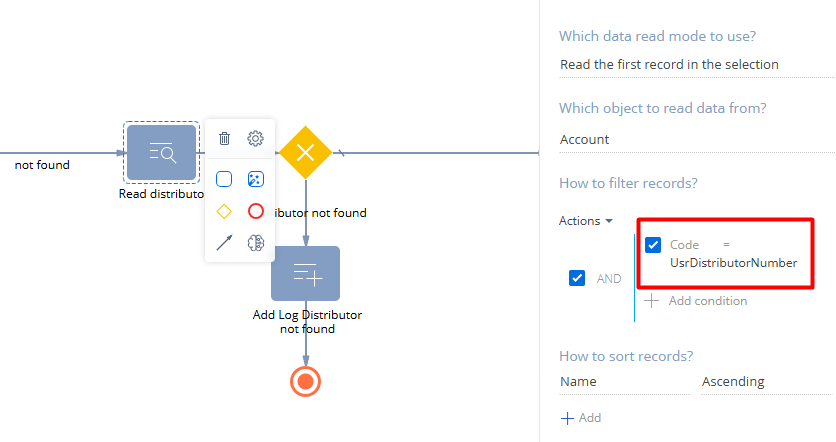
Hi Vladimir. The best way to solve this case without coding (using esq or smth) is to do the following:

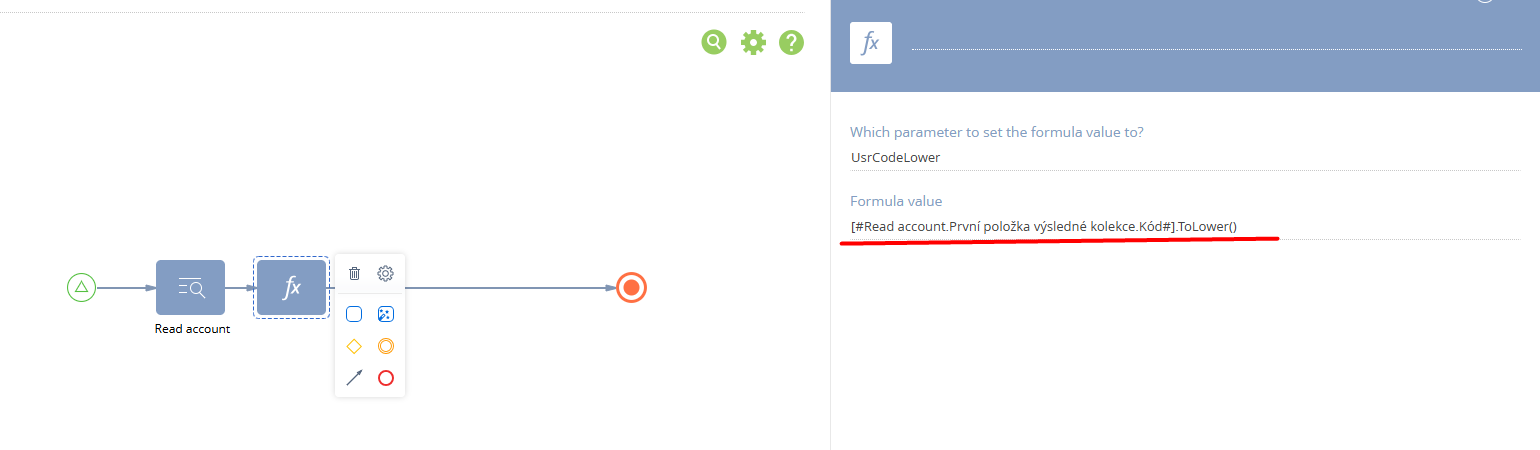
  1. In Account schema add a column with no use in UI - UsrCodeLower.
  2. Create some event-based process to fill this value in case of saved new Account record with Code filled or changed Code field in existing account with the following parameter [#Read account.First record in the resulting collection.Code#].ToLower() then modify Account's UsrCodeLower with it's value:

3. Add to your process for looking for an account by code (this one on the screen) some parameter for "lowered" code value: UsrDistributionNumberLower = UsrDistributionNumber.ToLower(). 

4. In the Read data element replace Code with UsrCodeLower and the parameter to UsrDistributionNumberLower. 

As both values will be in lower case, this should do.


Show all comments
Discussion
Business Process
lookup
Read Data

Hi,

Would it be possible to have the lookup name (or any other column the lookup has) value added as part of the output when working with entities on Formulas in Business Processes?
 

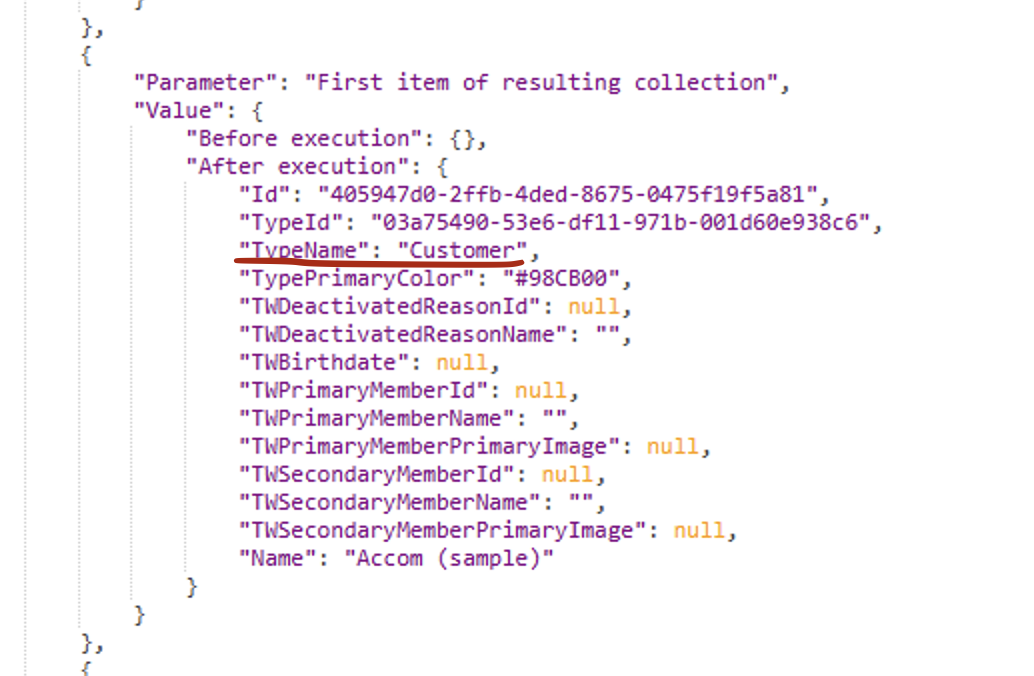
The values are already loaded when a read task is executed as shown on the trace 

There's already logic in place to get extra values from the lookup, not all columns but clearly Name is already there.

It would really help with business process building speed, reading and understanding if we don't need to add a read task to get the text value of a lookup all the time. 
 

It would significantly reduce the number of actions and the complexity of the business process


Thank you


3 comments

+1 for adding Id / Display value by default for any Read Data element.

Yes please add this feature. We can end up a lot of unnecessary Read elements if we have this ability

I think adding in the ability to read related data in general in a single Read Data step would be amazing for both readability and performance. This functionality and UI is already set up nicely for things like filtering and List column setups, so getting it added to BPs would be a very natural extension! It would be especially useful when querying for collections of records, reducing potentially hundreds of individual reads (in subprocesses) to a single join in the original read.


I would also like to see the ability to sort records based on related object data too in the same way, as this can actually be impossible to work around with the current setup.


I raised a ticket asking for both of these a little while back, so hopefully these calls are all being added to the priority for such functionality! Ticket was #SR-01431536.

Show all comments
url
Read Data
Studio_Creatio_free_edition
8.0

Hi,


Is there a way to read data in an edit page url ?

Like 0

Like

5 comments

Hello Thibault,


Would you please provide more details on your question, so that we can check it for you?

Hello Yuliya,


I am calling a third party service in order to obtain an authorization code from scratch. After that, I am redirected back to my edit page with a code. The url looks like this: https://079046-studio.creatio.com/0/Shell/?code=Uq-EurbsQyJ1si-mXiw_DW7…. I would like to know how I can retrieve the code to put it in a business process.

Hello,


Please review this video material, as it may assist you in implementing your task:

https://www.youtube.com/live/mHaGY1DxETw?feature=share&t=292

https://www.youtube.com/live/ehjfcBxpLsQ?feature=share&t=247

Hi, I think you can try this


1. Make parameter to record your code, in my example it is simple string parameter called UsrTest2

2. add script task:


string resultString = "https://079046-studio.creatio.com/0/Shell/?code=Uq-EurbsQyJ1si-mXiw_DW7…";

string part = resultString.Substring(0, resultString.LastIndexOf('#'));

string newURL = part;

string[] parts = newURL.Split('=');

string itIsCode = parts[parts.Length-1];

Set<string>("UsrTest2", itIsCode);

return true;


3. Get some autogenerated page to see the result

4. Result

now my parameter UsrTest2 holds the code from URL. I can use it anywhere in the process now.


Note: this example works if your url is going to be static and there will be no extra symbols. If your url format is changed - this code might not work properly. In that case you will have to query the string to find the code after the word "code=", something like this


foreach (string queryString in queryStrings)
{
 if (queryString.StartsWith("code="))
	{	
    string codeValue = queryString.Substring("==".Length);
     Console.WriteLine(codeValue);
   }
}


Hi, 


Thank you for your answer. The URL will not be static since the code will change with every call. However, I am unsure of how to retrieve the URL string.

Show all comments
data
data import
Read Data
Sales_Creatio
8.0

Hi Team,


I need help in automatic mapping of excel file fields with the creatio fields for the scenario as follows:


The fields of section are mapped while import if the titles of fields are same in both excel and creatio instance section. But in the case of linked fields, we have to manually map the fields. How can this mapping process be automated?


The field settlement party got mapped automatically as the field title is same in excel and in creatio. However, in case of the Risk Location, the field is in another section which is linked through the Claim ID lookup. Hence, had to be mapped manually.


please suggest a solution for how risk location can also be mapped automatically without user intervention.


Best Regards,


Sarika

Like 0

Like

1 comments

Hello,


As for now, there is no built-in functionality that allows binding columns while importing as Connected object -> column from this connected object automatically, since it can provoke more errors after the import. But we have a suggestion registered to our R&D team regarding this topic in the "Accepted" status so it is included in the plan to make the functionality better. I will also let them know about your request so to make the priority of the problem higher! Currently, you need to specify connections manually and there is no workaround for this functionality.

Thank you for helping us to make our application better!


Kind regards,

Mira

Show all comments
Business Process
Read Data
Sales_Creatio
7.17

Hey community !


TL;DR : How can I Read data from  a lookup that was fetch in a previous Read data ?


I have a business process that is called when a field in an object is changed. Based on this, I get the object ID and read the data from it. Until then, no problem.


This object contains lookup fields (they are all filled in) and I also need to read the data from these objects.


Here is my business process, I will explain what I do after the screenshot :


So my "Candidat retenu" signal passes the object ID which is changed to "read recruteurs" and I ask for all the lines in the recruteurs object :


Based on the data received, I have my second read data (read contact) which I have configured as follows:


All read data are very similar after that:

"read opportinite" : Opportunité.id = read recruteurs.Premier élément de la collection résultante.Opportunité

"read Soft skill 1" : custom object.id = read contact.Premier élément de la collection résultante.Soft Skills 1

"read Soft skill 2" : custom object.id = read contact.Premier élément de la collection résultante.Soft Skills 2

"read Soft skill 3" : custom object.id = read contact.Premier élément de la collection résultante.Soft Skills 3

"read Soft skill 4" : custom object.id = read contact.Premier élément de la collection résultante.Soft Skills 4


Based on all previously queried table I create a new object "candidature" :


All fields which I try to query data from are filled in.


Unfortunately when the candidature object is created the only fields that are filled in are the fields from "read recruteurs" and the "Disponibilité" field and I don't understand why. In the process diagram everything's "working" :


I don't have any errors and I don't understand what are my mistakes.


How can I query data from objects previously queried like I'm trying to do ?


Thanks in advance for your response !


Best regards,


Julien Gunther

Like 0

Like

1 comments

Dear Julien,


Try to contact the support team via support@creatio.com. It is necessary to have the access to the website to have and have a look at entire process. Most likely you linked some elements incorrectly, it is necessary to find the place. 


Regards,

Dean

Show all comments
Business Process
script task
Read Data
ReadDataCollection
code

Hi,


I have a business process where I need to read the read element values in a script task.

When the read element is set to "read a collection of records" I'm using the following code:


var AccountsData = Get>("ReadDataUserTask12.ResultCompositeObjectList");

var AccountData = AccountsData.First();


var AccountAddress="";

AccountData.TryGetValue("Address", out AccountAddress);


What change do I need to do when the read element is set to "read the first record"?


Thanks,

Raz


Like 0

Like

3 comments


string name = string.Empty;
string email = string.Empty;
Guid RecordId = Guid.Empty;

/**
 * This approach should not be used in production
 * Please create process parameters and set values with standard tools (i.e. Formula)
 * ReadDataUserTask1 is the Code of "Read One Contact" element
 */
var re = context.Process.FindFlowElementByName("ReadDataUserTask1").GetPropertyValue("ResultEntity");

if (re.TryGetPropertyValue("Email", out object _email))
{
	email = _email.ToString();
}

if (re.TryGetPropertyValue("Name", out object _name))
{
	name = _name.ToString();
}

if (re.TryGetPropertyValue("Id", out object _id))
{
	if(Guid.TryParse(_id.ToString(), out Guid Id))
	{
		RecordId = Id;
	}
}

//Set values to process parameters
Set<string>("Name", name);
Set<string>("Email", email);
Set<Guid>("RecordId", RecordId);

return true;


Kirill Krylov CPA,

Hi Kirill,


I don't understand you code.

So if shouldn't use this code in production.


what should I do?


I don't manage to get the values from ResultEntry.


Thanks,

Raz

Kirill Krylov CPA,

Your code is exactly what I need if I don't want to use "get a set of records" and if I don't what to use the "Formula" process element.

Why not to use it in production?

Show all comments
Discussion
Business Process
Read Data
ReadDataCollection

I was trying to choose a random user as a sender of the automatic email in Business process.

I wanted to avoid development in C#. Using only business process elements as in the cloud version. Creatio Sales Enterprise v.7.16.


The workaround I found for random is a formula like

RoundOff(DateTime.Now.Ticks / 17) % 2 == 0 ? "user1" : "user2"

This selects one of the strings "user1" or "user2", and by this string, whether it's Full name, Email, or else, the user can be determined.

But this works only for 2 users and crashes if any string changes.


I think such situations happen when we simply need to pick up a random element of selection.


But then I thought Creatio could add a new read data mode:


This isn't as complicated to implement, is it?

2 comments

Dear Yuriy,


Thank you for the idea! I will definitely pass it to our R&D team so they could consider implementing the following functionality.


Best regards,

Angela

Hi Yuriy,


As a workaround this gap of ootb solution You can store list of users in eg. Parameter 1- Text unlimited , separated by semicolon.


Next You may use Your random function to build formula like this one ...

[#Parameter 1#].Split(';')[RoundOf(....)%1]) .


Regards,

Marcin

Show all comments
Read Data
script task
7.13_()
-Sales_Creatio
enterprise_edition_()

Hello,

I tried the script task to read multiple records as below:

EntityCollection entities = Get("MyEntity");

var result = new Collection();

foreach(Entity entity in entities) {

                var productName = entity.GetTypedColumnValue("Name");

                string temp = productName.ToString();

                result.Add(temp);

                }

string displayValue = result.ConcatIfNotEmpty(",");

Set("UsrLatestOrderProduct", displayValue);

return true;

But, here I'm getting below errors:

Like 0

Like

1 comments

Dear Riddhi,


The issue happened due to the incorrect using of generic methods (Get<T> and GetTypedColumnValue<TResult>) and generic type (Collection<T>). In order to resolve the issue you should add the type argument for every generic construction in the code. Please see the example of the code:


EntityCollection entities = Get<type>(“MyEntity”);

var result = new Collection<type>();

var productName = entity.GetTypedColumnValue<string>(“Name”);


Please find additional information in the article by the link below:


https://academy.creatio.com/documents/technic-bpms/7-15/script-task-process-element


Best regards,

Norton

Show all comments
studio
Business Process
7.14_()
Read Data

I created a Business Process and when calling the service externally by Postman for example I can not receive the returned data. I need to return customer data. I am using the object "Read Data".

File attachments
Like 0

Like

1 comments

Hello, 

Regarding to the read data part, we would recommend you to use script task as in example on the academy. 

https://academy.bpmonline.com/documents/technic-sdk/7-13/how-run-bpmonline-processes-web-service


The call of the process with script task returns nothing as you haven't specified return parameter, that is why it returns 1 stating that the process was called. Please try calling the process with the link http[s]://<bpm'online_application_address>/0/ServiceModel/ProcessEngineService.svc/UsrGetCustomer/Execute?ResultParameterName=ParameterReturn

Best regards,

Dennis 

Show all comments
web api
json
Read Data
7.14_()
studio

Hi,


Can someone please direct me to any documentation around how to add data to bpmonline when receiving the data through an API?


Does the JSON.NET work for bpmonline or do I have to use JavaScriptSerializer class?

Like 0

Like

1 comments

Hi aaykay

Please refer to the below link:

https://academy.bpmonline.com/documents/technic-sdk/7-13/integration-bpmonline-and-public-api

The above link will have all information related to API integration and the management of data recieved through them.

In the below link, you will specifically find how to do CRUD operations in BPMOnline objects like Contacts etc.

https://academy.bpmonline.com/documents/technic-sdk/7-13/working-bpmonline-objects-over-odata-protocol-wcf-client

Thanks

Abinaya


Show all comments