knowledge base
SDK
Q&A
support

Case

When the catalogue structure is changed, catalogues cannot be opened.

Solution

In the FolderManagerViewModel  schema of the ProductOmnichannel  package, make the following changes in the getCatalogueLevelItemsSelect()  method:

repace the strings:

select.addColumn("Id", "ColumnPathValueId");
var column = select.addColumn("Name", "ColumnPathValueName");

for the following:

select.addMacrosColumn(Terrasoft.QueryMacrosType.PRIMARY_COLUMN, "ColumnPathValueId");
var column = select.addMacrosColumn(Terrasoft.QueryMacrosType.PRIMARY_DISPLAY_COLUMN,  "ColumnPathValueName");

These changes are needed because a customer might not have the [Name] field in the object at all.

Necessary conditions:

Verison 7.6

Like 0

Like

Share

0 comments
Show all comments
knowledge base
SDK
support
Q&A

Question

I want to perform ESQ from rootSchemaName: "X". How do I know which object property is its text view (the column value displayed in the screenshot)?

We receive responses to some requests that are not mine. In these responses, there are objects with the displayValue property, which is exactly what I need.

Example of a code:

var select = Ext.create("Terrasoft.EntitySchemaQuery", {
    rootSchemaName: dimensionItem.get("SysSchemaName")
});
 
select.getEntityCollection(function(response) {
    if (response.success) {
        var collection = response.collection;
        if (collection && collection.getCount() > 0) {
 
        }
    }
})

Answer

To receive the column values marked as Displayed name in an object via esq, use the esq.addMacrosColumn() esq method.

Example of a code:

var esq = this.Ext.create("Terrasoft.EntitySchemaQuery", {
    rootSchemaName: 'UsrTestObj'
});
esq.addMacrosColumn(Terrasoft.QueryMacrosType.PRIMARY_DISPLAY_COLUMN, "displayValue");
esq.addMacrosColumn(Terrasoft.QueryMacrosType.PRIMARY_COLUMN, "value");
esq.getEntityCollection(function(result) {
    if (result.success) {
        debugger;
    }
}, this);

As a result, you receive the Id column value collection and the column marked as Displayed value from the UsrTestObj table.

Like 0

Like

Share

2 comments

Hi,


Is there a way to do this in C#?


Thank you.

Solem Khan Abdusalam,

For server-side C# ESQ, the entities returned by GetEntity and GetEntityCollection include a property for this:

var displayText = entity.PrimaryDisplayColumnValue;

Ryan

Show all comments

Symptoms

Bug report sample:

Terrasoft-Mobile":"true","Accept":"application/json","Content-Type":"application/json","Authorization":"Cookie"},"method":"GET","disableCaching":false},"performanceCounter":{"startDate":"2015-07-24T08:26:56.702Z"}},"headers":{"X-Terrasoft-Mobile":"true","Accept":"application/json","Content-Type":"application/json","Authorization":"Cookie"},"method":"GET","disableCaching":false},"async":true},"requestId":8,"status":500,"statusText":"Internal Server Error","responseText":"Terrasoft.Mobile.MobileModelLoopException: Models specified in the mobile application manifest have circular relationships\r\n   at Terrasoft.Mobile.MobileModelTopologicalSorter.Sort()\r\n   at Terrasoft.Mobile.MobileModelGraph.Build()\r\n   at Terrasoft.Mobile.MobileManifest.BuildModelGraph()\r\n   at Terrasoft.Mobile.MobileUtilities.GetAppMetadata(HttpContextBase context)\r\n   at Terrasoft.WebApp.Mobile.Services.MobileCodeService.ProcessRequest(HttpContext context)\r\nCycle: [Account,KnowledgeBase]","responseXML":null,"responseBytes":null} 

Calls sequence:

Solution

To solve, you must create (Add - Source code) a custom manifest (for example, MobileApplicationManifestCustom) and specify the "Javascript" language.

For version 7.6 and higher, if MobileApplicationManifest is not in Custom, you need to replace the parent manifest schema. To do this, in the mobile application wizard, select "Section settings" for the workplace and click the "Save" button.

If the custom manifest already exists, open it and add the following code:

{
    "Loops": [
        ["Account", "KnowledgeBase"],
    ]
}

where ["Account", "KnowledgeBase"] - links that must be specified.

The value is written from the value.

For example (from the bug report):

If

Cycle: [Invoice,Contract]","responseXML":null,"responseBytes":null}

Then

Specify the following code:

{
    "Loops": [
        ["Invoice”,”Contract "],                   
    ]
}

If the mobile app version is 7.5 and lower, you also need a manifest (for example, MobileApplicationManifestCustom) in the MobileApplicationManifest system setting:
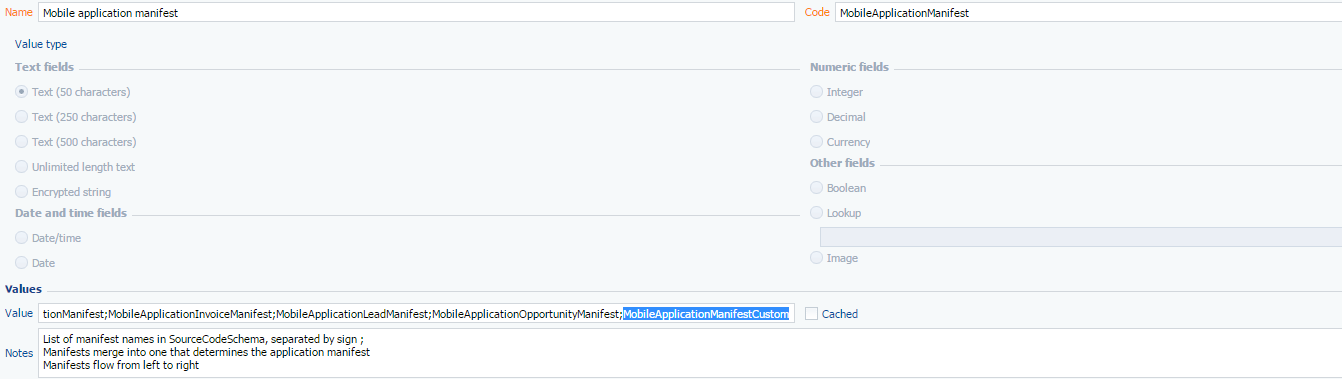
And check the synchronization. If it ends with an error, then most likely it is still necessary to specify the connection in the custom manifest. As a result, add to the manifest until synchronization ends successfully.

Like 0

Like

Share

0 comments
Show all comments

Question

My question concerns changing the button availabillity without updating the list – kindly advise where I can learn about the sandbox message implementation feature?

Answer

There are a lot of examples of sandbox message implementation in bpm'online. The BasePageV2  and BaseSectionV2 modules are some of them. In these modules, when performing initialization, we call the subscribeSandboxEvents() method that implements subscription to the sandbox messages.

For example, the [CardChanged] message subscription is implemented in the BaseSectionV2  module. When the module receives this message, it sets the modified value to the corresponding attribute. The message, on the other hand, sends (publishes) the BasePageV2 module when calling the publishPropertyValueToSection() method. The publishPropertyValueToSection() method, in its turn, is called when certain attributes of the edit page model are modified.

You can act in a similar way. For example, subscribe to the modification of the [ServiceCategory] field in the init() method of your edit page (CasePage):

init: function() {
    this.callParent(arguments);
    this.on("change:ServiceCategory", function(model, value) {
        this.publishPropertyValueToSection("CurrentServiceCategory",value);
    }, this);
}

Thus, when the [ServiceCategory] page field is modified, the new value will be populated in the [CurrentServiceCategory] attribute of the CaseSection section.

After this, you will be able to receive the current category value by addressing the [CurrentServiceCategory] attribute:

isEnableButtonColumbus: function() {
    var serviceCategory = this.get("CurrentServiceCategory");
    if (!serviceCategory) {
        // Ваш код
    } else {
        return (serviceCategory.value ===UsrConsts.ServiceCategory.Dynamix);
    }
}


Like 0

Like

Share

0 comments
Show all comments
SDK
support
cases
mobile

1. Create Source Code:

Ext.define("Terrasoft.configuration.service.UsrYourService", {
    alternateClassName: "Terrasoft.UsrYourService",
    statics: {
         
        serviceUrl: "rest/UsrYourService/",  // Name of your Service
         
        yourAction: function(config) {
            var data = {
                recordId: config.id // Input parameter(s) of service
            };
            Terrasoft.RequestManager.issueRequest({
                supressRequestEvents: false,
                requestFn: Terrasoft.Ajax.request,
                requestFnConfig: {
                    url: Terrasoft.util.encodeServiceUrl(this.serviceUrl) + config.action,
                    method: "POST",
                    jsonData: data,
                    success: function(response) {
                        var decodedResponse = Ext.JSON.decode(response.responseText, true);
                        Ext.callback(config.success, config.scope, [decodedResponse]);
                    },
                    failure: function(response) {
                        var parser = Ext.create("Terrasoft.ServiceResponseParser", response);
                        var exception = parser.getServiceFailureException();
                        Ext.callback(config.failure, config.scope, [exception]);
                    },
                    scope: this
                },
                responseToStatusCodeFn: function(response) {
                    return response.status;
                },
                scope: Terrasoft.Ajax
            });
        }
    }
});

2. Add in MobileApplicationManifest your service into CustomSchemas block:

"CustomSchemas": [
    "UsrYourService"
]

3. Call service from your code:

yourFunction: function() {
    Terrasoft.UsrYourService.yourAction({
        id: this.record.getId(), // RecordId
        action: "Start", // Method of service
        success: this.serviceSuccess, // Success callback
        failure: this.serviceFailure, // Error callback
        scope: this
    });
},
serviceSuccess: function(response) {
    if (response.isSuccess) {
        ///TODO: do something
    } else {
        Terrasoft.MessageBox.showMessage(Terrasoft.LocalizableStrings.StartErrorMessage); // Error message
    }
},
serviceFailure: function(error) {
    var response = error.getResponse();
    Terrasoft.MessageBox.showMessage(response.statusText);
}


Like 0

Like

Share

0 comments
Show all comments
SDK
support
cases

In order to run process GlbProcess1 from server side use code below:

IProcessExecutor processExecutor = UserConnection.ProcessEngine.ProcessExecutor;
var nameValues = new Dictionary();
// Add your parameters
nameValues["RecordId"] = entityId.ToString();
processExecutor.Execute("GlbProcess1", nameValues);

If you want to run GlbProcess1 for all records in Case:

var esq = new EntitySchemaQuery(UserConnection.EntitySchemaManager, "Case");
esq.PrimaryQueryColumn.IsAlwaysSelect = true;
var entities = esq.GetEntityCollection(UserConnection);
foreach(var entity in entities) {
    var entityId = entity.PrimaryColumnValue;
    IProcessExecutor processExecutor = UserConnection.ProcessEngine.ProcessExecutor;
    var nameValues = new Dictionary();
    // Add your parameters
    nameValues["RecordId"] = entityId.ToString();
    processExecutor.Execute("GlbProcess1", nameValues);
}


Like 0

Like

Share

3 comments

This code gives an error now. "ProcessExecutor is not usable because of it's protection level" or something like that.

Hi Jonas,

I just checked from my end and I was able to use above article to start a process.


Which version are you using? Could you please provide error screenshot?


Regards,

Dmytro

Hi Dmytro Smishchenko & Tatiana,

Have a follow up question regarding executing a BP from the server side. The article covers how to execute it by passing certain parameters. How does one get back certain out output parameters after the BP executes??


I went through the IProcessExecutor documentation here and it permits to retrieve one result parameter. What if I need to read more than 1 parameter at the end of the business process execution?? Is there any other way to execute a BP from server side code and get the output parameter?


Anastasia's comment in this question - https://community.creatio.com/questions/call-business-process recommends the use of FlowEngine to run the business process. I also went through the class documentation of FlowEngine here. Could not find a way to get BP parameters after execution.


Appreciate your assistance. 

Show all comments

Question

Can we configure calculating the response/resolution time from the moment of assigning a case assignee (it is now calculated from the moment of registering a case)?

Answer

The date of calculation is performed at the moment of changing the Service in the onServiceItemChanged() method when a case is created. You can create a method that would process chaning of the Assignee and calculate the date, but make sure all the necessary fields are populated before that (in particular, the [Service] field).

Like 0

Like

Share

0 comments
Show all comments

Question

How do I display another column in the "Accounts" list in the mobile app? For example, the "Address" coulmn?

Answer

Since the MobileAccountModuleConfig base schema cannot be changed, you need to create a custom UsrMobileAccountModuleConfig schema (in a custom package, create the page extension schema of the corresponding section). To do this, in the [Configuration] section, select Add > Source code. Fill in the schema properties ([Title], [Name], [Package]). Select JavaScript as a language for the schema, and connect it to the manifest.


"Models": {
"Account": {
"RequiredModels": [
. . .
],
"ModelExtensions": [
. . .
],
"ModelExtensions": [],
            "PagesExtensions": [
                "MobileAccountRecordPageSettingsDefaultWorkplace",
                "MobileAccountGridPageSettingsDefaultWorkplace",
                "MobileAccountActionsSettingsDefaultWorkplace",
                "MobileAccountModuleConfig",
                "UsrMobileAccountModuleConfig"
            ]

Paste the following code in the schema:

Terrasoft.sdk.GridPage.setSecondaryColumn("Account", {
    columns: ["Address"],
    convertFunction: function(values) {
        return values.Address;
    }
});

Register the necessary columns in the manifest:

{
            "Name": "Account",
            "SyncColumns": [
                "Address"
            ]
        }

Once done, we recommend regenerating the source code and compiling the configuration 

Like 0

Like

Share

0 comments
Show all comments

Question

I cannot delete a participant from an activity. The error message informs that I canot delete the Owner, but the participant in fact IS NOT the owner.

Answer

-- downgrading to a participant
SELECT ac.Id, Title, OwnerId, ap.ParticipantId, ap.Id as ApId FROM Activity ac
LEFT JOIN ActivityParticipant ap on ap.RoleId = '53fc4a92-b0ea-e111-96c4-00165d094c12'
AND ac.Id = ap.ActivityId
WHERE OwnerId <> ap.ParticipantId
--
UPDATE ActivityParticipant SET RoleId = '1a8324e8-a6e1-df11-971b-001d60e938c6'
WHERE Id In (
SELECT ap.Id FROM Activity ac
LEFT JOIN ActivityParticipant ap on ap.RoleId = '53fc4a92-b0ea-e111-96c4-00165d094c12'
AND ac.Id = ap.ActivityId
WHERE OwnerId <> ap.ParticipantId
)
-- upgrading to an owner
SELECT ac.Id, Title, OwnerId, ap.ParticipantId, ap.Id as AppId, ap.RoleId FROM Activity ac
LEFT JOIN ActivityParticipant ap on ac.Id = ap.ActivityId
WHERE ac.OwnerId = ap.ParticipantId AND
ap.RoleId <> '53fc4a92-b0ea-e111-96c4-00165d094c12'
--
UPDATE ActivityParticipant Set RoleId = '53fc4a92-b0ea-e111-96c4-00165d094c12'
WHERE Id In (
SELECT ap.Id FROM Activity ac
LEFT JOIN ActivityParticipant ap on ac.Id = ap.ActivityId
WHERE ac.OwnerId = ap.ParticipantId AND
ap.RoleId <> '53fc4a92-b0ea-e111-96c4-00165d094c12'
)


Like 0

Like

Share

0 comments
Show all comments
SDK
support
cases

Case description:

We want to change color of activity on ActivitySection.

Algorithm of realization:

  1. You should create client replacing module for "ActivitySectionV2" from NUI package.
  2. Add to this module three methods:
    1.  getGridDataColumns - this method configures which fields we will get from DB for each activity;

      getGridDataColumns: function() {
          var baseGridDataColumns = this.callParent(arguments);
          var gridDataColumns = {
              "Account": {path: "Account"},
              "StartDate": {path: "StartDate"},
              "DueDate": {path: "DueDate"},
              "ShowInScheduler": {path: "ShowInScheduler"},
              "Status": {path: "Status"},
              //Added by me, because in base implementation this method doesn't get this field
              "Result": {path: "Result"},
              "Status.Finish": {path: "Status.Finish"},
              "ProcessElementId": {
                  path: "ProcessElementId",
                  dataValueType: 0
              }
          };
          return Ext.apply(baseGridDataColumns, gridDataColumns);
      },


    2. prepareResponseCollection and setColor - this methods set background color for activities;

      prepareResponseCollection: function(collection) {
          var notStartedId = ConfigurationConstants.Activity.Status.NotStarted;
          var inProgressId = ConfigurationConstants.Activity.Status.InProgress;
          var finishedId   = ConfigurationConstants.Activity.Status.Done;
          var canceledId   = ConfigurationConstants.Activity.Status.Cancel;
           
          this.callParent(arguments);
           
          collection.each(function(item) {
              var status = item.get("Status").value;
              if (status === notStartedId.toLowerCase()) {
                  this.setColor(item, "#42f4dc");
              } else if (status === inProgressId.toLowerCase()) {
                  this.setColor(item, "#4168f4");
              } else if (status === finishedId.toLowerCase()) {
                  this.setColor(item, "#88f441");
              } else if (status === canceledId.toLowerCase()) {
                  this.setColor(item, "#f441af");
              }
          }, this);
      },
      setColor: function(item, color) {
          //Items in register
          item.customStyle = {
              background: color,
          };
          //Items on calendar view
          item.set("Background", color);
      }


  3. In this case we change color depend on activity status, but you can use another field. For example - Result. You can get Result id of item by call item.get("Result").value. IMPORTANT! You must add this field to getGridDataColumns method. Identificators of default activity results you can get by next query

    SELECT Name, Id FROM ActivityResult

    to your bpm'online DB.

  4. This code can work for ActivityDetail too. Algorithm of realization is same.
  5. If you want you can store your color settings in Lookup.
    1. Create lookup which will looks like this:

      Figure 0.

    2. Add method which will get them from DB

      init: function() {
          this.callParent(arguments);
          this.getColorsFromLookup();
      },
      getColorsFromLookup: function() {
          var colors = {};
          var esq = Ext.create("Terrasoft.EntitySchemaQuery", {
              rootSchemaName: "GlbActivityColor"
          });
          esq.addColumn("Name");
          esq.addColumn("GlbCode");
          esq.getEntityCollection(function (result) {
              if (!result.success) {
                  return;
              }
              result.collection.each(function (item) {
                  colors[item.get("Name")] = item.get("GlbCode");
              });
              this.set("Colors", colors);
              debugger;
          }, this);
      }


    3. Add attribute which will store colors at front-end

      attributes: {
          Colors: {
              dataValueType: this.Terrasoft.DataValueType.CUSTOM_OBJECT
          },
      },


    4. Fix prepareResponseCollection method for using colors from our attribute

      prepareResponseCollection: function(collection) {
          var notStartedId = ConfigurationConstants.Activity.Status.NotStarted;
          var inProgressId = ConfigurationConstants.Activity.Status.InProgress;
          var finishedId   = ConfigurationConstants.Activity.Status.Done;
          var canceledId   = ConfigurationConstants.Activity.Status.Cancel;
           
          this.callParent(arguments);
           
          collection.each(function(item) {
              var status = item.get("Status").value;
              if (status === notStartedId.toLowerCase()) {
                  this.setColor(item, this.get("Colors")["notStarted"]);
              } else if (status === inProgressId.toLowerCase()) {
                  this.setColor(item, this.get("Colors")["inProgress"]);
              } else if (status === finishedId.toLowerCase()) {
                  this.setColor(item, this.get("Colors")["finished"]);
              } else if (status === canceledId.toLowerCase()) {
                  this.setColor(item, this.get("Colors")["canceled"]);
              }
          }, this);
      },


Like 0

Like

Share

1 comments

Color is not getting updated once activity edit page is saved and closed when activity edit page is opened from onScheduleItemDoubleClick method

Show all comments