mobile application
Mobile app
Print
html
7.16
Mobile_Creatio

Hello, 

We want to print html document in mobile app. we have HTML document (whole, with , , tags) in response after calling API.

Now we need to show print preview or something like it, to print on connected printer. No matter how, the main thing is to print it.


In web app, we made it using small js code. 

1. open new window

2. set html text

3. call print function

but this all are using browser's functionality.


How we can make it in mobile app?

Like 1

Like

4 comments

Dear Luka, 


Unfortunately, there are no known examples of adding printing functionality into Creatio mobile application. 

Please follow this link to learn more on development in Creatio Mobile Application in order to find the possible ways of implementing the mentioned functionality:

https://academy.creatio.com/documents/technic-sdkmob/7-16/creatio-devel…


Kind regards,

Roman Brown


I think, I explained incorrectly.

I need to invoke print preview, maybe it will platform native or something like it.

Can I create webview and set html to it? in both platforms?

It work, thanks

I have another problem now.

I need to print opened document, but there is error winPrint.print is not a function.

Can I somehow print opened page ?

Show all comments
Filtering
mobile application
Mobile_Creatio

Hi,


There are list of columns available in order to search for a contact in Mobile App. I have a use case to remove/hide those and set "Last Name" as the primary and default column to search based on.

E.g. as soon as you chose to set a filter, your text to be search as a last name.


How is this possible in Creatio?


Thanks


Like 0

Like

1 comments

Dear Kavian, 


It's possible to configure columns by which search will be performed in mobile application. 

Information on where and how it can be configured can be found in this academy article: https://community.creatio.com/articles/search-multiple-columns-mobile-a…


Please refer to it and configure the list of columns in your own way. 


Kind regards,

Roman

Show all comments
dashboard
mobile application
7.15
Studio_Creatio

Hi Community,

I have almost 10 plus dashboards in web application. Now in mobile I want only to show 3, how can I hide some of it? Is there a way I can filter it in Mobile Application Manifest?


Like 0

Like

3 comments

I think you can try the "Access Rights" option in dashboard and not give access to certain set of users who use the mobile app.

Thanks KrishnaPrasad,

On my scenario, access rights will not do. They should still need to see these dashboards in web application. I only need to limit the dashboards in mobile. Do you know if it can be achieve through filtration?

Dear Fulgen, 


There is no possibility to reach the functionality you have requested by applying changes to manifest only. 

You can do that overriding method onDashboardRecordsLoaded in Terrasoft.configuration.controller.DashboardPage (MobileDashboardPageController). 

An argument called "records" is passed into this method which contains all dashboards uploaded from DB. 

You can filter which of them to display in method onDashboardRecordsLoaded

Here is the short instructions on how to override an existing controller:

1. Create custom module which inherits the existing controller and add your own logic to it. Here is example for activity controller: https://prnt.sc/s8izs3

2. Create a custom module for replacing grid page for the created controller: https://prnt.sc/r0pz21

3. Create a Replacing client module for the existing manifest, copy the code from the base manifest, change the Grid property in the needed object and add the controller in the PageExtentions array: https://prnt.sc/r0q35h

4. Recycle pool and re-synchronize your mobile app.


Kind regards,

Roman

Show all comments
mobile application
7.15
Mobile_Creatio

Hi community,


We implement a user action on "Ocorrências" section that give us our current location and set "imdEndereco" with our coordinates, as you can see on the "Screenshot_1.png".

Also, we created "Serviços" section with detail "Ocorrências" ("Screenshot_3.png") and we successfully establish connection between them. When we tried to create a new record on that detail, our action return our coordinates but cannot successfully set "imdEndereco". ("Screenshot_2.png")


Any sugestions on how can we resolve this problem?


Thanks in advance.


Best regards,

Pedro Pinheiro

Like 1

Like

1 comments

Dear Pedro, 


As discussed in the support case, the issue occurred because the imdEndereco was not in the QueryConfig columns and there was an issue with variables not explicitly converted into string type. 

Show all comments

Hi Community,


In mobile application how we can enable the uploading of contact picture in contact, the same functionality in web application.


Like 0

Like

1 comments

In order to implement the required functionality please do the following:


1. Use the attachments detail for uploading the image.


2. Create a business process that should be triggered when a new image was uploaded to the application.


3. In the business process, you should copy data of the created record from the “ContactFile” table to the “SysImage” table. Please note that in order to copy the value from the “Data” column you should use the “Script task” business process element. Please find the example of the code below:


var getAttachmentId = new Guid("78B9876B-61CE-4EAB-9424-E19E2CABD2BE");

            var getImageId = new Guid("4C14605B-4904-43CE-8EC6-CD192222274A");

            byte[] getData = new byte[1000000];


            using (DBExecutor dbExecutor = UserConnection.EnsureDBConnection())

            {

                dbExecutor.StartTransaction();

                var select = new Select(UserConnection)

                .Column("Data")

                .From("ContactFile")

                .Where("Id").IsEqual(Column.Parameter(getAttachmentId)) as Select;


                using (IDataReader dataReader = select.ExecuteReader(dbExecutor))

                {


                    if (dataReader.Read())

                    {

                        getData = (byte[])dataReader[0];

                    }

                }

            }

            var fileContent = new MemoryStream(getData);

            var esqResult = new EntitySchemaQuery(UserConnection.EntitySchemaManager, "SysImage");

            esqResult.AddAllSchemaColumns();

            var entity = esqResult.GetEntity(UserConnection, getImageId);

            entity.SetStreamValue("Data", fileContent);

            entity.Save();

            return true;


Please do not forget to add the following namespaces to the business-process https://prnt.sc/s0ju9o


Additionally, please find more information about the “Entity” class in the article by the link below:


https://academy.creatio.com/documents/technic-sdk/7-15/working-database-entity-entity-class


Best regards,

Norton

Show all comments
mobile application
7.15
Mobile_Creatio

Hi Community,

In mobile how can I change the display name of column in Section Page just like in web application we can change the column display name in "Section->Select fields to Display".

The image below show the example that I tried put the title name of the column.


An example already exists but is directed to change the display name of a column in mobile grid/List Page (https://community.creatio.com/questions/column-display-name-mobile-gridlist-page)


Thanks an advance.


Best Regards,

Pedro Pinheiro

Like 1

Like

1 comments

Dear Pedro,


Currently it is not possible to do it in the mobile application. There were multiple similar requests from different customers and our development team accepted this idea. It will be available in the nearest future application versions.


Regards,

Dean

Show all comments

Hi Community,


In mobile we can configure the Column Set to disable the collapsible using below property:

collapsible: false

isCollapsed: false


We tried to apply the same for Attachment/File Detail but the above property is not working. Please suggest how we can disable the collapsible in mobile preview page.


Like 0

Like

1 comments

The "collapsible" and "isCollapsed" properties are used for detail as well. Please see the example:


Terrasoft.sdk.RecordPage.configureEmbeddedDetail("Case", "CaseFilesDetail", {

    alwaysShowTitle: true,

    collapsible: false,

    isCollapsed: false,

});


The result - > https://prnt.sc/rizh0k

Show all comments
homepage
mobile application
7.15

Hi Community,


In web application, we can set the default page after login by giving the default value in home page field in system users. I want to the same in mobile application, how we can set the default page after login in mobile application?


Like 0

Like

1 comments

Dear Fulgen, 


Unfortunately, there is no possibility to configure home page in mobile application using native tools or changing existing configuration. 

The only possible way to implement this functionality for now is to create your own mobile application using our source files. 


The responsible R&D team is already informed about this request so they will consider a possibility of creating functionality which would allow our users to configure home pages in their mobile apps. 


Kind regards,

Roman

Show all comments

We applied custom css on mobile interface successfully; idea took from this article  custom css reflected on all screens (after successful login)


We are using Creatio Mobile Emulator for identifying html/css , we need to apply css on login page (before successful login), once we apply the custom css (using above method) for login page it’s not reflecting, we came to know that all css source files are from local emulator. So, there should be a way to achieve this requirement


There is an html file (Creatio\Creatio_Mobile_Emulator\7.15.7\appV2\MobileApp\LoginPage.html)
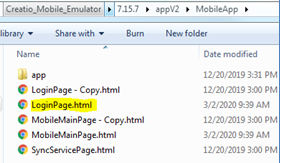


We tried to modify this file and changes are successfully reflecting on mobile Emulator. We modified “LoginPage.html” and change showing on mobile emulator like below screenshot but not on mobile app.

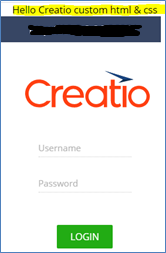
 

The question is how it will be proceed for on-demand development and production systems mobile app?

Can we modify above file on local and send to Creatio Support so that they will configure for our on-demand development and production systems mobile app?

Like 0

Like

1 comments

Unfortunately, it's not possible to modify the Login page for mobile application.

Show all comments
mobile application
emulator
7.15

Hi Community,


I have this problem with my Mobile emulator, after giving the creatio server address and clicking "Continue" button, emulator is redirecting to web login page not to mobile login page. I already tried to clear browser cache I have already deleted "ChromeUserData" folder but still this issue is happening. Any idea how I can fix this?

Like 0

Like

2 comments

Dear Fulgen, 


This is a known issue for mobile emulator when you are using Chrome of version 80 or higher. 

Our R&D team is working on fixing it. 

Meanwhile, as a workaround you can install ChromePortable of version 79 or lower and specify the path to it in "startchrome_withcookie.bat" file by changing:

start chrome

start C:\...\chromeportable


Kind regards,

Roman

Roman Brown,


Thanks Roman, my emulator is working now

Show all comments