business rule
mobile application
Mobile_Creatio
Studio_Creatio
8.0

Hi everyone,


I’m working with Creatio Freedom UI and trying to configure show/hide business rules that must work in the Mobile App. The older community posts and documentation links related to mobile business rules all redirect to page not found, and most examples are for the classic UI or legacy mobile rules. I need clarity on the correct and officially supported way to control field/tab visibility in Freedom UI Mobile, ideally using view model attributes, expressions, or any recommended approach. If anyone has working examples or best practices for implementing visibility logic in Freedom UI Mobile, please share. 

Thanks in advance!

Like 0

Like

1 comments

Hello,

Currently, in Freedom UI mobile, business rules can only be implemented at the metadata level, and detailed public documentation on this process is not yet available.

Using standard functionality, you can configure mobile business rules only at the object level.

However, our R&D team is working on expanding this capability in future application releases.

In the meantime, we have prepared instructions for adding business rules to Freedom UI mobile pages. You can find the guide here:
Set up business rules at the page level for mobile -081025-160622.pdf

I trust this helps.

Best regards,
Tom

Show all comments
mobile
mobile application
#mobileapp
logo

Hi!

I updated the system setting Mobile application logo (BLOB) via a package. The value in SysSettingsValue has been updated (verified in the database; ModifiedOn shows the update date).

However, the logo does not appear in the mobile application. The package was installed after making the changes, and there is no old cache on the device (the app was downloaded for the first time).

Question:

  • Does the Creatio mobile app use the BLOB from SysSettingsValue for the logo, or does it load the logo from another resource/system setting?
  • For the mobile app, is it necessary to additionally link the logo to SysImage or take any other actions to make the new logo appear?

Thank you!

Like 0

Like

0 comments
Show all comments

Привет!

Я обновила системную настройку Mobile application logo (BLOB) через пакет, значение в SysSettingsValue обновилось (проверено в базе, ModifiedOn показывает дату обновления).

Однако в мобильном приложении логотип не отображается. Пакет был установлен после внесения изменений, старого кэша на устройстве нет (приложение скачано впервые).

Вопрос:

  • Использует ли мобильное приложение Creatio BLOB из SysSettingsValue для логотипа, или подгружает логотип из другого ресурса/системной настройки?
  • Нужно ли для мобильного приложения делать дополнительную привязку к SysImage или ещё какие-то действия, чтобы новый логотип появился?

Спасибо!

Like 0

Like

3 comments

Здравствуйте,

Чтобы перенести значение лого с одного сайта на другой, необходимо выполнить следующее:

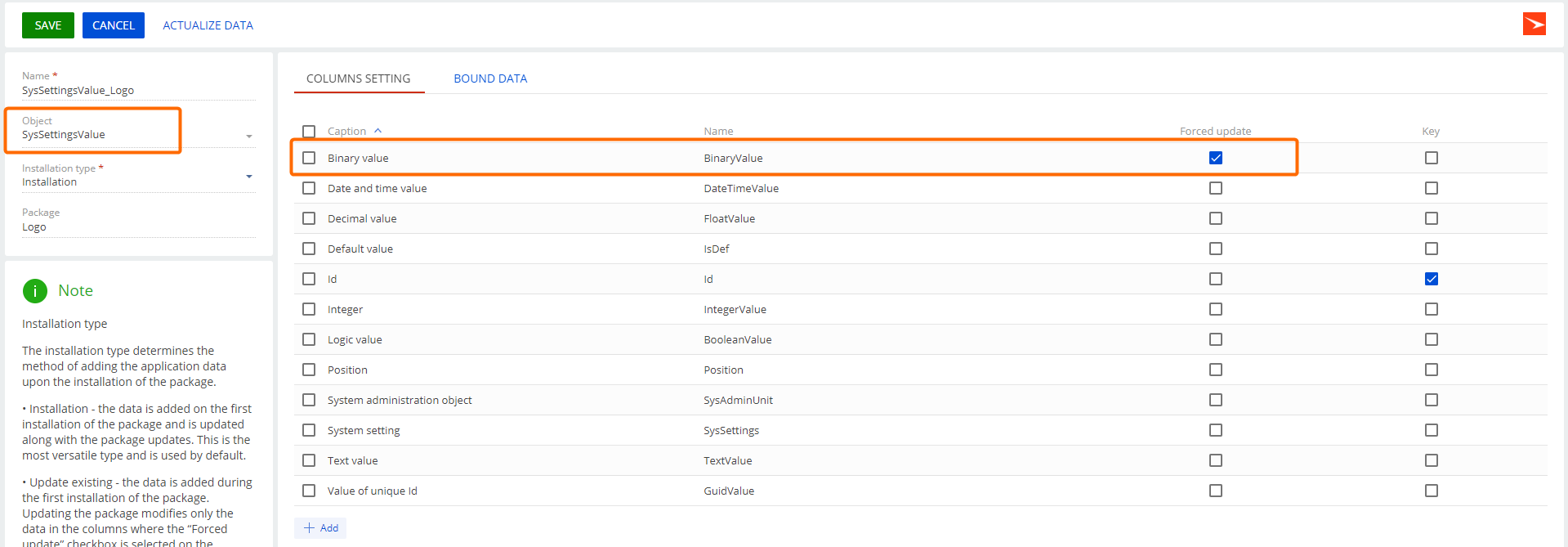
1. Создайте привязку данных для таблицы SysSettingsValue в вашем пакете. Привяжите таблицу SysSettingsValue к необходимым системным настройкам для логотипа:
Логотип (код - LogoImage)
Логотип на верхней панели (код - HeaderLogoImage)
Логотип в главном меню (код - MenuLogoImage)

В вашем случае, укажите системную настройку: Mobile application logo (код - MobileLogoImage).

2. Включите принудительное обновление для колонки BinaryValue. На вкладке «Настройки колонок» найдите: BinaryValue и включите опцию Принудительное обновление. 


3. Установите пакет на целевом сайте. 

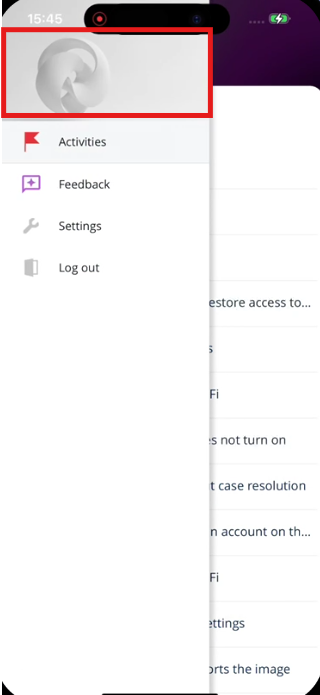
Прошу заметить, что системная настройка: MobileLogoImage меняет логотип только в Classic UI интерфейсе, в боковой панели меню (см.скриншот ниже). 


Malika,

Здравствуйте,
спасибо за рекомендации. У меня всё это уже выполнено:

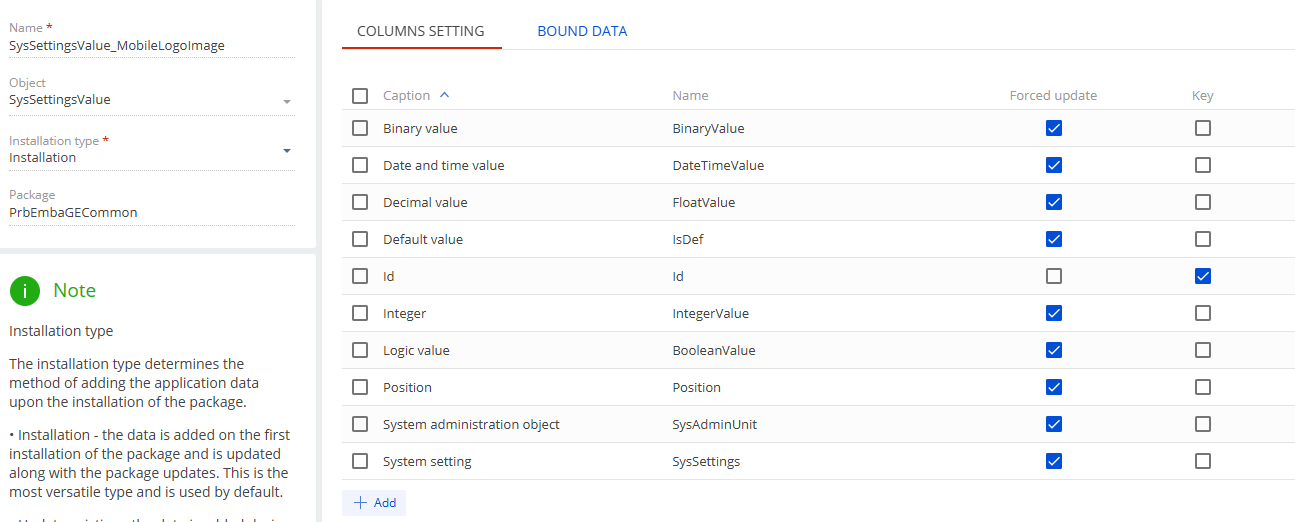
  1. Привязка данных для SysSettingsValue создана, включая настройку MobileLogoImage.
  2. Принудительное обновление для колонки BinaryValue включено.
  3. Пакет установлен на целевом сайте.

Тем не менее, логотип всё равно не отображается.


Gulgaz Mammadova,


Пожалуйста, выполните следующий SQL запрос на сайте, где вы переносили пакет с системной настройкой и также на сайте, где создали привязку данных:

select ssv."Id", ssv."CreatedOn", ssv."ModifiedOn", c."Name" as "ModifiedBy", ss."Code", sau."Name", ssv."TextValue", ssv."GuidValue", ssv."IntegerValue", ssv."BooleanValue", ssv."BinaryValue" from "SysSettingsValue" ssv
join "SysSettings" ss on ss."Id"=ssv."SysSettingsId"
left join "SysAdminUnit" sau on sau."Id"=ssv."SysAdminUnitId"
left join "Contact" c on ssv."ModifiedById" = c."Id"
where ss."Code" in ('MobileLogoImage');

Нам необходимы результаты в колонке: BinaryValue, поскольку в ней сохраняется ваш файл. Если она заполнена, это означает, что ваше лого было перенесено на сайт, если нет- означает, что, скорее всего, не хватает какой-то привязки данных.

Show all comments
Mobile_Creatio
mobile application
mobile sdk
8.2.7
8.0

Dear Creatio Community,

I am writing to request guidance regarding the utilization of the @creatio/mobile-common library for extending the Creatio mobile application within the Freedom UI framework. Specifically, I am working with Creatio version 8.2.7 (APK).

While the index.d.ts file for @creatio/mobile-common is available on the official npm repository, I am encountering significant challenges due to the absence of comprehensive documentation and practical, live examples demonstrating its use in the context of Creatio mobile app customization.

My objectives involve leveraging this library to achieve advanced customizations and integrations within the mobile platform.

I would greatly appreciate any assistance in the form of:

  • Comprehensive code examples demonstrating the use of @creatio/mobile-common in real-world scenarios.
  • Detailed explanations of the library's architecture and functionality.
  • Guidance on best practices for integrating custom components with the Creatio mobile platform.
  • Information on how to debug and test code that utilizes the @creatio/mobile-common library.


Like 0

Like

1 comments

Hello Pranshu,

Our Academy team is currently working on creating articles that present the full information regarding all the questions mentioned.

Please follow for updates on the Academy site to receive all the answers.

Show all comments
mobile
mobile application
Mobile_Creatio
mobile_freedomui
8.0

Dear Creatio Community,

I am writing to seek assistance with mobile app development within the Freedom UI environment. I am encountering significant challenges extending the mobile app's functionality, particularly due to the current lack of comprehensive documentation and practical examples.

Specifically, I am facing the following issues:

1. Auto-Numbering Issue on Record Page:

  • I have observed that the auto-numbering functionality within the Creatio mobile app behaves inconsistently.
  • When an auto-numbering field is displayed on a record page, the automatic number generation fails.
  • However, if the auto-numbering field is removed from the record page layout, it functions correctly within the list page.
  • I require guidance on how to resolve this conflict and ensure auto-numbering works consistently across both list and record pages within the Freedom UI mobile app. Ideally, a code example demonstrating the correct implementation would be invaluable.

2. Implementing a Resizable Image Component:

  • I need to add a custom image component to the mobile app that allows users to upload images from their native phone's API, similar to an attachment.
  • This component should be resizable to accommodate various image dimensions and screen sizes.
  • I am struggling to find any documentation or examples on how to implement such a component within the Freedom UI mobile framework.
  • I would be very grateful for a working example of how to implement a resizable image component, that interacts with the native phones OS to retrive images.

The current documentation lacks detailed explanations and practical examples for mobile app development in Freedom UI. This makes it challenging to extend the mobile app's functionality effectively.

Any assistance, code examples, or pointers to relevant resources would be greatly appreciated.

Like 0

Like

1 comments

Hello Pranshu,

1. Autonumbering is supported, and there were no registered issues with it before. Please create a case for Creatio Support to review the specific issue that you've faced.

2. Unfortunately, there is currently no mobile component that can display images in a given size, as on the web. At the moment, only attachments are suitable for downloading/uploading images. 
 

Show all comments
mobile
mobile application
Mobile_Creatio
7.18

Hi Team,
I am currently working on creatio mobile app and trying to get the list of roles that are being tagged to the current user in addBusinessRule.But I am not able to get it using Terrasoft.store.BaseStore.
I tried using Try catch block , the error message is empty. Can you please help me regarding this?


Terrasoft.sdk.Model.addBusinessRule("Activity", {
    name: "FieldForceActivityTypeRule",
    ruleType: Terrasoft.RuleTypes.Custom,
    triggeredByColumns: ["Type"],
    events: [Terrasoft.BusinessRuleEvents.Load],
    executeFn: function(record, rule, column, customData, callbackConfig, event) {
     var currentUser = Terrasoft.CurrentUserInfo.userId; 
      alert("currentUser: "+ currentUser);
    var modelName = "SysUserInRole";
    var store = Ext.create("Terrasoft.store.BaseStore", {
      model: modelName
    });
    var columns = ["SysRole", "SysUser"];
    var queryConfig = Ext.create("Terrasoft.QueryConfig", {
      modelName: modelName,
      columns: columns
    });
    var filtersConfig = {
      property: "SysUser",
      value: currentUser
    };
    store.setPageSize(Terrasoft.AllRecords);
    store.loadPage(1, {
      isCancelable: true,
      filters: Ext.create("Terrasoft.Filter", filtersConfig),
      queryConfig: queryConfig,
      callback: function(loadedRecords, operation, success) {
        if (success) {
          alert("success :"+ loadedRecords.length);
          for (var i = 0, ln = loadedRecords.length; i < ln; i++) {
            var record = loadedRecords[i];
            alert("i "+ record);
          }
        }
      },
      scope: this
    });
        Ext.callback(callbackConfig.success, callbackConfig.scope, [true]);
    }
});


Like 1

Like

1 comments

Hello,


First, you need to check if SysUserInRole and SysUser are syncing with the mobile app (correspondent records are present in the mobile application's manifest). Then check if you get any result at the callback function when you debug the code.

Show all comments
mobile application
FreedomUI
Run Process
Button
process_button
Sales_Creatio
8.0

Hello 
It 's possible to add business process buton on Mobile App Freedom Ui in section , or section page.


Thank you 

Like 0

Like

1 comments

Hello Safa,

Unfortunately, there is no no-code way to add the custom button. We've already registered the suggestion for the R&D team.


Meanwhile, this article explains how to create a custom button. Please follow the release updates to find out when SDK for Mobile will be implemented.

Show all comments
Mobile_Creatio
mobile application
custom button
#FreedomUI
8.0

Hi community , 


I find it a little difficult to figure out how to implement the freedom ui component configuration in my page, even if Creatio documentation lists it all:

 https://academy.creatio.com/docs/8.x/dev/development-on-creatio-platform/mobile-development/customization/freedom-ui/customize-page/references/common-components

The "UsrMobileUsrLeaveRequestRecordPageSettingsWorkplace2" client module is attached to this mobile page for a custom section that I designed called "UsrLeaveRequest."
How do I proceed about adding a custom button to this edit page now? 


[
    {
        "operation": "insert",
        "name": "settings",
        "values": {
            "entitySchemaName": "UsrLeaveRequest",
            "details": [],
            "columnSets": [],
            "localizableStrings": {
                "SocialMessageDetailCaptionUsrLeaveRequest_caption": "Feed",
                "AttachmentsDetailCaptionUsrLeaveRequest_caption": "Attachments",
                "primaryColumnSetUsrLeaveRequest_caption": "General information",
                "UsrEmployeV2_DetailStandardDetailUsrLeaveRequest_caption": "Employees detail"
            },
            "settingsType": "RecordPage",
            "operation": "insert",
            
        }
    },
    {
        "operation": "insert",
        "name": "SocialMessageDetailV2StandardDetail",
        "values": {
            "caption": "SocialMessageDetailCaptionUsrLeaveRequest_caption",
            "entitySchemaName": "SocialMessage",
            "showForVisibleModule": true,
            "filter": {
                "detailColumn": "EntityId",
                "masterColumn": "Id"
            },
            "operation": "insert"
        },
        "parentName": "settings",
        "propertyName": "details",
        "index": 0
    },
    {
        "operation": "insert",
        "name": "AttachmentsFlutterDetailStandardDetail",
        "values": {
            "caption": "AttachmentsDetailCaptionUsrLeaveRequest_caption",
            "entitySchemaName": "SysFile",
            "filter": {
                "detailColumn": "RecordId",
                "masterColumn": "Id"
            },
            "operation": "insert"
        },
        "parentName": "settings",
        "propertyName": "details",
        "index": 1
    },
    {
        "operation": "insert",
        "name": "UsrEmployeV2_DetailStandardDetail",
        "values": {
            "caption": "UsrEmployeV2_DetailStandardDetailUsrLeaveRequest_caption",
            "entitySchemaName": "Employee",
            "filter": {
                "detailColumn": "Manager",
                "masterColumn": "UsrApplicant"
            },
            "detailSchemaName": "UsrEmployeV2_Detail",
            "operation": "insert"
        },
        "parentName": "settings",
        "propertyName": "details",
        "index": 2
    },
    {
        "operation": "insert",
        "name": "primaryColumnSet",
        "values": {
            "items": [],
            "rows": 1,
            "entitySchemaName": "UsrLeaveRequest",
            "caption": "primaryColumnSetUsrLeaveRequest_caption",
            "position": 0,
            "operation": "insert"
        },
        "parentName": "settings",
        "propertyName": "columnSets",
        "index": 0
    },
    {
        "operation": "insert",
        "name": "42d4b33c-f361-44d4-92cd-07e8db664fca",
        "values": {
            "row": 0,
            "content": "Leave Request No.",
            "columnName": "UsrLeaveReaquestNo",
            "dataValueType": 1,
            "operation": "insert"
        },
        "parentName": "primaryColumnSet",
        "propertyName": "items",
        "index": 0
    },
    {
        "operation": "insert",
        "name": "0d5ca981-1558-4e4d-b1a2-2b2b9dbd422c",
        "values": {
            "row": 1,
            "content": "End Date",
            "columnName": "UsrEndDate",
            "dataValueType": 8,
            "operation": "insert"
        },
        "parentName": "primaryColumnSet",
        "propertyName": "items",
        "index": 1
    },
    {
        "operation": "insert",
        "name": "2013f978-c87f-4896-96be-5383cfd044e3",
        "values": {
            "row": 2,
            "content": "Start Date",
            "columnName": "UsrStartDate",
            "dataValueType": 8,
            "operation": "insert"
        },
        "parentName": "primaryColumnSet",
        "propertyName": "items",
        "index": 2
    },
    {
        "operation": "insert",
        "name": "266417d3-f847-4386-af45-2674e9e779bb",
        "values": {
            "row": 3,
            "content": "Applicant",
            "columnName": "UsrApplicant",
            "dataValueType": 10,
            "operation": "insert"
        },
        "parentName": "primaryColumnSet",
        "propertyName": "items",
        "index": 3
    },
    {
        "operation": "insert",
        "name": "1655829d-ce75-476c-9350-ce2696ecbf6d",
        "values": {
            "row": 5,
            "content": "Reason",
            "columnName": "UsrReason",
            "dataValueType": 1,
            "operation": "insert"
        },
        "parentName": "primaryColumnSet",
        "propertyName": "items",
        "index": 4
    },
    {
        "operation": "insert",
        "name": "9f677f71-3322-4e75-9938-69ca4e1c650f",
        "values": {
            "row": 6,
            "content": "Status",
            "columnName": "UsrStatus",
            "dataValueType": 10,
            "operation": "insert"
        },
        "parentName": "primaryColumnSet",
        "propertyName": "items",
        "index": 5
    },
    {
        "operation": "insert",
        "name": "3d874029-b467-4d7b-9eb0-d2ebfbe20403",
        "values": {
            "row": 7,
            "content": "Working Days Count",
            "columnName": "UsrWorkingDaysCount",
            "dataValueType": 4,
            "operation": "insert"
        },
        "parentName": "primaryColumnSet",
        "propertyName": "items",
        "index": 6
    },
    {
        "operation": "insert",
        "name": "bc0d7d7e-ffdf-44a5-98b3-0a10094341e2",
        "values": {
            "row": 4,
            "content": "Applicant.Manager",
            "columnName": "UsrApplicant.Manager",
            "dataValueType": 10,
            "operation": "insert"
        },
        "parentName": "primaryColumnSet",
        "propertyName": "items",
        "index": 7
    }
]

 

Like 0

Like

2 comments

Hello,
In order to add a button to a mobile page you need to modify the viewConfigDiff element. In your code it is missing, so you should add it manually in the "settings" element:

{
    "operation": "insert",
    "name": "settings",
    "values": {
        ---
        "viewConfigDiff": "[]"
    }
}

Here is an example of adding a new tab to the page:

"viewConfigDiff": "[{\"operation\":\"insert\",\"name\":\"LeadDecisionsPaths_Tab\",\"parentName\":\"Lead_Tabs\",\"propertyName\":\"items\",\"values\":{\"position\":2,\"text\":\"DecisionsPaths_Caption\",\"body\":{}}}]"

The button should be added similarly. 

Jimmy Meijon,

You can find an instruction on how to add a button and its logic in this article.

Show all comments
mobile
mobile application
Mobile_Creatio
Mobile app

Anyone I want to ask how to create business rules in product in order mobile apps?


The case is when creating new orders in mobile apps then add product in order I want to make products that appear only products in the hardware category.


Can anyone help me to solve this case guys?

Thank you

Like 0

Like

1 comments

Hi anyone, this case solved with this code

Terrasoft.sdk.Model.addBusinessRule("OrderProduct", {
   ruleType: Terrasoft.RuleTypes.Filtration,
   events: [Terrasoft.BusinessRuleEvents.Load],
   triggeredByColumns: ["Product"],
   filters: Ext.create("Terrasoft.Filter", {
       modelName: "Product",
       property: "Category",
       value: "Hardware"
   })
});

Show all comments

Anyone can help me to enable live update data like in web application and implement in mobile app? or like Refresh button on the top right corner dashboard section at mobile app?

need to be implement in this preview page:

So the users didn't should click Back button and choose the record again. Thank you.

Like 2

Like

1 comments

Hello,

This community post regarding data refresh may be helpful to you.

Best regards,
Antonii.

Show all comments