Import
export
package
custom
Service_Creatio_enterprise_edition
7.18

Hello,


For some technical issues, I had to reinstall database. so I exported the package "Custom" to be able to import it via application install. while trying to import it, it fails to restore configuration from backup.

How can I retrieve configuration done on this custom package? is there any best practice to export packages?


Thanks,

Like 0

Like

4 comments

Hello Mariam,


You can export the package from the Configuration section:


But we recommend installing the package in the Installed application section. So you will be able to download the application log to check the errors.


Best regards,

Bogdan

Hello Bogdan,


Thank you for the reply. in fact this is what I have done and then I tried to import the package from the installed application section. bellow is the screen of import failure. 

Bellow is a snippet of the errors in log file.

Error occured while performing operation on "Custom" item, UId = a00051f4-cde3-4f3f-b08e-c5ad1a5c735a.

2022-04-15 10:15:43,737 System.AggregateException: One or more errors occurred. (Error occured while saving resources for schema 'UsrServiceCatalogc9afd9b9Section' in 'Custom' package for 'pt-PT' culture) (Error occured while saving resources for schema 'UsrServiceCatalogc9afd9b9Section' in 'Custom' package for 'ro-RO' culture) (Error occured while saving resources for schema 'CaseInFolder' in 'Custom' package for 'pt-BR' culture) (Error occured while saving resources for schema 'UsrSchema6cea64dfPage' in 'Custom' package for 'it-IT' culture) (Error occured while saving resources for schema 'UsrSchema6cea64dfPage' in 'Custom' package for 'vi-VN' culture) (Error occured while saving resources for schema 'CaseInFolder' in 'Custom' package for 'he-IL' culture) (Error occured while saving resources for schema 'UsrSchema6cea64dfPage' in 'Custom' package for 'ar-SA' culture) (Error occured while saving resources for schema 'UsrSchema6cea64dfPage' in 'Custom' package for 'fr-FR' culture) (Error occured while saving resources for schema 'UsrCaseVisa' in 'Custom' package for 'en-US' culture) (Error occured while saving resources for schema 'UsrSchema6cea64dfPage' in 'Custom' package for 'cs-CZ' culture) (Error occured while saving resources for schema 'UsrRentalVehicle' in 'Custom' package for 'nl-NL' culture)

Thanks,

mariam moufaddal,

Did you ever find a solution?

The package "Custom" cannot be exported between environments. A solution would be to add a new package and add the same dependencies as in the package "Custom" and move files from Custom to the new created package. then you can export that package between environments.

Show all comments
Import
Business Process
Studio_Creatio

We need to import some data to inactivate contacts on a monthly basis. I want to import a contact identifier and then execute a business process to mark the imported contacts as inactive.


We have other import needs that also need to execute a business process for each row. 


Does anyone know of any utility/marketplace add on that will allow us to execute a bp for each import row?


Ideally, it would be great to be able to have a BP system function that would import a file and then process each row, but I'd take a scripted object to read the file in and process each row.

Like 0

Like

1 comments

Hi Marry,


Unfortunately, are no such basic tools for imported records/


The only way to achieve your business task is to create a new business process with a start signal with an event that should trigger the signal (Record added / Record modified).


Please note you should enable this business process before the import and disable afer.


Best regards,

Bogdan

Show all comments
Import
Sales_Creatio
7.17

I'm importing activity records for contacts who are not associated with an account. When I open one of the imported records, the contact field is empty. Is an account required to have a contact on an activity? I do have the category field set to "Visit to contact."

Like 0

Like

1 comments

Hello Jeffrey,


Hope you're doing well.


No, it's not necessary to populate the Account field. It seems you didn't set the field mapping correctly, so the Contact wasn't added as expected. Please try to import the Activity records using the mapping settings. For example:

configure the column values in the Excel file:


choose the Activity object as a target object:


match the needed columns:


and perform the import (using or noty using the duplicate checking, it depends on your business task).


As a result, the needed record was imported and it's also viewable from the connected contact:


Also you can find more information and examples of import/export in the articles below:


Best regards,

Roman

Show all comments
Import
Studio_Creatio
7.17

Hi community,

is it possible to load the data to import in the same structure used by data import standard feature and launch it programmatically ?


Like 0

Like

2 comments

Hello Stefano,


Can you please provide us more detailed information on your business task?


Thank you in advance!


Best regards,

Bogdan

Bogdan,

I would like to load programmaticaly the temporary table used by creatio when I import an excel file and then launch  the import, specifing which entity fill 

Show all comments
campaigns
Import
campaign
Marketing_Creatio
7.17

Hi community!


Our customer wants to import campaigns with participants of an old system to keep that data as history.

I managed to import the campaigns (see Can't import campaigns | Community Creatio), but I can't import the participants.

The import tells me that the field 'current step' is mandatory. Is there any way to work around this or a fixed value that I can use? My problem is that the old campaigns do not have a single step, because they just act like an empty container and the participation should be used as criteria for building marketing segments in the future.


Thanks and BR,

Robert

Like 0

Like

2 comments
Best reply

Hello Robert,


If possible, I would suggest filling the field of CampaignParticipant table


1) The following script will add one empty CampaignItem record (which is current step) for each campaign:


Insert into "CampaignItem" ("CampaignId") (select "Id" from "Campaign") 


2) Then you can set the name for all those records if you want:

update "CampaignItem" set "Name" = 'test' where "Name" = ''


3) The next script will set the CampaignItemId (if it is null) of the CampaignParticipant to any that is available in the corresponding campaign (There will always be at least one since in the first script we added one for each):


update "CampaignParticipant" set "CampaignItemId" = (select "Id" from "CampaignItem" where "CampaignItem"."CampaignId" = "CampaignParticipant"."CampaignId" limit 1) where "CampaignItemId" is null


That last script will only modify the participants who do not already have current step specified. 


If you know that there are campaign items for each campaign then you can skip the first and second scripts.


Hope it helps!


Best regards,

Max,

Hello Robert,


If possible, I would suggest filling the field of CampaignParticipant table


1) The following script will add one empty CampaignItem record (which is current step) for each campaign:


Insert into "CampaignItem" ("CampaignId") (select "Id" from "Campaign") 


2) Then you can set the name for all those records if you want:

update "CampaignItem" set "Name" = 'test' where "Name" = ''


3) The next script will set the CampaignItemId (if it is null) of the CampaignParticipant to any that is available in the corresponding campaign (There will always be at least one since in the first script we added one for each):


update "CampaignParticipant" set "CampaignItemId" = (select "Id" from "CampaignItem" where "CampaignItem"."CampaignId" = "CampaignParticipant"."CampaignId" limit 1) where "CampaignItemId" is null


That last script will only modify the participants who do not already have current step specified. 


If you know that there are campaign items for each campaign then you can skip the first and second scripts.


Hope it helps!


Best regards,

Max,

Max,

Hi Max,


thanks, that worked like a charm! I executed scripts 1 and 2 and then imported the participants with reference to the newly created step (I have deleted the participant table before to have a fresh start).


Many thanks and best regards,

Robert

Show all comments
Import
campaign
Marketing_Creatio
7.17

Hi Community!


I tried to import into the campaign table, but it doesn't work as expected.

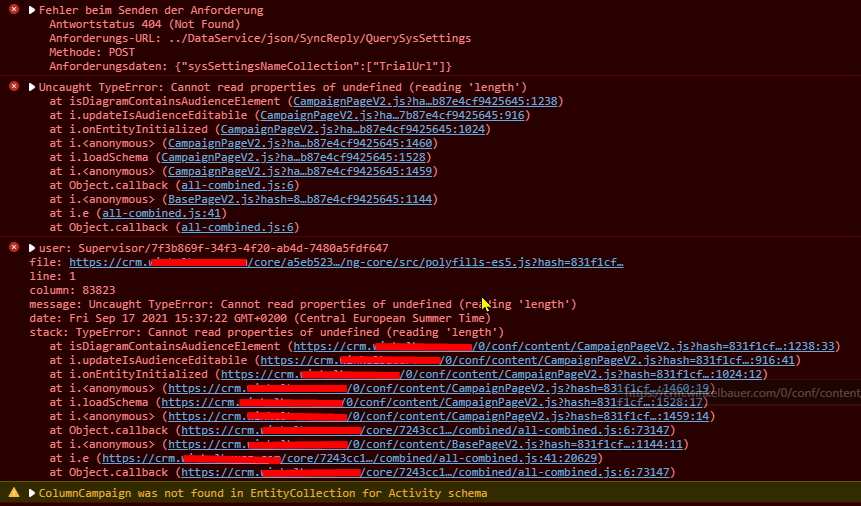
I can see them in the campaign list, but when I open one of the imported records, the page is messed up (see screenshot 2021-09-17 15_31_03-Window.png).

The dev tools show errors as seen in screenshot Console Errors.png


I imported the following columns:

  • Name
  • Status (as finished)
  • Startmode (manual)
  • Endmode (manual)
  • Owner

The import log showed the following error on every row, but the records were created none-the-less:

Row 51: Error reading JObject from JsonReader. Path '', line 0, position 0.


Any thoughts on what went wrong and how to import campaigns properly? Am I missing some fields? Do I have to create other records in related tables?


Thanks,

Robert

 

Like 0

Like

5 comments
Best reply

So I got this working...kind of.


In the table CampaignType, the following two records are stored:


235273BB-91CB-47FC-8A34-01F0002E38D4    Campaign

389EB587-52D4-4AB6-B4AD-E7E2F0D62EAC    Campaign (old)


The problem is that imported campaigns will default to the wrong TypeId (type "Campaign (old)").


However, the Type lookup cannot be selected during the import, so I fixed it by updating the imported records directly via SQL with this simple script:

update Campaign
set TypeId = '235273BB-91CB-47FC-8A34-01F0002E38D4'
where TypeId <> '235273BB-91CB-47FC-8A34-01F0002E38D4'

Hope this helps someone and I also hope Creatio fixed this issue!


BR,

Robert

Hello Robert,


You can try fixing the campaign schema object bindings by running the following script:


update SysModuleEntity

set TypeColumnUId = '876C6749-2C05-4861-856E-EFD51B847904'

where SysEntitySchemaUId = '1F9BB71A-EB9C-4220-A40E-9B623EACFEC8'


Hope it helps!


Best regards,

Max.

Max,

Hi Max,


thanks for the hint! Could you elaborate a little bit on what this script does? It's a production system so I don't want to risk too much ;)


Thanks,

Robert

Robert Pordes,

It will set the type for the campaigns section and should not affect the system in any negative way.


Best regards,

Max.

Max,

it was already set...any other tips?

Btw, manually created campaigns can be opened normally.


BR,

Robert

So I got this working...kind of.


In the table CampaignType, the following two records are stored:


235273BB-91CB-47FC-8A34-01F0002E38D4    Campaign

389EB587-52D4-4AB6-B4AD-E7E2F0D62EAC    Campaign (old)


The problem is that imported campaigns will default to the wrong TypeId (type "Campaign (old)").


However, the Type lookup cannot be selected during the import, so I fixed it by updating the imported records directly via SQL with this simple script:

update Campaign
set TypeId = '235273BB-91CB-47FC-8A34-01F0002E38D4'
where TypeId <> '235273BB-91CB-47FC-8A34-01F0002E38D4'

Hope this helps someone and I also hope Creatio fixed this issue!


BR,

Robert

Show all comments
package
export
Import
campaign
Marketing_Creatio
7.17

Hi community,


I must move the marketing campaigns from one package to another. The versions of my customer's CRM is the 7.17.0 and they don't have this "move to another package" option, released after the 7.17.0 update. 


I tried to "Export" the element and then reimport it in the apposite package but it doesn't work because it imports it in the same package even if I select the new package and I change the current package in the system settings.


How can I achieve this without doing the update to the newest release ? I can't do it right now for a customer's point of view but I need to export some marketing campaigns from the current package to the custom package.


I'm almost sure that there is a command from the clio console but how can I find which element is the marketing campaign I want to move in my packages. Should I move only one element or are there other elements directly related to this marketing campaign ? Could you help me to try to find this out ? 


Thanks a lot !


7.18.3


7.17.0


Like 0

Like

1 comments

Dear Jonathan,


As for now, there is no such OOTB functionality that will allow transferring marketing campaigns from one instance to another fully due to the way campaign elements are connected. You can try to bind them to the package but we cannot guarantee that campaign will work after transfer so we do not recommend doing it.


This is happening due to the fact that each system generates its own ID values for communication between campaign elements. So during migration to a new system, due to the uniqueness of these links for each campaign, conflicts arise due to which the campaign functionality can start working not properly after the migration (like in cases when the campaign contains additional elements).  On another hand, after transferring the campaign schema, you can perform correct data binding using SQL scripts. However, this is very detailed work, so the best option would be to re-create the campaign scheme in a new environment.


Our R&D team responsible for this functionality is already working on implementing this functionality in future releases. I will forward your case to the team in order to increase the importance of this functionality.


Best regards,

Roman

Show all comments
Forecast
Import
7.17

Hi Community,


Is there a way we can import data in Forecast?

Like 0

Like

3 comments

Hello!


There is no way to import data to forecasts. This feature will be available in the nearest future versions.

As the workaround, if you have some data, for example opportunities, you can try to import them and perform required calculations in forecasts based on it.


Regards,

Dean

Hi Dean,


how can data from some Creatio table (opportunities or just a custom object) can be used as a source for target values for a forecast?


Regards,

Alex

Hello,


When creating the new tab you can select the necessary source entity:

Regards,

Dean

Show all comments
data import
Import
7.17

Dear community,


How do you import data without creating any records? The main goal is to only update records.


Example:

We import a list of contacts with upated emails but it's possible that someone has changed their names. These people shouldn't be created in creatio but rather ignored. (matching column is name)

Is this possible and what's the best practice?


Kind regards,

Yosef

Like 0

Like

4 comments

Hello Yosef, 


Your request can be done properly in case you have 1 stable and unique column for records in the excel file and in a system as well.

Let’s imagine the following situation: 

You have an excel file that contains “Full name”, “Email” and (some kind of unique identifier) “Birth name/Birth time” column and other columns which we may disregard. And we save the conditions described in your message: you need to update the email address and you know that some Contact names are different from the one you have in a system (ex. Alex instead of Alexander). In order to perform the import, follow the steps below:

1.  Data import – Select the needed file – Where do you want the date imported to? – Contact – Next

2.  Specify column mapping between Excel file and the system: Full name – Full name; Email – Email; Birth time - Birth time. And un-press other columns in case no update is requested for them. 

3.  Specify the duplicates search rule for data import to the system.

Important! Here you should choose only your column with unique identifier (“Birth time”), so no duplicates will be created and the existing records will be updated with information from the file. And one more thing to mention, the “Full name” column will be updated along with the “Email” column as well, but as it’s same contact and based on your comments I can assume that it’s not an issue if the changes in name are minor and relevant (Alex instead of Alexander). 

 You can consider this as an example, it can be applied to a very specific case as yours, described in detail, but I do understand that it’s a bit hard to apply to a very a general occasion. 

As of now there is no mechanism to make the system blind to the records with minor changes or implement a set of rules for AI to choose which records to ignore.

Hope, this helps.


Best regards, 

Anastasiia

Anastasiia Zhuravel,

Hi Anastasiia,


Thank you for your reply but in this case people with the same birth time(?) will be considered as the same person I think.


And this doesn't cover contacts that never existed in the system before.

So another example would be:

- Creatio has 3 000 contacts

- Import file has 20 000 contacts

goal = Update 3 000 contacts without creating 17 000 other contacts


The only solution I can think of would be to export all contacts, make a match in excel and then import only the ones that matched. 


Kind regards,

Yosef


Dear Yosef, 


That’s why I have emphasized that the column chosen for “Duplicate search” should be stable and unique identifier for the records and yes, that’s the point of a Duplicate search - the records with same value in the column will be considered as the same record so it’ll prevent system from creating duplicates and the information in other columns will be simply updated. 

Based on your second example I would agree that the most appropriate way is first to “cut off” the irrelevant 17000 contacts and after that import only the needed records to the system to update the information.


Best regards, 

Anastasiia

Anastasiia Zhuravel,

Hi,

I try importing data to Creatio, I checked the ID for the duplicate but I get an error - Row 117: Violation of PRIMARY KEY constraint 'PKM6wloFxzp2AiW27IF5551t48'. Cannot insert duplicate key in object 'dbo.Product'.

why is this not modifying the record?

Thanks, Chani

Show all comments
Import
#importPackage;
SVN
SVN REPOSITORY
transfer package
transfer changes
7.15
Sales_Creatio_enterprise_edition

I have 2 environments of Creatio CRM full bundle.

I have created my package in environment 1 which has version 7.16.0. I have committed to SVN server. 

Now I have another environment environment 2 in which I want to install package from SVN repository but it has downgraded version 7.15.4.


The package has all custom objects. All the objects have very simple connections and it only depends on ProductCore package.


I want to know if it is possible to install this package to another Env 2 which has a downgraded version.

Like 0

Like

2 comments

Dear Ramnath, 


We recommend to transfer packages between environments deployed on the same version of Creatio in order to avoid unexpected issues after or during the process. 

You can follow this update guide where updating process is described:

https://academy.creatio.com/documents/update-guide


Please update your second website to the same version as the first one before transferring any packages between them. 


Kind regards,

Roman

Hi Roman,

These both environments are demo environments. 

It is not possible to upgrade.

Show all comments