Import
data import

Hello,

I have a use case where I will need to migrate millions of records over to the creatiodb. Doing this via OData does not seem feasible as it would take an extremely long time.

Has anyone encountered this before and what solutions have worked?

Like 0

Like

1 comments

Hello!

We recommend using Excel import for working with large volumes of data.

Excel data import | Creatio Academy

You can also check the Marketplace for data import add-ons, which might be helpful.

Additionally, I can suggest importing the data directly into the database using SQL scripts.

Regards, 
Orkhan

Show all comments
data import
Import
Sales_Creatio_enterprise_edition
8.0

Hello community,

Is there any way to map the Parent object, while importing data in the detail?

(Example : We want to Import a (Product In Order) in an Order.

Thank you 

Sasor


Like 0

Like

4 comments

Hello!


Thank you for your question!

Allow me to clarify how the import process works. When importing data into Creatio, you are essentially transferring the information from your Excel file into the corresponding database table. Each detail in Creatio corresponds to a different object or database table. Therefore, during an import, data can be inserted into one table or object at a time.

Import to Contact/Accounts have custom core logic applied, but all other objects work with logic described above.

You can read more about Excel import on Creatio Academy: https://academy.creatio.com/docs/8.x/creatio-apps/creatio-basics/busine…

Have a nice day!

Hello community,

Any update regarding this topic?

Sasor

Hello, answer has been already provided , but we will duplicate it below for your convenience: 

"Thank you for your question!

Allow me to clarify how the import process works. When importing data into Creatio, you are essentially transferring the information from your Excel file into the corresponding database table. Each detail in Creatio corresponds to a different object or database table. Therefore, during an import, data can be inserted into one table or object at a time.

Import to Contact/Accounts have custom core logic applied, but all other objects work with logic described above.

You can read more about Excel import on Creatio Academy: https://academy.creatio.com/docs/8.x/creatio-apps/creatio-basics/busine…

Have a nice day!"

Dear support team members

Kateryna and Oleksandra

I believe you missunderstood our request

_____________________________________________

Here is the scenario

  1. We are in the Opportunity Section.
  2. We want to import a list of Competitors.
  3. While importing the excel file, containing the Competitors list, we need that the competitors list, is assigned to this specific Opportunity '495 / Fast Works / Sale of Goods'
  4. We want to obviously achieve this without manually adding the '495 / Fast Works / Sale of Goods' as a separate column for all the records of the excel. 

Is there any example in the Code-Base, or any other workaround where this is achieved?

Sasor
 

Show all comments
data import
Import
Sales_Creatio_enterprise_edition
8.0

Hi community!


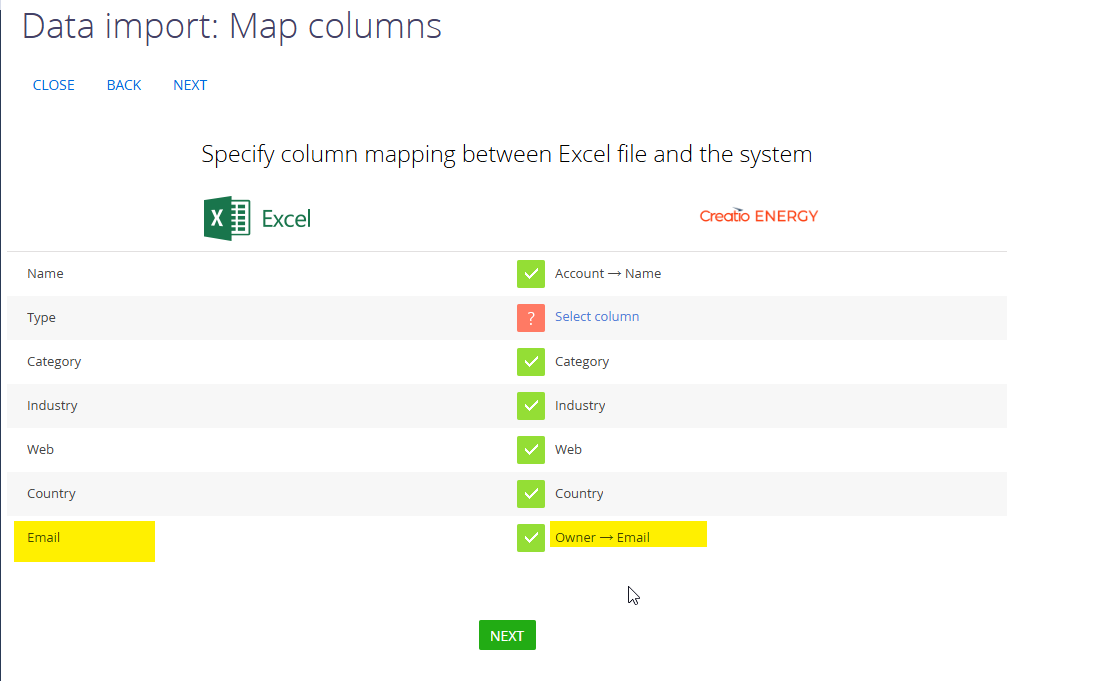
I'm importing a file with Leads and needing to assign them to a user. Is there a way for seeking a user by email, not by full name? Because we have a lot of contacts with the same name in the database.

Like 0

Like

2 comments

Hi,

Yes, it is possible to perform the mapping this way. You need to map the Email field from excel file to the Owner.Email field, which means you need to "drill down" into the column of the object referenced by the Owner column.
 

Here’s a guide on how to achieve this:


I hope this helps!


Pavlo Sokil,

Thanks a lot!

Show all comments
PowerBI
API
Import

I need to import the tables into Power BI. I've tried using the 'Connector' and I've also tried using the API. And yes, I did everything according to the documentation.


When trying to use the 'Connector', I used the "Creatio.GetBigData" instruction, which according to the documentation is appropriate for obtaining large tables. However, it doesn't work, because it keeps giving me a credential error and constantly asking me to enter my credentials. And if my credentials are accepted, it takes many hours to import a table. This connector doesn't work at least for importing large tables. And let's face it, in 99% of cases the tables are large with much... much more than 20 thousand rows. In other words, this connector doesn't work for 99% of cases.


When trying to use the API, the same thing happens, because I can't import a table with more than 20 thousand records at once, and when trying to use pagination to import a few records at a time, the process takes me several hours to completely import a single table. This is not productive, it is tiring and takes up a lot of my time to do something that should be simple.


I am being charged to bring CRM data into Power BI, please can someone help me?

Like 0

Like

2 comments

Hi Raí,

The GetBigData and GetBigTopData functions were created as a workaround for the limitation of 20k records imposed by OData when attempting to download table data. The actual function used for data retrieval is GetData.


These functions enable you to download a snapshot of the table, bypassing the 20k record restriction. However, it's still necessary to apply a filter that ensures fewer than 20k records are retrieved in the process.

As a solution, we recommend using a regular database backup. After obtaining a copy of the database, you can restore it locally and configure Power BI to connect to this local DB copy. This approach will be much faster, more convenient, and ultimately easier for you.

Regarding the "credential error", I'd recommend you delete all connections from "Data source settings" menu. It might reset all previously entered credentials.

Hi Rai,

I and I am sure many others would appreciate an update on what you have done to get PowerBI working to a level it is genuinely useful. Like you I found the performance of the data ingestion to be painfully slow, prone to throwing errors and limited in the data retrievable.

Whilst the reporting capabilities within Creatio have improved, and will further when List object is available again, I cannot see it being a truly capable BI tool on its own data for some time yet. Especially when it comes to having mixed sourced data on the same page.

Thanks for sharing any useful information you may have.

Mark

Show all comments
event
data import
Import
Marketing_Creatio
8.0

Hi, all mentors, 


    I'd like to use the notes filed in event object to keep record of the participant event details information, I'd like to import data from excel, however, I can't find any import button or function inside "event" object. Is there any way to solve it?

Thank in advance.


File attachments
Like 0

Like

2 comments
Best reply

Hi Jeffrey,

To import data to the Event section, you can add an import button to the event page or go to System Designer, where you can import records to any object.

To add the import button, you need to open Page Designer. Then, add a button component to the page. In the action section, choose the "Data import" option, finish the setup and save the page.
 

To import data without adding the button, please go to System Designer and choose "Data import" section:


Have a great day!

Hi Jeffrey,

To import data to the Event section, you can add an import button to the event page or go to System Designer, where you can import records to any object.

To add the import button, you need to open Page Designer. Then, add a button component to the page. In the action section, choose the "Data import" option, finish the setup and save the page.
 

To import data without adding the button, please go to System Designer and choose "Data import" section:


Have a great day!

Alina Yakovlieva,

Thanks a lot for your help. 

Show all comments

Hi Team Creatio,


I have an excel file when I want to import the file it doesn't work or 0%.


Following file attch, is lookup the cause of this?


Please Feedback


Regards,

Andra

File attachments
Like 1

Like

1 comments

Please kindly contact our support in order to resolve this query 

Show all comments
Import
Opportunity
set
date
null
Sales_Creatio
8.0

Dear,

I want to set to null a date field in the opportunities by performing a file import.

In Creatio, the date field is filled in, i want to set it to null.

I can not find the syntax to do this...

So what must i write in the excel date field if it is possible to to this...

Thank you !

Nicolas

Like 0

Like

2 comments
Best reply

Hello Nicolas,


The logic of making the field empty using data import is not developed yes and as a result, there is no way to make the field empty using the import tool. 


We've registered it in our R&D team backlog for consideration and implementation in future application releases.


Thank you for helping us to improve our product. 

Hello Nicolas,


The logic of making the field empty using data import is not developed yes and as a result, there is no way to make the field empty using the import tool. 


We've registered it in our R&D team backlog for consideration and implementation in future application releases.


Thank you for helping us to improve our product. 

Hi Nicolas, 


It's possible to do using the free add-on available on Marketplace. 


https://marketplace.creatio.com/app/mass-updating-creatio


Have a great day! 

BR,

Jacek

Show all comments
Import
error
Sales_Creatio
sales
7.17

Good day!


I need help to understand an error during install of package.

Terrasoft.Core.Packages.Exceptions.InvalidDescriptorInFileSystemException: Invalid discripter: 
Reading of property "Type" is not supported 
Path: UsrTest ---> Terrasoft.Common.InvalidObjectStateException: Reading of property "Type" is not supported
   at Terrasoft.Core.Packages.PackageFileStorage.Read(DataReader reader, Package package) 
   at Terrasoft.Core.Packages.PackageFileStorage.b__201_0(JsonDataReader reader, Package package) 
   at Terrasoft.Core.Packages.PackageFileStorage.InitializeDescriptor[T](Action2 initializeDescriptor, String descriptorFilePath, T descriptor) 
   at Terrasoft.Core.Packages.PackageFileStorage.CreatePackageDescriptorBasedOnDirectory(String directoryPath, Action2 initializeDescriptor) 
   --- End of inner exception stack trace --- 
   --- End of inner exception stack trace --- 
   at Terrasoft.Core.AppInstallation.Packages.Operations.PackageZipOperations.ThrowIfPackageStorageItemErrorsExist(PackageStorage packageStorage) 
   at Terrasoft.Core.AppInstallation.Packages.Operations.PackageZipOperations.Load() 
   at Terrasoft.Core.AppInstallation.Packages.Backup.ZipPackageBackupManager.ComposePackages(String sourcePackagesPath, String tempFilesPath) 
   at Terrasoft.Core.AppInstallation.Packages.Backup.ZipPackageBackupManager.CreateBackup(String sourcePackagesPath, String tempFilesPath, String backupPath, String code) 
   at Terrasoft.Core.ServiceModelContract.PackageInstaller.PackageInstallerServiceInternal.<>c__DisplayClass25_0.b__0() 
   at Terrasoft.Core.ServiceModelContract.PackageInstaller.BaseInstallerServiceInternal.InvokeWithLogging(Action action) 

Install log is in the attachment.


It works without any errors and is imported correctly in other systems (on versions higher).


Is there something I can change in the package? Or is it a problem in the system I import package in?   

How can I fix this?


Thank you in advance!

File attachments
Like 1

Like

2 comments

Hello,


The cause of the problem is the difference between the versions of websites of Сrеаtio that you used during the development of your package versus installation.

Kalymbet Anastasia,

Dear Anastasia, 


Thank you for expllanaition. Is there any possibility to make my package suitable for versions lower than original?

Show all comments
datamigration
datamodels
Import
json
schema
database
Studio_Creatio
8.0

Is it possible to export an existing database schema into a creatio datamodel? Or from an ERD Data export?


I use lucidchart to create a model of my database, it has export functions for MySQL, PostgreSQL, SQL Server, Oracle SQL and a similar platform as creatio, Quickbase. 


Does creatio support such an import wizard?

Like 1

Like

1 comments

Hello Pascal,


unfortunately this is not quite possible.

The thing is that you can export the DB in such way, but you will not have any objects in the system.

So we would recommend sticking to the standard way. Also, we will register this option as a wish for the dev team to implement it in the future.


Regards,

Gleb.

Show all comments

In database I have Order table and Product in Order Table. The Order table i have the same Order no but it not a same record because it order created a different day

Ex.

OrderNo : 0001 Created : 2022-01-21

OrderNo : 0001 Created : 2022-02-21


The problem is I cannot import Product in Order table data by match order no and date in Order table


How import data by excel file with same order no but different date and different record

Like 0

Like

1 comments

Maybe you could create a single column in Creatio to store order number + date, then in the Excel file use a formula to append the values together and map that value to link to the order? 

Ryan

Show all comments