

.jpg)
I’m having trouble enabling the Export to Excel action for a List Widget.
The built-in Export to Excel action works for List Components, but I can’t find a way to configure it with the newer List Widget released in version 8.3.1.
Here’s what I’ve tried:
- I added a button to trigger the default Export to Excel action.
- In the button’s settings, under “Which data to export?”, the List Widgets on the page do not appear.
- If I add a standard List Component to the page, it does show up in the export configuration as expected.
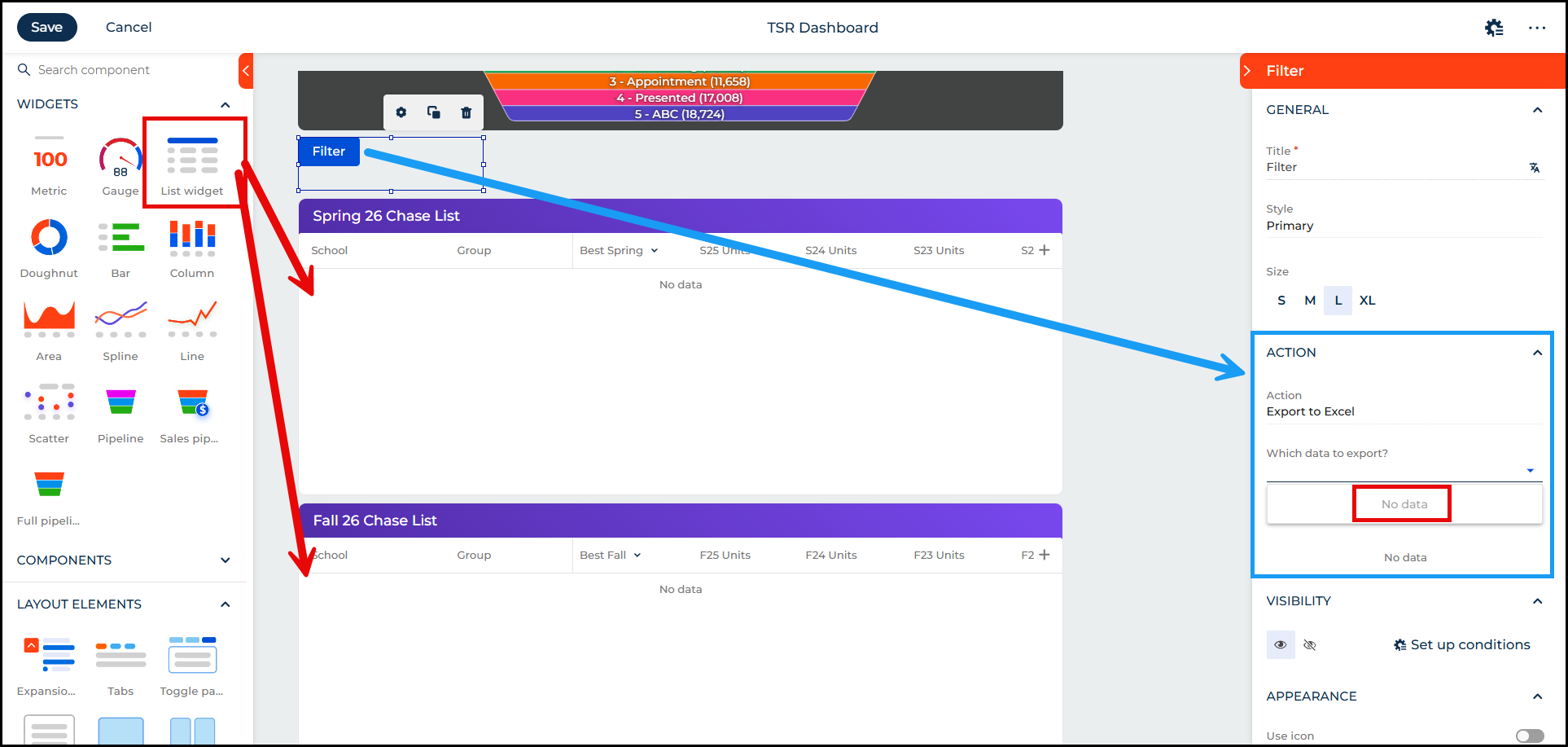
Is it possible to use the built-in Export to Excel action with a List Widget?
If not, is there a recommended workaround (e.g., custom code, BPM, or another approach) to export the list widget’s data to Excel?
Like

Hello,
Unfortunately at this moment there is no built-in possibility to enable Export to Excel for List Widget.
The team is aware of the request to enable the ‘Export to Excel’ option for list widgets in Freedom UI dashboards. There is a corresponding task in progress, but at this time there is no confirmed release date for this functionality.
As a temporary workaround, it is possible to add a button directly to the dashboard schema that will export the list widget to Excel. Below is an example configuration for such a button:
{
"operation": "insert",
"name": "Button_cfj1ji4",
"values": {
"layoutConfig": {
"column": 1,
"colSpan": 1,
"row": 1,
"rowSpan": 1
},
"type": "crt.Button",
"caption": "Export list widget to excel",
"color": "default",
"disabled": false,
"size": "large",
"iconPosition": "only-text",
"visible": true,
"clicked": {
"request": "crt.ExportDataGridToExcelRequest",
"params": {
"viewName": "ListWidget_1ocamke",
"filters": "$ListWidget_1ocamke | crt.ToCollectionFilters : 'ListWidget_1ocamke' : $ListWidget_1ocamke_SelectionState"
}
},
"clickMode": "default"
},
"parentName": "Main",
"propertyName": "items",
"index": 1
}
In this example, ListWidget_1ocamke should be replaced with the items attribute name of your list widget.
Thank you for reaching out!
Hello,
Unfortunately at this moment there is no built-in possibility to enable Export to Excel for List Widget.
The team is aware of the request to enable the ‘Export to Excel’ option for list widgets in Freedom UI dashboards. There is a corresponding task in progress, but at this time there is no confirmed release date for this functionality.
As a temporary workaround, it is possible to add a button directly to the dashboard schema that will export the list widget to Excel. Below is an example configuration for such a button:
{
"operation": "insert",
"name": "Button_cfj1ji4",
"values": {
"layoutConfig": {
"column": 1,
"colSpan": 1,
"row": 1,
"rowSpan": 1
},
"type": "crt.Button",
"caption": "Export list widget to excel",
"color": "default",
"disabled": false,
"size": "large",
"iconPosition": "only-text",
"visible": true,
"clicked": {
"request": "crt.ExportDataGridToExcelRequest",
"params": {
"viewName": "ListWidget_1ocamke",
"filters": "$ListWidget_1ocamke | crt.ToCollectionFilters : 'ListWidget_1ocamke' : $ListWidget_1ocamke_SelectionState"
}
},
"clickMode": "default"
},
"parentName": "Main",
"propertyName": "items",
"index": 1
}
In this example, ListWidget_1ocamke should be replaced with the items attribute name of your list widget.
Thank you for reaching out!