

Exclude activities of type Email from the mobile list view

Is it possible to exclude activities of type email from the mobile list view? I have synced my mailbox in Creatio and now when I open Activities on the mobile app, I also see my emails there. Is there a way to exclude these from appearing?
Like
Good day,
When it comes to potential approaches to filtering Activities in mobile application, you may consider following approaches:
I.
For older versions of Creatio (before 8.3.2), the only out-of-the-box means of filtering list / grid pages on mobile without additional development is via synchronization settings in the mobile application wizard.
- Go to System designer > Mobile application wizard
- Choose a workplace > Actions > Set up synchronization
- Choose an object for which you need to set up filtration
- Set up additional filters, for example:
Keep in mind, however, that this type of filtration only works when MobileApplicationMode system setting is set to Offline.
II. Alternatively, starting from 8.3.2 version of Creatio, where Freedom UI designer for mobile application was introduced, you may use Static filters on the list page to filter out Activities of type Email:
(using Contact list page as an example. A separate Activity list page / section would have to be created and added to a mobile workplace)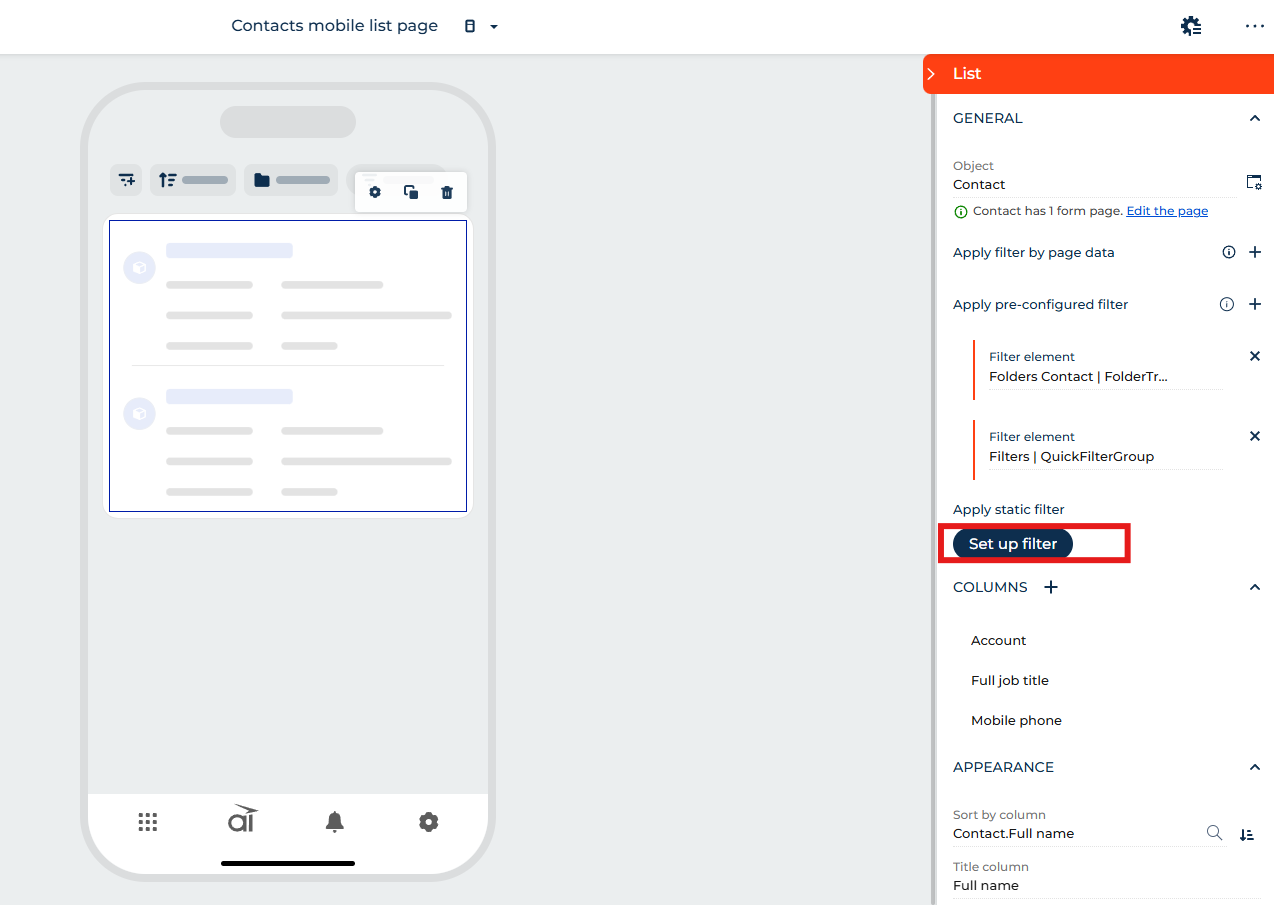
Nikita Kudin,
The image.png that you have attached here is not opening. Can you reshare in a way where I can see it?