Freedom UI DataGrid: handle hover on a cell/row. Tooltip on masked column

Hi Community,
I’m trying to implement a small UX feature in a Freedom UI native DataGrid and wanted to check whether there is any supported/native way to do this.
I have a DataGrid column that contains a masked value. What I would like to achieve is:
- when the user hovers over that cell (preferred),
or at least:
- when the user hovers over the row,
I want to show the full value in a tooltip.
I went through the Freedom UI List/DataGrid documentation and page customization docs, but I could not find anything describing:
- a hover listener / mouseenter event for DataGrid cells or rows
- a native way to bind a tooltip on hover to a specific grid column
- a request/handler that is triggered by hovering a native DataGrid cell
So at the moment it looks like hover is not exposed as a native event in the standard DataGrid.
By inspecting the rendered DOM, I can see the table and cells generated by Angular/CDK/Material, for example something like:
document.querySelector('#cdk-drop-list-0')and column/cell selectors such as:
td[crt-data-table-column-id="f6"]So one idea I had was to try with plain JS / DOM event delegation, for example:
- attach a mouseover / mouseenter listener to the rendered table
- detect when the event target is inside the masked-number column
- inject a title attribute or custom tooltip dynamically
However, this feels quite fragile because this does not seem like an officially supported Freedom UI extension point.
My question is:
Has anyone implemented hover behavior in a native Freedom UI DataGrid without using a custom component?
More specifically:
- Is there any native/supported way to react to hover on a DataGrid cell or row?
- Is there any native way to show a tooltip for one specific column?
- Has anyone successfully used a DOM hack like
querySelector(...).addEventListener(...)for this in Freedom UI? - If hover is not supported, what would be the best native workaround?
If anyone has an example, that would help a lot.
Thanks
Like
Hello Krzysztof,
I have not found any native or supported way to handle hover events for a DataGrid cell or row. Using DOM-based workarounds such as querySelector(...).addEventListener(...) is not recommended, because the DOM structure is internal and may change in future Creatio updates.
As a supported workaround for displaying a tooltip, I tested the following approach.
The crt.EncryptedInput component supports the tooltip property. Since the Creatio DataGrid allows you to customize how cells are displayed, I added a custom cell to the DataTable (crt.DataGrid) and used crt.EncryptedInput inside it:
{
	"operation": "merge",
	"name": "DataTable",
	"values": {
		"columns": [
			{
				// ... other columns ...
			},
			{
				"id": "EncryptedTooltipColumn",
				"code": "PDS_EncryptedTooltip",
				"caption": "#ResourceString(PDS_EncryptedTooltip)#",
				"cellView": {
					"type": "crt.EncryptedInput",
					"control": "$Items.PDS_UsrEncryptedString",
					"readonly": true,
					"tooltip": "$Items.PDS_Id | usr.UnmaskValue"
				}
			}
		]
	}
}
Where:
- id - unique identifier for the column
- code - unique column code, must be formed according to the pattern
[data source code]_[column code], for examplePDS_DeleteAction - caption - resource string macro for the column header
- cellView - cell view config, where you can specify any input or bind it to a column value
Why is the tooltip property bound to $Items.PDS_Id and not to $Items.PDS_UsrEncryptedString? The reason is in how the value unmasking works in Creatio.
To see the value in the UI, you need to click on the “Show value” icon next to the value input field:
If you inspect how the "Show value" option is working, you will find that it calls for the "ValueUnmaskingService" internal web service and its "GetUnmaskedValue" endpoint:
You need to pass this endpoint an object containing a schema name, a column name, and a record ID.
Therefore, the custom converter receives the record ID and uses the Creatio DevKit SDK to retrieve the unmasked value:
converters: /**SCHEMA_CONVERTERS*/{
	"usr.UnmaskValue": async function(value) {
		const httpClientService = new sdk.HttpClientService();

		const endpoint = "ServiceModel/ValueUnmaskingService.svc/GetUnmaskedValue";
		const body = {
			"schemaName": "SchemaName", // use your schema name
			"columnName": "UsrEncryptedString", // use your column name
			"recordId": value
		};

		const response = await httpClientService.post(endpoint, body);

		return response.body.unmaskedValue;
	}
}/**SCHEMA_CONVERTERS*/
After saving the configuration, open the page in the Freedom UI page designer and set the column title: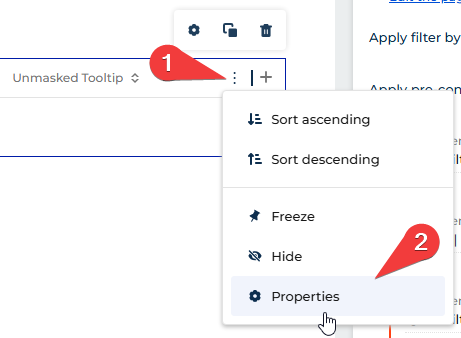
The result is that the encrypted value remains displayed through crt.EncryptedInput, while the tooltip shows the unmasked value.: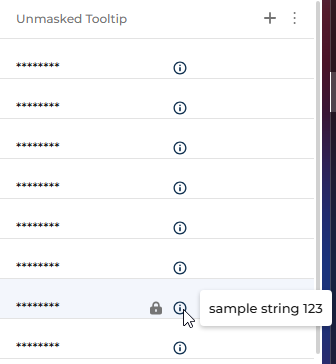
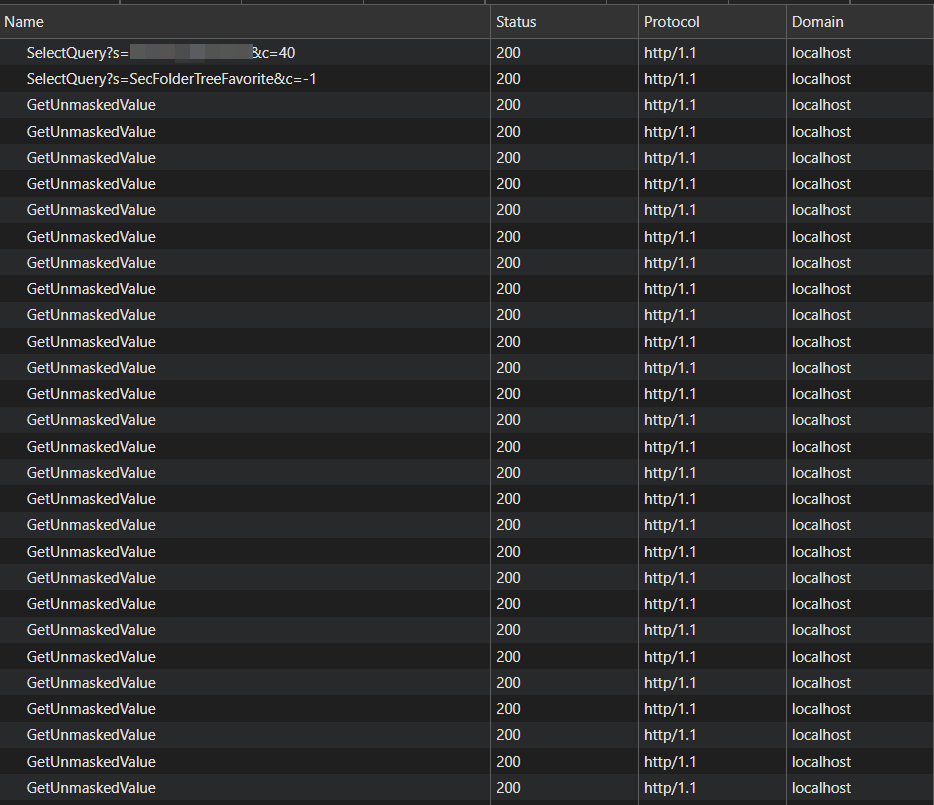
One important concern is performance. When the list page opens, in addition to the main SelectQuery, Creatio sends a separate request to 0/ServiceModel/ValueUnmaskingService.svc/GetUnmaskedValue for every record currently present in the DOM. This may affect page loading time if the list contains many visible records: