


We're a new client trying to get our production environment up and running with data loaded from our prior CRM (millions of records). We had been able to push updates and/or new records via the DataService adhering to the service limitations but our instance now seems to be unresponsive.
Has anyone else had this experience trying to bring in historical data? Are there any recommendations or guidance on making the process more painless?
Like

Often the unresponsiveness after loading a lot of data is due to Creatio's live update feature. Basically, many Creatio objects have live update enabled, which means for any add or update, it sends a signal back to the browser so the browser reloads the UI to show the updates/adds that occurred on the server. When loading in a large set of data, that causes a socket back to the browser for every single add or update, which the browser then reloads the data causing a request to be made back to the server to retrieve the newly added or updated data. So if you're loading a million records, that could also mean a million socket signals sent back the UI, and if your browser is open and viewing that record type, possibly a million requests to the server to load the data. All of that extra communication can cause things to get overwhelmed for large amounts of data to say the least. This feature is great for normal user activity, but when loading large amounts of data causes too much overhead. (I show below how to turn this feature off)
To get things responding again, you can restart the Creatio system which scraps all the pending socket requests. Don't do it while the data is loading, but after or when paused. I use Clio Explorer for this. Once installed and you've registered the system (also need to install Clio API package in the system which Clio Explorer can do - refer to linked article), you'll see a restart option on the menu for the registered system.
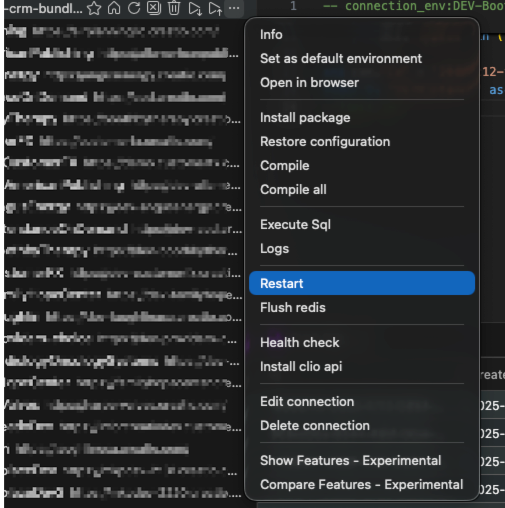
However, if the system currently isn't responding at all, you might just need to contact support and they can restart the system from their end (but for next time, this option of using Clio is quick and easy).
While you're loading the large amounts of data, you can turn off the Live Updates feature altogether. Then once the data is all loaded, turn it back on again.
To turn off Live Updates for the entire system, go to the features page https://yourcreatiosystem/0/flags then search for the feature called LiveEditing and disable it (see below). Uncheck "Is enabled" (if checked) and also uncheck for "All employees" and also "All external users" (technically, only needs to get disabled for the user you're connecting via DataService or OData with, but I just turn it off for all). Then click Clear Cache button.
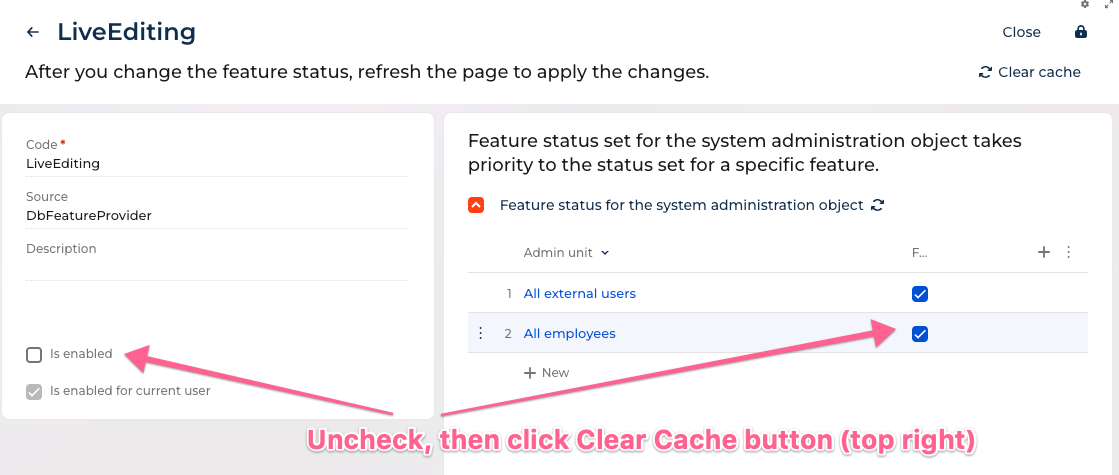
Now, it will no longer add all that extra traffic with sockets back to the browser and reloading of data from the server. Then once complete with the migration you can turn that back on again.
Ryan

Brendan,
Hi Brendan, in general the best practice is to migrate large amount of data from the source DB to creatio via DB server tools outside of the system and then use the DB prepared before implementation. If you still want (or you no other option) to do it record by record, then I agree with Ryan's advice to disable live update. The second thing is that you have to control batches length and periodicity. Couple hundreds of records in a sigle batch, and batch every 5 minutes will be ok. The third thing is to move firstly active records from the source system (for instance lately edited by the timestamp of the record itself or it's connected records, for instance payments) by some triggered event and the rest historical data normally by batch outside of business hours etc.

Hi Dmitry, Hi Ryan,
Both excellent advice and tutorials :) (Academy could use the upgrade ;) )
what kind of db server tools do you use with Creatio ?
Damien Collot,
The idea is that you request a database backup from support, then do the migration directly to the database itself, then provide the database back to support to put back in place in the cloud.
I've done a few large migrations this way and without question it is faster since you are doing things directly on the database level. If both the Creatio database and the source database are the same type of database such as MSSSQL or Postgres you can load millions of records into tables in seconds using insert into or using cross database queries, etc. If they're different database types you can still use things like MSSQL's import to load the data to Postgres or even add it as a linked server. However, a possible downside is that you no longer have the Creatio object model to do things automatically, for things like record access rights, etc - so you do have to also create those as well (or re-enable the record access rights after loading the data to let Creatio recreate those, if that scenario works and no special access rights are needed). Obviously, processes don't trigger for this approach so you need to make sure you account for any data added or updated normally from those. Also, loading attachments can be a problem with this approach. In prior versions the attachment file was stored in the database so you could load the file bytes in using a tool or custom code, however, now that the file is stored in outside locations such as S3, that approach no longer works.
Ryan