


I have a process set to start on a timer, but it's not starting: nothing in the process log, error or otherwise.
It should be running every day at 1:20 a.m. I used Free Online Cron Expression Generator and Describer - FreeFormatter.com to generate the expression "0 20 1 ? * * *", and Creatio interprets the expression as "At 01:20:00 AM", which looks correct. (Side note: I originally had the expression as "0 20 1 * * ? *" which also generated "At 01:20:00 AM", but that didn't trigger, so I changed it to the expression the from freeformatter.com).
Any ideas on how to troubleshoot why it's not firing?
Like

Hi Jeff,
One possible reason could be the time zone configuration. Please ensure that the time zone set in the business process trigger matches the time zone configured in the user’s profile.

I believe the user Prabhath is referring to that is used for scheduled BPs is Supervisor by default, or the user specified by the system setting "System operations user" (code SystemUser) if that's been changed away from Supervisor.
Yes, that’s one possibility. Additionally, if the timezone configured doesn’t match the one Jeff is currently in, the business process may not trigger at all or may not even appear in the process log. I believe Jeff is checking the logs using Supervisor credentials. Setting the correct timezone might resolve this issue.

Hello,
We were facing the same issue and the reason was that our IIS site was going into idle state.
To avoid this, we had to change the Idle timeout settings in IIS Manager on our on-site environments.
For our cloud environments, we are asking Creatio support to change this timeout for us.
Please see also this post : https://community.creatio.com/questions/iis-configuration-daily-process…
Thanks for all the replies.
The system operations user is Supervisor. The business process is also created/modified by Supervisor, and Supervisor has the same time zone setting as the business process timer start. (It didn't but I changed it). At 7:20 a.m., I set it to run at 7:30 a.m. in the time zone for that user, and it didn't start.
One thing that I don't know if it will make a difference is that the business process has a script task which instantiates a class that does the bulk of the work. The instantiated class was created by another user, but most recently modified by Supervisor. Could the fact it was created by a different user impact things?
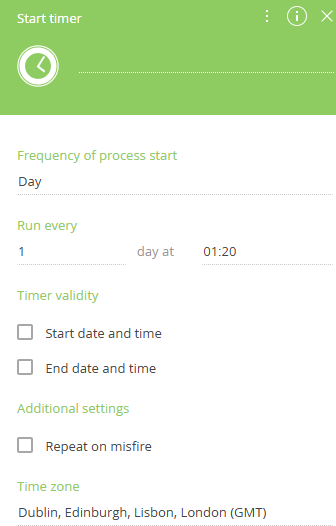
Not sure why the system wouldn't work when set up as described, but could you instead just use a "Day" frequency for the start timer and set the start time to 01:20?
As I was typing my reply, I had a thought. When modifying the script task, it usually prompts to be recompiled, and if after changing the time zones to match a recompile would work. So, I changed the script task to get it to prompt for the recompile. After I did that, I scheduled it to run at 8:15 a.m., and it worked.
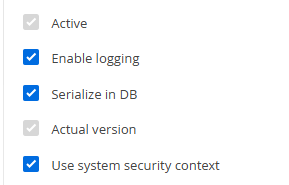
Another thought - are you sure the BP isn't running but just not logging? Is it taking some action in the system that you could check on outside of the logs, e.g. a record created/updated by the BP? I ask as it could be that you have logging turned off for the BP, which means it wouldn't show up in the logs unless there were an error during execution. In the "settings" tab inside the BP when no step is selected, near the bottom there is a checkbox for logging:
Harvey Adcock,
That's a great thought. Not sure why I used the cron expression, because your solution would be a little easier to read. I'll probably make that change for readability and test it again, but I suspect it's the recompiling that fixed the issue.
Harvey Adcock writes:
Another thought - are you sure the BP isn't running but just not logging?
Good thought, and easy to overlook. But "Enable logging" is checked.
So, I made one more change to the timer (using the Cron expression) and made sure to publish. It seemed to work. So, I think it was the time zone issue, but it also required that my script task be compiled.
Thanks to all for the responses!