

Clarification on the Purpose and Differences of Workplace Types in Creatio

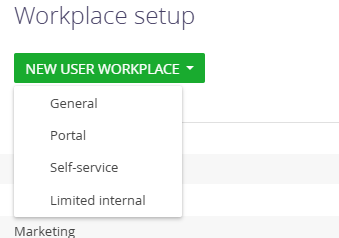
In Creatio, what is the actual difference between the ‘General’, ‘Portal’, ‘Self-service’, and ‘Limited internal’ workplace types when creating a new workplace? All of them look identical in the UI, and I can’t see any functional distinctions.
Additionally, what is the purpose of the ‘Limited internal’ license, and is it directly related to the ‘Limited internal’ item shown in the interface on my screenshot?
Like
Hello!
1. Workplace Types
The workplace types ‘General’, ‘Portal’, ‘Self-service’, and ‘Limited internal’ primarily serve as organizational categories for different user groups. While they may appear visually identical in the UI, they help structure workplaces according to typical license and role scenarios. The actual permissions and accessible sections for users are determined by their license type and security roles, not the workplace type itself.
Here’s a brief overview of each type:
General: For standard internal users with broad access to system sections and features.
Portal: For external users (e.g., clients or partners) who access the system via the portal, typically with limited functionality.
Self-service: For users needing minimal interaction, often restricted to submitting requests or accessing knowledge resources.
Limited internal: For users with reduced access compared to full internal users, typically limited to one or a few sections and read-only access to certain data.
2. Limited Internal License
The ‘Limited internal’ license is designed for users who do not require full functionality. It restricts access to advanced features and limits the sections a user can interact with.
The ‘Limited internal’ workplace type in the UI corresponds directly to this license.
Assigning a user to a ‘Limited internal’ workplace ensures that the workplace configuration matches the limitations of this license.
Here you can find more information from Academy: https://academy.creatio.com/docs/8.x/no-code-customization/customization-tools/appearance-customization/set-up-workplaces#title-1730-2
Hello!
1. Workplace Types
The workplace types ‘General’, ‘Portal’, ‘Self-service’, and ‘Limited internal’ primarily serve as organizational categories for different user groups. While they may appear visually identical in the UI, they help structure workplaces according to typical license and role scenarios. The actual permissions and accessible sections for users are determined by their license type and security roles, not the workplace type itself.
Here’s a brief overview of each type:
General: For standard internal users with broad access to system sections and features.
Portal: For external users (e.g., clients or partners) who access the system via the portal, typically with limited functionality.
Self-service: For users needing minimal interaction, often restricted to submitting requests or accessing knowledge resources.
Limited internal: For users with reduced access compared to full internal users, typically limited to one or a few sections and read-only access to certain data.
2. Limited Internal License
The ‘Limited internal’ license is designed for users who do not require full functionality. It restricts access to advanced features and limits the sections a user can interact with.
The ‘Limited internal’ workplace type in the UI corresponds directly to this license.
Assigning a user to a ‘Limited internal’ workplace ensures that the workplace configuration matches the limitations of this license.
Here you can find more information from Academy: https://academy.creatio.com/docs/8.x/no-code-customization/customization-tools/appearance-customization/set-up-workplaces#title-1730-2