


Question
How can I add a web-type field (as the one in the [Communication options] detail) that would open in a new tab when I click it?
Answer
To turm a usual text field into a web link, develop the diff property of this field with the following code:
{
    "operation": "insert",
    "name": "AdditionalExpenses",
    "values": {

        // -->
        "showValueAsLink": true,
        "controlConfig": {
            "enabled": true,
            "href": {
                "bindTo": "getAdditionalExpensesLink"
            },
            "linkclick": {
                "bindTo": "onExternalLinkClick"
            }
        },
        // <--

        "layout": {
            "colSpan": 12,
            "rowSpan": 1,
            "column": 0,
            "row": 3,
            "layoutName": "Tab07720f4eTabLabelGridLayout691629ea"
        },
        "labelConfig": {},
        "enabled": true,
        "bindTo": "AdditionalExpenses"
    },
    "parentName": "Tab07720f4eTabLabelGridLayout691629ea",
    "propertyName": "items",
    "index": 5
},
Add the following code to the methods property:
methods: {

    getAdditionalExpensesLink: function() {
        return this.getLink(this.get("AdditionalExpenses"));
    },
    onExternalLinkClick: function() {
        return;
    },
    getLink: function(value) {
        if (Terrasoft.isUrl(value)) {
            return {
                url: value,
                caption: value
            };
        }
    }
},
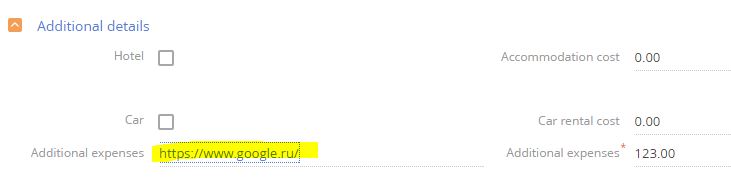
After this, the field becomes a link if it is specified in the correct web format or copied from browser. If you click the "Open in a new tab" option from the context menu, it will be opened in a new tab, if you left-click it - it will open in the current tab:
To open the link in a new window, develop the onExternalLinkClick() method:
onExternalLinkClick: function() {
    var value = this.get("AdditionalExpenses");
    if (!Ext.isEmpty(value)) {
        window.open(value, "_blank");
    }
    return false;
},