password
Sales_Creatio_enterprise_edition
8.0

Hi.  

Is there a setting to change the number of days a user gets warnings before their password expires?   Or is that a fixed value in Creatio (and what is it) ?

--- Thanks
--- Rob

Like 0

Like

1 comments

Hello, 


There is a system setting "Reminder about password change, days" (code "PasswordChangeReminding")  where you can change the number of days when notification about changing password should be send. 


Thank you for reaching out! 

Show all comments
dashboards
FreedomUI
Sales_Creatio_enterprise_edition
8.0

Hello

Creatio 8.3.0 added the dashboard view in section list, thath allows authorized users to create their own dashboard more or less as it was possible in dashboard of Classic UI.

The object that "hosts" the dashboard is SysFreedomDashboard but it's a virtual object and there's not a table with the same name.

What are the tables involved in Freedom UI Dashboards management? How is it possible creating a SQL script to create some Freedom UI dashboards?

Thanks

Regards


Like 0

Like

5 comments
Best reply

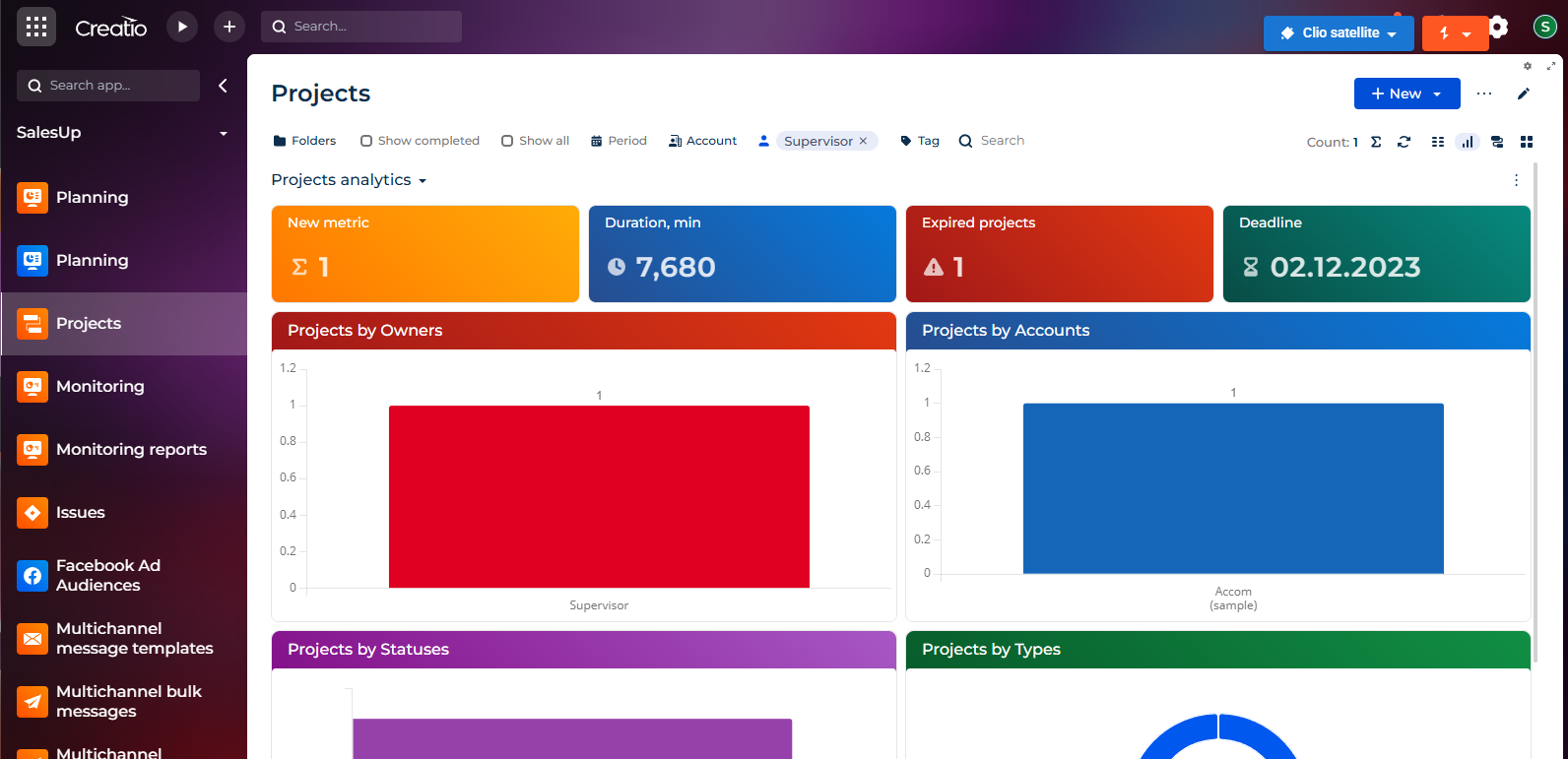
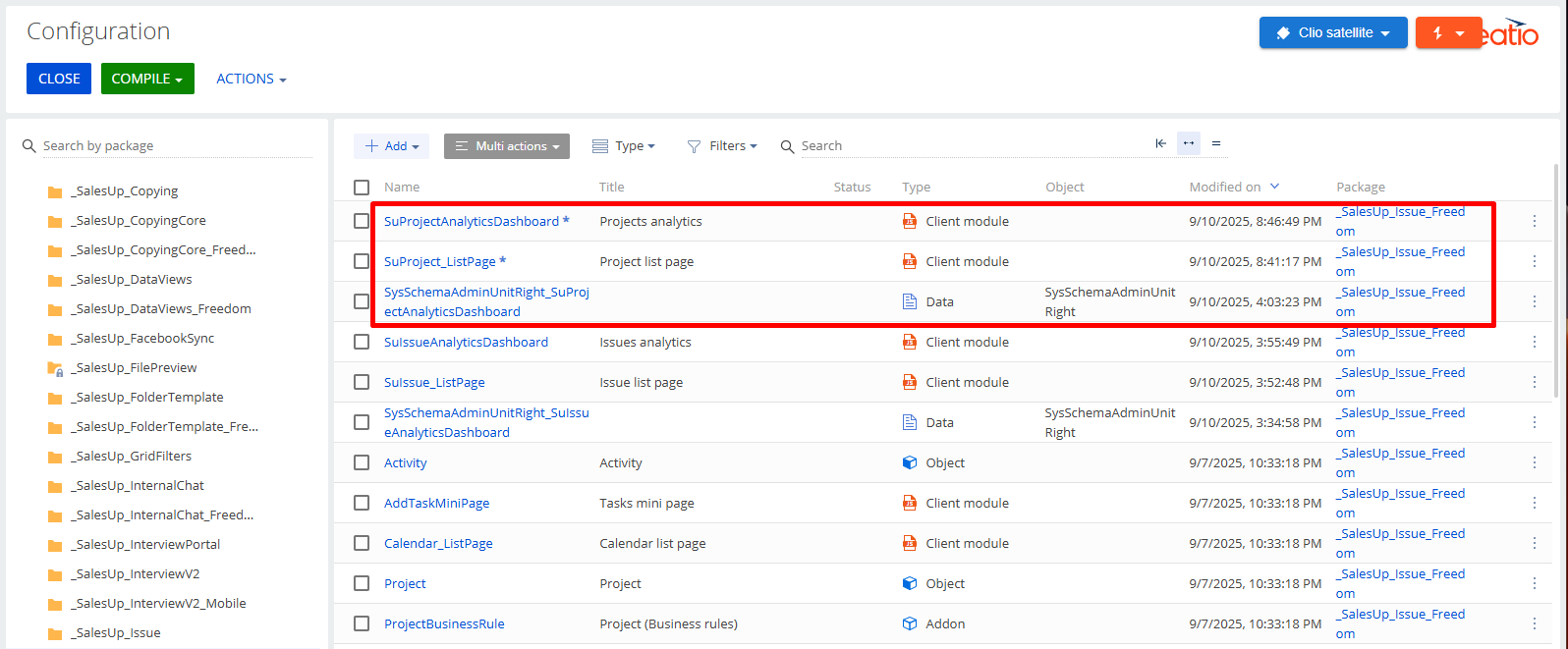
If you configure the dashboard in another way, then it will be a scheme in the package, as described earlier (screenshots 1-2).

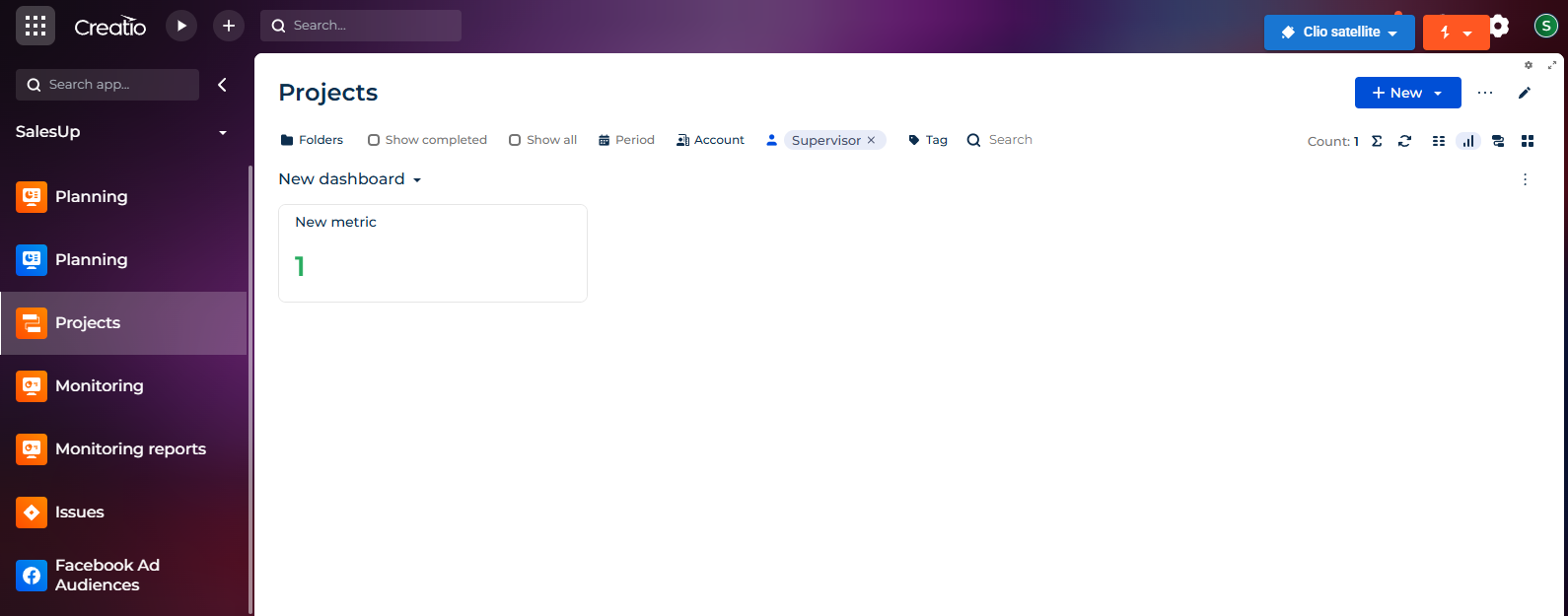
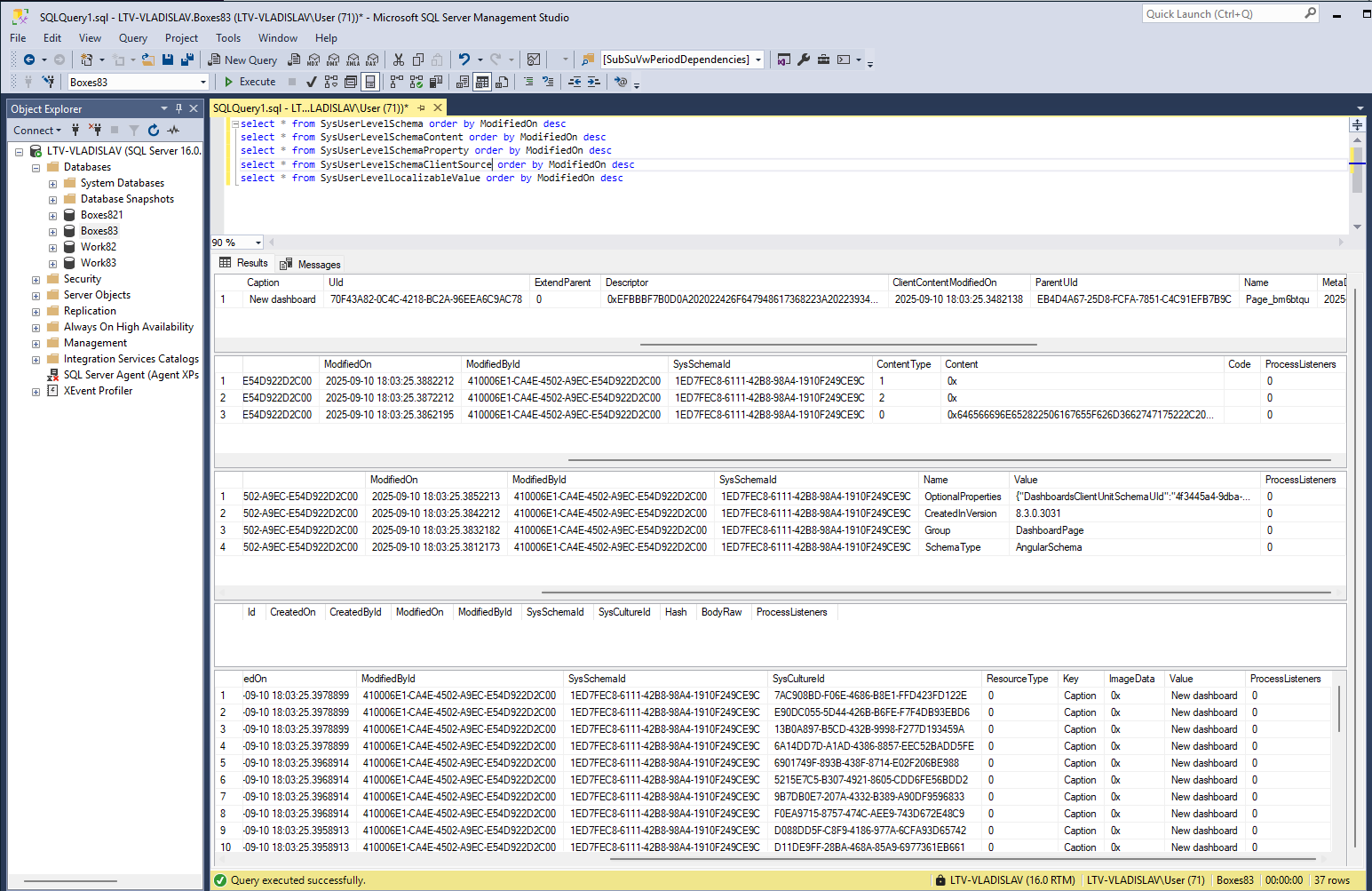
If you want to configure the dashboard without changing the package, then such a dashboard is saved in the SysUserLevelSchema table and dependents (screenshots 3-4)

Hello,


Thank you for your question regarding Freedom UI Dashboards in Creatio 8.3.0. 


To clarify, the object SysFreedomDashboard is indeed a virtual object and does not correspond to a physical database table.

 However, the information related to Freedom UI Dashboards is managed using the following physical tables:

 - SysDashboard: Stores dashboard-related metadata, including configurations and layout details. 

- SysDashboardItem: Contains the configuration of individual dashboard widgets. 

- SysDashboardLcz and SysDashboardItemLcz: Responsible for storing localized strings for dashboards and their items.

If you intend to create a SQL script to query or manipulate data, you can use these tables as a starting point. Please bear in mind that manipulating these tables directly is not recommended and should only be done after ensuring no impact on system functionality

If you need further clarification or have specific requirements, please provide additional details, and we would be happy to assist.

Embedding a "Data" element in a package selecting the freedom UI records from SysDashboard and SysDashboardItem is a good solution? The "Lcz" records would be automatically included in Data package element?

Thanks

Hi,

Freedom does not use SysDashboard tables and others.
You can see how the virtual SysFreedomDashboard object works in the SysFreedomDashboardQueryExecutor scheme.
The system does not store dashboard settings in the DB, but collects them from all client schemes that you create through the designer, for example, OrdersAnalyticsDashboard, AccountsAnalyticsDashboard, etc.
Therefore, you do not need to bind anything additionally to the package if you saved your scheme there.

Hello Lytvynchuk Vladyslav,

Valeriia listed those entities to be the ones involved in SysFreedomDashboard virtual object. When you edit or create a new Freedom UI dashboard nothing changes in current packages then the new dashboards seems not stored in client modules but only in some database tables.

There are two ways for creating a Freedom UI dashboard: 

  1. editing a client schema page, then it goes to the current package
  2. Creating it without editing any pages, then it seems to go only to database tables via SysFreedomDashboard virtual object. This is the method we need to use.

Checking for the tables listed by Valeriia it seems that those tables are really involved in Freedom UI dashboards (they have new records when you create a new freedom ui dashboard).

Were you talking about the "way 1" or the "way 2" to create freedom ui dashboards?

Thanks

If you configure the dashboard in another way, then it will be a scheme in the package, as described earlier (screenshots 1-2).

If you want to configure the dashboard without changing the package, then such a dashboard is saved in the SysUserLevelSchema table and dependents (screenshots 3-4)

Show all comments
mime
attachments
Sales_Creatio_enterprise_edition
8.0

Hello, 

we have a problem with following addon:

https://marketplace.creatio.com/app/mime-attachment-creatio

Until recently it was working, but since some time it is not working anymore :( and there is not support for it.

Does anybody have working solution for the problem of digitally signed emails in Creatio?

Thanks.

Like 0

Like

2 comments

Hello , 


Unfortunately, at the moment, there is no mechanism for signing outgoing emails in Creatio. We have registered the request for our development team to evaluate the possibility of implementing such a mechanism in future releases of the application. 


Thank you for helping us make our product better! 


Best regards, 

Creatio Support team 

Oleksandra,

Thank you.

I was referring more to the problem of incoming emails, where digitally signed incoming emails, have attachments shown as .p7m file in Creatio. This addon https://marketplace.creatio.com/app/mime-attachment-creatio added encrypted attachments to attachment detail and attachments were shown correctly with this addon, as .pdf and not as .p7m file. This worked in Creatio until some update of Creatio version and it does not work anymore. Do you know it encrypted attachments can automatically be added in attachments in Creatio?

Thank you.

Show all comments
REST
API
examples
Sales_Creatio_enterprise_edition
8.0

Hi.

I was trying to connect my BI tool via OData to get records from Creatio, but apparently OData has a 20,000 row limit for resultsets.

I would need to use REST to avoid this limit, true?
Are there Creatio-specific examples somewhere that I can use to test pulling data from Creatio? (I use Postman to test) 
If there are, I have not been able to find them.

Thanks for your help!

Rob


Like 2

Like

2 comments

Hello Rob,
You can try mine:
https://github.com/nlezoray-tech/Creatio-php-connector/tree/main
you will need PHP 7.4

Let me know if you need help to use it
Nico

Thanks for your help Nico.  I elaborated in another thread HERE 
(Please take a look at that, maybe you will have even more guidance.)

Show all comments

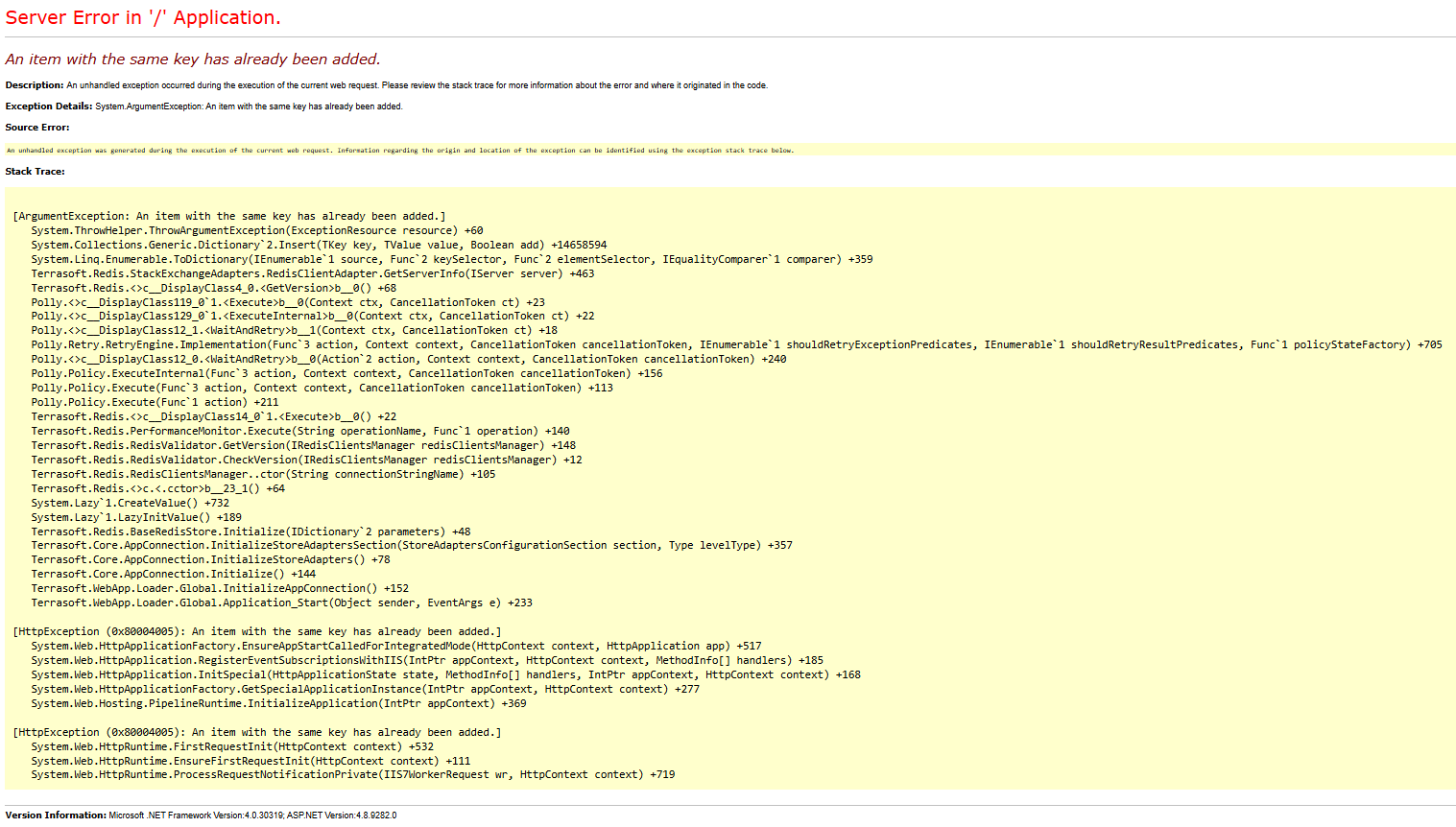
After local deploy on IIS, next request (http://localhost:82/) return An item with the same key has already been added. Could you explain pls how can I fix it ?

Like 1

Like

6 comments

Hello!

Could you provide a bit more detail for clarification — does the issue occur when opening the site or only after logging in?
If it happens after logging in, please check whether you have duplicate schemas — this can occur if you restore the system from a backup that contains duplicates, which can lead to a compilation error:
SELECT [ss1].[SchemaNameInMetaData],
      [ss1].[ManagerName]
 FROM (   SELECT [ss0].[ManagerName],
                 SUBSTRING(
                     [ss0].[MetaDataStr],
                     [ss0].[nameStartIndex] + 20,
                     CHARINDEX('"', [ss0].[MetaDataStr], [ss0].[nameStartIndex] + 20) - [ss0].[nameStartIndex] - 20) AS [SchemaNameInMetaData]
            FROM (   SELECT [Name] AS [SchemaName],
                            [ManagerName],
                            CAST([MetaData] AS VARCHAR(MAX)) AS [MetaDataStr],
                            PATINDEX('%MetaData.Schema.A2%', CAST([MetaData] AS VARCHAR(MAX))) AS [nameStartIndex]
                       FROM [dbo].[SysSchema]) AS [ss0]
           WHERE [ss0].[nameStartIndex] <> 0) AS [ss1]
GROUP BY [ss1].[SchemaNameInMetaData],
         [ss1].[ManagerName]
HAVING COUNT(*) > 1;

If possible, please share a screenshot that would help us localize the issue more accurately and provide you with more targeted recommendations.

It occurs when opening the site.

Hello!

Please change the number in the db parameter to any other number (that is not already in use in the database), up to 15.

For example, if you currently have:

add name="redis" connectionString="host=localhost; db=1;

Please change it to db=3.

After making this change, restart the application and try to log in.

Regards,
Orkhan

Unfortunately, I get same error. I changed my connection string to <add name="redis" connectionString="host=localhost;db=3;port=6379;" /> 

Did you find solution to fix error? I have the same error.

Andrii Yeletskyi,

Yes, I used Redis in docker. After running container, I always change default redis post into 6380 (instead 6379) and map it on 6380 host. After that inside container I run redis-server --port 6380. So, the workaround is to change default redis port.

Show all comments
organizational roles
functional roles
Access Rights
permissions
Sales_Creatio_enterprise_edition
8.0

Hello Community,

We want to achieve the following but cant find the right way to do it.

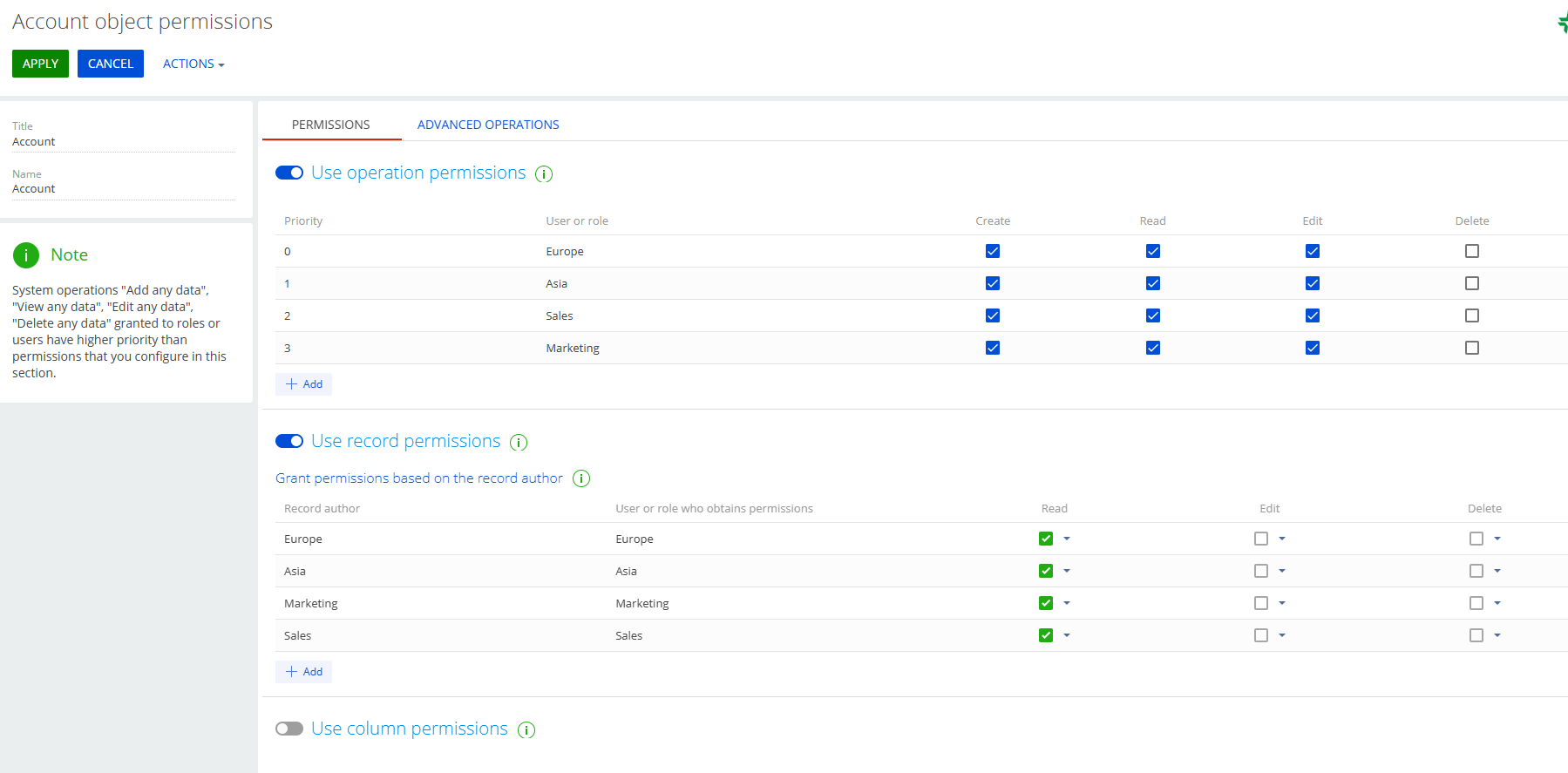
We have two Organizational Roles 

  • Europe
  • Asia

We have two functional roles 

  • Marketing
  • Sales

We want:

  • Europe/Marketing to see only Europe/Marketing records. 
  • Asia/ Marketing to see only Asia/ Marketing records. 


Same applies to Sales. 

  • Europe/Sales to see only Europe/Sales records,
  • Asia/Sales to see only Asia/Sales records.

Can this be achieved somehow?

Sasor

Like 0

Like

4 comments

++

Sasori Oshigaki,

Hello , this Code should work 
{
  request: "crt.LoadDataRequest",
  handler: async (request, next) => {
    // Check if this is your MultiSelect's data source
    if (request.dataSourceName !== "MultiSelect_lf952eo_List_Items_DS") {
      return await next?.handle(request);
    }
 
    try {
      // MAIN filter group for the lookup
      const filter = new sdk.FilterGroup();
      filter.logicalOperation = sdk.LogicalOperatorType.And;
 
      // Build a nested OR group for the 3 roles
      const roleOrGroup = new sdk.FilterGroup();
      roleOrGroup.logicalOperation = sdk.LogicalOperatorType.Or;
 
      // Role 1
      await roleOrGroup.addSchemaColumnFilterWithParameter(
        sdk.ComparisonType.Equal,
        "[SysAdminUnit:Contact:Id].[SysUserInRole:SysUser:Id].SysRole.Name",
        "Marketing"
      );
 
      // Role 2
      await roleOrGroup.addSchemaColumnFilterWithParameter(
        sdk.ComparisonType.Equal,
        "[SysAdminUnit:Contact:Id].[SysUserInRole:SysUser:Id].SysRole.Name",
        "Sales"
      );

 
      // Add the OR group to the main filter
      filter.add(roleOrGroup);
 
      // SDK workaround for versions < 8.1.1 (copy items)
      const newFilter = Object.assign({}, filter);
      newFilter.items = filter.items;
 
      // Push the filter into the request
      request.parameters.push({
        type: "filter",
        value: newFilter
      });
 
      return await next?.handle(request);
    } catch (error) {
      console.error("Error filtering contact list:", error);
      // Continue with original request if filtering fails
      return await next?.handle(request);
    }
  }
}

Hello Sasor,

To achieve the requirement where specific organizational and functional roles can only see records relevant to their combination (e.g., Europe/Marketing can only see Europe/Marketing records), you can configure access permissions in Creatio by following these steps:

1. Create Organizational Roles:
Ensure you have the organizational roles "Europe" and "Asia" set up in the system.
 

https://academy.creatio.com/docs/8.x/setup-and-administration/administration/user-and-access-management/user-management/organizational-roles


2. Create Functional Roles:
Ensure you have the functional roles "Marketing" and "Sales" set up.
 

https://academy.creatio.com/docs/8.x/setup-and-administration/administration/user-and-access-management/user-management/functional-roles


3. Assign Users to Roles:
Assign users to the appropriate combination of organizational and functional roles (e.g., users in Europe/Marketing should be assigned to both the "Europe" organizational role and the "Marketing" functional role).
 

https://academy.creatio.com/docs/8.x/setup-and-administration/administration/user-and-access-management/user-management/assign-a-user-role


4. Configure Record Permissions:
- Go to the System Designer and open the Object permissions section.
- Select the object for which you want to configure permissions (e.g., a specific entity or section).
- Set up record-level permissions to restrict visibility based on both organizational and functional roles.
This can be done by creating filters or conditions in the access settings that check for both role types assigned to the user.


https://academy.creatio.com/docs/8.x/setup-and-administration/administration/user-and-access-management/access-management/record-permissions


Let me know if you have any more questions - happy to help further.

Hello Valeriia,

Thank you for the answer. Are you suggesting that this combination might achieve what we need?

Thank you 

Sasor

Show all comments
Sales_Creatio_enterprise_edition
Sales_Creatio
8.0

Hi Everyone,

I'm currently packaging a custom lookup in Creatio and I need to ensure that the lookup column settings, as shown in the screenshot, are configured as the default display fields and sorted by the CreatedOn field.

Could someone guide me on the proper way to bind the lookup column configuration so that it can display correctly after installing the package in another environment?

I'm particularly interested in:
1. Where the lookup column configurations are stored (fields to display).
2. How to bind them properly during export as default configuration.

Thanks in Advance!

Like 2

Like

3 comments
Best reply

That is stored in SysProfileData, you'll see how to bind that to the package here: https://customerfx.com/article/including-the-default-column-layout-for-a-detail-in-a-creatio-package/

For a lookup, I believe the key is something like (where "LOOKUPOBJECTNAMEHERE" is the name of the lookup object):

"BaseLookupConfigurationSectionLOOKUPOBJECTNAMEHEREGridSettingsGridDataView"

Ryan

That is stored in SysProfileData, you'll see how to bind that to the package here: https://customerfx.com/article/including-the-default-column-layout-for-a-detail-in-a-creatio-package/

For a lookup, I believe the key is something like (where "LOOKUPOBJECTNAMEHERE" is the name of the lookup object):

"BaseLookupConfigurationSectionLOOKUPOBJECTNAMEHEREGridSettingsGridDataView"

Ryan

Hi Ryan Farley,

It works great, but how can we identify the record among the common records, as shown in the screenshot below? Also, why do duplicate records exist?

Thanks in Advance!

Ajay,

The one with an empty Contact value (the 3rd row in the screenshot) is the one that defines the default column layout for all users. 

Ryan

Show all comments
sales_enterprise
Sales_Creatio_enterprise_edition
8.0

Hello Community,

I’m trying to bind a system setting to a package with its value set as an empty string.

I added the system setting with an empty Text value in the package, but during installation, I'm encountering a JavaScript error when attempting to read the value from the same system setting field.

Has anyone faced a similar issue, or is there a proper way to bind an empty string in system settings within a package?

Thanks in advance!

Like 1

Like

5 comments

Hello!

In Creatio, there are 2 tables for system settings: one for system setting itself and other for system setting value. If you don't have value for system setting, then you can bind only system setting itself to a package. I never faced error during installation of package with bind of system setting without system setting value.

In your case, did you bind empty system setting value to a package or only system setting?

Hello Khassan Khakak,

Thank you for your response.

In my case, I had bound both the system setting and the corresponding system setting value to the package, with the value set as an empty string (Text Value). After installing the package in a fresh org, The page that tries to read the system setting value using JavaScript in Freedom UI handlers throws an error.

As per your suggestion, I tried binding only the system setting without the SysSettingsValue entry, but it still resulted in the same error.

Appreciate your input!

Best regards,
Ajay

What is the error you get?

Ajay,

What is the error and what does the code look like that is reading it?

Ryan Farley,

const field = await new Promise( (resolve, reject) => {  Terrasoft.SysSettings.querySysSettingsItem( "field", function(result) { resolve(result); }); });

The code above was used to read the system setting field and was returning a "404" error.

The issue has been resolved — it was caused by an outdated System Setting value bound to the package from an old record.

Show all comments

Hello,

With 8.2.3, the Landing Page Designer allows me to create a Landing Page with a form, export in HTML, publish it on my domain name.

The page and forms works well and a NEW submitted form record & contact are created in the CRM.

After submitting the form, the message displayed on the screen is as followed:


Where and How can we customize the message  OR  redirect to a Thank YOU page ?


PS : the version field when creating this POST has only 8.0 as an option.

Like 1

Like

4 comments

For now that is hardcoded in the javascript that Creatio includes with the form from https://webtracking-v01.creatio.com/JS/crt-landing-page.js

If you're self-hosting the form, you could save that script as your own copy and change the script tag in the form to use yours instead of the Creatio one, then modify it there. 

Ryan

Ryan Farley,

Outch….I’ve been doing Landing Pages for over 20 years with various softwares. Hard to believe that we can’t control the On Submit button  other than hardcoded JavaScript.

Can I suggest that you add the feature of redirecting to another page (Thank You or any url) within the coming release?

It’s a pretty basic Landing Page feature.

Francois Breault,

I agree, seems a bit short-sided. Hopefully they add that, I assume they will at some point (I don't work for Creatio, but I'm sure they'll see your suggestion to add that as a feature in your comment here). 

Hello,

Thank you for your question.

Currently, it is not possible to change the text that appears after a form submission in the Landing Pages module on a per-page basis. This text is fixed in the system and cannot be customized individually for each landing page.

However, we have registered this idea in our R&D team backlog for consideration and potential implementation in future releases of the application. We appreciate your feedback and your help in improving our product.

If you have any other questions or need further assistance, please feel free to reach out.

Show all comments
change_log
Workplace
8.1.3
Sales_Creatio_enterprise_edition
8.0

Is there any way to add the OOTB Change Log section into a workplace? I know it isn't a normal Section so it would be somethign of a workaround, but it would be useful for our purposes to grant access to just the Change Log without granting access to the System Designer to a user role. Even just having a "Section" displayed in the workplace that just acts as a link to the change log would be useful if that's possible in some way?

Like 0

Like

1 comments

Hello.

The Change Log is not a standard section in Creatio and cannot be directly added to a workplace as a section. 

The R&D team has a task to add the Change log as a section in future releases.

Best regards,
Antonii.

Show all comments