Unfortunately, at the moment there is no custom option to call this page in the custom functionality.
We have a task in the backlog to implement this feature in future versions of the application. We have raised the priority of the task taking into account your user experience.
This would be very useful for us too - selecting columns in the UI could be very helpful for creating marketplace tools to be used by others for no code configuration of things like import/export/integration tools.
Hi guys! There is a question. It is necessary to establish rules for the segmentation of the counterparty. If he has more than $10,000 revenue, then assign a segment in the directory with the value A, if the revenue field is less than $1,000, then segment B. How do I do this? In the "event - signal" business process, there is no sign greater than or equal to, only flat or uneven. I didn't find anything that would help me in setting up business rules either. Who can tell you? Version 7.18
You need to check whether your Revenue field is of type "Integer," as it seems that a text field is being used.
If you specifically need to use a text field, you will need to parse this field into an integer in formula and use a formula in the Conditional flow to evaluate this value using ">" or "<".
Also, that option for Freedom UI in mobile is controlled by a feature. I have a couple of systems where that feature never got enabled by upgrades and the option doesn't show. If it's not showing in your system, that could be the case also and you can check with support for which feature is needed for that (I can't remember the feature name that controls that)
I need urgent help from Creatio support - I have emailed support@creatio.com
All users of our domain are unable to access for more than 3hours.
It keeps stating we have entered an incorrect username and password - this is not possible for all users across all of our offices, I know for certain my credentials are correct.
Please try to send another email to support@creatio.com, make sure that you have entered correct mailbox address, or try to send an email from a different address so we could process your request.
is it possible to define start of scheduled process not in process itself (with Start timer element), but in some system settings or lookup, for example?
I don't need to determine when a timer will trigger. I need to start business process by some external timer (not starting signal), cause time of start should be calculated, not static
To achieve the desired functionality, the client can follow these steps:
Create a custom object:
Add a StartDate column to store the date when the process should begin. Design the process as illustrated in the provided diagram:
Configure the process to trigger when the StartDate column is updated.
Add logic to read the value of the StartDate column. Calculate the wait time in seconds using a formula such as (StartDate - DateTime.Now()).TotalSeconds. Use an intermediate timer to wait for the computed number of seconds. After the wait time, proceed to start the process.
We have tested this behavior and it looks like there shouldn't be a problem. We used the following scenario: 1) Created a custom package in which we created a replacement for the ActivityCategory object with the “Allow records deactivation” option enabled.
2) Created two test records through the lookups, for one of which we set the “Inactive” = true
3) Create a data binding in the package from step 1 for the ActivityCategory object, add the “Inactive” column to the data binding, and add two records.
4) As a result, in the exported package we see the created data binding with two records, for one of the records the Inactive attribute is set to true.
I wonder, how do I go about actually binding that configuration to the package i'm working on? So I can transfer the configuration from my dev environment to test/prod.
Unfortunately, in the current Creatio configuration, it is not possible to bind "Change Log" data to a package.
Change log information is stored for each entity separately in a "Sys<YourEntity>Log" view. For example, if logging is enabled for the "Account" schema, the activity is recorded in the "SysAccountLog" view.
However, it is not possible to bind view data to a package.
Unfortunately, in the current Creatio configuration, it is not possible to bind "Change Log" data to a package.
Change log information is stored for each entity separately in a "Sys<YourEntity>Log" view. For example, if logging is enabled for the "Account" schema, the activity is recorded in the "SysAccountLog" view.
However, it is not possible to bind view data to a package.
To bind the change log setup for both the object and columns on that object in a package, you need to change the settings in the Object schema itself in the package.
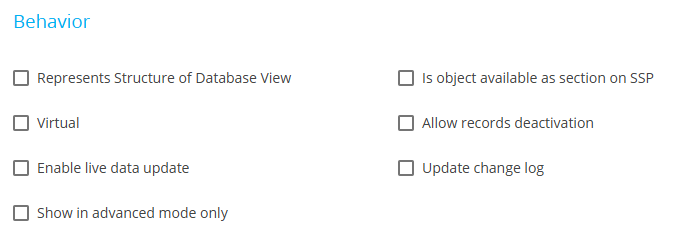
To enable logging for the Object, it's the "Update change log" checkbox under the "Behavior" heading:
To enable it for individual columns, you must select each column you want change logging for in the Object schema and check the "Update change log" checkbox for it:
You'll need to contact support. I've had several systems that were missing the needed system settings to create the webhook links. They'll need to verify/add them.
I would like to inquire whether it is possible to add a new lookup value to the "Result" field in the tasks section. Additionally, I have observed that the "Result" and "Category" fields appear to be interconnected. Could you please confirm if their linkage is determined by the process? I have not found any related configurations in the page rules.