8.1
email campaigns
attachments
Marketing_Creatio
8.0

Hello,

Is it possible to add an attachment to an email within a campaign?

I know it's possible to do it within a business process, but I want to utilize the marketing campaign features.

Have any of you accomplished this in Creatio?

Thanks.

Like 0

Like

2 comments
Best reply

Hello,


Bulk/trigger emails are not supposed to have files attached to them since the email provider can reject sending this email. The only way to have a file (for example pdf file) being attached to an email if it is a trigger/bulk email - is to put this file as a link to the body of an email. Your file should be stored in some public storage that can be accessed by anyone and the link to it will be like this https://test_storage_system/$File/TestSheet.pdf.


But if you put this link to the body of an email - recipients will get an error when opening it. So you need to use the OpenElement parameter at the end and make the link look like this

https://test_storage_system/$File/TestSheet.pdf?OpenElement. As a result, users will see opened pdf documents (which they can download after that) that can be accessed from your bulk/trigger email.

Hello,


Bulk/trigger emails are not supposed to have files attached to them since the email provider can reject sending this email. The only way to have a file (for example pdf file) being attached to an email if it is a trigger/bulk email - is to put this file as a link to the body of an email. Your file should be stored in some public storage that can be accessed by anyone and the link to it will be like this https://test_storage_system/$File/TestSheet.pdf.


But if you put this link to the body of an email - recipients will get an error when opening it. So you need to use the OpenElement parameter at the end and make the link look like this

https://test_storage_system/$File/TestSheet.pdf?OpenElement. As a result, users will see opened pdf documents (which they can download after that) that can be accessed from your bulk/trigger email.

Bogdan,

Hello thank you for your reply. I'll find a way to generate a link of my file and use it within a bulk email

Show all comments
attachments
FreedomUI
8.0

Hi,


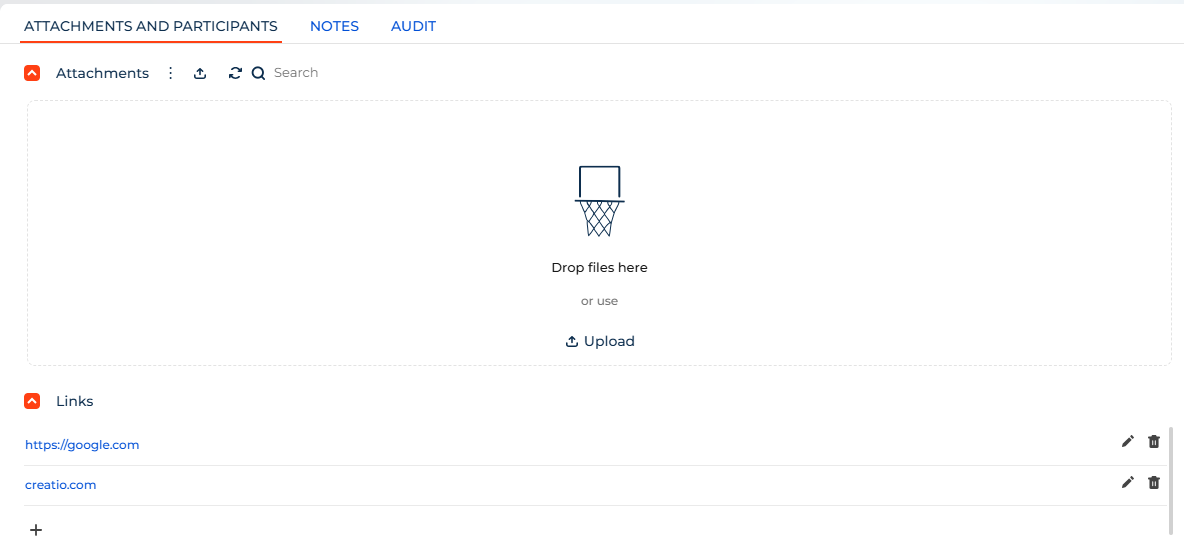
Currently in Classic UI we can add files or links in the attachements, Anybody knows where to insert the link for attachements in Freedom UI ?


Kind regards,


Damien

Like 3

Like

5 comments

Hello,


You can use this documentation:


Work with attachments | Creatio Academy


Regards,

Orkhan

Hi Orkhan,


Thank you but these are Classic UI instructions, I am looking for the equivalent in Freedom UI as new fresh installations do not have classic UI alternative in some sections.


Do you have such documentation & functionality for Freedom UI ?


Thanks,


Damien


hello, some news regarding this question? where is "file and link" in Freedom UI Pages?

we have to develop our own angular control to add this functionality to freedom ui.links

Sergejs Sokolovs,

Hi Sergejs, saw your comment about the custom Angular control for Freedom UI. That's exactly what I need! Any chance you could share it or point me in the right direction?

I'm also trying to add custom fields to file attachments (SysFile object), but the base component doesn't support field editing. Would be a huge help 🙏

Thanks in advance

Show all comments
FreedomUI
Files
attachments
FilesAndLinks
links
document_management
8.1
Studio_Creatio
8.0

Hi Community!


I need to display existing documents from other sections together with the directly attached documents in FreedomUI 8.1.


The attachments are stored in the table "SysFile", which has a column called "TypeId". That lookup has the values "File" (default), "Link" and "Link to object".


I have tried to tinker around with the database of my on-premise dev environment. While I could manage to display inserted documents of type "Link", they won't open because the SysFile-table has no columns for referencing other documents.


There is also a table called "FileLink", which looks promising because it has the columns "FileSchemaName", "FileRecordId", "RecordSchemaName", "RecordId". That would be enough to link existing documents to various records, but the don't show up in the FreedomUi AttachmentList component.


Did anyone already manage to do this without duplicating documents?


Any help is much appreciated, thanks!

Robert

Like 2

Like

1 comments

Hi Robert!


Unfortunately, displaying the various sections' attachments together in one attachment component is impossible. However, you can use a separate attachment component for each section.


To implement this, we recommend the following steps:

1.  Open the Page Designer.

2.  For each section that you would like to display the attachments from:

- add the dropdown field, specifying this section as “Lookup” in the field’s general settings (or make sure that such a dropdown field already exists);

- add the attachment component.

3. In each added attachment component, set “Record to attach files” (general settings) to a value from the previously added dropdown field and “File storage location” (advanced settings) to the corresponding table.


After you choose the exact records in the dropdown fields, they will be linked to the current record, and you will see their attachments in the corresponding components. It will help you to avoid duplicating documents.


Best regards,

Natalia

Show all comments

Hello community,

I have a use case where I need to add a column in attachments for a section in freedom UI and it should only be visible for that particular section. Can anyone help with this?


Thanks in advance.


Regards,

Yasaswini

Like 0

Like

3 comments

I think you set up biz rule for that section, make it visible for that section only cheeky

Hi Yasaswini,


We recommend adding the column in configuration to the object nameOfSectionFile (for example: CaseFile), then go to page designer, open settings for attachments and make sure the view is list, rather than gallery and add the column you have previously added in configuration. 

This setting will only be applied to one sections, because CaseFile object is only used in Case section.


Best regards,

Alina

Alina Yakovlieva,

Thank you,

But my use case is that I will have to edit that field according to the attached files in the attachments, but we can't edit the attachment's detail. Is there any possibility of editing the column that we create in the attachments?

Show all comments
attachments
attachment
FreedomUI
Freedom_UI
Link
on_link_click
disable_link

Hi everyone,


How can we override the onClick functionality of the attachment link? Or is there any way to disable the link?


Thanks & regards,

Ramya

Like 0

Like

3 comments

Hello Ramya,


We thought on overriding the logic of the crt.DownloadEntityFileRequest request, but the handler doesn't trigger upon clicking the file. I will ask our R&D team to make it possible to control the download of files out-of-the-box and do it in the nearest releases.


Thank you!

Oleg Drobina,


Thank you for the swift response. Since overriding is not possible as of now, is there any way to disable the link? Something similar to the Classic UI diff value "showValueAsLink" : false?


Regards,

Ramya

Oleg Drobina,


Can you also elaborate what handler is getting called if it is not "crt.DownloadEntityFileRequest" ?

Show all comments
attachment
attachments
Service_Creatio
8.0

Has anyone managed to return the count of attachment records from a record. Having trouble validating whether a record has any attachments or not.

Like 0

Like

1 comments

Hello,

You can use the EntitySchemaQuery to get the number of attachments:

onEntityInitialized: function() {
				this.callParent(arguments);
				var contactId = this.get("Id");
				var esq = Ext.create("Terrasoft.EntitySchemaQuery", {rootSchemaName: "ContactFile"});
                esq.addColumn("Contact");
                    var filter = esq.createColumnFilterWithParameter(Terrasoft.ComparisonType.EQUAL, "Contact", contactId);
                    esq.filters.add("filter",filter);
                    esq.getEntityCollection(function (result) {
                        if (result.success) {
                        	window.alert("This record has " + result.collection.collection.length + " attachments");
                        }
                    }, this);
			},


Show all comments
FreedomUI
Freedom_UI
attachments
Files

Hi everyone,


Is there a way to obtain the ID of the selected file in attachments in a Freedom UI section? Looking for an equivalent of activeRow / this.get("SelectedRows") for Freedom UI.


Regards,

Ramya

Like 1

Like

3 comments
Best reply

Yes. This is something I would need as well. I've not tried this, but maybe it's possible to add to the rowToolbarItems for the attachments list and get the selected Id from the handler there?

Ryan

Yes. This is something I would need as well. I've not tried this, but maybe it's possible to add to the rowToolbarItems for the attachments list and get the selected Id from the handler there?

Ryan

Ryan Farley,


Thanks a lot for the response. This worked!

You can pass the attachment Id in the params as mentioned below:

"rowToolbarItems": [{
	"type": 'crt.MenuItem',
	"caption": 'Get attachment id',
	"icon": 'open-button-icon',
	"clicked": {
		"request": 'psg.MyCustomHandler',
		"params": {
			"Id": "$AttachmentList.AttachmentListDS_Id"
		}
	}
}]

Regards,

Ramya

Ramya R,

Glad to hear this list can also be extended, great news. 

Ryan

Show all comments
attachments
Studio_Creatio
8.0

I need To restrict the user from uploading files other than PDF in the specific section alone. I'm aware of secure file upload feature to achieve this functionality but still this won't fulfill what I'm aiming to achieve i.e., restriction should be applicable only for specific section with custom disclaimer message

Like 1

Like

1 comments

Hello Kavya, 


Indeed the oob functionality includes possibility to restrict uploading files in a specific format into the system, however such limitation can be applied only to the whole system and not a specific section. 

Unfortunately, there is no way to apply such customization only to a specific section with a help of basic system tools, the additional development will be needed. 


We've registered a query for our responsible team to consider implementing such functionality in the upcoming releases.


Thank you for helping us to make our Application better!


Best regards,

Anastasiia

Show all comments
attachments
Upload
securedFiles
Studio_Creatio
7.18

Hello Community,


Our client has a case where he needs to upload a file secured with a password to the attachment details. He tried to upload that file file but with no success. Is there a way to keep that file in its encrypted format and be able to upload it?


Thank you,

Like 0

Like

2 comments

...

Hello Mariam,


You can make a password file in the archive and put the archive in the detail. At the moment there is no possibility to enter the password exactly inside Creatio. Perhaps this can be implemented by custom development.


Regards,

Anton

Show all comments

Hello Everyone,

I have a Requirement to upload Attachment and Some header fields of Custom Object to another Application Through API. I m able to get header data from a Custom Webservice but not sure how to get attachment that can be uploaded to another Application. 

Like 0

Like

4 comments

Hi!


You can write a custom web service in Creatio that retrieves the required attachment(s) from the custom object, formats the data appropriately, and sends it to the other application's API using HTTP requests. Alternatively, you could look into using a pre-built integration tool or middleware solution that can facilitate the transfer of data between applications in the marketplace. As an example, if you would intend to use DocuWare for your uploaded attachments -https://marketplace.creatio.com/app/docuware-connector-creatio.


Hope this info was helpful.

Hi! 


I would like to add that you might find the relevant information about the API file attachments on this page of the Academy - https://academy.creatio.com/docs/user/setup_and_administration/base_int…


We will be glad to help with any other questions.

Hello Everyone ,

Well I tried Creating WebService that can get and post the Data in Attachment Section but When i Try to Get the Data Using Record id its not getting it. Can you please Advise .

Screenshot of Postman is Attached and the Code of WebService

Code : 


namespace Terrasoft.Configuration.UsrCustomConfigurationServiceNamespace

{

using System;

using System.ServiceModel;

using System.ServiceModel.Web;

using System.ServiceModel.Activation;

using Terrasoft.Core;

using Terrasoft.Web.Common;

using Terrasoft.Core.Entities;

using System.Collections.Generic;


[ServiceContract]

[AspNetCompatibilityRequirements(RequirementsMode = AspNetCompatibilityRequirementsMode.Required)]

public class UsrCustomConfigurationService : BaseService

{

    /* The method that creates a new record in the SysFile entity. */

    [OperationContract]

[WebInvoke(Method = "POST", RequestFormat = WebMessageFormat.Json, BodyStyle = WebMessageBodyStyle.Wrapped,

    ResponseFormat = WebMessageFormat.Json)]

public string CreateSysFileRecord(string data, string fileGroup, string id, string name, int size,

    string sysFileStorage, string type, string recordId, string recordSchemaName)

{

    UserConnection userConnection = GetUserConnection();

    EntitySchemaManager entitySchemaManager = userConnection.EntitySchemaManager;

    EntitySchema entitySchema = entitySchemaManager.GetInstanceByName("SysFile");

    Entity entity = entitySchema.CreateEntity(userConnection);

    entity.SetDefColumnValues();

    entity.SetColumnValue("Data", Convert.FromBase64String(data));

    entity.SetColumnValue("FileGroup", new Guid(fileGroup));

    entity.SetColumnValue("Id", new Guid(id));

    entity.SetColumnValue("Name", name);

    entity.SetColumnValue("Size", size);

    entity.SetColumnValue("SysFileStorage", new Guid(sysFileStorage));

    entity.SetColumnValue("Type", new Guid(type));

    entity.SetColumnValue("RecordId", new Guid(recordId));

    entity.SetColumnValue("RecordSchemaName", recordSchemaName);

    if (!entity.Save())

    {

        throw new Exception("Failed to create SysFile record");

    }

    return entity.PrimaryColumnValue.ToString();

}

/* The method that retrieves a SysFile record by ID. */

[OperationContract]

[WebInvoke(Method = "GET", RequestFormat = WebMessageFormat.Json, BodyStyle = WebMessageBodyStyle.Wrapped,

ResponseFormat = WebMessageFormat.Json)]

public Dictionary<string, object> GetSysFileById(string id) {

    /* The default result. */

    var result = new Dictionary<string, object>();

    /* The EntitySchemaQuery instance that accesses the SysFile database table. */

    var esq = new EntitySchemaQuery(UserConnection.EntitySchemaManager, "SysFile");

    /* Add columns to the query. */

    var colId = esq.AddColumn("Id");

    var colName = esq.AddColumn("Name");

    var colData = esq.AddColumn("Data");

    var colSize = esq.AddColumn("Size");

    var colFileGroup = esq.AddColumn("FileGroup");

    var colSysFileStorage = esq.AddColumn("SysFileStorage");

    var colType = esq.AddColumn("Type");

    var colRecordId = esq.AddColumn("RecordId");

    var colRecordSchemaName = esq.AddColumn("RecordSchemaName");

    /* Filter the query data. */

    var esqFilter = esq.CreateFilterWithParameters(FilterComparisonType.Equal, "Id", id);

    esq.Filters.Add(esqFilter);

    /* Retrieve the query results. */

    var entities = esq.GetEntityCollection(UserConnection);

    /* If the service receives data. */

    if (entities.Count > 0)

    {

        var entity = entities[0];

        /* Add the values of the record fields to the result dictionary. */

        result.Add("Id", entity.GetTypedColumnValue<Guid>(colId.Name));

        result.Add("Name", entity.GetTypedColumnValue<string>(colName.Name));

        result.Add("Data", entity.GetTypedColumnValue<byte[]>(colData.Name));

        result.Add("Size", entity.GetTypedColumnValue<int>(colSize.Name));

        result.Add("FileGroup", entity.GetTypedColumnValue<Guid>(colFileGroup.Name));

        result.Add("SysFileStorage", entity.GetTypedColumnValue<Guid>(colSysFileStorage.Name));

        result.Add("Type", entity.GetTypedColumnValue<Guid>(colType.Name));

        result.Add("RecordId", entity.GetTypedColumnValue<Guid>(colRecordId.Name));

        result.Add("RecordSchemaName", entity.GetTypedColumnValue<string>(colRecordSchemaName.Name));

    }

    // Return the results.

    return result;

}

}

}

Show all comments