attachments
FreedomUI
handlers
file upload
Service_Creatio_enterprise_edition
8.0

Hi Community,

Since the last update, some files are not being uploaded correctly. It appears that the upload process terminates before the entire file is uploaded, which results in corrupted files.

To determine whether this sudden termination is not user-related, we want to add a popup that appears right after the upload process finishes. This way, the user can only navigate through the app once the upload is 100% complete.
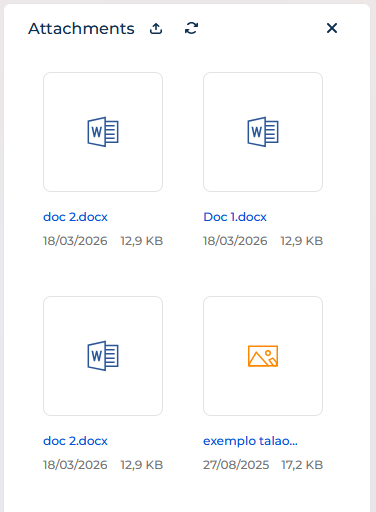
To achieve this, we tried using the UploadFileRequest handler, but it only executes at the start of the upload and does not wait for the process to finish:

{
	request: "crt.UploadFileRequest",
	handler: async (request, next) => {
		const result = await next?.handle(request);
		
		const dialogService = new sdk.DialogService();
		await dialogService.open({
			message: "O upload do documento foi iniciado. Para ficheiros grandes, poderá demorar mais tempo. Por favor, confirme se foi concluído com sucesso.",
			actions: [
				{
					key: "OK",
					config: {
						color: "primary",
						caption: "OK"
					}
				}
			]
		});
	
		return result;
	}
},

Could you please help us solve this issue?

Thank you.

Best regards,
Pedro Pinheiro

Like 0

Like

1 comments

Hello,
The probable reason you have this duplicate is that "LiveEditing" is enabled for the main record. Our R&D team knows about the issue and is working on a fix. As for now, please try disabling the live editing for the main object.

Show all comments

how user can enter only one pdf or one file not list like this is there any built-in item do this ?

form page data model

Like 0

Like

3 comments

Hello, 


Kindly provide more details about current behaviour and expected result so we could assist further. 

Oleksandra,

ok for example if I want user to enter his HR letter ok I will add input field which is attachment in the form page which will allow him to upload files but now we have a problem that user can upload more than one file but we need only one HR letter not list of HR letters 


Abanoub Saleh,

You can add a process which deletes from parent record all files except the last loaded one (Id <> Id of the last loaded file) in case of the new file was loaded in the object event. It's the simplest solution. 

Show all comments
FreedomUI
attachments
handlers
Studio_Creatio
8.0

Hello everyone, Is there a way to obtain the ID of the selected file in attachments in a Freedom UI section?

attachments files

Like 0

Like

5 comments
Best reply

I assume you could get it using the following (this works for lists, I assume it's the same for gallery mode)

const selectedId = await request.$context.TheListNameHere_ActiveRow;

See https://customerfx.com/article/responding-to-a-row-selected-event-in-a-creatio-freedom-ui-list/

Also, you could add the button/action as a menu item when you click the three-dots button, see https://customerfx.com/article/adding-row-action-menu-items-to-a-creatio-freedom-ui-list/ 

Ryan

I assume you could get it using the following (this works for lists, I assume it's the same for gallery mode)

const selectedId = await request.$context.TheListNameHere_ActiveRow;

See https://customerfx.com/article/responding-to-a-row-selected-event-in-a-creatio-freedom-ui-list/

Also, you could add the button/action as a menu item when you click the three-dots button, see https://customerfx.com/article/adding-row-action-menu-items-to-a-creatio-freedom-ui-list/ 

Ryan

Hello,

Basically there is no way to get the id when clicking, but maybe one of the options will be useful:

- you can create a list with files to write and display the id column
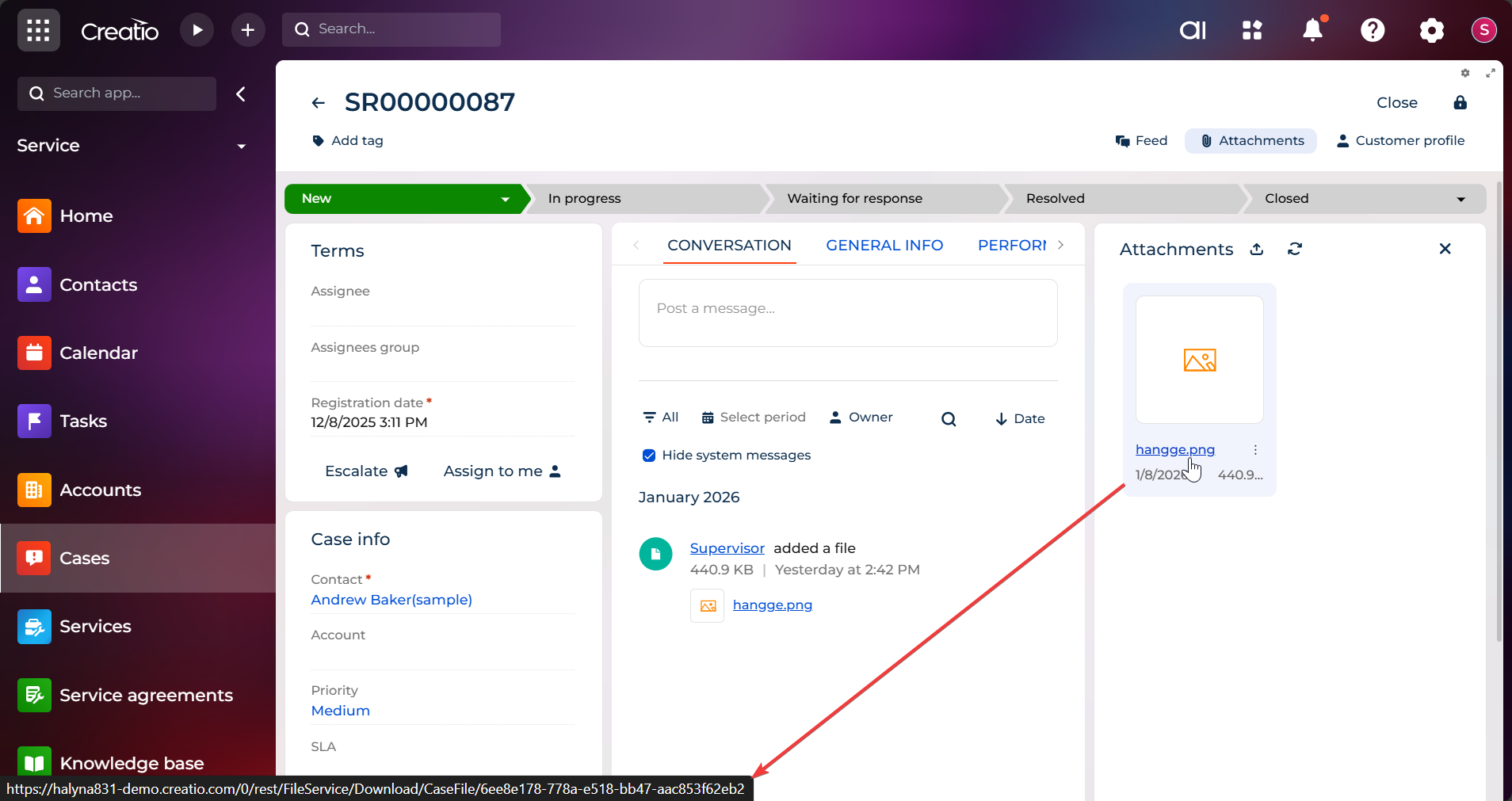
- when hovering over the file, the file id is displayed in the link

Ryan Farley,

Hi! Thanks for the suggestions.

I actually checked both approaches, but the AttachmentList  component seems to behave differently than a standard datagrid :

  1. The ActiveRow issue: I tried request.$context.AttachmentList_ActiveRow (and variations), but it appears the AttachmentList control does not populate the ActiveRow attribute in the ViewModel when you click on a file name. It seems the control handles the click event internally for downloading/previewing, without updating the page state.
  2. The Menu Items: Adding items via rowToolbarItems works visually, but there's a context issue. When using $Id as a parameter in a custom request within the AttachmentList, it returns the page Id  (the parent record) instead of the File Id . Unlike the DataGrid, the AttachmentList doesn't seem to "bridge" the row context to custom menu items easily.

Thanks!
Mario.

Mario Toro,

As for the selected row when clicked, you can try adding a change event handler and then output the change attributeName in the console, then click a row to see if it changes an attribute. 

As for the context menu, you can get the selected record Id, but its name won't be $Id. Somewhere in the page code you'll see the attributes for the data source for the attachments, you'll need to make sure you've wired it up correctly (I do know this works, I've added this for attachment lists before)

Ryan

Mario Toro,

If you look at the Attachment list on the Cases_FormPage you'll see it is named "AttachmentList" and has a an attribute for the primaryColumnName as "AttachmentListDS_Id" and it's Items collection is named "AttachmentList" (you can see this in the base page "PageWithTabsFreedomTemplate"). 

So, to wire up the menu, you'd use: 

{
	"operation": "merge",
	"name": "AttachmentList",
	"values": {
		"rowToolbarItems": [{
			"type": "crt.MenuItem",
			"caption": "Do something",
			"icon": "edit-row-action",
			"clicked": {
				"request": "cfx.doSomethingHandler",
				"params": {
					"itemsAttributeName": "AttachmentList",
					"recordId": "$AttachmentList.AttachmentListDS_Id"
				}
			}
		}]
	}
}

Then the event handler would be: 

{
	request: "cfx.doSomethingHandler",
	handler: async (request, next) => {
		const id = request.recordId;
			        
		// do something here with the id
			 
		return next?.handle(request);
	}
}

Ryan

Show all comments

When creating a case automatically from an email, is there a way to configure it to add the attachment of the email as an attachment of the case?

Like 0

Like

3 comments

Hello,

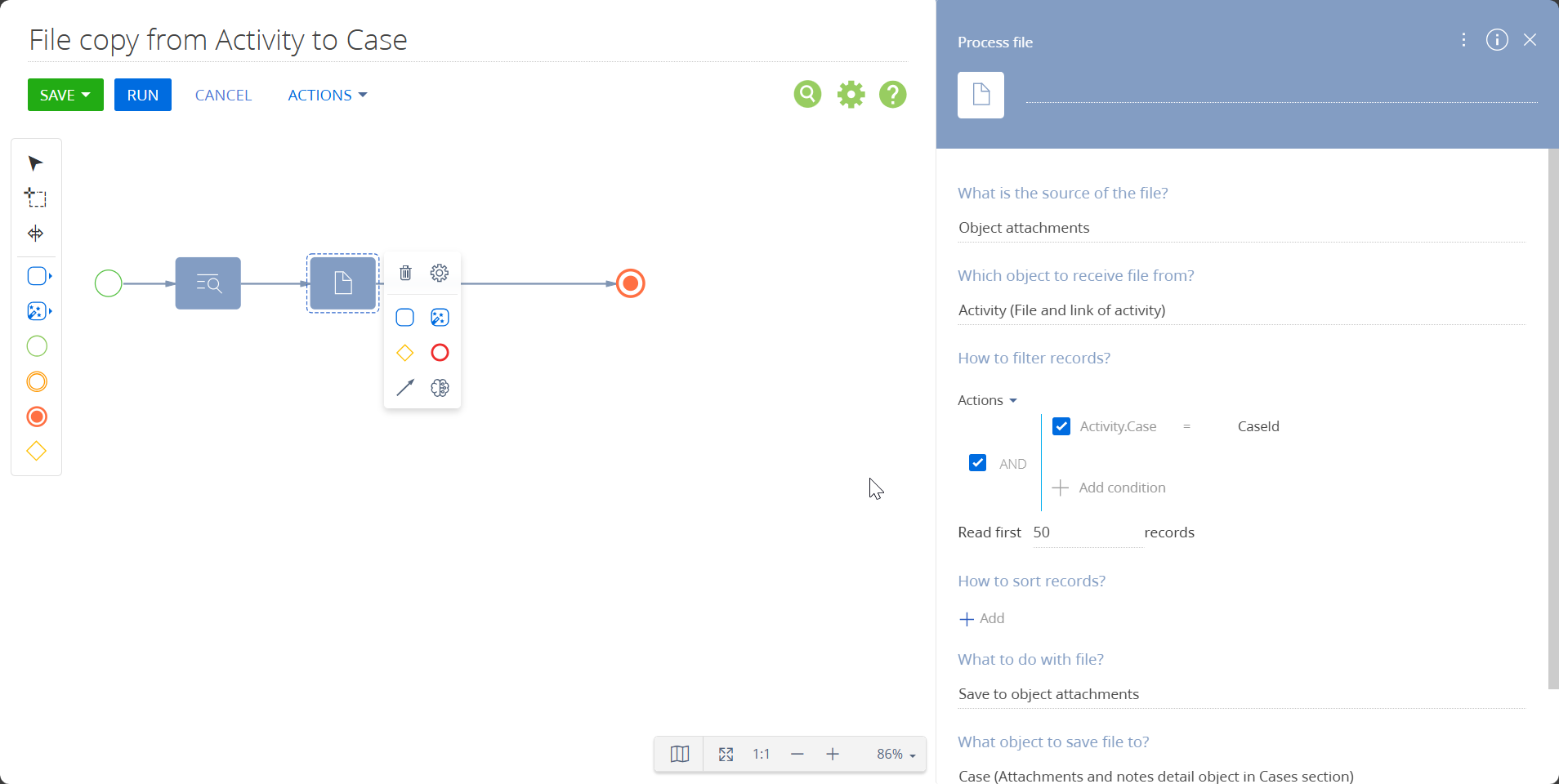
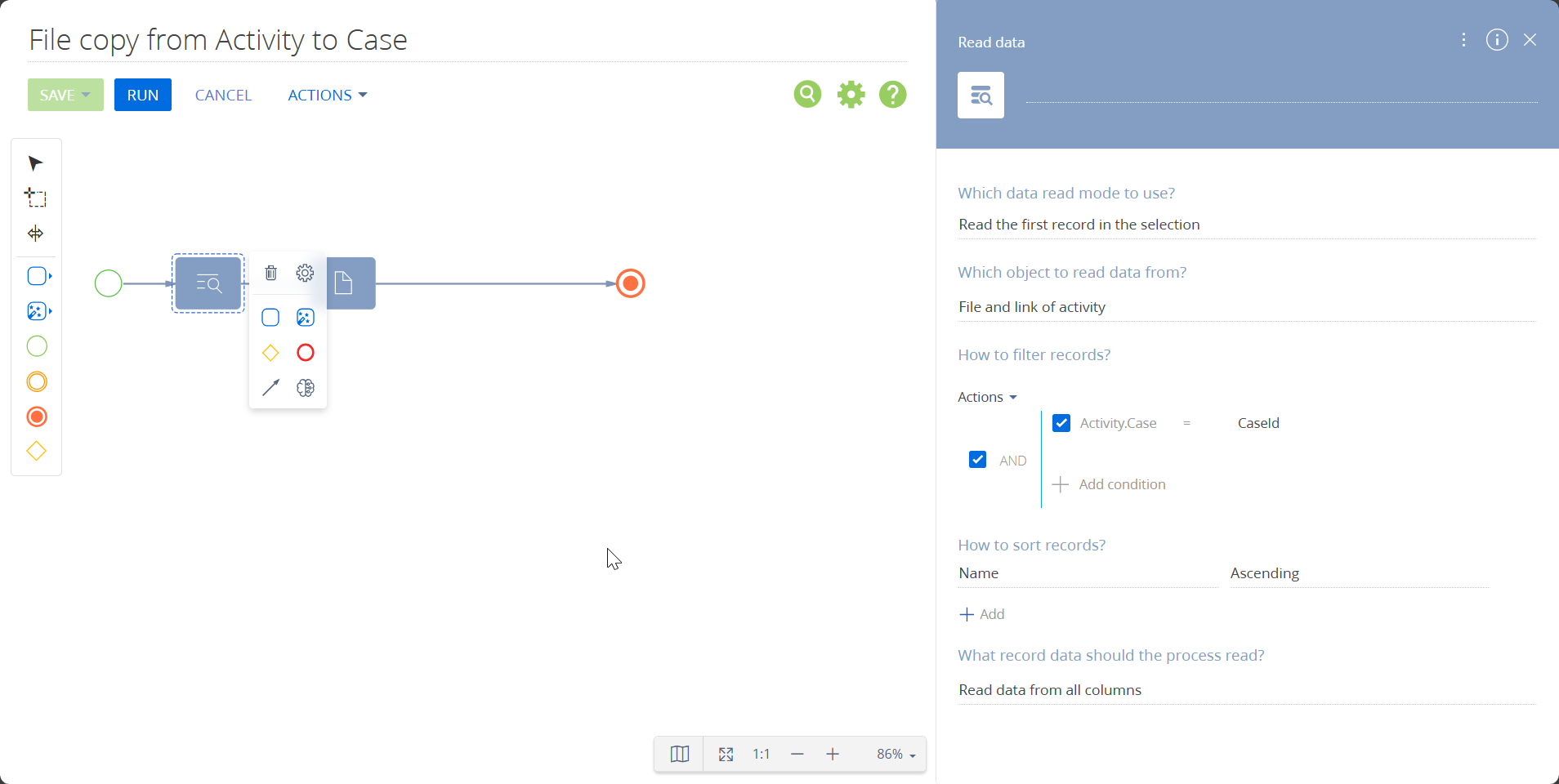
At this time, the system does not provide out-of-the-box functionality to automatically attach files from incoming emails to the Attachments list within a case. Email attachments are stored in the ActivityFile object, while case attachments are stored in the CaseFile object, so they are handled separately by design.

As a workaround, you can implement a business process that copies files from ActivityFile to CaseFile whenever an email is linked to a case. Below is an example of how such a process can be configured:

image.png
image.png
You can learn more about setting up business processes at the following link:
https://academy.creatio.com/docs/8.x/no-code-customization/bpm-tools/process-elements-reference/system-actions/process-file-element


Best regards,
Malika


Malika,

Thank for responding ! The pictures you sent does not appear ! can you please send them again :) 

Astro Developer,

Of course. Attached the screenshots below:


Best regards,
Malika

Show all comments

Hello!

As far as we know, there is an option to bind visibility/disabled properties of crt.MenuItem to some custom attribute. For example:

"rowToolbarItems": [
	{
		"type": "crt.MenuItem",
		"caption": "Some Option",
		"visible": "$SomeCustomAttribute",
		"clicked": {
			"request": "usr.SomeCustomRequestHandler",
			"params": {
				"recordId": "$AttachmentList.AttachmentListDS_Id"
			}
		}							
	}
]

But what if we need to change this attribute value dynamically according to some condition on a specific condition in each attachment, for example, show our custom menu item only for attachments, which have Description column filled.

In simple list we can you crt.HandleViewModelAttributeChangeRequest, which is called on selection change inside the list. There we can get selection state out of the list, see selected items id and perform with them any operations we like (database query, syssettings check, etc) including changing value of the custom attribute. But in the attachament list there is no request being called to do such thing.

What are the options to manage the attributes from the attachment list?

Like 0

Like

5 comments
Best reply

The only way I've been able to handle this scenario is to have the handler do the check and alert when the action isn't available due to whatever conditions. Binding in nested properties like the visible property of a nested rowToolbarItem collection item, doesn't work. 

The only way I've been able to handle this scenario is to have the handler do the check and alert when the action isn't available due to whatever conditions. Binding in nested properties like the visible property of a nested rowToolbarItem collection item, doesn't work. 

Ryan Farley,

Yeah, thanks Ryan, made the same thing already - handling availability with showing some messages to user inside the click handler. Very unfortunate that there's no other option.

Sergejs Sokolovs,

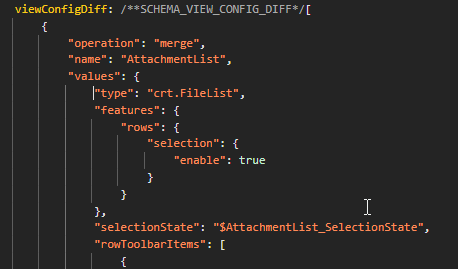
crt.FileList uses the default crt.DataGrid feature set, where row selection is turned off. Because selection is disabled, the grid never updates selectionState, so crt.HandleViewModelAttributeChangeRequest is not triggered.  If you need the attachments list to trigger that request, try the following:

...
viewConfigDiff: /**SCHEMA_VIEW_CONFIG_DIFF*/[
    ...
    },
    // This is your Attachments component in the page schema
    {
        "operation": "insert",
        "name": "FileList_t7inelh",
        "values": {
            "type": "crt.FileList",
            ...
            // Add this part to enable row selection event
            "features": {
                "rows": {
                    "selection": {
                        "enable": true
                    }
                }
            }
        }
    },
    ...
],
...

Eduard Dovydovskyi,

Are you sure this works when attachment list is in gallery mode? I tried to add your snippet to standard AttachmentList from PageWithTabsFreedomTemplate, and crt.HandleViewModelAttributeChangeRequest still not being triggered. I have even added the selectionState property to values, but still no luck.
rows selection

Sergejs Sokolovs,

If viewType is a gallery, crt.FileList uses the crt.Gallery function set instead of crt.DataGrid, so the solution will not work. viewType must be a list for the proposed solution to work.

Show all comments
MSwordReport
image
attachments
8.0

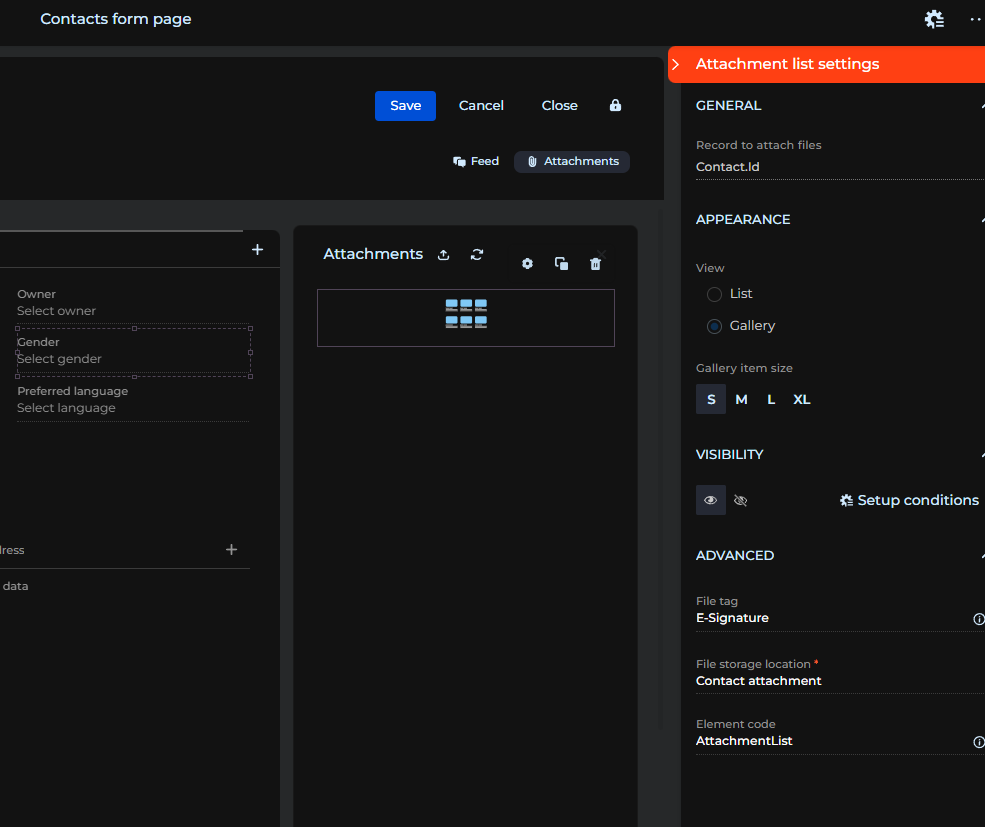
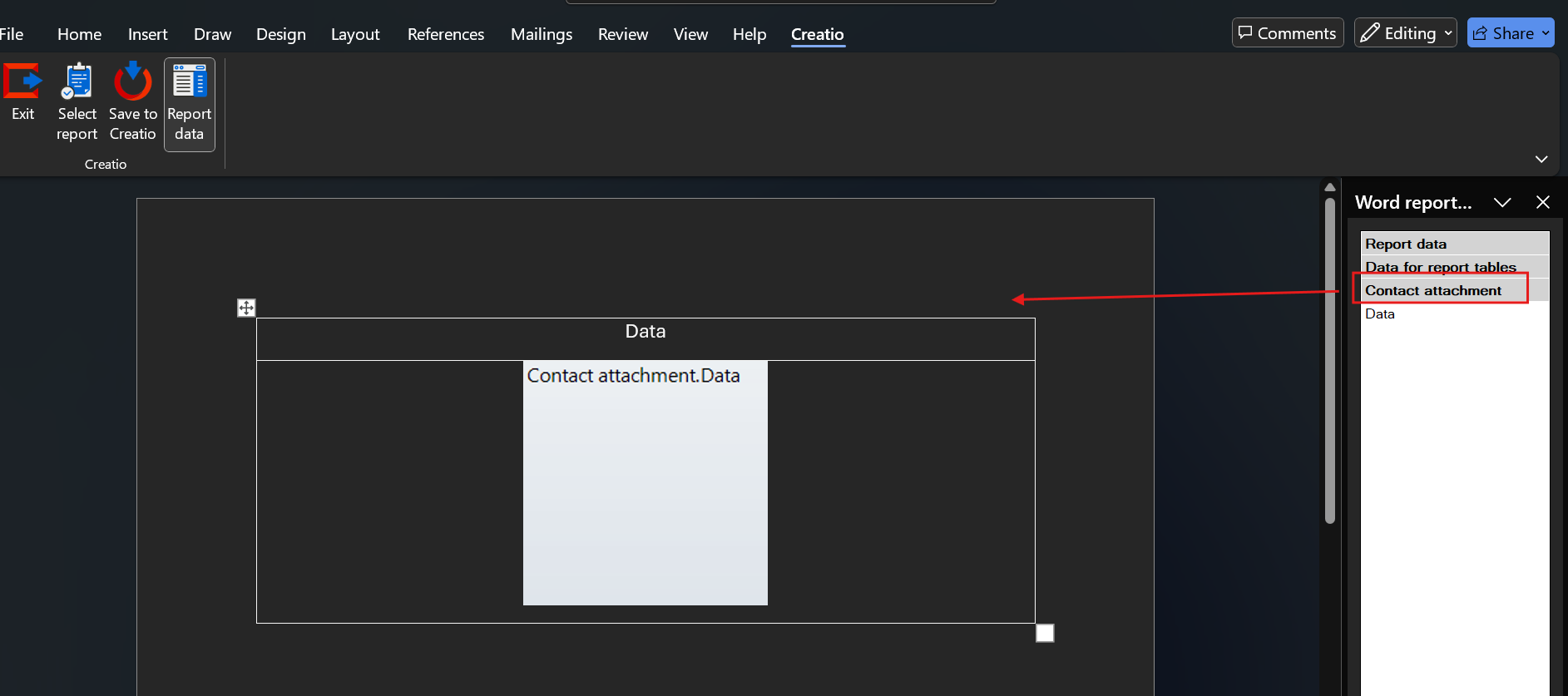
Hello, i am trying to add an image attachment to be shown in the Report setup,
as shown i put in a File tag however i am unable to add it into the report setup
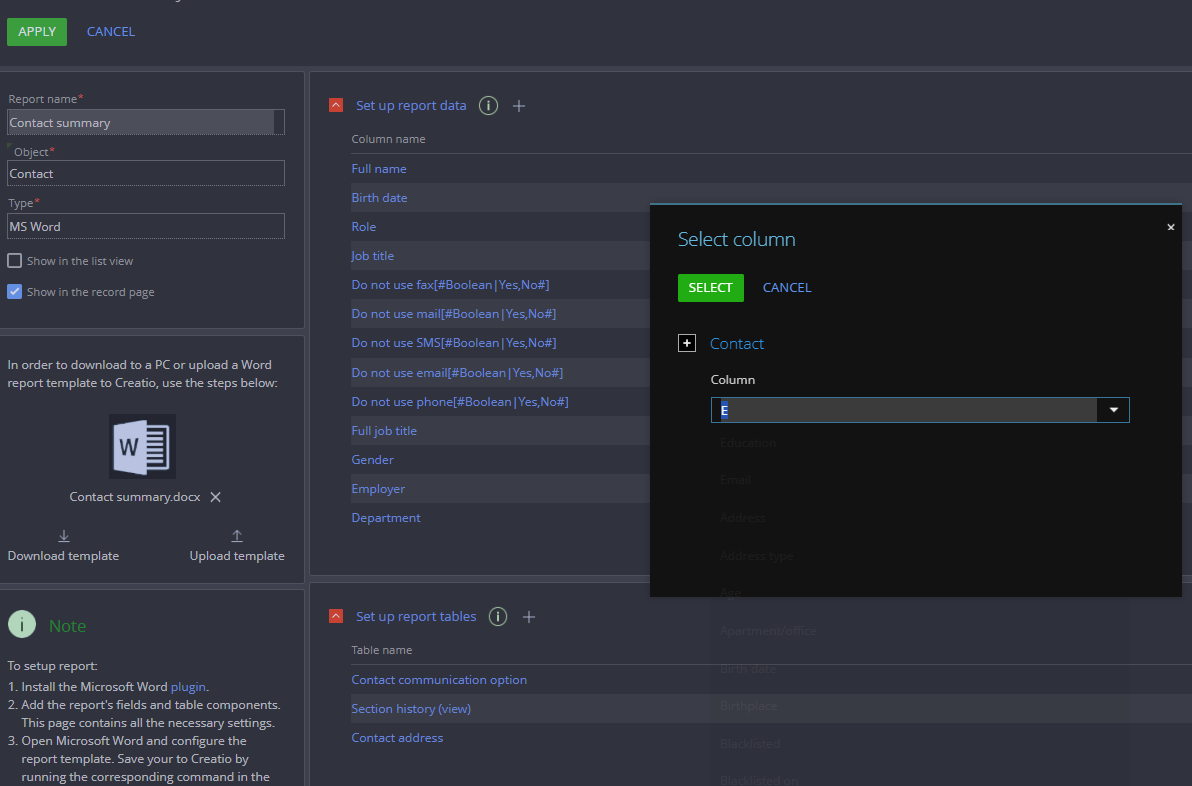
do i add it into the Report data or report tables? and how?

Like 0

Like

2 comments

Hi Michael,
Here’s how you can add images to the report:

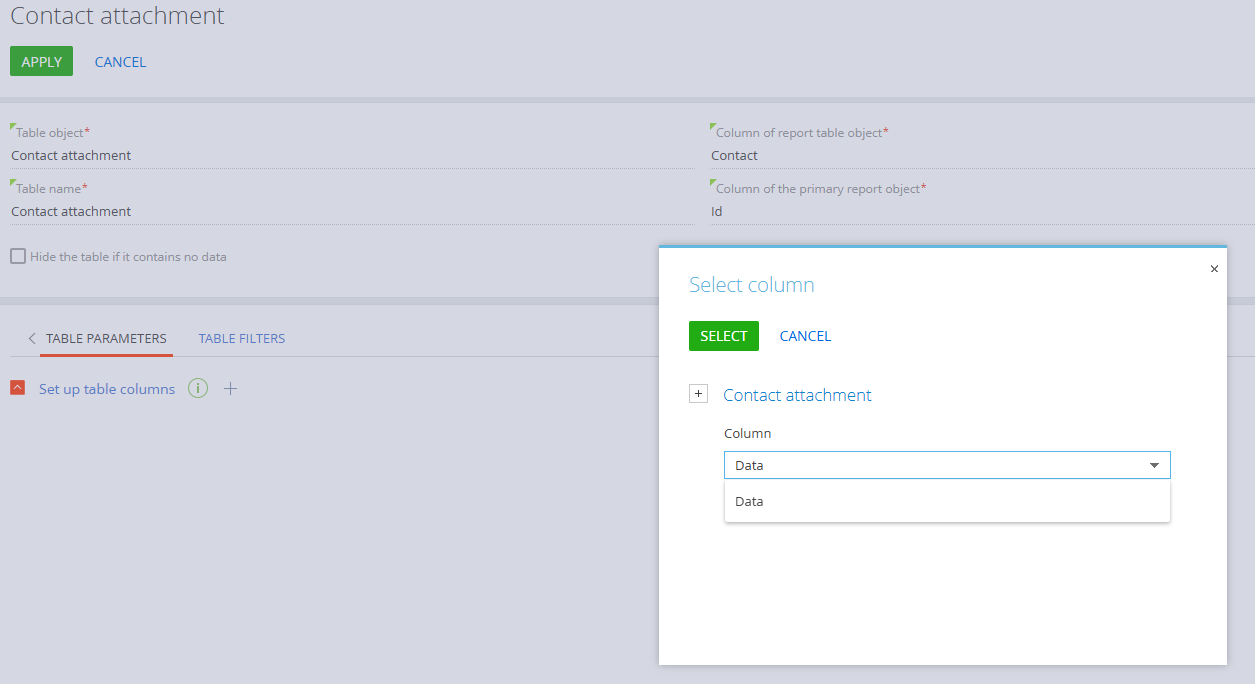
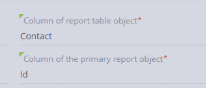
1) In Set up report tables, add Contact attachment table and add table parameters as shown below:
screenshot 1
You need to select Data column from the list.
If you need to apply any filters, you can configure them in the Table Filters section.

2) Then proceed to the Report Editor in Word and add necessary tables and columns. For the attachments, make sure to drag the table "Contact Attachment" (not the Data field). See screenshot below:

3) Save the changes and try running the report.

Hope this helps! Feel free to reach out if you have more questions or need further assistance.


thank you so much, after more research i found out that this part


is the one giving me trouble essentially i needed a lookup by contact dropdown field to select which contact i need to get  in the form page itself then add that into the bottom part of the Column of the primary report object

Show all comments
attachments
FreedomUI
Sales_Creatio
8.0

I want to display the attachments of the contacts associated with an account, in the Account detail's page. Tried with the attachments control, but the condition is not customizable. 

Tried with the list, but I couldn't undertand how to create the condition. 

Is there a code customization that can be done? Or another approach?

Thanks community! 

Like 0

Like

1 comments

Hello Ignacio,


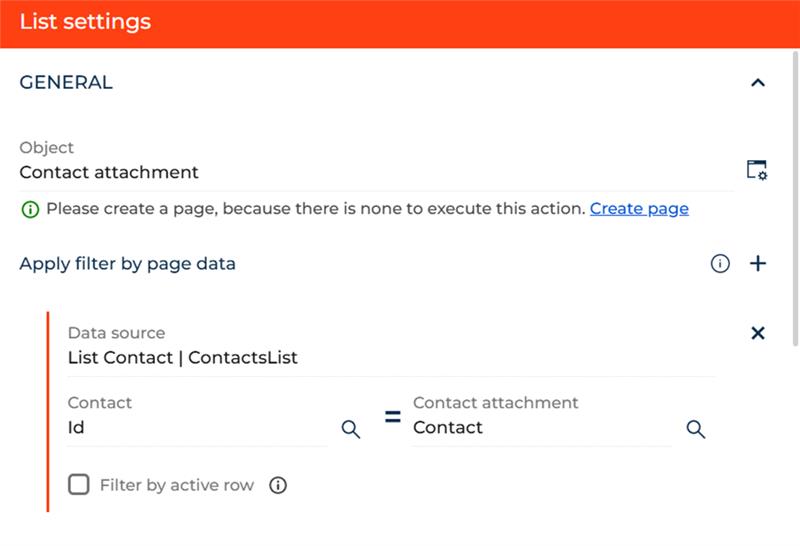
To display the attachments of all contacts that belong to the same account within the Account details section, you’ll need to add a new List component and configure it as follows:

image


The Contact attachment object stores all files associated with individual contacts.


The list only shows the attachments whose Contact is part of the Contacts linked to the current Account


In other words, the List retrieves all records from Contact attachments where the Contact belongs to the current Account.

Show all comments
mime
attachments
Sales_Creatio_enterprise_edition
8.0

Hello, 

we have a problem with following addon:

https://marketplace.creatio.com/app/mime-attachment-creatio

Until recently it was working, but since some time it is not working anymore :( and there is not support for it.

Does anybody have working solution for the problem of digitally signed emails in Creatio?

Thanks.

Like 0

Like

2 comments

Hello , 


Unfortunately, at the moment, there is no mechanism for signing outgoing emails in Creatio. We have registered the request for our development team to evaluate the possibility of implementing such a mechanism in future releases of the application. 


Thank you for helping us make our product better! 


Best regards, 

Creatio Support team 

Oleksandra,

Thank you.

I was referring more to the problem of incoming emails, where digitally signed incoming emails, have attachments shown as .p7m file in Creatio. This addon https://marketplace.creatio.com/app/mime-attachment-creatio added encrypted attachments to attachment detail and attachments were shown correctly with this addon, as .pdf and not as .p7m file. This worked in Creatio until some update of Creatio version and it does not work anymore. Do you know it encrypted attachments can automatically be added in attachments in Creatio?

Thank you.

Show all comments
AISkill
attachments
Studio_Creatio
8.0

Hi,

Can I use AI Skill to extract the readable content from files(pdf, .doc, .txt, .xlsx etc..). 
My expectation is, AI skill will take a file id/attachment id or binary data of the file then it'll give me the readable content from the file.

Thanks.

Like 0

Like

1 comments

Good day, Sagar,


At the moment, the official instruction regarding this AI skill is still under development on our Academy.

However, Creatio AI does support working with small text-based files.
All information regarding this topic is provided below:

Covered scenarios are :

  • Chat user files – uploaded by the user during a Creatio.ai chat session
  • Skill & agent embedded files – attached within dedicated skill or agent
  • Files handling inside BP for API skills – passed dynamically through business process logic

File handling is globally controlled by the feature GenAIFeatures.UseFileHandling
Description: “Enable the use of skill/agent files in the Creatio.Ai session.”

File limitations:

  • Only files with allowed extensions are processed. Setting listing permitted file extensions is CreatioAIAllowedIntentFileExtensions.
  • Files must not exceed a size specified in system setting CreatioAIMaxIntentFileSize
  • The sum of all embedded files' content for a single skill or agent must stay within the global limit defined in setting CreatioAIIntentFileContentSizeLimit
  • Total file content (from all sources) passed to the LLM in a single session must not exceed the limit set in setting CreatioAISessionFileContentSizeLimit

Please be informed that these instructions are subject to change, as this instruction is still under development.

Show all comments
attachments

Hi,

How to do Attachment* as mandatory?

Like 0

Like

3 comments

Hello! 


Please reffer to community post that is related to your question https://community.creatio.com/questions/how-do-attachment-mandatory.


Best regards,

Valeriia

Hamma Elmehdi,

Remove the . from the end of the url. Correct url https://community.creatio.com/questions/how-do-attachment-mandatory

Ryan Farley,

Hello Ryan, thanks for the response, could you please give me more details about how to set up the process, because they didn't let me add anything in the business process created with button " OPEN PROCESS"


and thanks in advanced ;)

Show all comments