pdf
printables
7.14_()
service

Hello,

Is there any way for creating a PDF from a printable? I need something to perform the function since it was pulled from the out of the box features for bpm'onine. Any help would be greatly appreciated.

Like 0

Like

22 comments

Hello Kevin,

Starting from 7.14.2 version the functionality of PDF-convertation was excluded from an out-of-the-box features list. All clients that are updating between versions and already use such a feature in their printables have this feature being available.

Currently our R&D team is working on implementation of this feature in an out-of-the-box version and we hope that it will return back very soon. We are very sorry for any inconveniences caused.

Best regards,

Oscar

Are there any updates on the PDF-printables?

Julius,


Unfortuantely there is no update regarding PDF-convertation in Word Printables, but the functionality of PDF-convertation is available in Fast Reports new feature added in 7.15.3 version. You can read more about it here.


Best regards,

Oscar

Hi Oscar,


Please add this feature quickly.

We have new projects and we can't explain how sucha a basic functionality is not availabe.

And to develop Fast Reports is not the same as a simple Printable.


Regards,

Luis

This was a handy feature. Fast Reports are not easy to build.

KrishnaPrasad,

I agree.  There is nothing FAST about Fast Reports.

This feature is really difficult to implement> I cannot make changes in each and every line if there is any new fields need to be added to printable. 

fast Report - Convert into the pdf is not working for me.


can you provide any other alternative way.

Any feedback on this Oscar:

"Currently our R&D team is working on implementation of this feature in an out-of-the-box version and we hope that it will return back very soon. We are very sorry for any inconveniences caused."?

Thks

Luis

Hi Team,


Is there any update in the latest version 7.18.1, still we don't have the option to "Convert to PDF" OOB in the printable section. Is there any alternative other than using Fast Reports?


I would like to know if there is a way to force the convertion to PDF in the last versions

Hi Creatio,


2 years into this request, any news regarding this point?

I (and many others in this thread, it seems to be the most popular request in the community) are waiting for a long time for this.

Fast Reports is really a lot of work to setup and to maintain/ introduce minor changes.

Hopefully it is one of the surprise features of the freedom release.


Thanks,

Luis

Luis Tinoco Azevedo, Use protected Word files (.docx) in the meantime. It's better than .pdfs in my opinion. But yes. I know, many customers like .pdfs since they're familiar

Hi Team,

Creation has moved to freedom version and still we don't have the option to "Convert to PDF" OOB in the printable section. Is there any alternative other than using Fast Reports? And the previous "Save Printable" business process element also doesn't seem to work for the latest version and document saves as Word doc. ?

Julius,

How do we use protected word files in this case?

Can you please describe the steps in detail?

How to use it in Creatio printables?

Hi Team,

We keep struggling with our customer for an option to convert printables to PDF. Will it ever be possible, as it was in the past? 


Julius,

Can you please detail?

Hello, some news regarding to generate PDF reports in Creatio, from 2019 we are waiting to can create pdf reports again, some news is this

on the R&D backlog?

Hello,


This functionality is implemented in one of the apps in the Creatio Marketplace: Aspose.PDF connector for Creatio

Serhii Parfentiev,

Not usefull, before 2019 is was available free, aspose connector requires pay a license/service :-(


Creatio proimise here it was working on it to get it available again, see the comment of @Oleg Drobinaon oct 2019 in this post: "

Hello Kevin,

Starting from 7.14.2 version the functionality of PDF-convertation was excluded from an out-of-the-box features list. All clients that are updating between versions and already use such a feature in their printables have this feature being available.

Currently our R&D team is working on implementation of this feature in an out-of-the-box version and we hope that it will return back very soon. We are very sorry for any inconveniences caused.

Best regards,"

Serhii Parfentiev,

This answer is not acceptable. It's not a nice to have. Is something every small app contains. As Creatio use too... come on... 5 years???

Yep, time to get this back, and soon.


PDF exports + also the ability to schedule emails reports with attached excel & pdf (not Word), in an easy way for end users (not with business process, which is already advanced for most business users) , helps are clients to respond to their management's requests. 


Today these features that exist in most of the other tools are inexistent as OOTB features (not an addon or with code) .... which should nowadays be a hygiene factor.

Show all comments
printables
cases
7.14_()
customer_center

Hi,

I am trying to generate a printables of case section.

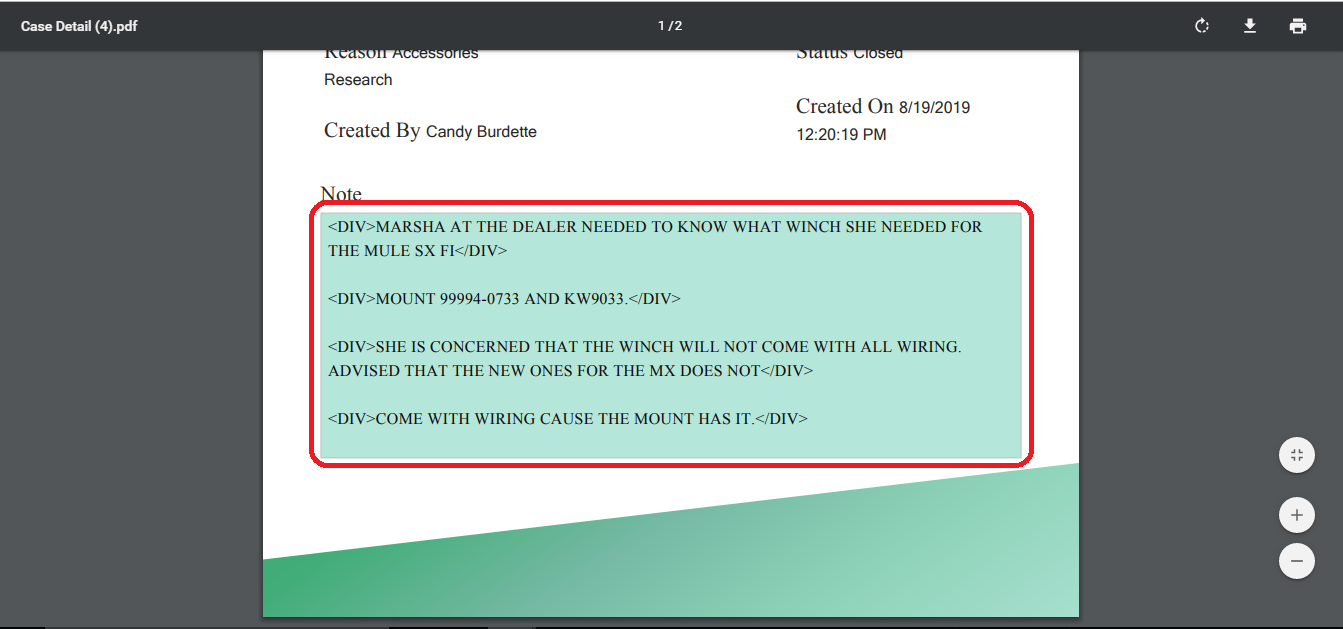
In the cases section, the Notes field is displaying in the HTML formate as you can see in the attachment. 

We would like to display it in a simple text format. 

Any help on this matter is appreciated thanks!

File attachments
Like 0

Like

3 comments

Hello Apurva,

Yes our R&D team is aware of this problem and it is in "Accepted" status. I will also inform them about your community question and ask them to speed up finding solution for this problem. You can workaround this problem by parsing text in notes field and paste this text in a separate "String" data type field and use this string field in your printable.

Thank you for helping us to make our application better!

Best regards,

Oscar

Hi Oscar,


Thank you for your reply.

Created a new "String" datatype field and created business process, will run on update on Notes field.

I am able to copy Notes into the String field but not able to convert HTML into text.

Will you please guide me through how I can parse text from notes HTML in this business process?

Regards,

Apurva Patel.

Apurva Patel,

You need to parse the text from Notes field. Since you are using business process, you can use means of C# language to parse HTML text. You can check the following article:

https://stackoverflow.com/questions/286813/how-do-you-convert-html-to-plain-text

If you are using means of JavaScript you can go for RegEx options to parse into plain text.

Regards,

Anastasia 

Show all comments
printables
script task
Javascript
sales

I am trying to generate a printable from the opportunity object (which will be a quote) and attach this printable to an email after generating.


I am getting stuck on the generate and save printable script task. 

This is the error I am getting

Terrasoft.Common.ItemNotFoundException: Value "Name" was not found.
   at Terrasoft.Core.Entities.EntityColumnValueCollection.GetByName(String name)
   at Terrasoft.Core.Entities.Entity.SetColumnValue(String valueName, Object value)
   at Terrasoft.Core.Process.UsrlabSavePrintableAndEmailQuote1Custom6.ScriptTask1Execute(ProcessExecutingContext context)
   at Terrasoft.Core.Process.ProcessFlowElement.Execute(ProcessExecutingContext context)


I'm not sure what the issue is. I tried hardcoding the name in the script but that doesn't seem to work either. 


My script action that is failing.

var reportService = new Terrasoft.Configuration.ReportService.ReportService();
Terrasoft.Configuration.ReportService.ReportData report = reportService.GenerateMSWordReport(
    (PrintableId.ToString()), ObjectId.ToString(), ConvertToPdf);
var entity = UserConnection.EntitySchemaManager.GetInstanceByName("Opportunity");
var fileEntity = entity.CreateEntity(UserConnection);
fileEntity.SetDefColumnValues();
fileEntity.SetColumnValue("Id", OpportunityId);
fileEntity.SetColumnValue("TypeId", AttachmentType);
fileEntity.SetColumnValue("Name", "ExamplePrintable.docx");
fileEntity.SetColumnValue("Data", report.Data);
fileEntity.Save();


return true;


Let me know if you need any more information.

Also, any documentation where I can read up on this myself. Like the fileEntity variable, or just how this code works in general.


Any help is appreciated thanks!

Like 0

Like

1 comments

Hi Tyler,

Implemented this week a very similiar feature throw a business process.

I reversed engeneered this market place app: https://marketplace.bpmonline.com/template/creating-quotes-opportunities

But I used the user task instead of the script task in the processes as I was getting in trouble passing the process parameters to the script task.


Hope it helps,

Luis

Show all comments
printables
7.14_()

Is it possible to generate a list of product in an offer by category and sum the total by category for example in an offer?


We have several products and would like to have a table with a service products'list and a total of services. Then a separate table with maintenance products'list that would be a yearly fee and a total of maintenance.


Thanks in advance

Like 0

Like

1 comments

Hi,

Such printable can be done. Products can be filtered in table of printables settings and total can be displayed via fields of printable setting. If an object which is used for printables is connected to the services by any field those services can be displayed in printable. 

Best regards,

Angela

Show all comments
email templates
printables
transfer package
7.13_()
studio

Hi Community,

We are transferring changes from dev instance to prod instance through 'Export packages to archive' in configuration from dev and 'Installed Applications' on Prod. But we noticed one thing Printables and Email Templates were not transferred. Any idea how we can fix this issue?

Like 0

Like

1 comments

Hello Fulgen, 


Here is an example how to transfer the email template,

you shoukd just do it similarly:

1.For example I has first instance localhost:8001

I have created a template "Test" in lookup "Email templates" http://prntscr.com/n7t0if

2.Now the task is to correctly bind the template to the package EmailTemplatesTest

Binding can be added by pressing Add button http://prntscr.com/n7t2r5

3. Select object email message template and press OK http://prntscr.com/n7t5am

4. Setup the filter that will choose the correct records http://prntscr.com/n7t60h

For example, in my case, the record with specified Id will be bounded to the package http://prntscr.com/n7t6kd

(You can check what records meets the filter by pressing "Display data" button)

5. After template is binded, you should export package to the archive http://prntscr.com/n7t7sp


6. Install the package to another instance in installed applications section http://prntscr.com/n7tf5a 

7. Now the template is successfully transfered http://prntscr.com/n7thai 


FYI: If you will have problems with non english templates, try to bind to the package Email template localization object http://prntscr.com/n7t9es


Best regards,

Alex

Show all comments
printables
7.13_()
studio

Hi Community,

In printable, how can I change the value of boolean from true or false, display it on printable form as 'yes' or 'no' or check or uncheck


Like 0

Like

1 comments

Dear Fulgen,

You can do so by using macro: in list of fields setting you can set up each column (http://prntscr.com/n6qkdy).To change the form of a boolean value to checkbox use macros "ColumnName[#Boolean|CheckBox#]". For yes/no option use "ColumnName[#Boolean|Yes,No#]". This is how settings should look like: http://prntscr.com/n6qlil

Best regards,

Angela

Show all comments

Hi Community,

How can I dynamically replace the file name of the report generated in printable, lets say for example i want to put some transaction code or current date time it was generated.

Like 0

Like

4 comments

Dear Fulgen,

As for now this logic is not implemented in out-of-the-box version of the application and we do have a correspondent problem registered for our R&D team and it is in "Accepted" status.


You need to create a replacing schema for PrintReportUtilities and overwrite the current logic. This is the out of the box logic used for naming the file:

    getCaption: function() {

            var baseCaption = this.get("Caption") || this.get("NonLocalizedCaption");

            return baseCaption + ((this.get("ConvertInPDF") || this.isDevExpressReport()) ? ".pdf" : ".docx");

        },


Also you can use function downloadReport (in PrintReportUtilities object):

function downloadReport(caption, key) {

        var report = document.createElement("a");

        report.href = "../rest/ReportService/GetReportFile/" + key;

        report.download = caption;

        document.body.appendChild(report);

        report.click();

        document.body.removeChild(report);

    }

You can try adding this function to section edit page and develop additional logic for report generation.

Best regards,

Oscar


Oscar Dylan,

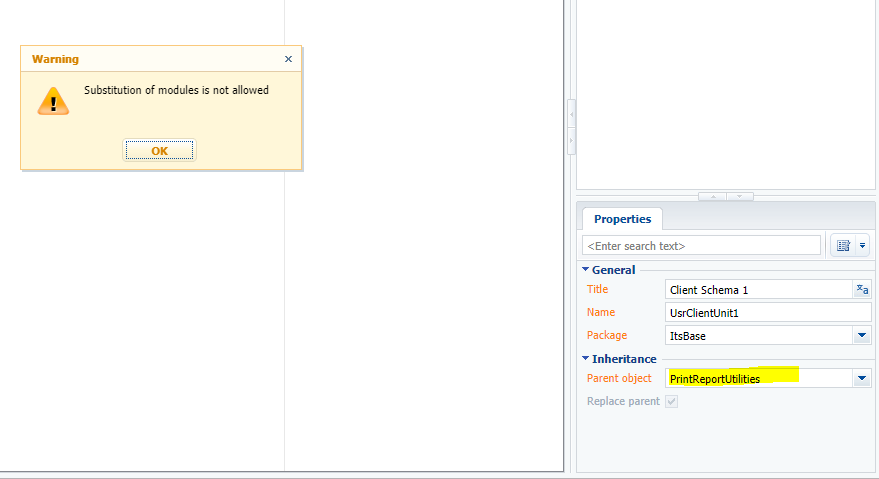
Hi Oscar Thanks for your reply, I tried to create a replacing client module for

PrintReportUtilities but there is a warning message "Substitution of modules is not allowed". Is it possible?


Oscar Dylan,

I also used this code on my edit page and changed the report.download to my file name but the file name is not replacing

function downloadReport(caption, key) {

        var report = document.createElement("a");

        report.href = "../rest/ReportService/GetReportFile/" + key;

        report.download = caption;

        document.body.appendChild(report);

        report.click();

        document.body.removeChild(report);

    }


Fulgen Ninofranco,

Try to find the answer in the article by the link below.

https://academy.bpmonline.com/documents/technic-sdk/7-13/client-modules

Show all comments
custom button
printables
customer portal

Hi Community,

I have a custom section, I added a custom button on edit view and button is visible on CRM and Customer portal as well.

On CRM that button is functional and on click the pdf is successfully downloading.

But on Customer portal that button is only visible and on click the pdf is not downloading.

from this post ( https://community.bpmonline.com/articles/how-show-printables-print-butt…) I come to know that I need to apply some permissions to enable OOB printable functionality for customer portal. I tried to apply all from this post but that button is still not functional and not downloading pdf (only button is appearing on edit view)

but since I'm not using OOB printable and I'm using custom button so may be there will be another solution to fix this issue like we need to add some code for enabling that button to download.


Like 0

Like

1 comments

Please deploy the application locally and debug the functionality. This way you'll find what exactly wrong. 

https://academy.bpmonline.com/documents/technic-sdk/7-13/server-code-de…

The main idea is that you need to give portal users access rights for all objects that you use in the printables. 

Show all comments
reportservice
userconnection
script task
supervisor
printables
help
7.13_()
sales_enterprise

I try to run the script task in a business process to create a printable. If the business process is started by user, it'll work just fine, but when the process is started by another process or an event it'll break with an exception:

System.NullReferenceException: Object reference not set to an instance of an object.

   at Terrasoft.Configuration.ReportService.ReportService.GetSchemaNameByTemplateId(Guid templateId)

   at Terrasoft.Configuration.ReportService.ReportService.GenerateMSWordReport(String urlTemplateId, String urlRecordUId, Boolean convertInPDF)

   at Terrasoft.Core.Process.ProcessInvoiceAutoSendCustom1Custom21Custom2MethodsWrapper.ScriptTask2Execute(ProcessExecutingContext context)

   at Terrasoft.Core.Process.ProcessFlowElement.Execute(ProcessExecutingContext context)

The script task is like this:

var PrintableId = Get("PrintableId2");
var ObjectIdInvoice = Get("ObjectIdInvoice1");
var ConvertToPdf = Get("ConvertToPdf");
var AddInvoiceId = Get("AddInvoiceId");
var AttachmentType = Get("AttachmentType");

var userConnection = Get("UserConnection");

var reportService = new Terrasoft.Configuration.ReportService.ReportService();
Terrasoft.Configuration.ReportService.ReportData report = reportService.GenerateMSWordReport(
    PrintableId, ObjectIdInvoice, ConvertToPdf);
var entity = userConnection.EntitySchemaManager.GetInstanceByName("InvoiceFile");
var fileEntity = entity.CreateEntity(UserConnection);
fileEntity.SetDefColumnValues();
fileEntity.SetColumnValue("InvoiceId", AddInvoiceId);
fileEntity.SetColumnValue("TypeId", AttachmentType);
fileEntity.SetColumnValue("Name", "Invoice.pdf");
fileEntity.SetColumnValue("Data", report.Data);
fileEntity.Save();
return true;

I guess ReportService doesn't obtain UserConnection from Supervisor user, so it can't get instance of "InvoiceFile". Is that the case?

How to change the script to make ReportService work with Supervisor or maybe with UserConnection of another user?

Like 0

Like

3 comments

In a script task in an interpretive business process you need to get "user connection"  with the following syntax:

var userConnection = Get<UserConnection>("UserConnection");

Additionally, please note that if you want to work with process parameters in a script task, you need to write in the following manner:

var parameter1 = Get<Guid>("Parameter1");

Set("Parameter2", parameter1.ToString());

var parameter2 = Get<string>("Parameter2");


Also, from exception message it seems that desired template not exists in the system, so you should check it.

I have a similar requirement to send report automatically to users at a certain frequency. We use Creatio 7.18.5 and the report was built using the old ReportDesigner for 7.14 and was carried over to the new version when we upgraded. 

I tried to follow this article to create the report as part of our process - https://community.creatio.com/articles/generate-printable-and-send-it-attachment-email

When the process is manually run by the user, the report gets generated. But when scheduled to run by Supervisor using timer, it gives below error - 

Terrasoft.Core.InstanceActivationException: Error creating an instance of the "Terrasoft.Tools.DevExpressReport.IReportProvider" class ---> Ninject.ActivationException: Error activating UserConnection using binding from UserConnection to method
Provider returned null.
Activation path:
  3) Injection of dependency UserConnection into parameter userConnection of constructor of type DevExpressConfReportLocalizationReader
  2) Injection of dependency IDevExpressReportLocalizationReader into parameter reportLocalizationReader of constructor of type ConfigurationDevExpressReportProvider
  1) Request for IReportProvider

Suggestions:
  1) Ensure that the provider handles creation requests properly.

   at Ninject.Activation.Context.ResolveInternal(Object scope)
   at Ninject.Activation.Context.Resolve()
   at Ninject.KernelBase.Resolve(IRequest request, Boolean handleMissingBindings)
   at Ninject.Planning.Targets.Target`1.ResolveWithin(IContext parent)
   at System.Linq.Enumerable.WhereSelectArrayIterator`2.MoveNext()
   at System.Linq.Buffer`1..ctor(IEnumerable`1 source)
   at System.Linq.Enumerable.ToArray[TSource](IEnumerable`1 source)
   at Ninject.Activation.Providers.StandardProvider.Create(IContext context)
   at Ninject.Activation.Context.ResolveInternal(Object scope)
   at Ninject.Activation.Context.Resolve()
   at Ninject.KernelBase.Resolve(IRequest request, Boolean handleMissingBindings)
   at Ninject.Planning.Targets.Target`1.ResolveWithin(IContext parent)
   at System.Linq.Enumerable.WhereSelectArrayIterator`2.MoveNext()
   at System.Linq.Buffer`1..ctor(IEnumerable`1 source)
   at System.Linq.Enumerable.ToArray[TSource](IEnumerable`1 source)
   at Ninject.Activation.Providers.StandardProvider.Create(IContext context)
   at Ninject.Activation.Context.ResolveInternal(Object scope)
   at Ninject.Activation.Context.Resolve()
   at Ninject.KernelBase.Resolve(IRequest request, Boolean handleMissingBindings)
   at Ninject.ResolutionExtensions.Get[T](IResolutionRoot root, IParameter[] parameters)
   at Terrasoft.Core.Factories.ClassFactory.GetInstance[T](Func`1 action)
   --- End of inner exception stack trace ---
   at Terrasoft.Core.Factories.ClassFactory.GetInstance[T](Func`1 action)
   at Terrasoft.Configuration.DevExpressReportGenerator.Generate(UserConnection userConnection, ReportGeneratorConfiguration configuration)
   at Terrasoft.Core.Process.TAIAutoSendOrderLogSummaryMethodsWrapper.ScriptTask1Execute(ProcessExecutingContext context)
   at Terrasoft.Core.Process.ProcessScriptTask.InternalExecute(ProcessExecutingContext context)
   at Terrasoft.Core.Process.ProcessFlowElement.ExecuteItem(ProcessExecutingContext context)
   at Terrasoft.Core.Process.ProcessFlowElement.Execute(ProcessExecutingContext context)

Below is the report generation part of the code -  

//ReportService reportService = new ReportService(userConnection);
//ReportData report = reportService.GenerateDevExpressReport(entitySchemaUId,reportSchemaUId,null,reportParamaters);

DevExpressReportGenerator reportGenerator = new DevExpressReportGenerator();
var configuration = new ReportGeneratorConfiguration {
				ReportTemplateId = !string.IsNullOrEmpty(reportSchemaUId) ? new Guid(reportSchemaUId) : Guid.Empty,
				EntitySchemaUId = !string.IsNullOrEmpty(entitySchemaUId) ? new Guid(entitySchemaUId) : Guid.Empty,
				RecordId = !string.IsNullOrEmpty(recordId) ? new Guid(recordId) : Guid.Empty,
				ReportParameters = !string.IsNullOrEmpty(reportParameters)
					? JsonConvert.DeserializeObject<Dictionary<string, object>>(reportParameters)
					: null
			};
ReportData report = reportGenerator.Generate(userConnection, configuration);

I understand it's an old version of the report but I would appreciate if anyone can provide any insights on what I'm missing.

Hello Nirupama, Can you check if the run elements in the background is disabled ? If that is enabled, then the process will not get the User Connection.

Show all comments
printables
quote
7.13_()
sales

Hi Community,

Is it possible to rename the generated file from a printable?

My client wants a generated Quote doc file to be named using Number field instead of Quote#.doc (where # is the result of a counting).

Thanks.

Like 0

Like

3 comments

Dear Danilo,

The generated file name is the same as the name of the file which was uploaded to this printable record in the application. To rename the resulted file you need to rename a template and upload this new template to the printable record and after the next download it will be named as this template.

Best regards,

Oscar


Oscar Dylan,

Hi Oscar, thanks for your message.

I am actually refering to the generated file whom is attached to the object when selecting to Print it. For instance, the Quote object is currently generating files Quote1.doc , Quote2.doc on the Attachments and Notes tab. I would need it to be something like [Quote.NumberField]v1.doc. 

Is that possible? If so, how can I do this?

Thanks.

Hi guys, I found that the name I was looking for is being edited on the Save printable to quote Business Process. Thanks.

Show all comments